
linux --> 获取进程执行时间
获取进程执行时间
一、时间概念
在linux下进行编程时,可能会涉及度量进程的执行时间。linux下进程的时间值分三种:
时钟时间(real time):指进程从开始执行到结束,实际执行的时间。
用户CPU时间(user CPU time):指进程中执行用户指令所用的时间,也包括子进程。
系统CPU时间(system CPU time):指为进程执行内核程序所经历的时间,例如调用read和write内核方法时,消耗的时间就计入系统CPU时间。
二、获取方法
有两种方法可以获取,第一种是用time命令,time 进程。第二种是通过在程序中进行记录,首先利用sysconf函数获取时钟滴答数,再用times获取tms结构。
查看times函数,man 2 tms,得到tms结构定义和times函数声明如下:
struct tms {

       clock_t tms_utime;  /* user time */

       clock_t tms_stime;  /* system time */

       clock_t tms_cutime; /* user time of children */

       clock_t tms_cstime; /* system time of children */

  };
#include <sys/times.h>

 clock_t times(struct tms *buf);
注意:此处计算的时间是时钟滴答数,需要除以系统时钟滴答数,得出实际的秒数。
三、测试例子
测试程序如下:
#include <stdio.h>

#include <stdlib.h>

#include <sys/times.h>

#include <unistd.h>

#define BUFFER_SIZE  4 * 1024

int main()

{

    int sc_clk_tck;

    sc_clk_tck = sysconf(_SC_CLK_TCK);

    struct tms begin_tms, end_tms;

    clock_t begin, end;

    system("date");

    begin = times(&begin_tms);

    sleep();

    end = times(&end_tms);

    printf("real time: %lf\n", (end - begin) / (double)sc_clk_tck);

    printf("user time: %lf\n", (end_tms.tms_utime - begin_tms.tms_utime) / (double)sc_clk_tck);

    printf("sys time: %lf\n", (end_tms.tms_stime - begin_tms.tms_stime) / (double)sc_clk_tck);

    printf("child user time: %lf\n", (end_tms.tms_cutime - begin_tms.tms_cutime) / (double)sc_clk_tck);

    printf("child sys time: %lf\n", (end_tms.tms_cstime - begin_tms.tms_cstime) / (double)sc_clk_tck);

    return ;

}
测试结果如下所示:
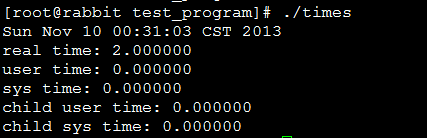
采用time命令,测试结果如下所示:

其中real表示时钟时间,user表示用户CPU时间,sys表示系统CPU时间。time命令也可以用于系统的命令,如time ls、time ps等等。
参考:http://www.cnblogs.com/Anker/p/3416288.htmllinux --> 获取进程执行时间的更多相关文章
- Linux获取进程执行时间
1.前言 测试一个程序的执行时间,时间包括用户CPU时间.系统CPU时间.时钟时间.之前获取之前时间都是在程序的main函数用time函数实现,这个只能粗略的计算程序的执行时间,不能准确的获取其 ...
- Unix/Linux获取进程的详细信息
Linux的进程的信息都记录在/proc/<pid>/下面,其实常用的ps.top命令也是从这里读取信息的.常用的信息有: cmd(命令).cmdline(完整的命令行参数).envrio ...
- Linux获取进程中变量
列出所有进程 #include <linux/kernel.h> #include <linux/module.h> #include <linux/init.h> ...
- Windows与Linux获取进程集合的方法
Windows: List<String> tasklist=new ArrayList<String>(); try { Process process = Runtime. ...
- Linux常用获取进程占用资源情况手段
测试环境:Ubuntu14.04 1. 获取进程ID号 ps -aux | grep your_process_name 例如: xxx@xxx:~$ ps -e |grep Midlet|awk ...
- linux: 获取监听指定端口的进程PID
在 linux 下经常需要杀死(重启)监听某端口的进程, 因此就写了一个小脚本, 通过 ss 命令获取监听制定端口的进程 PID, 然后通过 kill 命令结束掉进程: #!/bin/sh # set ...
- linux中使用top获取进程的资源占用信息
在linux中使用top获取进程的资源占用信息: Cpu(s): 1.0%us, 0.0%sy, 0.0%ni, 98.3%id, 0.7%wa, 0.0%hi, 0.0%si, 0.0 ...
- linux命令(26):Bash Shell 获取进程 PID
转载地址:http://weyo.me/pages/techs/linux-get-pid/ 根据pid,kill该进程:http://www.cnblogs.com/lovychen/p/54113 ...
- linux shell 获取进程pid
1.通过可执行程序的程序名称 a.运行程序 b.获取进程id号 c.pidof相关知识:http://www.cnblogs.com/yunsicai/p/3675938.html 2.有些程序需要在 ...
随机推荐
- PCI、CPCI、CPCIE 区别、特点
PCI.CPCI.CPCIE 区别.特点 CPCI总线 •PCI总线作为处理器系统的局部总线,主要目的是为了连接外部设备,而不是作为处理器的系统总线连接Cache和主存储器 •(1) PCI总线空间与 ...
- Redis进阶实践之十五 Redis-cli命令行工具使用详解第二部分(结束)
一.介绍 今天继续redis-cli使用的介绍,上一篇文章写了一部分,写到第9个小节,今天就来完成第二部分.话不多说,开始我们今天的讲解.如果要想看第一篇文章,地址如下:http: ...
- openfec的学习笔记
openfec实现了多种纠删码的算法实现,就包括Reed-Solomon算法.其基本使用流程为:输入n个原始包的分组后,计算生成k个额外的冗余包,后续将这n+k包送到接收端,若发生原始包丢包,但只要总 ...
- 简单bfs(hdu2612)
#include<stdio.h>#include<string.h>#include<queue>#define INF 0x3f3f3f3fusing name ...
- xml的Dom4j解析规则
一,xml的样本 <?xml version="1.0" encoding="utf-8"?> <contactList> <co ...
- Docker部署Apollo配置中心
1.Apollot简述 Apollo(阿波罗)是携程框架部门研发的分布式配置中心,能够集中化管理应用不同环境.不同集群的配置,配置修改后能够实时推送到应用端,并且具备规范的权限.流程治理等特性,适用于 ...
- C# 图解教程 第五章 方法
方法的结构方法体内部代码的执行本地变量 类型推断和var关键字 嵌套块中的本地变量本地常量控制流方法调用返回值返回语句和void方法参数 形参 实参值参数引用参数引用类型作为值 ...
- [HDU5799]This world need more Zhu
题面戳我 题意: 给定一棵树,m次操作,每次询问某一棵子树中,或者是某一条路径上,出现次数为a的所有数字之和与出现次数为b的所有数字之和的gcd 原题表述:the \(\gcd\) of the su ...
- UVA10692:Huge Mods
题面 传送门 题意 输入正整数a1,a2,a3..an和模m,求a1^a2^...^an mod m Sol 首先有\[ a^b\equiv \begin{cases} a^{b\%\phi(p)}~ ...
- [转]Git教程【译】
[转]Git教程[译] http://www.cnblogs.com/zhangjing230/archive/2012/05/09/2489745.html 原文出处:http://www.voge ...