
Linux获取进程执行时间
1、前言
测试一个程序的执行时间,时间包括用户CPU时间、系统CPU时间、时钟时间。之前获取之前时间都是在程序的main函数用time函数实现,这个只能粗略的计算程序的执行时间,不能准确的获取其他时间。在看《APUE》时,书中有关程序时间测试程序,非常正规,提供这三个时间。如是,上网搜了一下,进行总结一下。
2、获取方法
有两种方法可以获取,第一种是用time命令,time 进程。第二种是通过在程序中进行记录,首先利用sysconf函数获取时钟滴答数,再用times获取tms结构。
查看times函数,man 2 tms,得到tms结构定义和times函数声明如下:
struct tms {

       clock_t tms_utime;  /* user time */

       clock_t tms_stime;  /* system time */

       clock_t tms_cutime; /* user time of children */

       clock_t tms_cstime; /* system time of children */

  };
 #include <sys/times.h>

 clock_t times(struct tms *buf);
注意:此处计算的时间是时钟滴答数,需要除以系统时钟滴答数,得出实际的秒数。
3、测试例子:
测试程序如下:
   #include <stdio.h>

   #include <stdlib.h>

   #include <sys/times.h>

   #include <unistd.h>

   #define BUFFER_SIZE  4 * 1024

   int main()

   {

      int sc_clk_tck;

      sc_clk_tck = sysconf(_SC_CLK_TCK);

      struct tms begin_tms, end_tms;

      clock_t begin, end;

      system("date");

      begin = times(&begin_tms);

      sleep();

      end = times(&end_tms);

      printf("real time: %lf\n", (end - begin) / (double)sc_clk_tck);

      printf("user time: %lf\n",

              (end_tms.tms_utime - begin_tms.tms_utime) / (double)sc_clk_tck);

      printf("sys time: %lf\n",

              (end_tms.tms_stime - begin_tms.tms_stime) / (double)sc_clk_tck);

      printf("child user time: %lf\n",

              (end_tms.tms_cutime - begin_tms.tms_cutime) / (double)sc_clk_tck);

      printf("child sys time: %lf\n",

              (end_tms.tms_cstime - begin_tms.tms_cstime) / (double)sc_clk_tck);

      return ;

  }
测试结果如下所示:
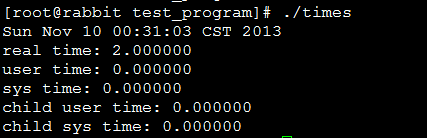
采用time命令,测试结果如下所示:

4、参考网址
http://www.01happy.com/linux-process-time/
http://www.01happy.com/c-get-process-time/
Linux获取进程执行时间的更多相关文章
- linux --> 获取进程执行时间
获取进程执行时间 一.时间概念 在linux下进行编程时,可能会涉及度量进程的执行时间.linux下进程的时间值分三种: 时钟时间(real time):指进程从开始执行到结束,实际执行的时间. 用户 ...
- Unix/Linux获取进程的详细信息
Linux的进程的信息都记录在/proc/<pid>/下面,其实常用的ps.top命令也是从这里读取信息的.常用的信息有: cmd(命令).cmdline(完整的命令行参数).envrio ...
- Linux获取进程中变量
列出所有进程 #include <linux/kernel.h> #include <linux/module.h> #include <linux/init.h> ...
- Windows与Linux获取进程集合的方法
Windows: List<String> tasklist=new ArrayList<String>(); try { Process process = Runtime. ...
- Linux常用获取进程占用资源情况手段
测试环境:Ubuntu14.04 1. 获取进程ID号 ps -aux | grep your_process_name 例如: xxx@xxx:~$ ps -e |grep Midlet|awk ...
- linux: 获取监听指定端口的进程PID
在 linux 下经常需要杀死(重启)监听某端口的进程, 因此就写了一个小脚本, 通过 ss 命令获取监听制定端口的进程 PID, 然后通过 kill 命令结束掉进程: #!/bin/sh # set ...
- linux中使用top获取进程的资源占用信息
在linux中使用top获取进程的资源占用信息: Cpu(s): 1.0%us, 0.0%sy, 0.0%ni, 98.3%id, 0.7%wa, 0.0%hi, 0.0%si, 0.0 ...
- linux命令(26):Bash Shell 获取进程 PID
转载地址:http://weyo.me/pages/techs/linux-get-pid/ 根据pid,kill该进程:http://www.cnblogs.com/lovychen/p/54113 ...
- linux shell 获取进程pid
1.通过可执行程序的程序名称 a.运行程序 b.获取进程id号 c.pidof相关知识:http://www.cnblogs.com/yunsicai/p/3675938.html 2.有些程序需要在 ...
随机推荐
- JavaScript基础之运算符及全面的运算符优先级总结
算数运算符: 加+,减—,乘*,除/,求余%,加加++,减减——, 加减乘除求余运算与数学上的用法完全一样. 不过,加号+还有连接字符串的作用,其他运算符还可以将字符串数字转换成数值型,参见JavaS ...
- windows pm2 开机启动
npm install pm2-windows-startup -g; pm2-startup install; pm2 kill; pm2 start ecosystem.config.js --o ...
- .net下的span和memory
.net core 2.1的重头戏就是性能,其中最重要的两个类就是span和memory,本文这里简单的介绍一下这两个类的使用. 什么是 Span<T> Span<T> 是新一 ...
- jquery 网页局部打印总结
最近开发过程中遇到了js局部打印的功能,在网上找相关的资料,最终找到了juery.jqprint-0.3.js 和jquery.PrintArea.js两种. 最初使用的是jquery.jqprint ...
- SQLCE使用
Windows Phone的本地数据库SQL Server CE是7.1版本即芒果更新的新特性,所以你要在应用程序中使用SQL Server CE数据库必须使用Windows Phone 7.1的AP ...
- Python可视化库
转自小小蒲公英原文用Python可视化库 现如今大数据已人尽皆知,但在这个信息大爆炸的时代里,空有海量数据是无实际使用价值,更不要说帮助管理者进行业务决策.那么数据有什么价值呢?用什么样的手段才能把数 ...
- Android按键添加和处理的方案
Android按键添加和处理的方案 版本号 说明 作者 日期 1.0 Android按键添加和处理的方案 Sky Wang 2013/06/18 需求:Android机器上有个W ...
- MAC系统压缩文件传到WINDOWS下出现乱码
可能使用Mac系统的朋友,在压缩文件时遇到过这样的问题: 要给朋友传文件,而对方又是WIN系统.我们打好包传过去以后,对方解压缩发现中文文件名都成乱码了.这是怎么回事? 原来,Mac下,默认文字编码是 ...
- eval json ajax
在JS中将JSON的字符串解析成JSON数据格式,一般有两种方式: 1.一种为使用eval()函数. 2. 使用Function对象来进行返回解析. 使用eval函数来解析,并且使用jquery的ea ...
- c++ Pthread创建线程后必须使用join或detach释放线程资源
http://www.cppblog.com/prayer/archive/2012/04/23/172427.html 这两天在看Pthread 资料的时候,无意中看到这样一句话(man pthre ...