
使用Python画玫瑰花
'''

Created on Nov 18, 2017

@author: QiZhao

'''

import turtle

# 设置初始位置

turtle.penup()

turtle.left(90)

turtle.fd(200)

turtle.pendown()

turtle.right(90)

# 花蕊

turtle.fillcolor("red")

turtle.begin_fill()

turtle.circle(10,180)

turtle.circle(25,110)

turtle.left(50)

turtle.circle(60,45)

turtle.circle(20,170)

turtle.right(24)

turtle.fd(30)

turtle.left(10)

turtle.circle(30,110)

turtle.fd(20)

turtle.left(40)

turtle.circle(90,70)

turtle.circle(30,150)

turtle.right(30)

turtle.fd(15)

turtle.circle(80,90)

turtle.left(15)

turtle.fd(45)

turtle.right(165)

turtle.fd(20)

turtle.left(155)

turtle.circle(150,80)

turtle.left(50)

turtle.circle(150,90)

turtle.end_fill()

# 花瓣1

turtle.left(150)

turtle.circle(-90,70)

turtle.left(20)

turtle.circle(75,105)

turtle.setheading(60)

turtle.circle(80,98)

turtle.circle(-90,40)

# 花瓣2

turtle.left(180)

turtle.circle(90,40)

turtle.circle(-80,98)

turtle.setheading(-83)

# 叶子1

turtle.fd(30)

turtle.left(90)

turtle.fd(25)

turtle.left(45)

turtle.fillcolor("green")

turtle.begin_fill()

turtle.circle(-80,90)

turtle.right(90)

turtle.circle(-80,90)

turtle.end_fill()

turtle.right(135)

turtle.fd(60)

turtle.left(180)

turtle.fd(85)

turtle.left(90)

turtle.fd(80)

# 叶子2

turtle.right(90)

turtle.right(45)

turtle.fillcolor("green")

turtle.begin_fill()

turtle.circle(80,90)

turtle.left(90)

turtle.circle(80,90)

turtle.end_fill()

turtle.left(135)

turtle.fd(60)

turtle.left(180)

turtle.fd(60)

turtle.right(90)

turtle.circle(200,60)

time.sleep(3)
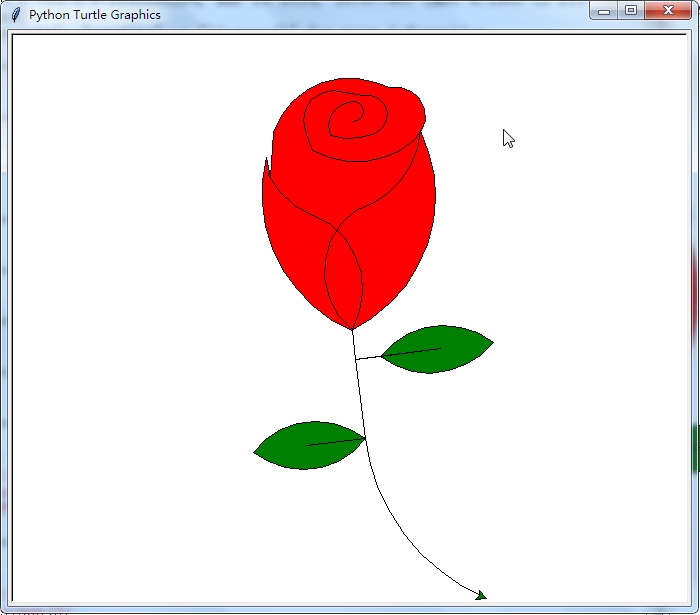
运行结果:
使用Python画玫瑰花的更多相关文章
- 沉淀再出发:用python画各种图表
沉淀再出发:用python画各种图表 一.前言 最近需要用python来做一些统计和画图,因此做一些笔记. 二.python画各种图表 2.1.使用turtle来画图 import turtle as ...
- python画樱花
用python画简单的樱花 代码如下: import turtle as T import random import time # 画樱花的躯干(60,t) def Tree(branch, t): ...
- python 画小猪佩奇
转自:python画个小猪佩奇 # -*- coding: utf-8 -*- """ Created on Mon May 20 11:36:03 2019 @auth ...
- 用python画 pareto front
用python画 pareto front 觉得有用的话,欢迎一起讨论相互学习~Follow Me 2D pf import os import matplotlib.pyplot as plt im ...
- python 画3D的高斯曲线
用python画3D的高斯曲线,我想如果有多个峰怎么画? import numpy as npimport matplotlib.pyplot as pltimport mathimport mpl_ ...
- python画一只佩奇
用python画一只佩奇 from turtle import* def nose(x,y):#鼻子 penup()#提起笔 goto(x,y)#定位 pendown()#落笔,开始画 sethead ...
- 利用python画出动态高优先权优先调度
之前写过一个文章. 利用python画出SJF调度图 动态高度优先权优先调度 动态优先权调度算法,以就绪队列中各个进程的优先权作为进程调度的依据.各个进程的优先权在创建进程时所赋予,随着进程的推进或其 ...
- 【python画圆】pip安装库时出现Read timed out.解决办法
昨天第一次用python画圆,当时并没有安装numpy库(导入数据包)和matplotlib库(导入图形包),于是尝试用pip安装库 首先,我先更新了pip,如下图: 顺便附上成功截图: 然后安装nu ...
- 用python画一朵玫瑰花
废话不多说,直接上代码 from turtle import * import time setup(600,800,0,0) speed(0) penup() seth(90) fd(340) se ...
随机推荐
- Python之父重回决策层
在Guido van Rossum(吉多·范罗苏姆)卸任BDFL(“终身仁慈独裁者”)一职半年多之后,Python社区迎来了新的治理新方案:指导委员会模式,而经过投票Guido van Rossum也 ...
- Qt之表格控件蚂蚁线
一.蚂蚁线 摘自互动百科:在图像影像软件中表示选区的动态虚线,因为虚线闪烁的样子像是一群蚂蚁在跑,所以俗称蚂蚁线.在Poshop,After Effect等软件中比较常见. 背景:用过excel的同学 ...
- asp.net core系列 57 IS4 使用混合流(OIDC+OAuth2.0)添加API访问
一.概述 在上篇中,探讨了交互式用户身份验证,使用的是OIDC协议. 在之前篇中对API访问使用的是OAuth2.0协议.这篇把这两个部分放在一起,OpenID Connect和OAuth 2.0组合 ...
- 我的Lambda的学习笔记
前述 Lambda表达式是 Java 8 的新特性.许多语言都有 Lambda 的特性. 因此使用的 Java 环境一定要 8 以上的环境. Lambda 到底什么是 Lambda 表达式呢? Lam ...
- Java进阶篇设计模式之八 ----- 责任链模式和命令模式
前言 在上一篇中我们学习了结构型模式的享元模式和代理模式.本篇则来学习下行为型模式的两个模式, 责任链模式(Chain of Responsibility Pattern)和命令模式(Command ...
- FreeSql.DbContext 第二个版本介绍
FreeSql.DbContext 实现类似 EFCore 使用方法,跟踪对象状态,最终通过 SaveChanges 方法提交事务. 目前是第二个初版,已实现状态跟踪保存(导航属性的跟踪暂时不支持). ...
- Center a website:网页居中
inside the <body> tags, using a "wrapper" div to control the whole section. HTML: &l ...
- Android项目实战(五十四):zxing 生成二维码图片去除白色内边距的解决方案
目录:zxing->encoding->EncodingHandler类 中修改 createQRCode方法 private static final int BLACK = 0xff0 ...
- 学习ELK之----01.建立ELK测试项目
1. 建立一个4G内存的虚拟机,安装Linux系统(具体的版本以能运行Docker为准,我用的是Ubuntu-Server) 2. 安装Docker 3. 下载elk容器:# docker pull ...
- 国内常用DNS
114.114.114.114 国内移动,电信,联通通用DNS 223.5.5.5 阿里 223.6.6.6 阿里 180.76.76.76 百度