
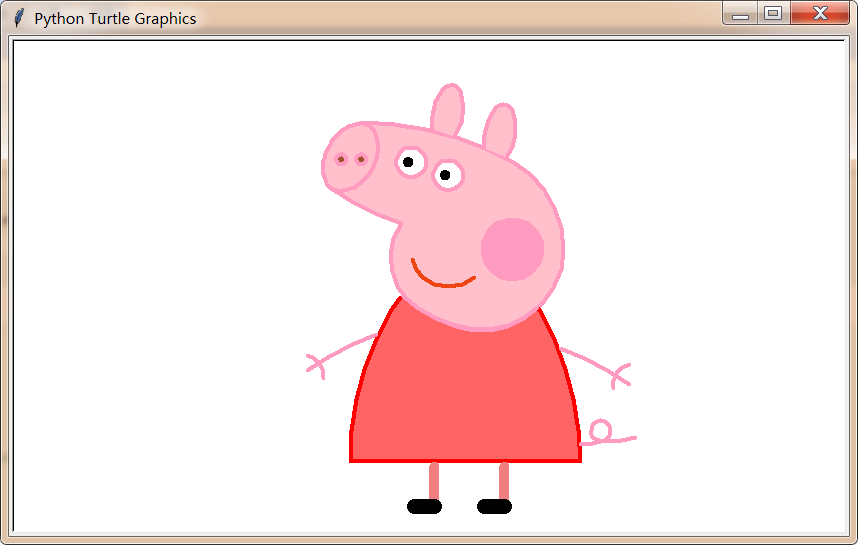
python画一只佩奇
用python画一只佩奇
from turtle import*

def nose(x,y):#鼻子

    penup()#提起笔

    goto(x,y)#定位

    pendown()#落笔,开始画

    setheading(-30)#将乌龟的方向设置为to_angle/为数字(0-东、90-北、180-西、270-南)

    begin_fill()#准备开始填充图形

    a=0.4

    for i in range(120):

        if 0<=i<30 or 60<=i<90:

            a=a+0.08

            left(3) #向左转3度

            forward(a) #向前走a的步长

        else:

            a=a-0.08

            left(3)

            forward(a)

    end_fill()#填充完成

    penup()

    setheading(90)

    forward(25)

    setheading(0)

    forward(10)

    pendown()

    pencolor(255,155,192)#画笔颜色

    setheading(10)

    begin_fill()

    circle(5)

    color(160,82,45)#返回或设置pencolor和fillcolor

    end_fill()

    penup()

    setheading(0)

    forward(20)

    pendown()

    pencolor(255,155,192)

    setheading(10)

    begin_fill()

    circle(5)

    color(160,82,45)

    end_fill()

def head(x,y):#头

    color((255,155,192),"pink")

    penup()

    goto(x,y)

    setheading(0)

    pendown()

    begin_fill()

    setheading(180)

    circle(300,-30)

    circle(100,-60)

    circle(80,-100)

    circle(150,-20)

    circle(60,-95)

    setheading(161)

    circle(-300,15)

    penup()

    goto(-100,100)

    pendown()

    setheading(-30)

    a=0.4

    for i in range(60):

        if 0<=i<30 or 60<=i<90:

            a=a+0.08

            lt(3) #向左转3度

            fd(a) #向前走a的步长

        else:

            a=a-0.08

            lt(3)

            fd(a)

    end_fill()

def ears(x,y): #耳朵

    color((255,155,192),"pink")

    penup()

    goto(x,y)

    pendown()

    begin_fill()

    setheading(100)

    circle(-50,50)

    circle(-10,120)

    circle(-50,54)

    end_fill()

    penup()

    setheading(90)

    forward(-12)

    setheading(0)

    forward(30)

    pendown()

    begin_fill()

    setheading(100)

    circle(-50,50)

    circle(-10,120)

    circle(-50,56)

    end_fill()

def eyes(x,y):#眼睛

    color((255,155,192),"white")

    penup()

    setheading(90)

    forward(-20)

    setheading(0)

    forward(-95)

    pendown()

    begin_fill()

    circle(15)

    end_fill()

    color("black")

    penup()

    setheading(90)

    forward(12)

    setheading(0)

    forward(-3)

    pendown()

    begin_fill()

    circle(3)

    end_fill()

    color((255,155,192),"white")

    penup()

    seth(90)

    forward(-25)

    seth(0)

    forward(40)

    pendown()

    begin_fill()

    circle(15)

    end_fill()

    color("black")

    penup()

    setheading(90)

    forward(12)

    setheading(0)

    forward(-3)

    pendown()

    begin_fill()

    circle(3)

    end_fill()

def cheek(x,y):#腮

    color((255,155,192))

    penup()

    goto(x,y)

    pendown()

    setheading(0)

    begin_fill()

    circle(30)

    end_fill()

def mouth(x,y): #嘴

    color(239,69,19)

    penup()

    goto(x,y)

    pendown()

    setheading(-80)

    circle(30,40)

    circle(40,80)

def body(x,y):#身体

    color("red",(255,99,71))

    penup()

    goto(x,y)

    pendown()

    begin_fill()

    setheading(-130)

    circle(100,10)

    circle(300,30)

    setheading(0)

    forward(230)

    setheading(90)

    circle(300,30)

    circle(100,3)

    color((255,155,192),(255,100,100))

    setheading(-135)

    circle(-80,63)

    circle(-150,24)

    end_fill()

def hands(x,y):#手

    color((255,155,192))

    penup()

    goto(x,y)

    pendown()

    setheading(-160)

    circle(300,15)

    penup()

    setheading(90)

    forward(15)

    setheading(0)

    forward(0)

    pendown()

    setheading(-10)

    circle(-20,90)

    penup()

    setheading(90)

    forward(30)

    setheading(0)

    forward(237)

    pendown()

    setheading(-20)

    circle(-300,15)

    penup()

    setheading(90)

    forward(20)

    setheading(0)

    forward(0)

    pendown()

    setheading(-170)

    circle(20,90)

def foot(x,y):#脚

    pensize(10)

    color((240,128,128))

    penup()

    goto(x,y)

    pendown()

    setheading(-90)

    forward(40)

    setheading(-180)

    color("black")

    pensize(15)

    fd(20)

    pensize(10)

    color((240,128,128))

    penup()

    setheading(90)

    forward(40)

    setheading(0)

    forward(90)

    pendown()

    setheading(-90)

    forward(40)

    setheading(-180)

    color("black")

    pensize(15)

    fd(20)

def tail(x,y):#尾巴

    pensize(4)

    color((255,155,192))

    penup()

    goto(x,y)

    pendown()

    seth(0)

    circle(70,20)

    circle(10,330)

    circle(70,30)

def setting():          #参数设置

    pensize(4)

    hideturtle()        #使乌龟无形(隐藏)

    colormode(255)      #将其设置为1.0或255.随后 颜色三元组的r,g,b值必须在0 .. cmode范围内

    color((255,155,192),"pink")

    setup(840,500)

    speed(10)

def main():

    setting()           #画布、画笔设置

    nose(-100,100)      #鼻子

    head(-69,167)       #头

    ears(0,160)         #耳朵

    eyes(0,140)         #眼睛

    cheek(80,10)        #腮

    mouth(-20,30)       #嘴

    body(-32,-8)        #身体

    hands(-56,-45)      #手

    foot(2,-177)        #脚

    tail(148,-155)      #尾巴

    done()

if __name__ == '__main__':

    main()
python画一只佩奇的更多相关文章
- 使用python画一只佩奇
打开界面: 打开python shell界面. 建立脚本: 单击"file"——"new file"来建立脚本. 编写代码: 具体的代码如下. import t ...
- python 画个小猪佩奇
不知道大家小时候有没有学习过logo语言,就是操纵一只小王八,来画各种图案.博主小学微机课就学习了这个,最近发现python的turtle包就是logo语言,所以画个小猪佩奇和大家分享. 代码来自知乎 ...
- python 画小猪佩奇
转自:python画个小猪佩奇 # -*- coding: utf-8 -*- """ Created on Mon May 20 11:36:03 2019 @auth ...
- 沉淀再出发:用python画各种图表
沉淀再出发:用python画各种图表 一.前言 最近需要用python来做一些统计和画图,因此做一些笔记. 二.python画各种图表 2.1.使用turtle来画图 import turtle as ...
- 为什么学Python语言,只需四步全面了解Python语言
为什么学Python语言,只需四步全面了解Python语言每个时代都会悄悄犒赏会选择的人,Python现在风口的语言Python--第三大主流编程语言Python , 是一种面向对象的解释型计算机程序 ...
- python画樱花
用python画简单的樱花 代码如下: import turtle as T import random import time # 画樱花的躯干(60,t) def Tree(branch, t): ...
- 利用Python制作一个只属于和她的聊天器,再也不用担心隐私泄露啦!
------------恢复内容开始------------ 是否担心微信的数据流会被监视?是否担心你和ta聊天的小秘密会被保存到某个数据库里?没关系,现在我们可以用Python做一个只属于你和ta的 ...
- div+css画一个小猪佩奇
用DIV+CSS画一个小猪佩奇,挺可爱的,嘻嘻. HTML部分(全是DIV) <!-- 小猪佩奇整体容器 --> <div class="pig_container&quo ...
- 用python画 pareto front
用python画 pareto front 觉得有用的话,欢迎一起讨论相互学习~Follow Me 2D pf import os import matplotlib.pyplot as plt im ...
随机推荐
- JDBC--Statement使用
1.通过Statement实现类执行更新操作(INSERT.UPDATE .DELETE): --1)获取数据库连接Connection的对象: --2)通过Connection类的createSta ...
- 「POJ1147」The Buses
传送门 POJ Vjudge 解题思路 可以首先预处理一下可能成为一条线路的所有方案,然后把这些可能的方案按照长度降序排序,即按照路线上的时间节点从多到少排序. 因为这样我们就可以先确定更多的时刻的状 ...
- 「NOI2009」二叉查找树
传送门 Luogu 解题思路 看一眼题面,显然这是一颗 treap ,考虑到这棵 treap 的中序遍历总是不变的,所以我们就先把所有点按照数据值排序,求出 treap 的中序遍历,然后还可以观察到, ...
- IOS 常用View属性设置
设置按钮属性 1.设置按钮背景颜色 backgroundColor @property (weak, nonatomic) IBOutlet UIButton *deleteButton; self. ...
- 软件环境常识 --dev sit uat
DEV环境:DEV顾名思义就是develop,即代码开发的环境. SIT环境:System Integration Test系统集成测试,开发人员自己测试流程是否走通. UAT环境:User Acce ...
- C# webkit 内核浏览器 访问https 网站 提示 Problem with the SSL CA cert (path? access rights?)
C# webkit 内核浏览器 访问https 网站 提示 Problem with the SSL CA cert (path? access rights?) 解决方法: 陈凯文11112014- ...
- ETC系列产品非接触式读卡器方案:SI522
随着科技的不断发展,出行上高速这是非常寻常的事.但是在很多节假日高峰时期,在高速路口塞车缴费给很多车主造成很大的烦心.为了解决这一系列的问题,科技发明了ETC这种便捷式缴费技术,让车主们顺畅通过高速路 ...
- Linux-lsxxx
Linux-lsxxx ls list directory contents 列出文件及目录 lsattr List file attributes on a Linux second extende ...
- jenkins#安装jenkins
1. 访问官网下载地址https://jenkins.io/zh/download/ 2. 选择自己的平台,然后按照文档进行操作: 主要按照文档来,下面是我按照文档按照的一个记录 #访问 https: ...
- leetcode1143 Longest Common Subsequence
""" Given two strings text1 and text2, return the length of their longest common subs ...