
教程二 网页和lua交互修改openwrt
硬件
http://zhan.renren.com/h5/entry/3602888498044209332
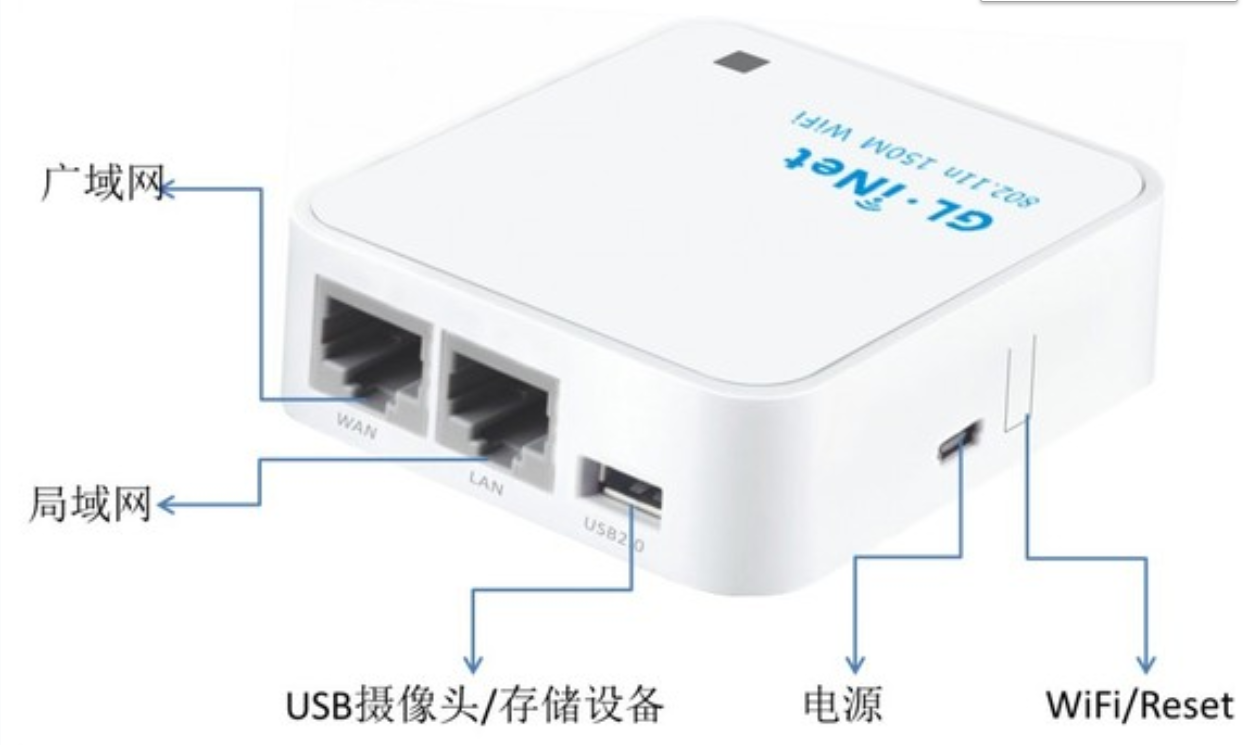
GL-iNet
1 首先安装 webserver之lighttpd ,openwrt自带的是uhttpd
http://www.voidcn.com/article/p-zqbwgqwy-vy.html
1-1安装过程简略
1-2配置
Lighttpd默认页面
http://localhost/index.lighttpd.html
写lighttpd的配置文件lighttpd.conf。
(1)使用语句 server.modules = ("mod_cgi")加入 cgi 模块;
(2)使用语句 cgi.assign = (".cgi" => "") 设置 cgi模块的扩展名和解释器。就本语句而言,表示cgi模块的扩展名是“.cgi”且该 cgi模块不需要特别的解释器来执行
lighttpd configuration
修改文件 /etc/lighttpd/lighttpd.conf in:
server.modules              = (

            "mod_access",

            "mod_cgi",

            "mod_alias",

            "mod_accesslog",

            "mod_compress",

)

and add these lines:

$HTTP["url"] =~ "/cgi-bin/" {

        cgi.assign = ( "" => "" )

}

cgi.assign      = (

        ".cgi"  => ""

)

Restart lighttpd typing:

debarm:~# /etc/init.d/lighttpd restart
2 编写登陆网页
http://192.168.8.1/cgi-bin/webservice?wifi-key=xixi&wifi-key-msg=xx

3 编写lua脚本文件执行修改
3-1 lua获取http参数 https://www.cnblogs.com/kekeoutlook/p/10787233.html
3-2 lua解析http参数
3-3 lua调用shell脚本命令,使用uci接口交互修改。
- 安装uhttpd包(https需要加装“uhttpd-mod-tls”和“px5g”);
- 修改uhttpd配置文件“/etc/config/uhttpd”,将Lua作为“interpreter”;
- Lua脚本写到“/www/cgi-bin/”目录下,但是不带扩展名,且可执行;
- Fast-CGI要求Lua脚本必须首先使用“io.write()”输出“Content-type: text/html\n\n”;
- “/www/cgi-bin/”目录下的脚本可以调用“/usr/lib/lua/”目录下的自定义模块;
- Lua环境已经就绪。
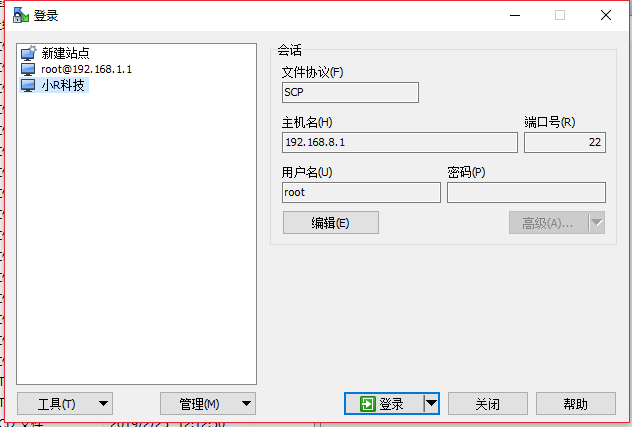
1登陆路由器文件系统
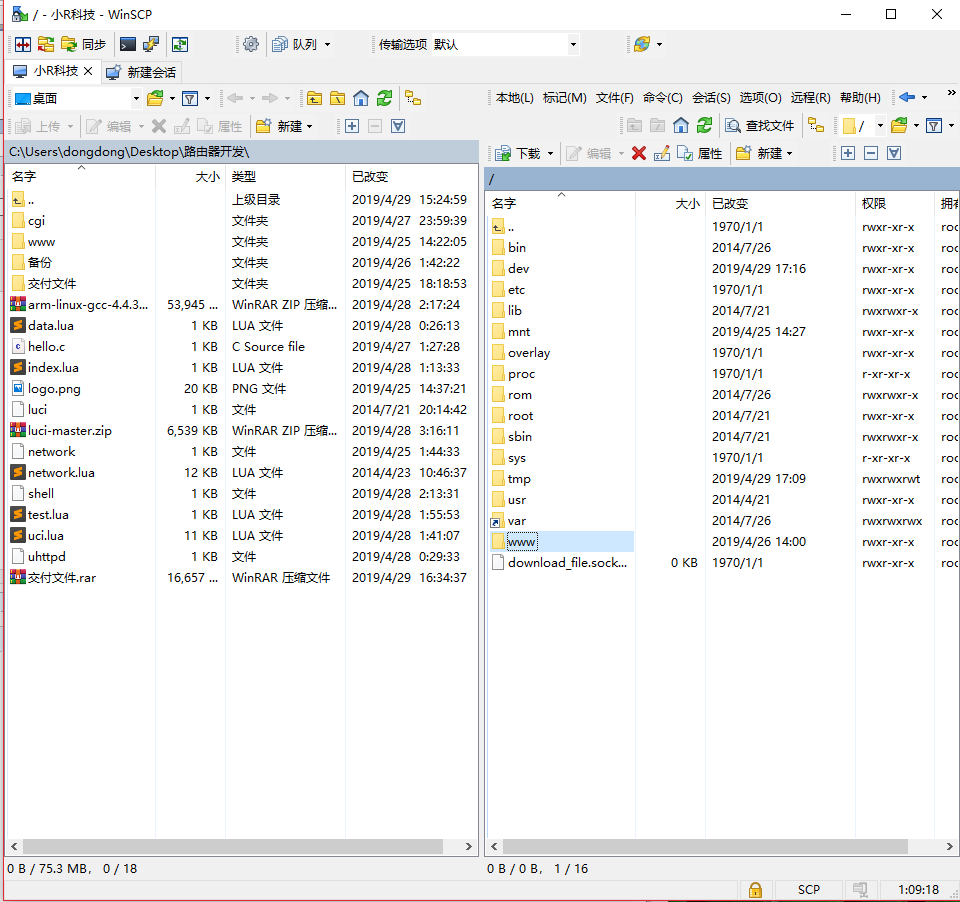
登陆后
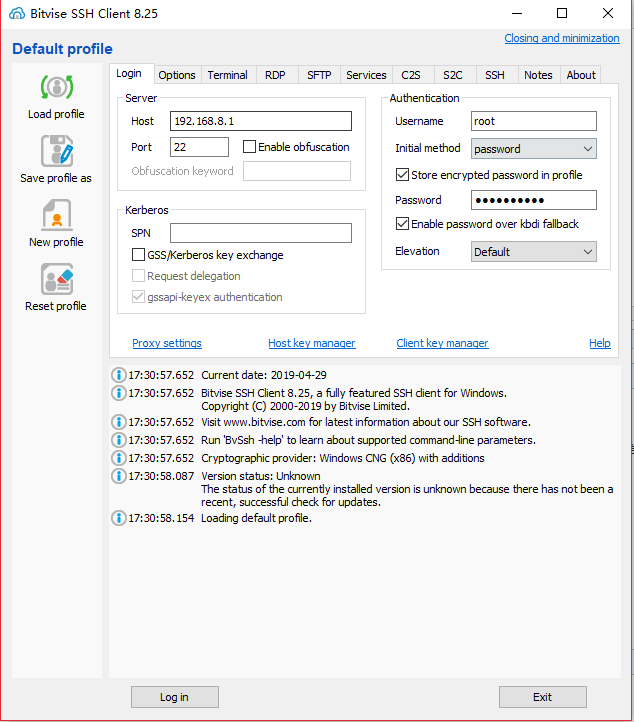
登录命令行
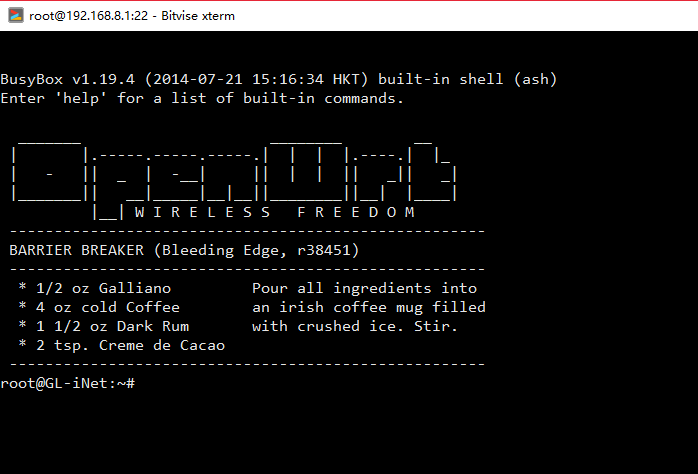
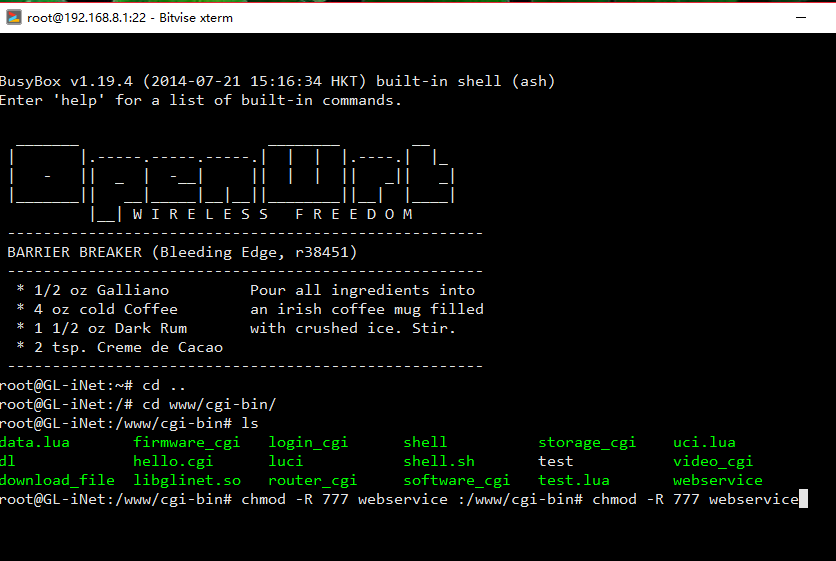
新建文件“/www/cgi-bin/webservice” 给予访问修改权限(注意没有 .lua结尾)
cd ..

cd www/cgi-bin/

ls
chmod -R 777 webservice
内容修改为:
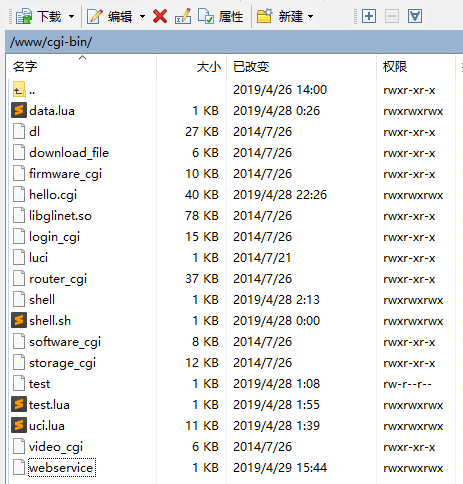
#!/usr/bin/lua

local WebService = require 'WebService'

WebService.Run()
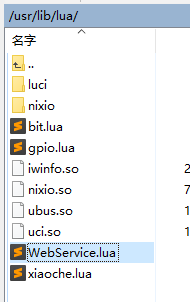
建立Lua模块文件,并读取参数,返回响应:
路径/usr/lib/lua/WebService.lua
local WebService = {}

--分割字符串函数

function Split(szFullString, szSeparator)

    local nFindStartIndex = 1

    local nSplitIndex = 1

    local nSplitArray = {}

    while true do

--找=号

        local nFindLastIndex = string.find(szFullString, szSeparator, nFindStartIndex)

        if not nFindLastIndex then

            nSplitArray[nSplitIndex] = string.sub(szFullString, nFindStartIndex, string.len(szFullString))

            break

        end

--从=号后面开始找 &

        nFindStartIndex=nFindLastIndex+1

        nFindLastIndex = string.find(szFullString, '&', nFindStartIndex)

 	if not nFindLastIndex then --最后一个

        nFindLastIndex=string.len(szFullString)

--截取 =和&之间

 	nSplitArray[nSplitIndex] = string.sub(szFullString, nFindStartIndex, nFindLastIndex)

        nFindStartIndex = nFindLastIndex+1

        nSplitIndex = nSplitIndex + 1

 	end

--截取 =和&之间

	nSplitArray[nSplitIndex] = string.sub(szFullString, nFindStartIndex, nFindLastIndex - 1)

     	nFindStartIndex = nFindLastIndex+1

                nSplitIndex = nSplitIndex + 1

      end

    return nSplitArray

end

--执行修改配置文件

function change_config(wifiname,wifipws)

--查询现有的WIFi名字

local t= io.popen('uci get wireless.@wifi-iface[0].ssid')

local a = t:read("*all")

--修改WIFI名字

local setwifiname='uci set wireless.@wifi-iface[0].ssid='..wifiname

io.popen(setwifiname)

--修改WIFI密码

local setwifipsd='uci set wireless.@wifi-iface[0].key='..wifipws

io.popen(setwifipsd)

--保存文件提交

io.popen('uci commit wireless')

--print("save change!")

--重启WIFI生效

--print("restart!")

io.popen('wifi')

end

--主函数

function WebService.Run()

    local client = os.getenv("REMOTE_ADDR")

    local GET = os.getenv("QUERY_STRING")

--解析求求

      list = Split(GET,'=')

    local POST = nil

    local POSTLength = tonumber(os.getenv("CONTENT_LENGTH")) or 0

    if (POSTLength > 0) then

        POST = io.read(POSTLength)

        --POST = io.read("*a")

    end

    io.write("Content-type: text/html\nPragma: no-cache\n\n")

    local reply = string.format("Client %s said: url: [%s], data: [%s]\n", client or '-', GET or '-', POST or '-')

    io.write(reply )

 --修改配置文件

       change_config(list [1],list [2])

end

return WebService
重启“uhttpd”服务(为了让更改的/etc/config/uhttpd生效):
root@OpenWrt:~# /etc/init.d/uhttpd restart
使用浏览器测试:
http://<openwrt_ipaddr>/cgi-bin/webservice?author=qige
这里假设OpenWrt开发板的IP为192.168.8.1
http://192.168.8.1/cgi-bin/webservice?wifi-key=xixi&wifi-key-msg=xx

单独讲解:
1脚本命令交互uci
查看每个配置在那个文件
uci export
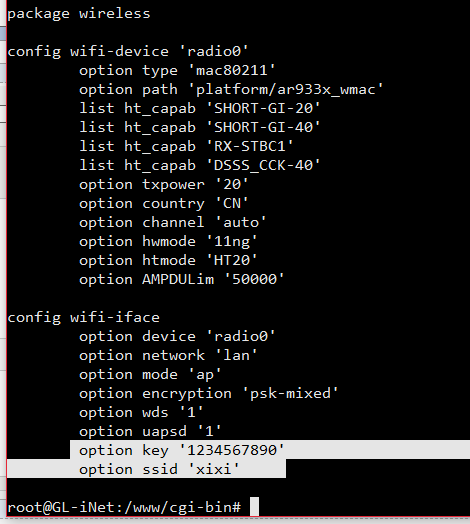
在次看到 无线账号密码在wireless配置文件里
uci show
查看具体包里面的信息

查询

uci get wireless.@wifi-iface[0].ssid

修改

uci set wireless.@wifi-iface[0].ssid="dongdong"

提交保存

uci commit wireless

重启生效

wifi
@wifi-iface[0]可能一个文件里面有多个同名的,这个代表第一个
教程二 网页和lua交互修改openwrt的更多相关文章
- Cocos 2d-X Lua 游戏添加苹果内购(二) OC和Lua交互代码详解
这是第二篇 Cocos 2d-X Lua 游戏添加苹果内购(一) 图文详解准备流程 这是前面的第一篇,详细的说明了怎样添加内购项目以及填写银行信息提交以及沙盒测试员的添加使用以及需要我们注意的东西,结 ...
- MIP开发教程(二) 使用MIP-CLI工具调试MIP网页
初始化 MIP 配置 新建一个 MIP 网页 编写 MIP 网页代码 校验 MIP 网页 调试 MIP 网页 1. 初始化 MIP 配置 首先在html目录下进行初始化 MIP 配置: $ mip i ...
- 无废话ExtJs 入门教程二十[数据交互:AJAX]
无废话ExtJs 入门教程二十[数据交互:AJAX] extjs技术交流,欢迎加群(521711109) 1.代码如下: 1 <!DOCTYPE html PUBLIC "-//W3C ...
- 【Visual C++】游戏开发五十六 浅墨DirectX教程二十三 打造游戏GUI界面(一)
本系列文章由zhmxy555(毛星云)编写,转载请注明出处. 文章链接:http://blog.csdn.net/poem_qianmo/article/details/16384009 作者:毛星云 ...
- C++与Lua交互之配置&交互原理&示例
|Lua 简介 Lua 是一种轻量小巧的脚本语言,也是号称性能最高的脚本语言,它用C语言编写并以源代码形式开放. 某些程序常常需要修改内容,而修改的内容不仅仅是数据,更要修改很多函数的行为. 而修改函 ...
- WiFi-ESP8266入门http(2-2)文件系统-复杂结构的网页 + 文本框交互WIFI信息
网友教程:https://blog.csdn.net/solar_Lan/article/details/74231360 通过网友教程,我们搭建了文件系统.在此基础上,我们增加WIFI交互. 现有功 ...
- Quartz教程二:API,Job和Trigger
原文链接 | 译文链接 | 翻译:nkcoder | 校对:方腾飞 本系列教程由quartz-2.2.x官方文档翻译.整理而来,希望给同样对quartz感兴趣的朋友一些参考和帮助,有任何不当或错误之处 ...
- PySide——Python图形化界面入门教程(二)
PySide——Python图形化界面入门教程(二) ——交互Widget和布局容器 ——Interactive Widgets and Layout Containers 翻译自:http://py ...
- 手把手教从零开始在GitHub上使用Hexo搭建博客教程(二)-Hexo参数设置
前言 前文手把手教从零开始在GitHub上使用Hexo搭建博客教程(一)-附GitHub注册及配置介绍了github注册.git相关设置以及hexo基本操作. 本文主要介绍一下hexo的常用参数设置. ...
随机推荐
- 你不知道的JavaScript--Item10 闭包(closure)
JavaScript 闭包究竟是什么? 用JavaScript一年多了,闭包总是让人二丈和尚摸不着头脑.陆陆续续接触了一些闭包的知识,也犯过几次因为不理解闭包导致的错误,一年多了资料也看了一些,但还是 ...
- Spring Data Jpa 实现分页(Spring MVC+easyui)
spring data jpa很好的对dao层进行了封装,这篇文章主要来写的是实现easyui datagird数据分页,由于各个UI参数不大一样,所以如果使用的是其他UI,得稍作修改.需要说明的是我 ...
- Android 实现个性的ViewPager切换动画 实战PageTransformer(兼容Android3.0以下)
转载请标明出处:http://blog.csdn.net/lmj623565791/article/details/40411921,本文出自:[张鸿洋的博客] 1.概述 之前写过一篇博文:Andro ...
- Python定时任务
在项目中,我们可能遇到有定时任务的需求.其一:定时执行任务.例如每天早上 8 点定时推送早报.其二:每隔一个时间段就执行任务.比如:每隔一个小时提醒自己起来走动走动,避免长时间坐着.今天,我跟大家分享 ...
- 解决 Scrapy-Redis 空跑问题,链接跑完后自动关闭爬虫
Scrapy-Redis 空跑问题,redis_key链接跑完后,自动关闭爬虫 问题:scrapy-redis框架中,reids存储的xxx:requests已经爬取完毕,但程序仍然一直运行,如何自动 ...
- baseFileWriter.go
package blog4go import ( "fmt" "os" "sync" "time" ) const ( ...
- BZOJ_3831_[Poi2014]Little Bird_单调队列优化DP
BZOJ_3831_[Poi2014]Little Bird_单调队列优化DP Description 有一排n棵树,第i棵树的高度是Di. MHY要从第一棵树到第n棵树去找他的妹子玩. 如果MHY在 ...
- B20J_3231_[SDOI2014]旅行_树链剖分+线段树
B20J_3231_[SDOI2014]旅行_树链剖分+线段树 题意: S国有N个城市,编号从1到N.城市间用N-1条双向道路连接,城市信仰不同的宗教,为了方便,我们用不同的正整数代表各种宗教. S国 ...
- BZOJ_1697_[Usaco2007 Feb]Cow Sorting牛排序_贪心
BZOJ_1697_[Usaco2007 Feb]Cow Sorting牛排序_贪心 Description 农夫JOHN准备把他的 N(1 <= N <= 10,000)头牛排队以便于行 ...
- python 之 初识模块
什么是模块 什么是模块 一个.py文件 就是一个模块 我们使用import加载的模块分为4个通用类别 1.py文件 2.包好一组模块的包(带__init__.py文件的文件夹) 3.内置模块 4.已被 ...