
Netty学习摘记 —— 预置SSL / HTTP / WebSocket编解码器
本文参考
本篇文章是对《Netty In Action》一书第十一章"预置的ChannelHandler和编解码器"的学习摘记,主要内容为通过 SSL/TLS 保护 Netty 应用程序、构建基于 Netty 的 HTTP/HTTPS 和websocket应用程序、处理空闲的连接和超时、解码基于分隔符的协议和基于长度的协议、写大型数据
本篇先摘记前两块内容 —— 通过 SSL/TLS 保护 Netty 应用程序、构建基于 Netty 的 HTTP/HTTPS 和WebSocket应用程序
通过SSL/TLS保护Netty应用程序
Adds SSL · TLS and StartTLS support to a Channel.
有关SSL/TLS的内容可以参考这篇文章:https://www.jianshu.com/p/7158568e4867
Netty 通过一个名为SslHandler的ChannelHandler 实现javax.net.ssl 包的SSLContext 和SSLEngine 类,其中SslHandler在内部使用SSLEngine来完成实际的工作
Netty 还提供了使用 OpenSSL 工具包的 SSLEngine实现。这个OpenSslEngine类提供了比 JDK 提供的SSLEngine实现更好的性能。如果OpenSSL库可用,可以将Netty应用程序(客户端和服务器)配置为默认使用OpenSslEngine。 如果不可用,Netty 将会回退到 JDK 实现,不过无论使用 JDK 的SSLEngine还是使用 Netty 的OpenSslEngine,SSL API 和数据流都是一致的
它的实现过程示意图如下
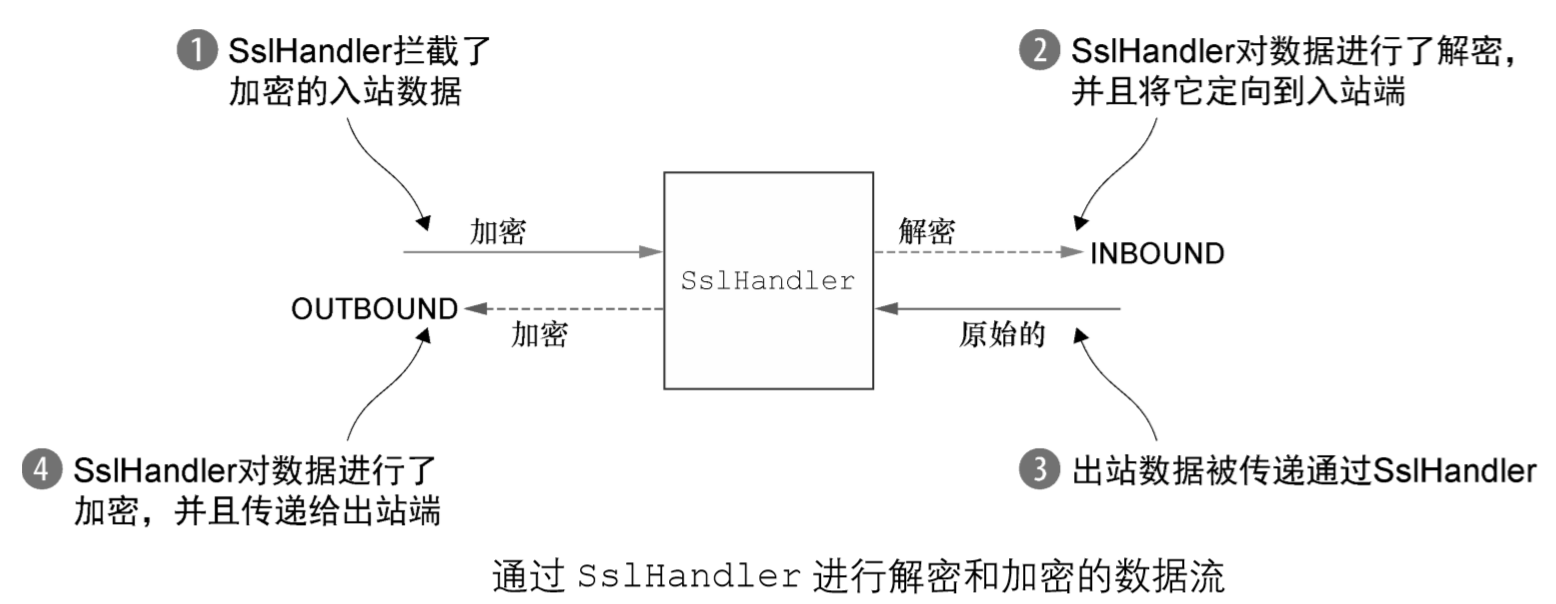
在大多数情况下,SslHandler是ChannelPipeline中的第一个ChannelHandler。 这确保了只有在所有其他的ChannelHandler将它们的逻辑应用到数据之后,才会进行加密,示例代码如下
public class SslChannelInitializer extends ChannelInitializer<Channel> {
private final SslContext context;
private final boolean startTls;
//传入要使用的 SslContext
//如果startTls设置为 true,第一个写入的消息将不会被加密(客户端应该设置为 true)
public SslChannelInitializer(SslContext context, boolean startTls) {
this.context = context;
this.startTls = startTls;
}
@Override
protected void initChannel(Channel ch) throws Exception {
//对于每个 SslHandler 实例
//都使用 Channel 的 ByteBufAllocator 从 SslContext 获取一个新的 SSLEngine
SSLEngine engine = context.newEngine(ch.alloc());
//将 SslHandler 作为第一个 ChannelHandler 添加到 ChannelPipeline 中
ch.pipeline().addFirst("ssl", new SslHandler(engine, startTls));
}
}
我们可以看到,将SslHandler添加到ChannelPipeline是十分简单的,只需要将它的实例添加到ChannelPipeline即可
下面是有关SslHandler的api

在加密之前会先进行SSL/TLS握手,握手会在Channel被激活后自动执行,不需要我们手动配置
The handshake will be automatically issued for you once the Channel is active and SSLEngine.getUseClientMode() returns true. So no need to bother with it by your self.
握手的成功与否,既可以通过SslHandler的handshakeFuture()方法获得通知,也可以在下一个ChannelHandler的userEventTriggered()方法内检查是否有SslHandshakeCompletionEvent事件发生来获得通知
Beside using the handshake ChannelFuture to get notified about the completion of the handshake it's also possible to detect it by implement the ChannelInboundHandler.userEventTriggered(ChannelHandlerContext, Object) method and check for a SslHandshakeCompletionEvent.
HTTP编解码器
下图分别展示了生产和消费 HTTP 请求和 HTTP 响应的方法

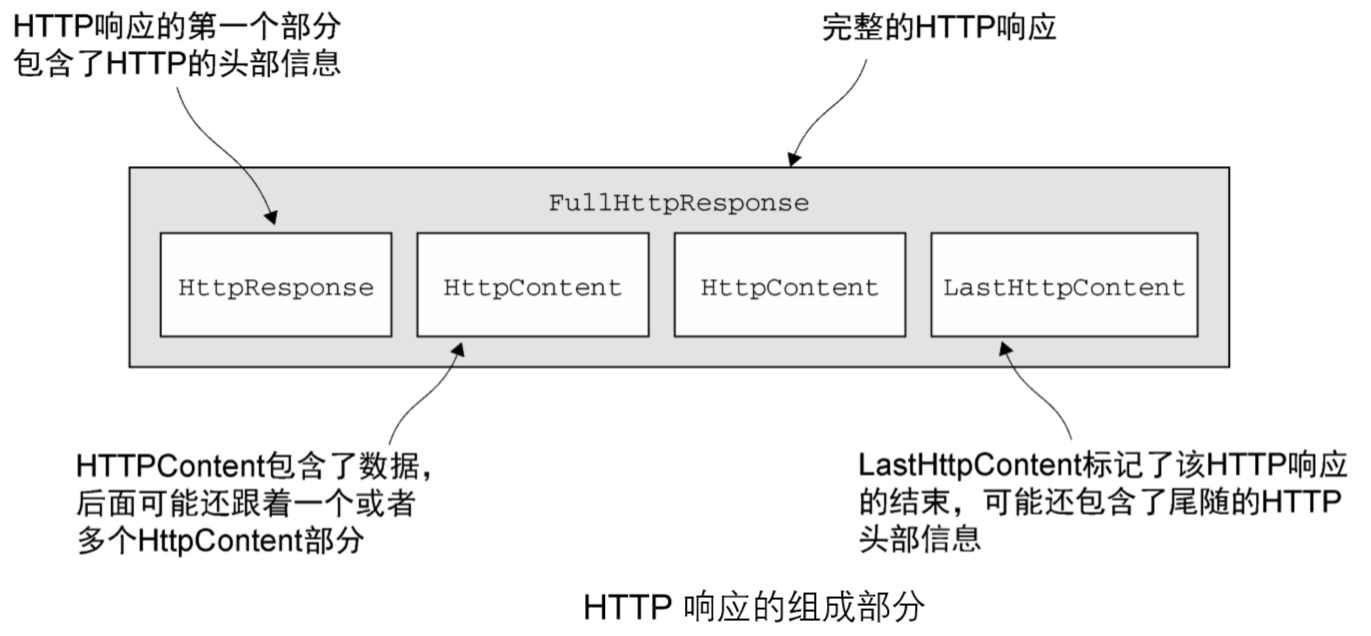
一个 HTTP 请求/响应可能由多个数据部分组成,并且它总是以一个LastHttpContent部分作为结束。Netty中FullHttpRequest和FullHttpResponse消息是特殊的子类型,分别代表了完整的请求和响应
有关HTTP的编解码器有HttpRequestEncoder、HttpResponseEncoder、HttpRequestDecoder、HttpResponseDecoder
HttpClientCodec在结合了HttpRquestEncoder和HttpResponseDecoder的基础上,还提供了额外的状态管理
A combination of HttpRequestEncoder and HttpResponseDecoder which enables easier client side HTTP implementation. HttpClientCodec provides additional state management for HEAD and CONNECT requests, which HttpResponseDecoder lacks.
下面是将HTTP编解码器添加到ChannelPipline的示例代码
public class HttpPipelineInitializer extends ChannelInitializer<Channel> {
private final boolean client;
public HttpPipelineInitializer(boolean client) {
this.client = client;
}
@Override
protected void initChannel(Channel ch) throws Exception {
ChannelPipeline pipeline = ch.pipeline();
if (client) {
//如果是客户端,则添加 HttpResponseDecoder 以处理来自服务器的响应
pipeline.addLast("decoder", new HttpResponseDecoder());
//如果是客户端,则添加 HttpRequestEncoder 以向服务器发送请求
pipeline.addLast("encoder", new HttpRequestEncoder());
} else {
//如果是服务器,则添加 HttpRequestDecoder 以接收来自客户端的请求
pipeline.addLast("decoder", new HttpRequestDecoder());
//如果是服务器,则添加 HttpResponseEncoder 以向客户端发送响应
pipeline.addLast("encoder", new HttpResponseEncoder());
}
}
}
HttpObjectAggregator聚合HTTP消息
A ChannelHandler that aggregates an HttpMessage and its following HttpContents into a single FullHttpRequest or FullHttpResponse (depending on if it used to handle requests or responses) with no following HttpContents. It is useful when you don't want to take care of HTTP messages whose transfer encoding is 'chunked'. Insert this handler after HttpResponseDecoder in the ChannelPipeline if being used to handle responses, or after HttpRequestDecoder and HttpResponseEncoder in the ChannelPipeline if being used to handle requests.
正如我们在上面HTTP的请求和响应组成部分图中所看到的,HTTP 的请求和响应可能由许多部分组成,因此需要聚合它们以形成完整的消息,Netty为此提供了HttpObjectAggregator类来简化这一操作,消息分段将被缓冲,直到可以转发一个完整的消息给下一个 ChannelInboundHandler
public class HttpAggregatorInitializer extends ChannelInitializer<Channel> {
private final boolean isClient;
public HttpAggregatorInitializer(boolean isClient) {
this.isClient = isClient;
}
@Override
protected void initChannel(Channel ch) throws Exception {
ChannelPipeline pipeline = ch.pipeline();
if (isClient) {
//如果是客户端,则添加 HttpClientCodec
pipeline.addLast("codec", new HttpClientCodec());
} else {
//如果是服务器,则添加 HttpServerCodec
pipeline.addLast("codec", new HttpServerCodec());
}
//将最大的消息大小为 512 KB 的 HttpObjectAggregator 添加到 ChannelPipeline
pipeline.addLast("aggregator", new HttpObjectAggregator(512 * 1024));
}
}
压缩 / 解压HTTP消息
当使用 HTTP 时,可以开启压缩功能以尽可能多地减小传输数据的大小,Netty同样为压缩和解压缩提供了ChannelHandler实现,它们同时支持gzip和deflate编 码
HttpContentDecompressor提供了解压操作
Decompresses an HttpMessage and an HttpContent compressed in gzip or deflate encoding.
HttpContentCompressor提供了压缩操作,根据HTTP头信息中的Accept-Encoding来确定编码方式
Compresses an HttpMessage and an HttpContent in gzip or deflate encoding while respecting the "Accept-Encoding" header. If there is no matching encoding, no compression is done.
public class HttpCompressionInitializer extends ChannelInitializer<Channel> {
private final boolean isClient;
public HttpCompressionInitializer(boolean isClient) {
this.isClient = isClient;
}
@Override
protected void initChannel(Channel ch) throws Exception {
ChannelPipeline pipeline = ch.pipeline();
if (isClient) {
//如果是客户端,则添加 HttpClientCodec
pipeline.addLast("codec", new HttpClientCodec());
//如果是客户端,则添加 HttpContentDecompressor 以处理来自服务器的压缩内容
pipeline.addLast("decompressor",
new HttpContentDecompressor());
} else {
//如果是服务器,则添加 HttpServerCodec
pipeline.addLast("codec", new HttpServerCodec());
//如果是服务器,则添加HttpContentCompressor 来压缩数据(如果客户端支持它)
pipeline.addLast("compressor", new HttpContentCompressor());
}
}
}
结合SSL / TLS启用HTTPS
启用 HTTPS 只需要将 SslHandler 添加到 ChannelPipeline 的 ChannelHandler组合中
public class HttpsCodecInitializer extends ChannelInitializer<Channel> {
private final SslContext context;
private final boolean isClient;
public HttpsCodecInitializer(SslContext context, boolean isClient) {
this.context = context;
this.isClient = isClient;
}
@Override
protected void initChannel(Channel ch) throws Exception {
ChannelPipeline pipeline = ch.pipeline();
SSLEngine engine = context.newEngine(ch.alloc());
//将 SslHandler 添加到ChannelPipeline 中以使用 HTTPS
pipeline.addFirst("ssl", new SslHandler(engine));
if (isClient) {
//如果是客户端,则添加 HttpClientCodec
pipeline.addLast("codec", new HttpClientCodec());
} else {
//如果是服务器,则添加 HttpServerCodec
pipeline.addLast("codec", new HttpServerCodec());
}
}
}
WebSocket
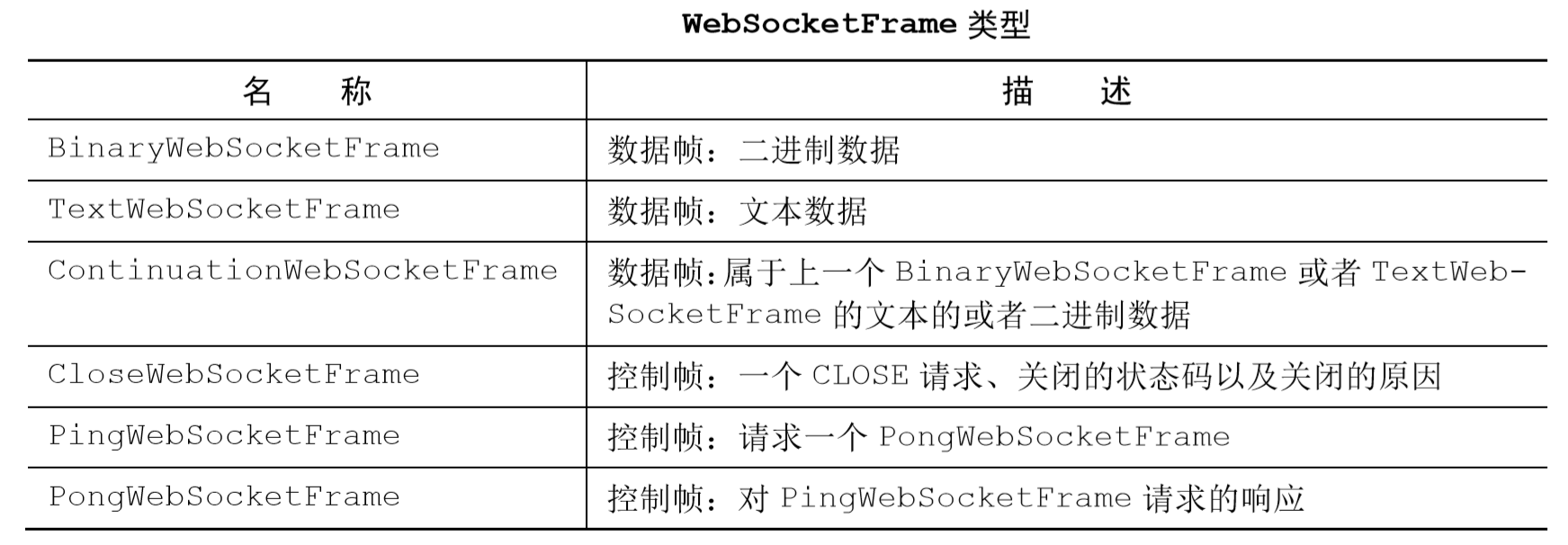
在上一篇文章"编解码器"的MessageToMessage代码示例中已经接触了WebSocket的数据帧和控制帧,下面的表格做一个归纳
下面是服务器端支持 WebSocket的代码示例
public class WebSocketServerInitializer extends ChannelInitializer<Channel> {
@Override
protected void initChannel(Channel ch) throws Exception {
ch.pipeline().addLast(
new HttpServerCodec(),
//为握手提供聚合的 HttpRequest
new HttpObjectAggregator(65536),
//如果被请求的端点是"/websocket",则处理该升级握手
new WebSocketServerProtocolHandler("/websocket"),
//TextFrameHandler 处理 TextWebSocketFrame
new TextFrameHandler(),
//BinaryFrameHandler 处理 BinaryWebSocketFrame
new BinaryFrameHandler(),
//ContinuationFrameHandler 处理 ContinuationWebSocketFrame
new ContinuationFrameHandler());
}
public static final class TextFrameHandler extends
SimpleChannelInboundHandler<TextWebSocketFrame> {
@Override
public void channelRead0(ChannelHandlerContext ctx,
TextWebSocketFrame msg) throws Exception {
// Handle text frame
}
}
public static final class BinaryFrameHandler extends
SimpleChannelInboundHandler<BinaryWebSocketFrame> {
@Override
public void channelRead0(ChannelHandlerContext ctx,
BinaryWebSocketFrame msg) throws Exception {
// Handle binary frame
}
}
public static final class ContinuationFrameHandler extends
SimpleChannelInboundHandler<ContinuationWebSocketFrame> {
@Override
public void channelRead0(ChannelHandlerContext ctx,
ContinuationWebSocketFrame msg) throws Exception {
// Handle continuation frame
}
}
}
要想为 WebSocket 添加安全性,只需要将 SslHandler 作为第一个 ChannelHandler 添加到 ChannelPipeline中
Netty学习摘记 —— 预置SSL / HTTP / WebSocket编解码器的更多相关文章
- Netty学习摘记 —— 初步认识Netty核心组件
本文参考 我在博客内关于"Netty学习摘记"的系列文章主要是对<Netty in action>一书的学习摘记,文章中的代码也大多来自此书的github仓库,加上了一 ...
- Netty学习摘记 —— 初识编解码器
本文参考 本篇文章是对<Netty In Action>一书第十章"编解码器框架"的学习摘记,主要内容为解码器和编码器 编解码器实际上是一种特殊的ChannelHand ...
- Netty学习摘记 —— 心跳机制 / 基于分隔符和长度的协议
本文参考 本篇文章是对<Netty In Action>一书第十一章"预置的ChannelHandler和编解码器"的学习摘记,主要内容为通过 SSL/TLS 保护 N ...
- Netty学习摘记 —— 简单WEB聊天室开发
本文参考 本篇文章是对<Netty In Action>一书第十二章"WebSocket"的学习摘记,主要内容为开发一个基于广播的WEB聊天室 聊天室工作过程 请求的 ...
- Netty学习摘记 —— 深入了解Netty核心组件
本文参考 本篇文章是对<Netty In Action>一书第三章"Netty的组件和设计"的学习摘记,主要内容为Channel.EventLoop.ChannelFu ...
- Netty学习摘记 —— UDP广播事件
本文参考 本篇文章是对<Netty In Action>一书第十三章"使用UDP广播事件"的学习摘记,主要内容为广播应用程序的开发 消息POJO 我们将日志信息封装成名 ...
- Netty学习摘记 —— 单元测试
本文参考 本篇文章是对<Netty In Action>一书第九章"单元测试"的学习摘记,主要内容为使用特殊的 Channel 实现--EmbeddedChannel来 ...
- Netty学习摘记 —— 再谈引导
本文参考 本篇文章是对<Netty In Action>一书第八章"引导"的学习摘记,主要内容为引导客户端和服务端.从channel内引导客户端.添加ChannelHa ...
- Netty学习摘记 —— 再谈EventLoop 和线程模型
本文参考 本篇文章是对<Netty In Action>一书第七章"EventLoop和线程模型"的学习摘记,主要内容为线程模型的概述.事件循环的概念和实现.任务调度和 ...
随机推荐
- centos7 配置nginx
安装是需要的环境 一. gcc 安装安装 nginx 需要先将官网下载的源码进行编译,编译依赖 gcc 环境,如果没有 gcc 环境,则需要安装: yum install gcc-c++ 二. PCR ...
- selenium在爬虫中的使用
一. selenium概述 1.1 定义 Selenium是一个Web的自动化测试工具,最初是为网站自动化测试而开发的,Selenium 可以直接调用浏览器,它支持所有主流的浏览器(包括Phantom ...
- js识别手机型号做业务判断
navigator为Window对象的一个属性,指向了一个包含浏览器相关信息的对象. navigatot中包含了一些常用到的属性,如: navigator.appVersion 浏览器的版本号 nav ...
- 为游戏编写boss剧情
教程目录: 1. 小游戏展示 2. 下载游戏引擎 3. 创作一个移动的背景 4. 让阿菌煽动翅膀 5. 让阿菌模拟重力下坠 6. 让阿菌可以摸鱼 7. 编写游戏开始与结束 8. 编写 boss 剧情 ...
- 有效提升Python代码性能的三个层面
使用python进入一个熟练的状态之后就会思考提升代码的性能,尤其是python的执行效率还有很大提升空间(委婉的说法).面对提升效率这个话题,python自身提供了很多高性能模块,很多大牛开发出了高 ...
- cURL error 60: SSL certificate problem: unable to get local issuer certifica 解决
从 https://curl.haxx.se/docs/caextract.html 上下载cacert.pem 打开php.ini 搜索curl.cainfo 与 openssl.cafile,将 ...
- mysql sql_mode=only_full_group_by问题临时解决
执行代码 set global sql_mode='STRICT_TRANS_TABLES,NO_ZERO_IN_DATE,NO_ZERO_DATE,ERROR_FOR_DIVISION_BY_ZER ...
- python的matplotlib.pyplot绘制甘特图
博主本来就想简单地找一下代码,画一幅甘特图,结果百度之后发现甘特图的代码基本都不是用matplotlib库,但是像柱状图等统计图通常都是用这个库进行绘制的,所以博主就花了一些时间,自己敲了一份代码,简 ...
- SQL语句性能优化策略
1.对查询进行优化,应尽量避免全表扫描,首先应考虑在 WHERE 及 ORDER BY 涉及的列上建立索引.2.应尽量避免在 WHERE 子句中对字段进行 NULL 值判断,创建表时 NULL 是默认 ...
- RandomStringUtils 生成随机字符串
代码: System.out.println(RandomStringUtils.randomAlphanumeric(32));System.out.println(RandomStringUtil ...