
C#自定义控件(3)—PanelHead控件
有时候我们会需要这样一种控件效果,上面是标题,下面是另外一个区域,且分别需要设置不同的颜
色等,当然我们可以使用splitContainer控件来制作,也可以直接使用自定义控件来,这样可以减少一
定的麻烦。添加一个组件并继承Panel类,对Panel进行扩展。
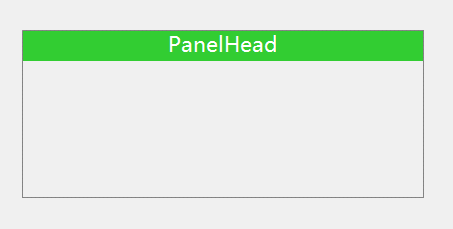
using System;

using System.Collections.Generic;

using System.ComponentModel;

using System.Diagnostics;

using System.Drawing;

using System.Linq;

using System.Text;

using System.Windows.Forms;

namespace JSControl

{

    public partial class PanelHead : Panel

    {

        //设置字体格式使用

        private StringFormat sf=new StringFormat();

        public PanelHead()

        {

            InitializeComponent();

            this.sf.Alignment = StringAlignment.Center;//文字水平居中

            this.sf.LineAlignment = StringAlignment.Center;//文字垂直居中

            //设置控件样式

            this.SetStyle(ControlStyles.AllPaintingInWmPaint, true);

            this.SetStyle(ControlStyles.DoubleBuffer, true);

            this.SetStyle(ControlStyles.ResizeRedraw, true);

            this.SetStyle(ControlStyles.Selectable, true);

            this.SetStyle(ControlStyles.SupportsTransparentBackColor, true);

            this.SetStyle(ControlStyles.UserPaint, true);

        }

        public PanelHead(IContainer container)

        {

            container.Add(this);

            InitializeComponent();

            this.sf.Alignment = StringAlignment.Center;//文字水平居中

            this.sf.LineAlignment = StringAlignment.Center;//文字垂直居中

            //设置控件样式

            this.SetStyle(ControlStyles.AllPaintingInWmPaint, true);

            this.SetStyle(ControlStyles.DoubleBuffer, true);

            this.SetStyle(ControlStyles.ResizeRedraw, true);

            this.SetStyle(ControlStyles.Selectable, true);

            this.SetStyle(ControlStyles.SupportsTransparentBackColor, true);

            this.SetStyle(ControlStyles.UserPaint, true);

        }

        private Graphics graphics;

        #region Filed

        private Font headFont = new System.Drawing.Font("微软雅黑", 10.5F, System.Drawing.FontStyle.Regular, System.Drawing.GraphicsUnit.Point);

        [Browsable(true)]

        [Category("自定义属性")]

        [Description("标题字体")]

        public Font HeadFont

        {

            get { return headFont; }

            set { headFont = value; this.Invalidate(); }

        }

        private string headTitle = "PanelHead";

        [Browsable(true)]

        [Category("自定义属性")]

        [Description("标题")]

        public string HeadTitle

        {

            get { return headTitle; }

            set { headTitle = value; this.Invalidate(); }

        }

        private int headHeight = 30;

        [Browsable(true)]

        [Category("自定义属性")]

        [Description("标题高度")]

        public int HeadHeight

        {

            get { return headHeight; }

            set { headHeight = value; this.Invalidate(); }

        }

        private Color headForeColor = Color.White;

        [Browsable(true)]

        [Category("自定义属性")]

        [Description("标题字体颜色")]

        public Color HeadForeColor

        {

            get { return headForeColor; }

            set { headForeColor = value; this.Invalidate(); }

        }

        private Color headBackColor = Color.LimeGreen;

        [Browsable(true)]

        [Category("自定义属性")]

        [Description("标题栏背景色")]

        public Color HeadBackColor

        {

            get { return headBackColor; }

            set { headBackColor = value; this.Invalidate(); }

        }

        private Color borderColor = Color.Gray;

        [Browsable(true)]

        [Category("自定义属性")]

        [Description("标题边框颜色")]

        public Color BorderColor

        {

            get { return borderColor; }

            set

            {

                borderColor = value;

                this.Invalidate();

            }

        }

        #endregion

        #region

        protected override void OnPaint(PaintEventArgs e)

        {

            base.OnPaint(e);

            graphics = e.Graphics;

            //消除锯齿,高质量显示

            graphics.SmoothingMode = System.Drawing.Drawing2D.SmoothingMode.AntiAlias;

            graphics.TextRenderingHint = System.Drawing.Text.TextRenderingHint.ClearTypeGridFit;

            //为了显示边框,所以需要减去1

            graphics.DrawRectangle(new Pen(this.borderColor), new Rectangle(0, 0, this.Width - 1, this.Height - 1));

            //为了显示边框,开始位置为(1,1)

            RectangleF rec = new RectangleF(1, 1, this.Width - 2, this.headHeight);

            graphics.FillRectangle(new SolidBrush(this.headBackColor), rec);

            //绘制文字

            graphics.DrawString(this.headTitle, this.headFont, new SolidBrush(this.headForeColor), rec, sf);

        }

        #endregion

    }

}
C#自定义控件(3)—PanelHead控件的更多相关文章
- C# 自定义控件VS用户控件
1 自定义控件与用户控件区别 WinForm中, 用户控件(User Control):继承自 UserControl,主要用于开发 Container 控件,Container控件可以添加其他Con ...
- Android开发技巧——自定义控件之组合控件
Android开发技巧--自定义控件之组合控件 我准备在接下来一段时间,写一系列有关Android自定义控件的博客,包括如何进行各种自定义,并分享一下我所知道的其中的技巧,注意点等. 还是那句老话,尽 ...
- Android自定义控件之日历控件
标签: android 控件 日历 应用 需求 2015年09月26日 22:21:54 25062人阅读 评论(109) 收藏 举报 分类: Android自定义控件系列(7) 版权声明:转载注 ...
- 背水一战 Windows 10 (79) - 自定义控件: Layout 系统, 控件模板, 事件处理
[源码下载] 背水一战 Windows 10 (79) - 自定义控件: Layout 系统, 控件模板, 事件处理 作者:webabcd 介绍背水一战 Windows 10 之 控件(自定义控件) ...
- winform 自定义控件:半透明Loading控件
winform 自定义控件:半透明Loading控件 by wgscd date:2015-05-05 效果: using System;using System.Drawing;using Sys ...
- 自定义控件VS用户控件
自定义控件VS用户控件 2015-06-16 1 自定义控件与用户控件区别 WinForm中, 用户控件(User Control):继承自 UserControl,主要用于开发 Container ...
- Flutter学习笔记(38)--自定义控件之组合控件
如需转载,请注明出处:Flutter学习笔记(38)--自定义控件之组合控件 在开始之前想先写点其他的,emm...就是今天在学习到自定义控件的时候,由于自定义控件这块一直是我的短板,无论是Andro ...
- Android自定义控件1--自定义控件介绍
Android控件基本介绍 Android本身提供了很多控件比如我们常用的有文本控件TextView和EditText:按钮控件Button和ImageButton状态开关按钮ToggleButton ...
- 自定义控件和XControl控件
(1)LabVIEW的自定义控件,实际上就是对LabVIEW自带的控件的一种修改,但是这种修改只能改变它的外观,即大小.颜色.位置等等,但是功能是改变不了的.如你对一个按钮进行自定义控件,无论怎么改, ...
随机推荐
- 分布式协同AI基准测试项目Ianvs:工业场景提升5倍研发效率
摘要:全场景可扩展的分布式协同AI基准测试项目 Ianvs(雅努斯),能为算法及服务开发者提供全面开发套件支持,以研发.衡量和优化分布式协同AI系统. 本文分享自华为云社区<KubeEdge|分 ...
- .NET 7 性能改进 -- 至今为止最快的.NET平台
2022年8月31日 Stephen Toub 发布的关于 .NET 7 性能改进的博客, 核心主题是 .NET 7 速度很快. 这篇博客非常的长,我尝试将它拷贝到Word 里,拷贝的时间都花了几分钟 ...
- 【Oracle初学者】ORA-01034: ORACLE not available
系统报错代码 ORA-01034: ORACLE not available 出现原因 //在启动实例时,关闭了数据库,导致外部软件无法访问Oracle数据库(大部分都是因为数据库监听或者服务关闭导致 ...
- 搭建docker镜像仓库(二):使用harbor搭建本地镜像仓库
目录 一.系统环境 二.前言 三.Harbor 四.使用harbor搭建私有镜像仓库 4.1 环境介绍 4.2 k8smaster节点安装配置harbor 4.2.1 安装harbor离线包 4.2. ...
- python3实现:进程遇Error定时重启
import os import time # 停止HFish def stopHFish(): # while True: try: # 找到HFish进程号 HFish_id = int(os.p ...
- 【pkuwc2018】随机算法
我们考虑用状压dp来解决这一道题 设$f[i][S]$表示当前排列的前i位所构成的最大独立集恰好为S的方案数 我们考虑用$f[i][S]$推出$f[i+1][S']$的值 那么我们有两种扩展的方法,一 ...
- 发布日志- kratos v2.1.4 发布!
v2.1.4 release https://github.com/go-kratos/kratos/releases/tag/v2.1.4 New Features feat(registry/co ...
- kibana配置文件kibana.yml参数详解
server.port: 默认值: 5601 Kibana 由后端服务器提供服务,该配置指定使用的端口号. server.host: 默认值: "localhost" 指定后端服务 ...
- 计算shell 脚本的执行时间
# shell_time.sh #!/bin/bash UseTime () { startTime_s=`date +%s` # 获取从1970-01-01 00:00:00 UTC到现在的秒数 $ ...
- 延申三大问题中的第一个问题处理---原先shell脚本中启动jar文件命令的配置,附加参数等
经过一系列的试错,最终采用的解决办法如下: 采用的配置文件 附加的启动参数 或者把这些都给统一添加到ConfigMap中