
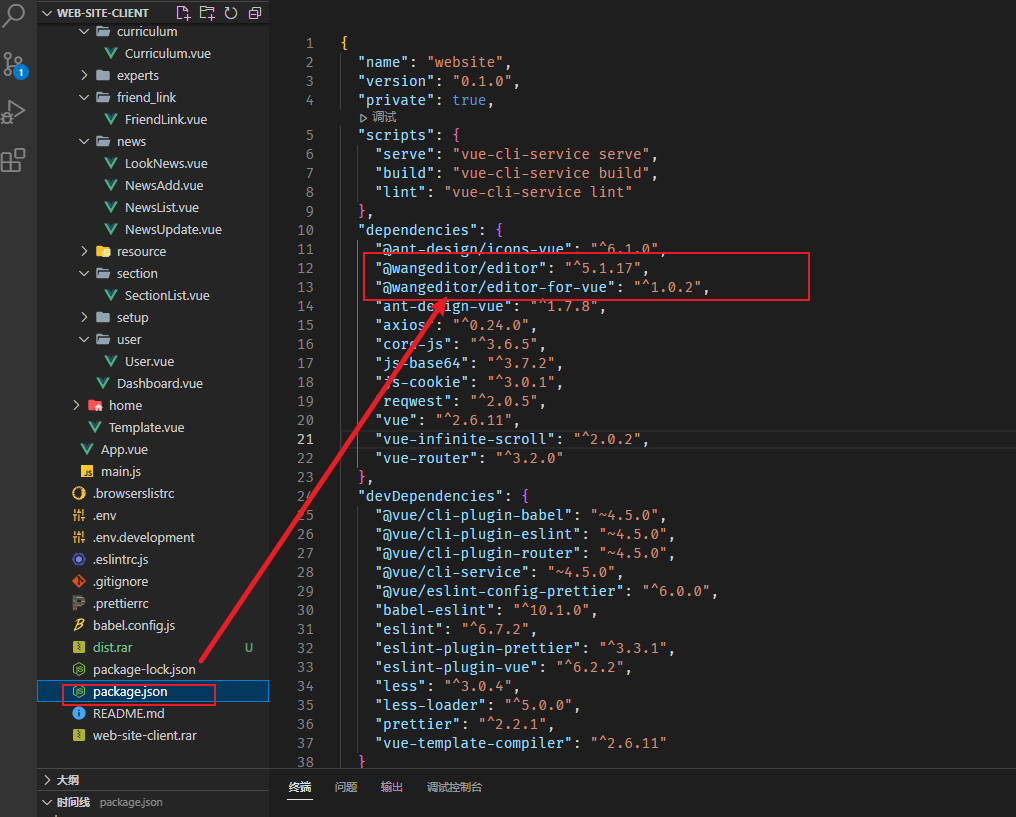
vue富文本(5版本)组件
<template>

  <div>

    <div style="border: 1px solid #ccc; width: 500px">

      <!-- 工具栏 -->

      <Toolbar style="border-bottom: 1px solid #ccc" :editor="editor" :defaultConfig="toolbarConfig" />

      <!-- 编辑器 -->

      <Editor style="height: 400px; overflow-y: hidden" :defaultConfig="editorConfig" v-model="html" @onChange="onChange" @onCreated="onCreated" />

    </div>

  </div>

</template>

<script>

import { Editor, Toolbar } from '@wangeditor/editor-for-vue';

import Cookie from 'js-cookie';

export default {

  name: 'MyEditor',

  components: { Editor, Toolbar },

  props: {

    destDir: {

      type: String,

    },

  },

  data() {

    return {

      editor: null,

      html: '',

      toolbarConfig: {

        // toolbarKeys: [ /* 显示哪些菜单,如何排序、分组 */ ],

        // excludeKeys: [ /* 隐藏哪些菜单 */ ],

      },

      editorConfig: {

        placeholder: '请输入内容...',

        // autoFocus: false,

        // 所有的菜单配置,都要在 MENU_CONF 属性下

        MENU_CONF: {},

      },

    };

  },

  methods: {

    onCreated(editor) {

      this.editor = Object.seal(editor); // 【注意】一定要用 Object.seal() 否则会报错

      console.log('Created');

    },

    onChange(editor) {

      // console.log('onChange', editor.getHtml()); // onChange 时获取编辑器最新内容

    },

    loadHtml(html) {

      this.html = html;

    },

    insertTextHandler(html) {

      const editor = this.editor;

      if (editor == null) return;

      console.log(html);

      editor.insertText(html);

    },

    printEditorHtml() {

      const editor = this.editor;

      if (editor == null) return;

      console.log(editor.getHtml());

    },

    disableHandler() {

      const editor = this.editor;

      if (editor == null) return;

      editor.disable();

    },

    // 自定义校验图片

    customCheckImageFn(src, alt, url) {

      if (!src) {

        return;

      }

      if (src.indexOf('http') !== 0) {

        return '图片网址必须以 http/https 开头';

      }

      return true;

      // 返回值有三种选择:

      // 1. 返回 true ,说明检查通过,编辑器将正常插入图片

      // 2. 返回一个字符串,说明检查未通过,编辑器会阻止插入。会 alert 出错误信息(即返回的字符串)

      // 3. 返回 undefined(即没有任何返回),说明检查未通过,编辑器会阻止插入。但不会提示任何信息

    },

    // 转换图片链接

    customParseImageSrc(src) {

      // JS 语法

      if (src.indexOf('http') !== 0) {

        return `${this.pictureUrl}${src}`;

      }

      return src;

    },

  },

  created() {

    let that = this;

    this.editorConfig.MENU_CONF['uploadImage'] = {

      server: process.env.VUE_APP_API_MANAGE + '/uploadFileController/editUpload.do',

      fieldName: 'file',

      // 继续写其他配置...

      meta: {

        destDir: that.destDir,

      },

      headers: {

        adminToken: Cookie.get('adminToken'),

      },

      onSuccess(file, res) {

        // JS 语法

        console.log(`${file.name} 上传成功`, res);

      },

      // customInsert(res: any, insertFn: InsertFnType) {

      // TS 语法

      customInsert(res, insertFn) {

        // JS 语法

        // res 即服务端的返回结果

        // 从 res 中找到 url alt href ,然后插入图片

        insertFn(process.env.VUE_APP_SERVER + 'imageServer' + res.data.url, res.data.alt, res.data.href);

      },

    };

    // 插入图片

    this.editorConfig.MENU_CONF['insertImage'] = {

      onInsertedImage(imageNode) {

        // JS 语法

        if (imageNode == null) return;

        const { src, alt, url, href } = imageNode;

        console.log('inserted image', src, alt, url, href);

      },

      checkImage: that.customCheckImageFn, // 也支持 async 函数

      parseImageSrc: that.customParseImageSrc, // 也支持 async 函数

    };

  },

  mounted() {

    // // 模拟 ajax 请求,异步渲染编辑器

    // setTimeout(() => {

    //   this.html = '<p>Ajax 异步设置内容 HTML</p>';

    // }, 1500);

  },

  beforeDestroy() {

    const editor = this.editor;

    if (editor == null) return;

    editor.destroy(); // 组件销毁时,及时销毁 editor ,重要!!!

  },

};

</script>

<style>

.w-e-full-screen-container {

  bottom: 0 !important;

  display: flex !important;

  flex-direction: column !important;

  height: 100% !important;

  left: 0 !important;

  margin: 0 !important;

  padding: 0 !important;

  position: fixed;

  right: 0 !important;

  top: 0 !important;

  width: 100% !important;

  z-index: 99999;

}

</style>

<style src="@wangeditor/editor/dist/css/style.css"></style>

vue富文本(5版本)组件的更多相关文章
- vue+富文本编辑器UEditor
vue+富文本编辑器UEditor 昨天的需求是把textarea换成富文本编辑器的形式, 网上找了几种富文本编辑器ueditor.tinymce等, 觉得ueditor实现双向绑定还挺有意思, 分享 ...
- vue富文本vue-quill-editor
这个富文本需要装一下插件 "quill": "^1.3.6" "quill-image-drop-module": "^1.0.3 ...
- vue富文本编辑器vue-quill-editor使用总结(包含图片上传,拖拽,放大和缩小)
vue-quill-editor是vue很好的富文本编辑器,富文本的功能基本上都支持,样式是黑白色,简洁大方. 第一步下载 vue-quill-editor: npm i vue-quill-edit ...
- vue 富文本编辑器 项目实战用法
1.挑个富文本编辑器 首先针对自己项目的类型,确定自己要用啥编辑器. 1.1 wangeditor 如果一般类似博客这种项目不需要花里胡哨的,功能也不要求贼多的,推荐一下wangeditor(点击跳转 ...
- Vue富文本编辑器(图片拖拽缩放)
富文本编辑器(图片拖拽缩放) 需求: 根据业务要求,需要能够上传图片,且上传的图片能在移动端中占满屏幕宽度,故需要能等比缩放上传的图片,还需要能拖拽.缩放.改变图片大小.尝试多个第三方富文本编辑器,很 ...
- vue富文本编辑器vue-quill-editor
1.下载Vue-Quill-Editor npm install vue-quill-editor --save 2.下载quill(Vue-Quill-Editor需要依赖) npm install ...
- vue富文本编辑器
基于webpack和vue 一.npm 安装 vue-quill-editor 二.在main.js中引入 import VueQuillEditor from 'vue-quill-editor'/ ...
- 富文本编辑器quill---vue组件(vue-quill-editor)的使用
1.配置webpack plugin 解决以下报错 Uncaught TypeError: Cannot read property 'imports' of undefined (image-res ...
- 前端富文本 js 版本
https://s3.pstatp.com/pgc/v2/resource/tt_ueditor_v3_temple/tt-editor.all.js?20180425
- 适用于 Mpvue 的微信小程序富文本解析自定义组件
废话不多说,直接上方法: 首先 npm 安装 mpvue-wxparse npm i mpvue-wxparse 接下来:使用 <template> <div> <wxP ...
随机推荐
- 直接使用Arrays.asList()转数组,转变类型实际为AbstractList
1.直接将数组转换为list时List的类型为AbstractList public static void main(String[] args) { String[] arr = {"A ...
- VIM的撤销与恢复设置行数
vim撤销操作:u vim恢复操作:ctrl+r 设置行数: :set nu
- notepad++设置
1.背景颜色 [设置]-[语言格式设置] 选择主题:Solarized-light
- charles小程序抓包
参考链接:https://www.jianshu.com/p/048b67c5ed00 1. 手机上的程序目前按app的抓包方式,配置代 理,下载证书,打开设备---微信---本地网络,就可以直接抓包 ...
- Mybatis拦截器,修改Date类型数据。设置毫秒为0
1:背景 Mysql自动将datetime类型的毫秒数四舍五入,比如代码中传入的Date类型的数据值为 2021.03.31 23:59:59.700 到数据库 2021.04.01 0 ...
- vue-图书管理系统
/* 路由模块 */ const express = require('express'); const router = express.Router(); const service = requ ...
- 安全漏洞之grafana-cve_2021_43798
漏洞说明 一个可绕过用户登录进行任意文件读取的漏洞 环境搭建 我使用的是vulfocus提供的vulfocus/grafana-cve_2021_43798 ,由vulfocus后台统一管理 利用脚本 ...
- 37.Spring注解相关面试题
1.@Resource和@Autowired 区别 2.@Repository.@Component.@Service.@Controller 区别
- yzh 总线选讲
分布式:通过总线,我们可以用"通信""消息"等视角,把各个模块拆成各个小状态机,每个小状态机互相之间独立,通过总线通信 集中式:通过一个大状态机生成所有控制信号 ...
- LaTex【七】latex换行顶格、不缩进
LaTex换行会默认缩进,如果想不缩进只需要在不需要缩进的内容前面加上 \noindent 命令 ababababababababababab \noindent 不缩进不缩进