
ThinkPHP 3.2.3 加减乘法验证码类
ThinkPHP 3.2.3 自带的验证码类位于 /ThinkPHP/Library/Think/Verify.class.php,字体文件位于 /ThinkPHP/Library/Think/Verify/
可以在 Verify.class.php 文件内进行修改,也可以单独写一个类继承自带的验证码类。如果单独写一个继承的类,可以重用父类的属性和方法,但是要注意的是父类中有一些属性和方法是私有(private)的,可以修改这些私有的属性和方法为保护(protected)的,如果不希望修改框架自带的方法的话,也可以在子类中再定义这些属性和方法。
测试的控制器位于 /Application/Home/Controller/TestVerifyController.class.php
测试的试图位于 /Application/Home/View/User/verify.html
自定义的子类位于 /Applicaion/Home/Common/VerifyProcess.class.php
VerifyProcess.class.php:
<?php

namespace Home\Common;

use Think\Verify;

class VerifyProcess extends Verify {

  private $_image   = NULL;     // 验证码图片实例

  private $_color   = NULL;     // 验证码字体颜色

 public function entryProcess($id = '') {

    // 图片宽(px)

    $this->imageW || $this->imageW = $this->length*$this->fontSize*1.5 + $this->length*$this->fontSize/2;

    // 图片高(px)

    $this->imageH || $this->imageH = $this->fontSize * 2.5;

    // 建立一幅 $this->imageW x $this->imageH 的图像

    $this->_image = imagecreate($this->imageW, $this->imageH);

    // 设置背景

    imagecolorallocate($this->_image, $this->bg[0], $this->bg[1], $this->bg[2]);

    // 验证码字体随机颜色

    $this->_color = imagecolorallocate($this->_image, mt_rand(1,150), mt_rand(1,150), mt_rand(1,150));

    // 验证码使用随机字体

    $ttfPath =  $_SERVER['DOCUMENT_ROOT'].'/ThinkPHP/Library/Think/Verify/' . ($this->useZh ? 'zhttfs' : 'ttfs') . '/';

    if(empty($this->fontttf)){

        $dir = dir($ttfPath);

        $ttfs = array();

        while (false !== ($file = $dir->read())) {

            if($file[0] != '.' && substr($file, -4) == '.ttf') {

                $ttfs[] = $file;

            }

        }

        $dir->close();

        $this->fontttf = $ttfs[array_rand($ttfs)];

    }

    $this->fontttf = $ttfPath . $this->fontttf;

    if($this->useImgBg) {

        $this->_background();

    }

    if ($this->useNoise) {

        // 绘杂点

        $this->_writeNoise();

    }

    if ($this->useCurve) {

        // 绘干扰线

        $this->_writeCurve();

    }

    // 绘验证码

    $codeNX = 0; // 验证码第N个字符的左边距

    // 验证码为简单运算

    $a = mt_rand(1,9);

    $b = mt_rand(1,9);

    $operate_array = array('+', '-', '*');

    $key = mt_rand(0, count($operate_array) - 1);

    if($operate_array[$key] == '+') { // 加法

    	$code = $a.'+'.$b.'=';

    	$result = intval($a + $b);

    } elseif($operate_array[$key] == '-') { // 减法

    	$code = max($a,$b).'-'.min($a,$b).'=';

    	$result = intval(abs($a - $b));

    } else { // 乘法

    	$code = $a.'*'.$b.'=';

    	$result = intval($a * $b);

    }

    $this->length = 4;

    for ($i = 0; $i<$this->length; $i++) {

        $codeNX  += mt_rand($this->fontSize*1.2, $this->fontSize*1.6);

        imagettftext($this->_image, $this->fontSize, mt_rand(-40, 40), $codeNX, $this->fontSize*1.6, $this->_color, $this->fontttf, $code[$i]);

    }

    // 保存验证码

    $key        =   $this->authcode($this->seKey);

    $result       =   $this->authcode($result);

    $secode     =   array();

    $secode['verify_code'] = $result; // 把校验码保存到session

    $secode['verify_time'] = NOW_TIME;  // 验证码创建时间

    session($key.$id, $secode);

    header('Cache-Control: private, max-age=0, no-store, no-cache, must-revalidate');

    header('Cache-Control: post-check=0, pre-check=0', false);

    header('Pragma: no-cache');

    header("content-type: image/png");

    // 输出图像

    imagepng($this->_image);

    imagedestroy($this->_image);

	}

  /**

   * 画杂点

   * 往图片上写不同颜色的字母或数字

   */

  private function _writeNoise() {

      $codeSet = '2345678abcdefhijkmnpqrstuvwxyz';

      for($i = 0; $i < 10; $i++){

          //杂点颜色

          $noiseColor = imagecolorallocate($this->_image, mt_rand(150,225), mt_rand(150,225), mt_rand(150,225));

          for($j = 0; $j < 5; $j++) {

              // 绘杂点

              imagestring($this->_image, 5, mt_rand(-10, $this->imageW),  mt_rand(-10, $this->imageH), $codeSet[mt_rand(0, 29)], $noiseColor);

          }

      }

  }

  /**

   * 画一条由两条连在一起构成的随机正弦函数曲线作干扰线(你可以改成更帅的曲线函数)

   *

   *      高中的数学公式咋都忘了涅,写出来

   *		正弦型函数解析式:y=Asin(ωx+φ)+b

   *      各常数值对函数图像的影响:

   *        A:决定峰值(即纵向拉伸压缩的倍数)

   *        b:表示波形在Y轴的位置关系或纵向移动距离(上加下减)

   *        φ:决定波形与X轴位置关系或横向移动距离(左加右减)

   *        ω:决定周期(最小正周期T=2π/∣ω∣)

   *

   */

  private function _writeCurve() {

    $px = $py = 0;

    // 曲线前部分

    $A = mt_rand(1, $this->imageH/2);                  // 振幅

    $b = mt_rand(-$this->imageH/4, $this->imageH/4);   // Y轴方向偏移量

    $f = mt_rand(-$this->imageH/4, $this->imageH/4);   // X轴方向偏移量

    $T = mt_rand($this->imageH, $this->imageW*2);  // 周期

    $w = (2* M_PI)/$T;

    $px1 = 0;  // 曲线横坐标起始位置

    $px2 = mt_rand($this->imageW/2, $this->imageW * 0.8);  // 曲线横坐标结束位置

    for ($px=$px1; $px<=$px2; $px = $px + 1) {

        if ($w!=0) {

            $py = $A * sin($w*$px + $f)+ $b + $this->imageH/2;  // y = Asin(ωx+φ) + b

            $i = (int) ($this->fontSize/5);

            while ($i > 0) {

                imagesetpixel($this->_image, $px + $i , $py + $i, $this->_color);  // 这里(while)循环画像素点比imagettftext和imagestring用字体大小一次画出(不用这while循环)性能要好很多

                $i--;

            }

        }

    }

    // 曲线后部分

    $A = mt_rand(1, $this->imageH/2);                  // 振幅

    $f = mt_rand(-$this->imageH/4, $this->imageH/4);   // X轴方向偏移量

    $T = mt_rand($this->imageH, $this->imageW*2);  // 周期

    $w = (2* M_PI)/$T;

    $b = $py - $A * sin($w*$px + $f) - $this->imageH/2;

    $px1 = $px2;

    $px2 = $this->imageW;

    for ($px=$px1; $px<=$px2; $px=$px+ 1) {

        if ($w!=0) {

            $py = $A * sin($w*$px + $f)+ $b + $this->imageH/2;  // y = Asin(ωx+φ) + b

            $i = (int) ($this->fontSize/5);

            while ($i > 0) {

                imagesetpixel($this->_image, $px + $i, $py + $i, $this->_color);

                $i--;

            }

        }

    }

  }

  /* 加密验证码 */

  private function authcode($str){

    $key = substr(md5($this->seKey), 5, 8);

    $str = substr(md5($str), 8, 10);

    return md5($key . $str);

  }

  /**

   * 绘制背景图片

   * 注:如果验证码输出图片比较大,将占用比较多的系统资源

   */

  private function _background() {

      $path = dirname(__FILE__).'/Verify/bgs/';

      $dir = dir($path);

      $bgs = array();

      while (false !== ($file = $dir->read())) {

          if($file[0] != '.' && substr($file, -4) == '.jpg') {

              $bgs[] = $path . $file;

          }

      }

      $dir->close();

      $gb = $bgs[array_rand($bgs)];

      list($width, $height) = @getimagesize($gb);

      // Resample

      $bgImage = @imagecreatefromjpeg($gb);

      @imagecopyresampled($this->_image, $bgImage, 0, 0, 0, 0, $this->imageW, $this->imageH, $width, $height);

      @imagedestroy($bgImage);

  }

}
TestVerifyController.class.php:
<?php

namespace Home\Controller;

use Think\Controller;

use Home\Common\VerifyProcess;

class TestVerifyController extends Controller {

	// 界面

	public function index() {

		$this->display('User/verify');

	}

	// 验证

	public function check_verify() {

		$verify = new VerifyProcess();

    if(!$verify->check($_POST['verify'])) {

        $this->error('验证码错误');

    }

	}

    // 显示验证码

    public function verify() {

			$verify = new VerifyProcess();

			$verify->entryProcess();

    }

}
verify.html:
<!DOCTYPE html>

<html lang="en">

<head>

	<meta charset="UTF-8">

	<title>Document</title>

	<script src="http://lib.sinaapp.com/js/jquery/1.9.1/jquery-1.9.1.min.js"></script>

</head>

<body>

	<form action="{:U('Home/TestVerify/check_verify','','')}" method="post">

		<table>

			<tr>

				<td>验证码:</td>

				<td><input type="text" name="verify"></td>

				<td>

					<img id="verify" src="{:U('Home/TestVerify/verify','','')}" style="cursor: pointer;" alt=""><a id="refresh" href="javascript:void(0)">更换验证码</a></td>

			</tr>

			<tr>

				<td colspan="2">

					<input type="submit" value="提交">

				</td>

			</tr>

		</table>

	</form>

</body>

<script>

	$(function(){

		$src = $("#verify").attr('src');

		$("#refresh").click(function(){

			change_verify();

		});

		$("#verify").click(function(){

			change_verify();

		});

		function change_verify() {

			$('#verify').attr('src', $src + '?' + Math.random());

		}

	});

</script>

</html>
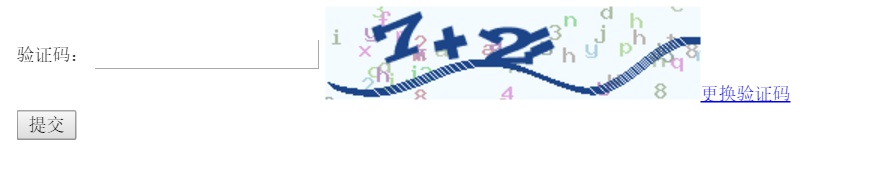
效果:
ThinkPHP 3.2.3 加减乘法验证码类的更多相关文章
- JS生成数字加减乘法验证码
给大家分享一个简单的js验证码生成代码 PS:该代码依赖Jquery1.4版本以上 传入元素 如productionVerificationCode(#\(("a")) 反回验证码 ...
- php生成动态验证码 加减算法验证码 简单验证码
预览效果: <?php /** *ImageCode 生成包含验证码的GIF图片的函数 *@param $string 字符串 *@param $width 宽度 *@param $height ...
- THINKPHP源码学习--------验证码类
TP3.2验证码类的理解 今天在学习中用到了THINKPHP验证码,为了了解究竟,就开始阅读TP验证码的源码. 源码位置:./ThinkPHP/Library/Think/Verify.class.p ...
- 修改ThinkPHP的验证码类
今天用ThinkPHP重新开发一个系统,用到了ThinkPHP的验证码类,由于我希望验证码别太复杂,希望验证码里边只有数字,却发现该Verify类并未提供设置验证码中使用的字符的配置的方法,于是查看源 ...
- thinkphp整合系列之极验滑动验证码
对于建站的筒子们来说:垃圾广告真是让人深恶痛绝:为了清净:搞个难以识别的验证码吧:又被用户各种吐槽:直到后来出现了极验这个滑动的验证码:这真是一个体验好安全高的方案:官网:http://www.gee ...
- 大整数加减运算的C语言实现
目录 大整数加减运算的C语言实现 一. 问题提出 二. 代码实现 三. 效果验证 大整数加减运算的C语言实现 标签: 大整数加减 C 一. 问题提出 培训老师给出一个题目:用C语言实现一个大整数计算器 ...
- php小数加减精度问题,比特币计算精度问题
php小数加减精度问题,比特币计算精度问题 在php开发时,有小数加减的场景.结果发现不能够等于预想的值,bccomp比较二个高精确度数字.语法: int bccomp(string left ope ...
- JavaScript 加减危机——为什么会出现这样的结果?
在日常工作计算中,我们如履薄冰,但是 JavaScript 总能给我们这样那样的 surprise~ 0.1 + 0.2 = ? 1 - 0.9 = ? 如果小伙伴给出内心的结果: 0.1 + 0.2 ...
- thinkphp整合系列之极验滑动验证码geetest
给一个央企做官网,登录模块用的thinkphp验证码类.但是2019-6-10到12号,国家要求央企检验官网漏洞,防止黑客攻击,正直贸易战激烈升级时期,所以各事业单位很重视官网安全性,于是乎集团总部就 ...
随机推荐
- ORA-27101 ORACLE not available
问题描述:今天打开plsql,报错无法识别连接服务 1.然后去找,是不是oracle服务没有启动,但是发现oracle的其他服务都能启动.只有OracleDBConsolearies不能启动,这说明O ...
- XSS攻击及防御
XSS又称CSS,全称Cross SiteScript,跨站脚本攻击,是Web程序中常见的漏洞,XSS属于被动式且用于客户端的攻击方式,所以容易被忽略其危害性.其原理是攻击者向有XSS漏洞的网站中输入 ...
- mount挂载问题
安装nfs-utils即可
- Python 开发轻量级爬虫06
Python 开发轻量级爬虫 (imooc总结06--网页解析器) 介绍网页解析器 将互联网的网页获取到本地以后,我们需要对它们进行解析才能够提取出我们需要的内容. 也就是说网页解析器是从网页中提取有 ...
- iOS开发UI篇—核心动画(UIView封装动画)
iOS开发UI篇—核心动画(UIView封装动画) 一.UIView动画(首尾) 1.简单说明 UIKit直接将动画集成到UIView类中,当内部的一些属性发生改变时,UIView将为这些改变提供动画 ...
- python常用文件处理函数_1
1.range()函数 函数原型:range(start,end,scan) 参数含义:start:计数从start开始.默认是从0开始的,如range()等价于range(0,5) end:计数到 ...
- 无废话ExtJs 入门教程十七[列表:GridPanel]
无废话ExtJs 入门教程十七[列表:GridPanel] extjs技术交流,欢迎加群(201926085) 在Extjs中,GridPanel用于数据显示,即我们平时说的列表页.在本节中,我们先对 ...
- [IDEA] 快捷键学习
IntelliJ Idea 常用快捷键列表 Alt+回车 导入包,自动修正Ctrl+N 查找类Ctrl+Shift+N 查找文件Ctrl+Alt+L 格式化代码 Ctrl+Alt+O 优化导 ...
- Python学习笔记(三)——类型与变量
一.输入与输出 print("string"); print("string1","string2","string3" ...
- 【dom4j xml】使用dom4j处理XML文件--测试过程遇到的问题
首先 关于dom4j的API,有如下: 当然 其中的实体引用有以下: 测试使用环境: 使用Maven搭建web环境,pom.xml文件配置如下: <project xmlns="ht ...