
android基础知识复习——RelativeLayout布局属性、背景、半透明设置(XML设置)
转自:http://blog.csdn.net/fansongy/article/details/6817968
复习布局与XML,写了一个空的登录界面。XML的注释我写在当行的后面了。程序运行图:
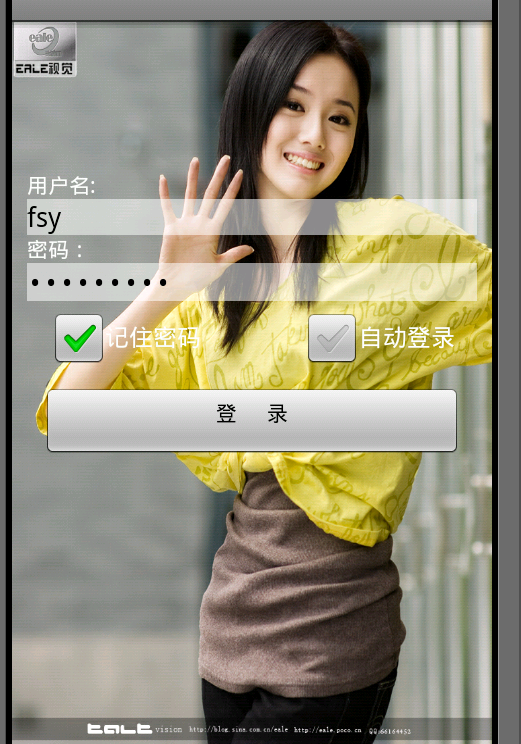
主函数没有改动,不贴了。背景图片名为:background.jpg 。看看main.xml吧。
- <?xml version="1.0" encoding="utf-8"?>
- <LinearLayout xmlns:android="http://schemas.android.com/apk/res/android"
- android:orientation="vertical"
- android:layout_width="fill_parent"
- android:layout_height="fill_parent"
- android:background="@drawable/background" //设置背景
- >
- <LinearLayout android:id="@+id/empty" //占位用的layout
- android:layout_width="fill_parent"
- android:layout_height="wrap_content"
- android:layout_weight ="1"></LinearLayout> //设置占总权重的比例
- <RelativeLayout android:id="@+id/relativeLayout"
- android:layout_width="fill_parent"
- android:layout_height="wrap_content"
- android:layout_weight="2"
- android:padding="10px"> //设置内间距
- /*颜色和不透明度 (alpha) 值以十六进制表示法表示。任何一种颜色的值范围都是 0 到 255(00 到 ff)。对于 alpha,00 表示完全透明,ff 表示完全不透明。表达式顺序是“aabbggrr”,其中“aa=alpha”(00 到 ff);“bb=blue”(00 到 ff);“gg=green”(00 到 ff);“rr=red”(00 到 ff)。例如,如果您希望对某叠加层应用不透明度为 50% 的蓝色,则应指定以下值:7fff0000 */
- <TextView
- android:id="@+id/user"
- android:text="用户名: "
- android:layout_width="fill_parent"
- android:layout_height="wrap_content"
- android:textColor="#ffffffff" />
- <EditText android:id="@+id/username"
- android:layout_width="fill_parent"
- android:layout_height="wrap_content"
- android:layout_below="@id/user" //在id为user的控件之下
- android:background="#88ffffff"/> //设置不透明
- <TextView
- android:id="@+id/key"
- android:layout_width="fill_parent"
- android:layout_height="wrap_content"
- android:text="密码:"
- android:layout_below="@id/username"
- android:textColor="#ffffffff" />
- <EditText android:id="@+id/keyword"
- android:layout_width="fill_parent"
- android:layout_height="wrap_content"
- android:layout_below="@id/key"
- android:background="#88ffffff"
- android:password="true"/>
- <CheckBox android:id="@+id/remember"
- android:layout_height="wrap_content"
- android:layout_width="wrap_content"
- android:text="记住密码"
- android:layout_below="@id/keyword"
- android:layout_alignLeft="@id/keyword"
- android:layout_marginLeft="15px"/> //外间距
- <CheckBox android:id="@+id/autoin"
- android:layout_height="wrap_content"
- android:layout_width="wrap_content"
- android:text="自动登录"
- android:layout_below="@id/keyword"
- android:layout_alignRight="@id/keyword" //与id为keyword的控件右对齐
- android:layout_marginRight="15px"/>
- <Button android:id="@+id/enter"
- android:layout_height="wrap_content"
- android:layout_width="fill_parent"
- android:gravity="center_horizontal" //内部文字位置
- android:text="登 录"
- android:layout_below="@id/autoin"
- android:layout_margin="10px"/>
- </RelativeLayout>
- </LinearLayout>
本篇博客出自 阿修罗道,转载请注明出处:http://blog.csdn.net/fansongy/article/details/6817968
android基础知识复习——RelativeLayout布局属性、背景、半透明设置(XML设置)的更多相关文章
- Android基础知识复习之打开照相机拍照并获取照片
对于我来说,做一件事情: 首先要理清我的思路,我要打开照相机,我能想到的是:在Android中我要打开系统应用,肯定需要一个隐式意图,那就要查询Android照相机的源码,查看并找到意图过滤器的书写方 ...
- 【Xamarin开发 Android 系列 4】 Android 基础知识
原文:[Xamarin开发 Android 系列 4] Android 基础知识 什么是Android? Android一词的本义指“机器人”,同时也是Google于2007年11月5日宣布的基于Li ...
- android:layout_alignleft layout_toleftof区别,详解RelativeLayout布局属性
转载请注明博客地址. 最近看博客看到有关于RelativeLayout布局的解释,有的解释很多是错误的.因此有必要对每一个常见的布局属性进行描述.以下解释全部都是逐行进行测试的. 首先把常用的布局分组 ...
- WPF基础知识、界面布局及控件Binding(转)
WPF是和WinForm对应的,而其核心是数据驱动事件,在开发中显示的是UI界面和逻辑关系相分离的一种开放语言.UI界面是在XAML语言环境下开发人员可以进行一些自主设计的前台界面,逻辑关系还是基于c ...
- WPF基础知识、界面布局及控件Binding
WPF是和WinForm对应的,而其核心是数据驱动事件,在开发中显示的是UI界面和逻辑关系相分离的一种开放语言.UI界面是在XAML语言环境下开发人员可以进行一些自主设计的前台界面,逻辑关系还是基于c ...
- Android基础_3 Activity相对布局
相对布局要比前面讲的线性布局和表格布局要灵活一些,所以平常用得也是比较多的.相对布局控件的位置是与其周围控件的位置相关的,从名字可以看出来,这些位置都是相对的,确定出了其中一个控件的位置就可以确定另一 ...
- Android 如何把一个 RelativeLayout或ImageView背景设为透明
在项目中,需要把RelativeLayout 和 ImageView背景设置为透明,怎么实现呢?这里主要通过代码,请参阅以下关键代码: public ImageView imgDetail; pri ...
- Android基础知识巩固:关于PendingIntent和广播
平时使用广播的场合比较多,但细节的东西,看过了也没有总结,以至于某些场合有小问题,还是要把原理和属性搞清楚才能运用自如. 其实也是自己比较懒,先看别人的blog,有个概念再去官网看英文的能好理解一些. ...
- Android基础知识-1
1.Android的Activity任务栈 在Android的系统中,在APP运行时每个APP都会默认有一个任务栈,任务栈的名称以APP的包名命名.任务栈是一中先进后出的结构,APP中每一个调用的Ac ...
随机推荐
- python--lxml
''' xpath语法: /:在子节点里面找 //:在子子孙孙里面找 //div:查找当前网页的所有div标签 //div/p:先查找所有div标签,再找div的子标签中的p标签 //div//p:现 ...
- 利用BeanUtils工具类封装表单数据
一.BeanUtils工具类的使用 1.首先导入BeanUtils工具类的jar包 commons-beanutils-1.8.0.jar commons-logging-1.1.1.jar 2.se ...
- linux命令(27):cat命令
实例一:把 log2012.log 的文件内容加上行号后输入 log2013.log 这个文件里 cat -n log2012.log log2013.log 实例二:把 log2012.log 和 ...
- linux命令(10):ps命令
1.查看mysql进程数: ps -ef | grep "mysql" | grep -v "grep" | wc –l 2.监控CPU状态:ps –au 3. ...
- 利用flex布局来column分布
html代码 <div class='items'> <div class='item'></div> <div class='item'></d ...
- LeetCode解题报告—— Unique Binary Search Trees & Binary Tree Level Order Traversal & Binary Tree Zigzag Level Order Traversal
1. Unique Binary Search Trees Given n, how many structurally unique BST's (binary search trees) that ...
- DataSet、DataTable、DataRow的数据复制方法
DataSet 对象是支持 ADO.NET的断开式.分布式数据方案的核心对象 ,用途非常广泛.我们很多时候需要使用其中的数据,比如取得一个DataTable的数据或者复制另一个DataTabe中的数据 ...
- AC日记——[SDOI2017]相关分析 洛谷 P3707
[SDOI2017]相关分析 思路: 裸线段树: (玄学ac): 代码: #include <bits/stdc++.h> using namespace std; #define max ...
- Django CRM查询 XXX.object.filter() 常用用法总结
__gt 大于 __gte 大于等于 User.objects.filter(age__gt=10) // 查询年龄大于10岁的用户 User.objects.filter(age__gte=10) ...
- hihoCoder #1831 : 80 Days-RMQ (ACM/ICPC 2018亚洲区预选赛北京赛站网络赛)
水道题目,比赛时线段树写挫了,忘了RMQ这个东西了(捞) #1831 : 80 Days 时间限制:1000ms 单点时限:1000ms 内存限制:256MB 描述 80 Days is an int ...