
基于winsocket的框体Server和Client
前面学了一点Winsock的知识,会编写简单的Server和Client,现在就想通过VS2008编写框体的Server和Client,而不是在控制台上的操作了,毕竟学编程就是要多加练习,在实践中发现不懂的地方,然后解决,然后再发现……
当然,作为一个刚接触Winsock的新手,大部分知识都来自于网上的资料,包括接下来的代码也是借鉴。。。
- 第一步利用VS2008创建一个Windows窗体应用程序chatServer(过程略);
- 设计你的窗体,简单的设计了一个窗体
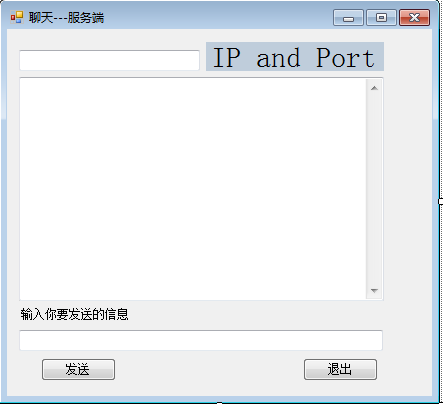
注意,每一个组件都需要有唯一的Name,在设置好组件的属性后,可以双击这个组件,则会自动生成对应的动作函数; - 在Form1.h中写入如下代码,注意里面很多的函数时根据组件Name来命名的,所以copy时需要注意这一点;
         #pragma once

 namespace chatServer {

     using namespace System;

     using namespace System::ComponentModel;

     using namespace System::Collections;

     using namespace System::Windows::Forms;

     using namespace System::Data;

     using namespace System::Drawing;

     using namespace System::Threading;

     using namespace System::Text;

     using namespace System::Net;

     using namespace System::Net::Sockets;

     using namespace System::IO;

     /// <summary>

     /// Form1 摘要

     ///

     /// 警告: 如果更改此类的名称,则需要更改

     ///          与此类所依赖的所有 .resx 文件关联的托管资源编译器工具的

     ///          “资源文件名”属性。否则,

     ///          设计器将不能与此窗体的关联

     ///          本地化资源正确交互。

     /// </summary>

     public ref class Form1 : public System::Windows::Forms::Form

     {

     Socket^ mySocket;

     Socket^ tempSocket;

     Thread^ myThread;

     int port;

     String^ host;

     public:

         Form1(void)

         {

             InitializeComponent();

             //

             //TODO: 在此处添加构造函数代码

             //

         }

     protected:

         /// <summary>

         /// 清理所有正在使用的资源。

         /// </summary>

         ~Form1()

         {

             if (components)

             {

                 delete components;

             }

         }

     private: System::Windows::Forms::TextBox^  IPBox;

     private: System::Windows::Forms::Label^  IP;

     private: System::Windows::Forms::TextBox^  ShowBox;

     private: System::Windows::Forms::TextBox^  InputBox;

     private: System::Windows::Forms::Label^  InputLabel;

     private: System::Windows::Forms::Button^  SendButton;

     private: System::Windows::Forms::Button^  ExitButton;

     public : String^ m_ShowText;

     public : String^ m_IPShowText;

     protected:

     private:

         /// <summary>

         /// 必需的设计器变量。

         /// </summary>

         System::ComponentModel::Container ^components;

 #pragma region Windows Form Designer generated code

         /// <summary>

         /// 设计器支持所需的方法 - 不要

         /// 使用代码编辑器修改此方法的内容。

         /// </summary>

         void InitializeComponent(void)

         {

             this->IPBox = (gcnew System::Windows::Forms::TextBox());

             this->IP = (gcnew System::Windows::Forms::Label());

             this->ShowBox = (gcnew System::Windows::Forms::TextBox());

             this->InputBox = (gcnew System::Windows::Forms::TextBox());

             this->InputLabel = (gcnew System::Windows::Forms::Label());

             this->SendButton = (gcnew System::Windows::Forms::Button());

             this->ExitButton = (gcnew System::Windows::Forms::Button());

             this->SuspendLayout();

             //

             // IPBox

             //

             this->IPBox->Location = System::Drawing::Point(, );

             this->IPBox->Name = L"IPBox";

             this->IPBox->Size = System::Drawing::Size(, );

             this->IPBox->TabIndex = ;

             this->IPBox->TextChanged += gcnew System::EventHandler(this, &Form1::IPBox_TextChanged);

             //

             // IP

             //

             this->IP->AutoSize = true;

             this->IP->BackColor = System::Drawing::SystemColors::InactiveCaption;

             this->IP->Font = (gcnew System::Drawing::Font(L"宋体", 21.75F, System::Drawing::FontStyle::Regular, System::Drawing::GraphicsUnit::Point,

                 static_cast<System::Byte>()));

             this->IP->Location = System::Drawing::Point(, );

             this->IP->Name = L"IP";

             this->IP->Size = System::Drawing::Size(, );

             this->IP->TabIndex = ;

             this->IP->Text = L"IP and Port";

             this->IP->Click += gcnew System::EventHandler(this, &Form1::IP_Click);

             //

             // ShowBox

             //

             this->ShowBox->Location = System::Drawing::Point(, );

             this->ShowBox->Multiline = true;

             this->ShowBox->Name = L"ShowBox";

             this->ShowBox->ScrollBars = System::Windows::Forms::ScrollBars::Vertical;

             this->ShowBox->Size = System::Drawing::Size(, );

             this->ShowBox->TabIndex = ;

             this->ShowBox->TextChanged += gcnew System::EventHandler(this, &Form1::ShowBox_TextChanged);

             //

             // InputBox

             //

             this->InputBox->Location = System::Drawing::Point(, );

             this->InputBox->Name = L"InputBox";

             this->InputBox->ScrollBars = System::Windows::Forms::ScrollBars::Vertical;

             this->InputBox->Size = System::Drawing::Size(, );

             this->InputBox->TabIndex = ;

             this->InputBox->TextChanged += gcnew System::EventHandler(this, &Form1::InputBox_TextChanged);

             //

             // InputLabel

             //

             this->InputLabel->AutoSize = true;

             this->InputLabel->Location = System::Drawing::Point(, );

             this->InputLabel->Name = L"InputLabel";

             this->InputLabel->Size = System::Drawing::Size(, );

             this->InputLabel->TabIndex = ;

             this->InputLabel->Text = L"输入你要发送的信息";

             this->InputLabel->Click += gcnew System::EventHandler(this, &Form1::InputLabel_Click);

             //

             // SendButton

             //

             this->SendButton->Location = System::Drawing::Point(, );

             this->SendButton->Name = L"SendButton";

             this->SendButton->Size = System::Drawing::Size(, );

             this->SendButton->TabIndex = ;

             this->SendButton->Text = L"发送";

             this->SendButton->UseVisualStyleBackColor = true;

             this->SendButton->Click += gcnew System::EventHandler(this, &Form1::SendButton_Click);

             //

             // ExitButton

             //

             this->ExitButton->Location = System::Drawing::Point(, );

             this->ExitButton->Name = L"ExitButton";

             this->ExitButton->Size = System::Drawing::Size(, );

             this->ExitButton->TabIndex = ;

             this->ExitButton->Text = L"退出";

             this->ExitButton->UseVisualStyleBackColor = true;

             this->ExitButton->Click += gcnew System::EventHandler(this, &Form1::ExitButton_Click);

             //

             // Form1

             //

             this->AutoScaleDimensions = System::Drawing::SizeF(, );

             this->AutoScaleMode = System::Windows::Forms::AutoScaleMode::Font;

             this->ClientSize = System::Drawing::Size(, );

             this->Controls->Add(this->ExitButton);

             this->Controls->Add(this->SendButton);

             this->Controls->Add(this->InputLabel);

             this->Controls->Add(this->InputBox);

             this->Controls->Add(this->ShowBox);

             this->Controls->Add(this->IP);

             this->Controls->Add(this->IPBox);

             this->Name = L"Form1";

             this->Text = L"聊天---服务端";

             this->Load += gcnew System::EventHandler(this, &Form1::Form1_Load);

             this->ResumeLayout(false);

             this->PerformLayout();

         }

 #pragma endregion

         delegate void UpdateShowBox_Invoke();

         void UpdateShowBox()

         {

             ShowBox->AppendText(m_ShowText);//在后面追加显示新的内容

         }

         delegate void UpdateIPShowBox_Invoke();

         void UpdateIPShowBox()

         {

             IPBox->AppendText(m_IPShowText);

         }

         void DoWork()

         {

             port = ;//设置端口号

             host = "1.1.1.1";

             //设置服务器地址,这里需要你本机的ip

             IPAddress^ ip = IPAddress::Parse(host);

             IPEndPoint^ ipe = gcnew IPEndPoint(ip,port);

             mySocket = gcnew  Socket(AddressFamily::InterNetwork,SocketType::Stream,ProtocolType::Tcp);//创建一个socket类

             mySocket->Bind(ipe);//绑定端口

             m_IPShowText = host+" // "+port;

             this->Invoke(gcnew  UpdateIPShowBox_Invoke(this,&Form1::UpdateIPShowBox));//显示IP和端口号

             mySocket->Listen();//开始监听

             tempSocket = mySocket->Accept();//为新建连接创建新的Socket

             //连接上后进行死循环,避免断开连接

             while(){

                 try{

                     String^ recvStr = "";

                     array<Byte>^ recvBytes = gcnew array<Byte>();

                     int bytes;

                     bytes = tempSocket->Receive(recvBytes,recvBytes->Length,SocketFlags::None); //从客户端接收信息

                     recvStr = Encoding::Default->GetString(recvBytes,,bytes); //转换数据为字符串

                     m_ShowText = "\r\n"+"Client 说:"+"\r\n"+recvStr+"\r\n"; //加上换行符把客户端传来的信息显示出来

                     this->Invoke(gcnew UpdateShowBox_Invoke(this,&Form1::UpdateShowBox));

                 }

                 catch(EndOfStreamException^ e)

                 {

                 }

                 catch(IOException^ e)

                 {

                     MessageBox::Show("I/O error");

                 }

             }

         }

     private: System::Void label1_Click(System::Object^  sender, System::EventArgs^  e) {

              }

     private: System::Void Form1_Load(System::Object^  sender, System::EventArgs^  e) {

                  myThread = gcnew Thread(gcnew ThreadStart(this,&Form1::DoWork));

                  //创建一个线程

                  myThread->IsBackground = false;

                  myThread->Start();

              }

 private: System::Void SendButton_Click(System::Object^  sender, System::EventArgs^  e) {

              String^ sendStr = InputBox->Text;

              if(sendStr->Length > )

              {

                  m_ShowText = "\r\n"+"我说:"+"\r\n"+sendStr+"\r\n";

                  //加上换行符

                  this->Invoke(gcnew  UpdateShowBox_Invoke(this,&Form1::UpdateShowBox));

                  //本窗口显示发出去的内容

                  array<Byte>^ bs = Encoding::Default->GetBytes(sendStr);

                  //将字符串转为二进制,支持中英文传输

                  tempSocket->Send(bs,bs->Length,SocketFlags::None);

                  //把当前的聊天内容发送给客户端

                  InputBox->Text = "";

              }

          }

 private: System::Void ExitButton_Click(System::Object^  sender, System::EventArgs^  e) {

              tempSocket->Close();

              mySocket->Close();

              myThread->Abort();

              Application::Exit();

          }

 private: System::Void IP_Click(System::Object^  sender, System::EventArgs^  e) {

          }

 private: System::Void InputLabel_Click(System::Object^  sender, System::EventArgs^  e) {

          }

 private: System::Void ShowBox_TextChanged(System::Object^  sender, System::EventArgs^  e) {

          }

 private: System::Void IPBox_TextChanged(System::Object^  sender, System::EventArgs^  e) {

          }

 private: System::Void InputBox_TextChanged(System::Object^  sender, System::EventArgs^  e) {

          }

 };

} - 在chatServer中加入这一行代码:using namespace System::Threading;到此Server就基本完成了。。
- 仿照这样的方法完成Client端
- chatClient过程中Form1.h的代码
 #pragma once

 namespace chatClient {

     using namespace System;

     using namespace System::ComponentModel;

     using namespace System::Collections;

     using namespace System::Windows::Forms;

     using namespace System::Data;

     using namespace System::Drawing;

     using namespace System::Threading;

     using namespace System::Text;

     using namespace System::Net;

     using namespace System::Net::Sockets;

     using namespace System::IO;

     /// <summary>

     /// Form1 摘要

     ///

     /// 警告: 如果更改此类的名称,则需要更改

     ///          与此类所依赖的所有 .resx 文件关联的托管资源编译器工具的

     ///          “资源文件名”属性。否则,

     ///          设计器将不能与此窗体的关联

     ///          本地化资源正确交互。

     /// </summary>

     public ref class Form1 : public System::Windows::Forms::Form

     {

         Socket^ mySocket;

         Socket^ tempSocket;

         Thread^ myThread;

         int port;

         String^ host;

     public:

         Form1(void)

         {

             InitializeComponent();

             //

             //TODO: 在此处添加构造函数代码

             //

         }

     protected:

         /// <summary>

         /// 清理所有正在使用的资源。

         /// </summary>

         ~Form1()

         {

             if (components)

             {

                 delete components;

             }

         }

     private: System::Windows::Forms::TextBox^  IPShowBox;

     protected:

     private: System::Windows::Forms::TextBox^  showBox;

     protected:

     private: System::Windows::Forms::Label^  label1;

     private: System::Windows::Forms::Label^  InputLabel;

     private: System::Windows::Forms::TextBox^  InputBox;

     private: System::Windows::Forms::Button^  SendButton;

     private: System::Windows::Forms::Button^  exitButton;

     public : String^ m_ShowText;

     public : String^ m_IPShowText;

     private:

         /// <summary>

         /// 必需的设计器变量。

         /// </summary>

         System::ComponentModel::Container ^components;

 #pragma region Windows Form Designer generated code

         /// <summary>

         /// 设计器支持所需的方法 - 不要

         /// 使用代码编辑器修改此方法的内容。

         /// </summary>

         void InitializeComponent(void)

         {

             this->IPShowBox = (gcnew System::Windows::Forms::TextBox());

             this->showBox = (gcnew System::Windows::Forms::TextBox());

             this->label1 = (gcnew System::Windows::Forms::Label());

             this->InputLabel = (gcnew System::Windows::Forms::Label());

             this->InputBox = (gcnew System::Windows::Forms::TextBox());

             this->SendButton = (gcnew System::Windows::Forms::Button());

             this->exitButton = (gcnew System::Windows::Forms::Button());

             this->SuspendLayout();

             //

             // IPShowBox

             //

             this->IPShowBox->Location = System::Drawing::Point(, );

             this->IPShowBox->Multiline = true;

             this->IPShowBox->Name = L"IPShowBox";

             this->IPShowBox->Size = System::Drawing::Size(, );

             this->IPShowBox->TabIndex = ;

             this->IPShowBox->TextChanged += gcnew System::EventHandler(this, &Form1::IPShowBox_TextChanged);

             //

             // showBox

             //

             this->showBox->Location = System::Drawing::Point(, );

             this->showBox->Multiline = true;

             this->showBox->Name = L"showBox";

             this->showBox->ScrollBars = System::Windows::Forms::ScrollBars::Vertical;

             this->showBox->Size = System::Drawing::Size(, );

             this->showBox->TabIndex = ;

             this->showBox->TextChanged += gcnew System::EventHandler(this, &Form1::showBox_TextChanged);

             //

             // label1

             //

             this->label1->AutoSize = true;

             this->label1->Font = (gcnew System::Drawing::Font(L"宋体", , System::Drawing::FontStyle::Regular, System::Drawing::GraphicsUnit::Point,

                 static_cast<System::Byte>()));

             this->label1->Location = System::Drawing::Point(, );

             this->label1->Name = L"label1";

             this->label1->Size = System::Drawing::Size(, );

             this->label1->TabIndex = ;

             this->label1->Text = L"IP and Port\r\n";

             //

             // InputLabel

             //

             this->InputLabel->AutoSize = true;

             this->InputLabel->Location = System::Drawing::Point(, );

             this->InputLabel->Name = L"InputLabel";

             this->InputLabel->Size = System::Drawing::Size(, );

             this->InputLabel->TabIndex = ;

             this->InputLabel->Text = L"输入信息";

             //

             // InputBox

             //

             this->InputBox->Location = System::Drawing::Point(, );

             this->InputBox->Name = L"InputBox";

             this->InputBox->Size = System::Drawing::Size(, );

             this->InputBox->TabIndex = ;

             this->InputBox->TextChanged += gcnew System::EventHandler(this, &Form1::InputBox_TextChanged);

             //

             // SendButton

             //

             this->SendButton->Location = System::Drawing::Point(, );

             this->SendButton->Name = L"SendButton";

             this->SendButton->Size = System::Drawing::Size(, );

             this->SendButton->TabIndex = ;

             this->SendButton->Text = L"发送";

             this->SendButton->UseVisualStyleBackColor = true;

             this->SendButton->Click += gcnew System::EventHandler(this, &Form1::SendButton_Click);

             //

             // exitButton

             //

             this->exitButton->Location = System::Drawing::Point(, );

             this->exitButton->Name = L"exitButton";

             this->exitButton->Size = System::Drawing::Size(, );

             this->exitButton->TabIndex = ;

             this->exitButton->Text = L"退出";

             this->exitButton->UseVisualStyleBackColor = true;

             this->exitButton->Click += gcnew System::EventHandler(this, &Form1::exitButton_Click);

             //

             // Form1

             //

             this->AutoScaleDimensions = System::Drawing::SizeF(, );

             this->AutoScaleMode = System::Windows::Forms::AutoScaleMode::Font;

             this->ClientSize = System::Drawing::Size(, );

             this->Controls->Add(this->exitButton);

             this->Controls->Add(this->SendButton);

             this->Controls->Add(this->InputBox);

             this->Controls->Add(this->InputLabel);

             this->Controls->Add(this->label1);

             this->Controls->Add(this->showBox);

             this->Controls->Add(this->IPShowBox);

             this->Name = L"Form1";

             this->Text = L"聊天--客户端";

             this->Load += gcnew System::EventHandler(this, &Form1::Form1_Load);

             this->ResumeLayout(false);

             this->PerformLayout();

         }

 #pragma endregion

         delegate void UpdateShowBox_Invoke();

         void UpdateShowBox()

         {

             showBox->AppendText(m_ShowText);//在后面追加显示新的内容

         }

         delegate void UpdateIPShowBox_Invoke();

         void UpdateIPShowBox()

         {

             IPShowBox->AppendText(m_IPShowText);

         }

         void DoWork()

         {

             port = ;//设置端口号

             host = "1.1.1.1";//设置服务器地址

             IPAddress^ ip = IPAddress::Parse(host);

             IPEndPoint^ ipe = gcnew IPEndPoint(ip,port);

             mySocket = gcnew  Socket(AddressFamily::InterNetwork,SocketType::Stream,ProtocolType::Tcp);//创建一个socket类

             mySocket->Connect(ipe);

             m_IPShowText = host+" // "+port;

             this->Invoke(gcnew  UpdateIPShowBox_Invoke(this,&Form1::UpdateIPShowBox));//显示IP和端口号

             //连接上后进行死循环,避免断开连接

             while(){

                 try{

                     String^ recvStr = "";

                     array<Byte>^ recvBytes = gcnew array<Byte>();

                     int bytes;

                     bytes = mySocket->Receive(recvBytes,recvBytes->Length,SocketFlags::None); //从客户端接收信息

                     recvStr = Encoding::Default->GetString(recvBytes,,bytes); //转换数据为字符串

                     m_ShowText = "\r\n"+"Server 说:"+"\r\n"+recvStr+"\r\n"; //加上换行符把客户端传来的信息显示出来

                     this->Invoke(gcnew UpdateShowBox_Invoke(this,&Form1::UpdateShowBox));

                 }

                 catch(EndOfStreamException^ e)

                 {

                 }

                 catch(IOException^ e)

                 {

                     MessageBox::Show("I/O error");

                 }

             }

         }

 private: System::Void exitButton_Click(System::Object^  sender, System::EventArgs^  e) {

              mySocket->Close();

              myThread->Abort();

              Application::Exit();

          }

 private: System::Void SendButton_Click(System::Object^  sender, System::EventArgs^  e) {

              String^ sendStr = InputBox->Text;

              if(sendStr->Length > )

              {

                  m_ShowText = "\r\n"+"我说:"+"\r\n"+sendStr+"\r\n";

                  //加上换行符

                  this->Invoke(gcnew  UpdateShowBox_Invoke(this,&Form1::UpdateShowBox));

                  //本窗口显示发出去的内容

                  array<Byte>^ bs = Encoding::Default->GetBytes(sendStr);

                  //将字符串转为二进制,支持中英文传输

                  mySocket->Send(bs,bs->Length,SocketFlags::None);

                  //把当前的聊天内容发送给客户端

                  InputBox->Text = "";

              }

          }

 private: System::Void InputBox_TextChanged(System::Object^  sender, System::EventArgs^  e) {

          }

 private: System::Void showBox_TextChanged(System::Object^  sender, System::EventArgs^  e) {

          }

 private: System::Void IPShowBox_TextChanged(System::Object^  sender, System::EventArgs^  e) {

          }

 private: System::Void Form1_Load(System::Object^  sender, System::EventArgs^  e) {

              myThread = gcnew Thread(gcnew ThreadStart(this,&Form1::DoWork));

              //创建一个线程

              myThread->IsBackground = true;

              myThread->Start();

          }

 };

} - 同样需要在chatClient中加入using namespace System::Threading;
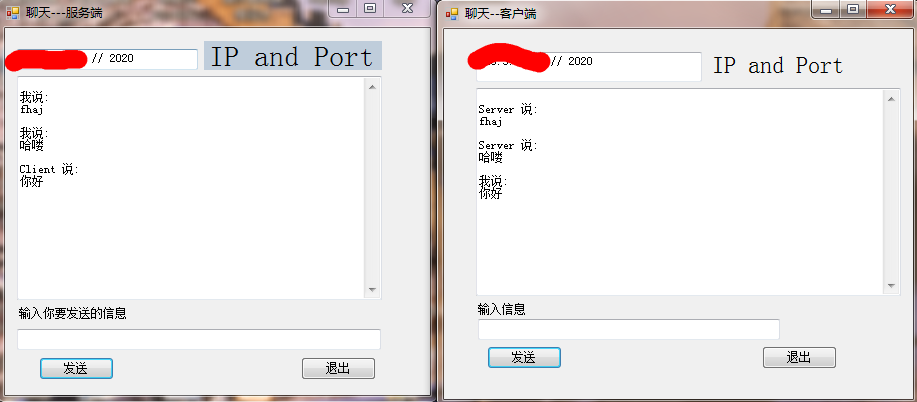
- 接下来执行,先打开Server,在打开Client
- 结果是:
基于winsocket的框体Server和Client的更多相关文章
- Winsock网络编程笔记(2)----基于TCP的server和client
今天抽空看了一些简单的东西,主要是对服务器server和客户端client的简单实现. 面向连接的server和client,其工作流程如下图所示: 服务器和客户端将按照这个流程就行开发..(个人觉得 ...
- Winsock网络编程笔记(3)----基于UDP的server和client
在上一篇随笔中,对Winsock中基于tcp面向连接的Server和Client通信进行了说明,但是,Winsock中,Server和Client间还可以通过无连接通信,也就是采用UDP协议.. 因此 ...
- [转]一个基于完成端口的TCP Server Framework,浅析IOCP
[转]一个基于完成端口的TCP Server Framework,浅析IOCP http://www.cppblog.com/adapterofcoms/archive/2010/06/26/1187 ...
- Netty4.0学习笔记系列之一:Server与Client的通讯
http://blog.csdn.net/u013252773/article/details/21046697 本文是学习Netty的第一篇文章,主要对Netty的Server和Client间的通讯 ...
- JVM的Server与Client运行模式区别与切换
概述 JVM有两种运行模式Server与Client.两种模式的区别在于,Client模式启动速度较快,Server模式启动较慢:但是启动进入稳定期长期运行之后Server模式的程序运行速度比Clie ...
- 使用unity3d和tensorflow实现基于姿态估计的体感游戏
使用unity3d和tensorflow实现基于姿态估计的体感游戏 前言 之前做姿态识别,梦想着以后可以自己做出一款体感游戏,然而后来才发现too young.但是梦想还是要有的,万一实现了呢.趁着p ...
- ESP8266开发之旅 网络篇⑦ TCP Server & TCP Client
授人以鱼不如授人以渔,目的不是为了教会你具体项目开发,而是学会学习的能力.希望大家分享给你周边需要的朋友或者同学,说不定大神成长之路有博哥的奠基石... QQ技术互动交流群:ESP8266&3 ...
- 手写一个类SpringBoot的HTTP框架:几十行代码基于Netty搭建一个 HTTP Server
本文已经收录进 : https://github.com/Snailclimb/netty-practical-tutorial (Netty 从入门到实战:手写 HTTP Server+RPC 框架 ...
- 更改默认alert框体
更改框体主要用到的是更改系统的内置控件winpop下面是winpop具体代码 (function(window, jQuery, undefined) { 2 3 var HTMLS = { 4 ov ...
随机推荐
- iOS开发者的管理工具-CocoaPods安装
1. 安装 Ruby 对于iOS开发者,CocoaPods是最方便使用的第三方管理工具了,但是怎么安装CocoaPods呢,安装CocoaPods之前,要确保mac已经安装上Ruby,但在安装Ruby ...
- 使用apache反向代理tomacat
起源 在大部分的生产环境中,基本上使用的都是java程序,从而促进了各种应用程序中间件的产生,在这里大概有几种,tomcat作为最著名的开源servlet容器,jboss也是开源的,而且有管理界面,主 ...
- 如何实现跨 Docker 主机存储?- 每天5分钟玩转 Docker 容器技术(73)
从业务数据的角度看,容器可以分为两类:无状态(stateless)容器和有状态(stateful)容器. 无状态是指容器在运行过程中不需要保存数据,每次访问的结果不依赖上一次访问,比如提供静态页面的 ...
- Writing Science 7.10 (The Opening and The Funnel)
Opening: 1.文章的第一句话必须要达到如下目标:找出推动研究的问题,介绍内容,并确定本文针对的观众.如果你足够聪明的话甚至可以将遇到的挑战以及结论写进来. 2.通过第一段话建立本文的重点和基调 ...
- POJ 3923 Ugly Windows(——考察思维缜密性的模拟题)
题目链接: http://poj.org/problem?id=3923 题意描述: 输入一个n*m的屏幕 该屏幕内有至少一个对话框(每个对话框都有对应的字母表示) 判断并输出该屏幕内处于最表层的对话 ...
- uva12519
The Farnsworth Parabox Professor Farnsworth, a renowned scientist that lives in year 3000 working at ...
- Linux 独立安装subversion-1.8.18
一.所需软件包 1.apr-1.4.6.tar.gz 下载地址:http://apr.apache.org/ 2.apr-util-1.4.1.tar.gz 下载地址:http://apr.apa ...
- HDU2282 Chocolate KM算法
第一次做这样的题,其中有几个细节是反复思考反复调试,最后一A的,ORZ,又加深了对KM算法的理解.能不参考网上的题解,而是平静下来思考,参透,最后敢于尝试.....真的很重要,以后遇到才会有更深的印象 ...
- Java面向对象 String 基本数据类型对象包装类
Java面向对象 String 知识概要: (1)String的用法详解 (2)基本数据类型对象包装类 String 顾名思义,该类主要是对字符串 ...
- redis性能调优笔记(can not get Resource from jedis pool和jedis connect time out)
对这段时间redis性能调优做一个记录. 1.单进程单线程 redis是单进程单线程实现的,如果你没有特殊的配置,redis内部默认是FIFO排队,即你对redis的访问都是要在redis进行排队,先 ...