
Springboot Mybatis Redis 实现二级缓存
前言
什么是mybatis二级缓存?
二级缓存是多个sqlsession共享的,其作用域是mapper的同一个namespace。
即,在不同的sqlsession中,相同的namespace下,相同的sql语句,并且sql模板中参数也相同的,会命中缓存。
第一次执行完毕会将数据库中查询的数据写到缓存,第二次会从缓存中获取数据将不再从数据库查询,从而提高查询效率。
Mybatis默认没有开启二级缓存,需要在全局配置(mybatis-config.xml)中开启二级缓存。
本文讲述的是使用Redis作为缓存,与springboot、mybatis进行集成的方法。
1、pom依赖
使用springboot redis集成包,方便redis的访问。redis客户端选用Jedis。
另外读写kv缓存会进行序列化,所以引入了一个序列化包。
        <dependency>
            <groupId>org.springframework.boot</groupId>
            <artifactId>spring-boot-starter-redis</artifactId>
        </dependency>
        <dependency>
            <groupId>redis.clients</groupId>
            <artifactId>jedis</artifactId>
            <version>2.8.0</version>
        </dependency>
        <dependency>
            <groupId>com.alibaba</groupId>
            <artifactId>fastjson</artifactId>
            <version>1.2.19</version>
        </dependency>
依赖搞定之后,下一步先调通Redis客户端。
2、Redis访问使用的Bean
增加Configuration,配置jedisConnectionFactory bean,留待后面使用。
一般来讲,也会生成了redisTemplate bean,但是在接下来的场景没有使用到。
@Configuration
public class RedisConfig {

    @Value("${spring.redis.host}")
    private String host;
    @Value("${spring.redis.port}")
    private int port;
    @Value("${spring.redis.database}")
    private int database;
    @Value("${spring.redis.password}")
    private String password;
    @Value("${spring.redis.timeout}")
    private int timeout;
    @Value("${spring.redis.pool.maxTotal}")
    private int maxTotal;
    @Value("${spring.redis.pool.maxWaitMillis}")
    private int maxWaitMillis;
    @Value("${spring.redis.pool.maxIdle}")
    private int maxIdle;
    @Value("${spring.redis.pool.minIdle}")
    private int minIdle;

    @Bean
    public JedisPoolConfig getRedisConfig(){
        JedisPoolConfig config = new JedisPoolConfig();
        config.setMaxIdle(maxIdle);
        config.setMaxTotal(maxTotal);
        config.setMaxWaitMillis(maxWaitMillis);
        config.setMinIdle(minIdle);
        return config;
    }

    @Bean(name = "jedisConnectionFactory")
    public JedisConnectionFactory getConnectionFactory(){
        JedisConnectionFactory factory = new JedisConnectionFactory();
        JedisPoolConfig config = getRedisConfig();
        factory.setPoolConfig(config);
        factory.setHostName(host);
        factory.setPort(port);
        factory.setDatabase(database);
        factory.setPassword(password);
        factory.setTimeout(timeout);
        return factory;
    }

    @Bean(name = "redisTemplate")
    public RedisTemplate<?, ?> getRedisTemplate(){
        RedisTemplate<?,?> template = new StringRedisTemplate(getConnectionFactory());
        return template;
    }
}
这里使用@Value读入了redis相关配置,有更简单的配置读取方式(@ConfigurationProperties(prefix=...)),可以尝试使用。
Redis相关配置如下
#redis
spring.redis.host=10.93.84.53
spring.redis.port=6379
spring.redis.password=bigdata123
spring.redis.database=15
spring.redis.timeout=0

spring.redis.pool.maxTotal=8
spring.redis.pool.maxWaitMillis=1000
spring.redis.pool.maxIdle=8
spring.redis.pool.minIdle=0
Redis客户端的配置含义,这里不再讲解了。pool相关的一般都和性能有关,需要根据并发量权衡句柄、内存等资源进行设置。
Redis客户端设置好了,我们开始配置Redis作为Mybatis的缓存。
3、Mybatis Cache
这一步是最为关键的一步。实现方式是实现Mybatis的一个接口org.apache.ibatis.cache.Cache。
Cache.java
package org.apache.ibatis.cache;

import java.util.concurrent.locks.ReadWriteLock;

public interface Cache {
    String getId();

    void putObject(Object var1, Object var2);

    Object getObject(Object var1);

    Object removeObject(Object var1);

    void clear();

    int getSize();

    ReadWriteLock getReadWriteLock();
}
可以看到,这个接口设计了写缓存,读缓存,销毁缓存的方式,和访问控制读写锁。
我们实现实现Cache接口的类是MybatisRedisCache。
MybatisRedisCache.java
public class MybatisRedisCache implements Cache {

    private static JedisConnectionFactory jedisConnectionFactory;

    private final String id;

    private final ReadWriteLock readWriteLock = new ReentrantReadWriteLock();

    public MybatisRedisCache(final String id) {
        if (id == null) {
            throw new IllegalArgumentException("Cache instances require an ID");
        }
        this.id = id;
    }

    @Override
    public void clear() {
        RedisConnection connection = null;
        try {
            connection = jedisConnectionFactory.getConnection();
            connection.flushDb();
            connection.flushAll();
        } catch (JedisConnectionException e) {
            e.printStackTrace();
        } finally {
            if (connection != null) {
                connection.close();
            }
        }
    }

    @Override
    public String getId() {
        return this.id;
    }

    @Override
    public Object getObject(Object key) {
        Object result = null;
        RedisConnection connection = null;
        try {
            connection = jedisConnectionFactory.getConnection();
            RedisSerializer<Object> serializer = new JdkSerializationRedisSerializer();
            result = serializer.deserialize(connection.get(serializer.serialize(key)));
        } catch (JedisConnectionException e) {
            e.printStackTrace();
        } finally {
            if (connection != null) {
                connection.close();
            }
        }
        return result;
    }

    @Override
    public ReadWriteLock getReadWriteLock() {
        return this.readWriteLock;
    }

    @Override
    public int getSize() {
        int result = 0;
        RedisConnection connection = null;
        try {
            connection = jedisConnectionFactory.getConnection();
            result = Integer.valueOf(connection.dbSize().toString());
        } catch (JedisConnectionException e) {
            e.printStackTrace();
        } finally {
            if (connection != null) {
                connection.close();
            }
        }
        return result;
    }

    @Override
    public void putObject(Object key, Object value) {
        RedisConnection connection = null;
        try {
            connection = jedisConnectionFactory.getConnection();
            RedisSerializer<Object> serializer = new JdkSerializationRedisSerializer();
            connection.set(serializer.serialize(key), serializer.serialize(value));
        } catch (JedisConnectionException e) {
            e.printStackTrace();
        } finally {
            if (connection != null) {
                connection.close();
            }
        }
    }

    @Override
    public Object removeObject(Object key) {
        RedisConnection connection = null;
        Object result = null;
        try {
            connection = jedisConnectionFactory.getConnection();
            RedisSerializer<Object> serializer = new JdkSerializationRedisSerializer();
            result = connection.expire(serializer.serialize(key), 0);
        } catch (JedisConnectionException e) {
            e.printStackTrace();
        } finally {
            if (connection != null) {
                connection.close();
            }
        }
        return result;
    }

    public static void setJedisConnectionFactory(JedisConnectionFactory jedisConnectionFactory) {
        MybatisRedisCache.jedisConnectionFactory = jedisConnectionFactory;
    }

}
注意:
可以看到,这个类并不是由Spring虚拟机管理的类,但是,其中有一个静态属性jedisConnectionFactory需要注入一个Spring bean,也就是在RedisConfig中生成的bean。
在一个普通类中使用Spring虚拟机管理的Bean,一般使用Springboot自省的SpringContextAware。
这里使用了另一种方式,静态注入的方式。这个方式是通过RedisCacheTransfer来实现的。
4、静态注入
RedisCacheTransfer.java
可以看到RedisCacheTransfer是一个springboot bean,在容器创建之初进行初始化的时候,会注入jedisConnectionFactory bean给setJedisConnectionFactory方法的传参。
而setJedisConnectionFactory通过调用静态方法设置了类MybatisRedisCache的静态属性jedisConnectionFactory。
这样就把spring容器管理的jedisConnectionFactory注入到了静态域。
@Component
public class RedisCacheTransfer {

    @Autowired
    public void setJedisConnectionFactory(JedisConnectionFactory jedisConnectionFactory) {
        MybatisRedisCache.setJedisConnectionFactory(jedisConnectionFactory);
    }

}
到这里,代码基本已经搞定,下面是一些配置。主要有(1)全局开关;(2)namespace作用域开关;(3)Model实例序列化。
5、Mybatis二级缓存的全局开关
前面提到过,默认二级缓存没有打开,需要设置为true。这是全局二级缓存的开关。
Mybatis的全局配置。
<?xml version="1.0" encoding="UTF-8"?>

<!DOCTYPE configuration PUBLIC "-//mybatis.org//DTD Config 3.0//EN" "http://mybatis.org/dtd/mybatis-3-config.dtd">

<configuration>
    <!-- 全局参数 -->
    <settings>
        <!-- 使全局的映射器启用或禁用缓存。 -->
        <setting name="cacheEnabled" value="true"/>
    </settings>

</configuration>
全局配置的加载在dataSource中可以是这样的
    @Bean(name = "moonlightSqlSessionFactory")
    @Primary
    public SqlSessionFactory moonlightSqlSessionFactory(@Qualifier("moonlightData") DataSource dataSource) throws Exception {
        SqlSessionFactoryBean bean = new SqlSessionFactoryBean();
        bean.setDataSource(dataSource);
        bean.setMapperLocations(new PathMatchingResourcePatternResolver().getResources("classpath:mybatis-mapper/*.xml"));
        bean.setConfigLocation(new ClassPathResource("mybatis-config.xml"));
        return bean.getObject();
    }
6、配置mapper作用域namespace
前面提到过,二级缓存的作用域是mapper的namespace,所以这个配置需要到mapper中去写。
<mapper namespace="com.kangaroo.studio.moonlight.dao.mapper.MoonlightMapper">
<cache type="com.kangaroo.studio.moonlight.dao.cache.MybatisRedisCache"/>
<resultMap id="geoFenceList" type="com.kangaroo.studio.moonlight.dao.model.GeoFence">
<constructor>
<idArg column="id" javaType="java.lang.Integer" jdbcType="INTEGER" />
<arg column="name" javaType="java.lang.String" jdbcType="VARCHAR" />
<arg column="type" javaType="java.lang.Integer" jdbcType="INTEGER" />
<arg column="group" javaType="java.lang.String" jdbcType="VARCHAR" />
<arg column="geo" javaType="java.lang.String" jdbcType="VARCHAR" />
<arg column="createTime" javaType="java.lang.String" jdbcType="VARCHAR" />
<arg column="updateTime" javaType="java.lang.String" jdbcType="VARCHAR" />
</constructor>
</resultMap>
<select id="queryGeoFence" parameterType="com.kangaroo.studio.moonlight.dao.model.GeoFenceQueryParam" resultMap="geoFenceList">
select <include refid="base_column"/> from geoFence where 1=1
<if test="type != null">
and type = #{type}
</if>
<if test="name != null">
and name like concat('%', #{name},'%')
</if>
<if test="group != null">
and `group` like concat('%', #{group},'%')
</if>
<if test="startTime != null">
and createTime >= #{startTime}
</if>
<if test="endTime != null">
and createTime <= #{endTime}
</if>
</select>
</mapper>
注意:
namespace下的cache标签就是加载缓存的配置,缓存使用的正式我们刚才实现的MybatisRedisCache。
<cache type="com.kangaroo.studio.moonlight.dao.cache.MybatisRedisCache"/>
7、Mapper和Model
读写缓存Model需要序列化:只需要类声明的时候实现Seriaziable接口就好了。
public class GeoFence implements Serializable {

    private Integer id;
    private String name;
    private String group;
    private Integer type;
    private String geo;
    private String createTime;
    private String updateTime;

    public GeoFence() {}

    public GeoFence(Integer id, String name, Integer type, String group, String geo, String createTime, String updateTime) {
        this.id = id;
        this.name = name;
        this.type = type;
        this.group = group;
        this.geo= geo;
        this.createTime = createTime;
        this.updateTime = updateTime;
    }
    // setter和getter省略
}
mapper就还是以前的写法
@Mapper
public interface MoonlightMapper {
    List<GeoFence> queryGeoFence(GeoFenceQueryParam geoFenceQueryParam);
}
到这里,所有的代码和配置都完成了,下面测试一下。
8、测试一下
Controller中实现一个这样的接口POST。
@RequestMapping(value = "/fence/query", method = RequestMethod.POST)
    @ResponseBody
    public ResponseEntity<Response> queryFence(@RequestBody GeoFenceQueryParam geoFenceQueryParam) {
        try {
            Integer pageNum = geoFenceQueryParam.getPageNum()!=null?geoFenceQueryParam.getPageNum():1;
            Integer pageSize = geoFenceQueryParam.getPageSize()!=null?geoFenceQueryParam.getPageSize():10;
            PageHelper.startPage(pageNum, pageSize);
            List<GeoFence> list = moonlightMapper.queryGeoFence(geoFenceQueryParam);
            return new ResponseEntity<>(
                    new Response(ResultCode.SUCCESS, "查询geoFence成功", list),
                    HttpStatus.OK);
        } catch (Exception e) {
            logger.error("查询geoFence失败", e);
            return new ResponseEntity<>(
                    new Response(ResultCode.EXCEPTION, "查询geoFence失败", null),
                    HttpStatus.INTERNAL_SERVER_ERROR);
        }
使用curl发送请求
curl -H "Content-Type:application/json" -XPOST http://bigdata.xiaojukeji.com/data_monitor/moonlight/fence/query -d '{
    "name" : "test",
    "group": "test",
    ,
    "startTime":"2017-12-06 00:00:00",
    "endTime":"2017-12-06 16:00:00",
    ,

}'
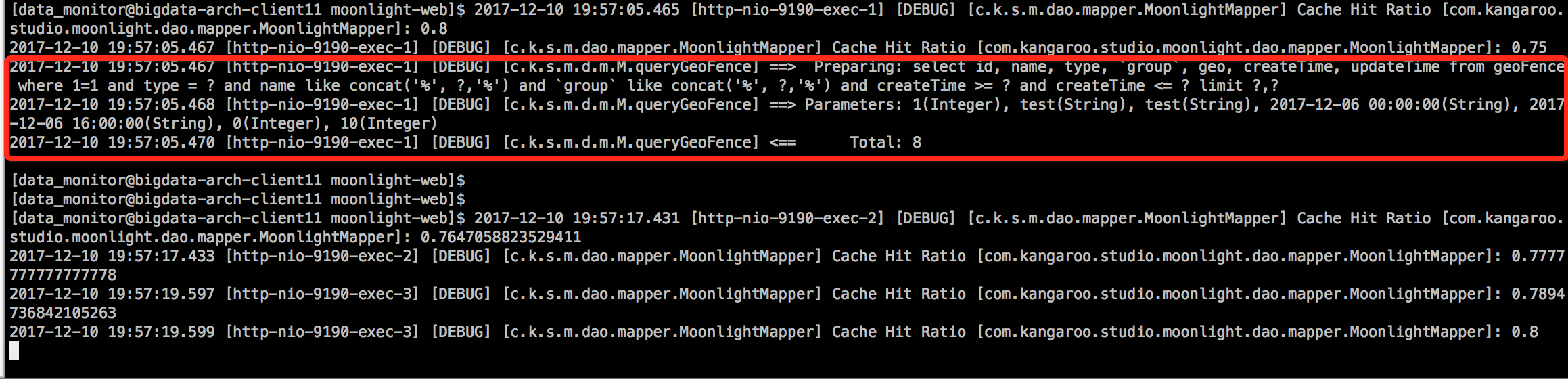
请求了三次,日志打印如下,
可以看到,只有第一次执行了sql模板查询,后面都是命中了缓存。
完毕。
Springboot Mybatis Redis 实现二级缓存的更多相关文章
- Spring + MySQL + Mybatis + Redis【二级缓存】
一.Redis环境 Redis 官网 :http://redis.io/ windows下载:https://github.com/dmajkic/redis/downloads 1.文件解压缩 2. ...
- springboot+mybatis+redis实现分布式缓存
大家都知道springboot项目都是微服务部署,A服务和B服务分开部署,那么它们如何更新或者获取共有模块的缓存数据,或者给A服务做分布式集群负载,如何确保A服务的所有集群都能同步公共模块的缓存数据, ...
- mybatis+redis实现二级缓存
在网上看了很多资料,发现例子都是千篇一律的相互复制.而且,使用的都是jedis的客户端..我这里使用的是redistemplate类实现. 缓存的原理..实现cache类接口,当哪个类需要缓存的时候, ...
- Spring + MySQL + Mybatis + Redis【二级缓存】执行流程分析
一级缓存基于 PerpetualCache 的 HashMap 本地缓存,其存储作用域为 Session,当 Session flush 或 close 之后,该Session中的所有 Cache 就 ...
- mybatis plus使用redis作为二级缓存
建议缓存放到 service 层,你可以自定义自己的 BaseServiceImpl 重写注解父类方法,继承自己的实现.为了方便,这里我们将缓存放到mapper层.mybatis-plus整合redi ...
- SpringMVC + MyBatis + Mysql + Redis(作为二级缓存) 配置
2016年03月03日 10:37:47 标签: mysql / redis / mybatis / spring mvc / spring 33805 项目环境: 在SpringMVC + MyBa ...
- mybatis 使用redis实现二级缓存(spring boot)
mybatis 自定义redis做二级缓存 前言 如果关注功能实现,可以直接看功能实现部分 何时使用二级缓存 一个宗旨---不常变的稳定而常用的 一级是默认开启的sqlsession级别的. 只在单表 ...
- SpringMVC +Spring + MyBatis + Mysql + Redis(作为二级缓存) 配置
转载:http://blog.csdn.net/xiadi934/article/details/50786293 项目环境: 在SpringMVC +Spring + MyBatis + MySQL ...
- Mybatis的二级缓存、使用Redis做二级缓存
目录 什么是二级缓存? 1. 开启二级缓存 如何使用二级缓存: userCache和flushCache 2. 使用Redis实现二级缓存 如何使用 3. Redis二级缓存源码分析 什么是二级缓存? ...
随机推荐
- IDEA + Maven + JavaWeb项目搭建
前言:在网上一直没找到一个完整的IDEA+Maven+Web项目搭建,对于IDEA和Maven初学者来说,这个过程简单但是非常痛苦的,对中间的某些步骤不是很理解,导致操作错误,从而项目发布不成功,一直 ...
- Unix/Linux僵尸进程
1. 僵尸进程的产生: 一个进程调用exit命令结束自己生命的时候,其实它并没有真正的被销毁,而是留下一个称为“僵尸进程”的数据结构.这时它已经放弃了几乎所有内存空间,没有任何可执行代码,也不能被调度 ...
- 对Spring事务一些问题的讨论
提起spring事务,就会让人联想起四大基本特征,五个隔离级别,七大传播特性.相信大多数人都知道这些东西,但是知道是一回事情,能用好真的是另一回事了.在使用Spring事务的时候,我曾遇到过几个比较严 ...
- Problem F
Problem Description "Yakexi, this is the best age!" Dong MW works hard and get high pay, h ...
- javascript 之变量对象-09
变量对象 变量对象:每个执行环境(执行上下文)都有一个对应的变量对象(variable object),环境中(执行上下文中)定义的所有变量.函数都保存在这个对象中. 在上篇中说到,当执行流执行一个函 ...
- Day1作业-模拟登录
# /usr/bin/env python# -*- coding: utf-8 -*-# Author:jenvid.yangimport getpassimport shutiluserspwd ...
- RobotFramework自动化测试框架-移动手机自动化测试Get Element Location关键字的使用
Get Element Location关键字用来获取一个Element的Location位置,该关键字接收一个参数[ locator ] 示例1:使用Get Element Location来获取一 ...
- Fiddler系列教程3:使用Fiddler录制Jmeter性能测试脚本
今天继续给大家带来Fiddler工具的教程3:使用Fiddler录制Jmter性能测试脚本. 我们知道Jmeter本身可以录制脚本,也可以通过BadBoy,BlazeMeter等工具进行录制,其实Fi ...
- 68、django之session与分页
前面我们介绍了cookies,主要应用在用户登录上,保存用户登录状态,不过cookies直接放在了浏览器上,安全性较低,所以我们便引出了session功能与cookies相同,不同的是它放在了客户端, ...
- Unity跨平台C/CPP动态库编译---可靠UDP网络库kcp基于CMake的各平台构建实践
1.为什么需要动态库 a)提供原生代码(native code)的支持,也叫原生插件,但是我实践的是c/cpp跨平台动态库,这里不具体涉及安卓平台java库和ios平台的objectc库构建. b)某 ...