
[Jenkins] Creating Application builds
After installing the jenkins, we start creating new job.
1. Give job names (your project name):


2. Go to "Source Code Management tab":
Connect to source code:

3. Go to the "Build" tab, using the drop down menu, to select a step.
Normally like a web app, you can select "Excute Shell" / "Excute Windows batch command".
Here, because we use Java application as an example, so we select "Invoke top-level Maven targets".

4. Give the command should be excuted.
In the example we just need to use 'mvn compile' to compile a Java app.

5. In some case, the root dir is not the app's root dir, you can click "advanced" button to add more information. (see the pic above)
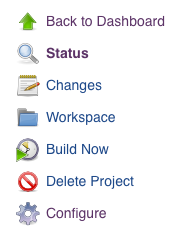
6. After those step, you are able to Build the application by clicking "Build now".
So now jenkins will do the following steps:
- Go to our github, clone the source code and put the code inside "~/.jenkins/Workspace/atomsphere" folder.
- Output file (if any) will be also put inside this folder.
Usually the output files will be some file we want to use, for example a web app, the output might be the bundle files that we want to served.
Now everytime you click "Build Now" button, it will re-generate new files and discard the previous files. But we might want to keep history instead of throw those away.
7. Archive previous version files
We can actaully choose which files (folder) actually we want to keep. For web app, it might be just one "dist" folder.
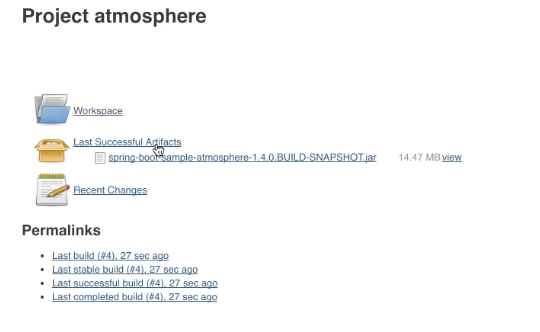
Here we want to keep jar file which generated by comiler.

8. Now after we build again, we will get a copy:
9. You might also want to clean the files after some time, you can also chain the command together. such as:
mvn clean

mvn package

10. Those jenkins job are actually saved into a config.xml file inside "workspace/[job_name]" folder.
If anything change on this file manully, you can also click "Reload Configuration from Disk" to get latest changes.

[Jenkins] Creating Application builds的更多相关文章
- Jenkins(二)
官网:https://wiki.jenkins-ci.org/display/JENKINS/Meet+Jenkins 我的这篇文章不过简单的依据上文,介绍Jenkins提供了哪些功能.详细大家还是要 ...
- Jenkins(两)
官网:https://wiki.jenkins-ci.org/display/JENKINS/Meet+Jenkins 我的这篇文章不过简单的依据上文,介绍Jenkins提供了哪些功能.详细大家还是要 ...
- Jenkins Docker 插件
原文地址:https://wiki.jenkins.io/display/JENKINS/Docker+Plugin Created by magnayn -, last modified by Ni ...
- jenkins构建结果企业微信提醒
每当jenkin在构建之后我们想把构建结果SUCCESS/FAILURE或者其他信息通知给其他人,也许有人会说,不是有邮件提醒吗?但是我这里的环境邮件提醒的话所被通知者并不会第一时间去阅读,所以我们用 ...
- DEVOPS技术实践_15:使用Docker作为Jenkins的slave
前面实验了使用docker搭建一个jenkins,下面实验使用docker作为jenkins的slave节点 1. 环境准备 一个运行Docker的主机或者群集 Jenkins应该能访问互联网,方便安 ...
- Jenkins构建时报错:No Space left on device
Jenkins在自动化构建服务的同时也在消耗服务器的磁盘空间,如果构建的项目个数很多,而Jenkins 服务器磁盘空间又不是非常大的话,每隔一段时间磁盘空间就会爆满导致,就会出现磁盘空间不足无法构建的 ...
- jenkins 插件Copy Artifacts + Artifacts to copy
问题及遇到的错误: Unable to access upstream artifacts area /var/lib/jenkins/jobs/PROJECTNAME-Master-Branch/b ...
- Jenkins遇到问题二:Jenkins服务器磁盘空间管理策略
Jenkins在帮助我们自动化构建服务的同时也在消耗服务器的磁盘空间,试想如果构建的项目个数很多,而Jenkins 服务器磁盘空间又不是非常大的话,每隔一段时间磁盘空间就会爆满导致Jenkins出现磁 ...
- Jenkins的配置
原文:http://www.cnblogs.com/itech/archive/2011/11/04/2236230.html 1 修改jenkins的根目录,默认地在C:\Documents an ...
随机推荐
- 【Codeforces Round #451 (Div. 2) A】Rounding
[链接] 我是链接,点我呀:) [题意] 在这里输入题意 [题解] 模拟 [代码] /* 1.Shoud it use long long ? 2.Have you ever test several ...
- SSO单点登录学习总结(1)——单点登录(SSO)原理解析
SSO的概念: 单点登录SSO(Single Sign-On)是身份管理中的一部分.SSO的一种较为通俗的定义是:SSO是指访问同一服务器不同应用中的受保护资源的同一用户,只需要登录一次,即通过一个应 ...
- 设计模式六大原则(三):依赖倒置原则(Dependence Inversion Principle)
依赖倒置原则(DIP)定义: 高层模块不应该依赖低层模块,二者都应该依赖其抽象:抽象不应该依赖细节:细节应该依赖抽象. 问题由来: 类A直接依赖类B,假如要将类A改为依赖类C,则必须通过修改类A的代码 ...
- 洛谷—— P1162 填涂颜色
https://www.luogu.org/problem/show?pid=1162 题目描述 由数字0 组成的方阵中,有一任意形状闭合圈,闭合圈由数字1构成,围圈时只走上下左右4个方向.现要求把闭 ...
- Arch Linux下配置Samba
本文记录笔者配置Samba的过程,供用于自用. sudo pacman -S samba sudo vim /etc/samba/smb.conf 添加以下内容 [global] dns pro ...
- arguments对象----不定参数的实现方式
function format(string) { var args = arguments; var pattern = new RegExp("%([1-" + argumen ...
- vb.net structure 定义静态数组
Const RAS95_MaxEntryName = 256 Const RAS95_MaxDeviceName = 128 Const RAS_MaxDeviceType = 16 Structur ...
- php字符串函数分类总结
php字符串函数分类总结 一.总结 explode str_split str_word_count strtolower 二.php字符串函数分类总结 php内置了98个字符串函数(除了基于正 ...
- 当数据库没有备份,redo或undo损坏
数据库在没有备份的情况下,如果数据库redo或undo损坏,可以通过如下方法处理,但是不一定成功 把init文件中的: undo_management=manual 然后启动数据库到mount 状态后 ...
- (转)oracle常用的数据字典
一.oracle数据字典主要由以下几种视图构成: .user视图 以user_为前缀,用来记录用户对象的信息 .all视图 以all_为前缀,用来记录用户对象的信息及被授权访问的对象信息 .dba视图 ...