
elasticsearch start
启动、停止服务
默认官方版启动:
linux:./bin/elasticsearch start
window:直接运行bin/elasticsearch.bat
默认官方版停止:
linux:kill 掉elasticsearch 进程。
window:管理启动的elasticsearch.bat 窗口
中文集成版启动与停止:
中文集成版集成了 elasticsearch-servicewrapper这个es插件
linux:
                         ./elasticsearch console  ------前台运行

                         ./elasticsearch start    ------后台运行

                         ./elasticsearch install  -------添加到系统自动启动

                         ./elasticsearch remove   -----取消随系统自动启动
./elasticsearch stop ------停止
./elasticsearch restart ------重新启动
window:直接运行elasticsearch.bat
Tips:
ik_max_word: 会将文本做最细粒度的拆分,比如会将“中华人民共和国国歌”拆分为“中华人民共和国,中华人民,中华,华人,人民共和国,人民,人,民,共和国,共和,和,国国,国歌”,会穷尽各种可能的组合;
ik_smart: 会做最粗粒度的拆分,比如会将“中华人民共和国国歌”拆分为“中华人民共和国,国歌”。
Download and install the .tar.gz packageedit
The .tar.gz archive for Elasticsearch v6.2.3 can be downloaded and installed as follows:
wget https://artifacts.elastic.co/downloads/elasticsearch/elasticsearch-6.2.3.tar.gz

wget https://artifacts.elastic.co/downloads/elasticsearch/elasticsearch-6.2.3.tar.gz.sha512
[root@VM_0_15_centos soft]# shasum

-bash: shasum: command not found

[root@VM_0_15_centos soft]#

[root@VM_0_15_centos soft]#

[root@VM_0_15_centos soft]# yum install perl-Digest-SHA -y

Loaded plugins: fastestmirror, langpacks

Loading mirror speeds from cached hostfile

Resolving Dependencies

--> Running transaction check

---> Package perl-Digest-SHA.x86_64 :5.85-.el7 will be installed

--> Processing Dependency: perl(Digest::base) for package: :perl-Digest-SHA-5.85-.el7.x86_64

--> Running transaction check

---> Package perl-Digest.noarch :1.17-.el7 will be installed

--> Finished Dependency Resolution

Dependencies Resolved

================================================================================================================================

 Package                             Arch                       Version                            Repository              Size

================================================================================================================================

Installing:

 perl-Digest-SHA                     x86_64                     :5.85-.el7                       os                       k

Installing for dependencies:

 perl-Digest                         noarch                     1.17-.el7                       os                       k

Transaction Summary

================================================================================================================================

Install   Package (+ Dependent package)

Total download size:  k

Installed size:  k

Downloading packages:

(/): perl-Digest-1.17-.el7.noarch.rpm                                                               |   kB  ::

(/): perl-Digest-SHA-5.85-.el7.x86_64.rpm                                                             |   kB  ::

--------------------------------------------------------------------------------------------------------------------------------

Total                                                                                            kB/s |   kB  ::

Running transaction check

Running transaction test

Transaction test succeeded

Running transaction

  Installing : perl-Digest-1.17-.el7.noarch                                                                              /

  Installing : :perl-Digest-SHA-5.85-.el7.x86_64                                                                          /

  Verifying  : perl-Digest-1.17-.el7.noarch                                                                              /

  Verifying  : :perl-Digest-SHA-5.85-.el7.x86_64                                                                          /

Installed:

  perl-Digest-SHA.x86_64 :5.85-.el7

Dependency Installed:

  perl-Digest.noarch :1.17-.el7

Complete!

[root@VM_0_15_centos soft]#

[root@VM_0_15_centos soft]# shasum -a 512 -c elasticsearch-6.2..tar.gz.sha512

elasticsearch-6.2..tar.gz: OK

[root@VM_0_15_centos soft]#
http://www.elastic.co/guide/en/elasticsearch/reference/current/zip-targz.html
 ./elasticsearch

[--17T15::,][WARN ][o.e.b.ElasticsearchUncaughtExceptionHandler] [] uncaught exception in thread [main]

org.elasticsearch.bootstrap.StartupException: java.lang.RuntimeException: can not run elasticsearch as root

        at org.elasticsearch.bootstrap.Elasticsearch.init(Elasticsearch.java:) ~[elasticsearch-6.2..jar:6.2.]

        at org.elasticsearch.bootstrap.Elasticsearch.execute(Elasticsearch.java:) ~[elasticsearch-6.2..jar:6.2.]

        at org.elasticsearch.cli.EnvironmentAwareCommand.execute(EnvironmentAwareCommand.java:) ~[elasticsearch-6.2..jar:6.2.]

        at org.elasticsearch.cli.Command.mainWithoutErrorHandling(Command.java:) ~[elasticsearch-cli-6.2..jar:6.2.]

        at org.elasticsearch.cli.Command.main(Command.java:) ~[elasticsearch-cli-6.2..jar:6.2.]

        at org.elasticsearch.bootstrap.Elasticsearch.main(Elasticsearch.java:) ~[elasticsearch-6.2..jar:6.2.]

        at org.elasticsearch.bootstrap.Elasticsearch.main(Elasticsearch.java:) ~[elasticsearch-6.2..jar:6.2.]

Caused by: java.lang.RuntimeException: can not run elasticsearch as root

        at org.elasticsearch.bootstrap.Bootstrap.initializeNatives(Bootstrap.java:) ~[elasticsearch-6.2..jar:6.2.]

        at org.elasticsearch.bootstrap.Bootstrap.setup(Bootstrap.java:) ~[elasticsearch-6.2..jar:6.2.]

        at org.elasticsearch.bootstrap.Bootstrap.init(Bootstrap.java:) ~[elasticsearch-6.2..jar:6.2.]

        at org.elasticsearch.bootstrap.Elasticsearch.init(Elasticsearch.java:) ~[elasticsearch-6.2..jar:6.2.]
Elasticsearch Reference [6.2] » Set up Elasticsearch » Installing Elasticsearch » Install Elasticsearch with .zip or .tar.gz
https://www.elastic.co/guide/en/elasticsearch/reference/current/zip-targz.html#_checking_that_elasticsearch_is_running
异常描述为不能以root权限运行Elasticsearch.
解决办法是运行时加上参数:
bin/elasticsearch -Des.insecure.allow.root=true
或者修改bin/elasticsearch,加上ES_JAVA_OPTS属性:
ES_JAVA_OPTS="-Des.insecure.allow.root=true"
保存之后重启Elasticsearch。
安装运行
1、前置安装java8
jdk-8u112-linux-x64.rpm
下载地址:http://www.oracle.com/technetwork/java/javase/downloads/index.html
2、下载
wget https://artifacts.elastic.co/downloads/elasticsearch/elasticsearch-5.1.1.zip
3、解压
unzip elasticsearch-5.1.1.zip
4、运行
./bin/elasticsearch
./bin/elasticsearch -d #后台运行
tail -f logs/elasticsearch.log #查看日志
注:ES有执行脚本的能力,因安全因素,不能在root用户下运行,强行运行会报如下错误:
org.elasticsearch.bootstrap.StartupException: java.lang.RuntimeException: can not run elasticsearch as root
解决方案:
groupadd es #增加es组
useradd es -g es -p pwd #增加es用户并附加到es组
chown -R es:es elasticsearch-5.1.1 #给目录权限
su es #使用es用户
./bin/elasticsearch -d #后台运行es
外网访问
vi conf/elasticsearch.yml
修改network.host: 0.0.0.0
再次启动linux可能出现如下类似错误
bootstrap checks failed
max file descriptors [65535] for elasticsearch process is too low, increase to at least [65536]
解决方案
1、vi /etc/sysctl.conf
设置fs.file-max=655350
保存之后sysctl -p使设置生效
2、vi /etc/security/limits.conf 新增
* soft nofile 655350
* hard nofile 655350
3、重新使用SSH登录,再次启动elasticsearch即可。
外网访问:serverip:9200/
安装elasticsearch-head插件
elasticsearch 5以后的版本比较新,不支持直接安装head插件,以下是github上提供的安装方法,如下图示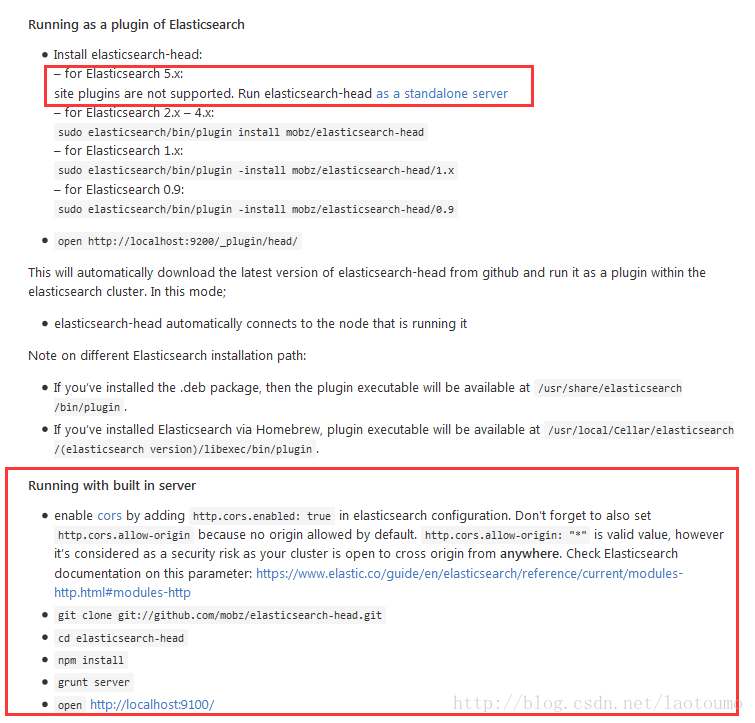
1、下载head插件
wget https://codeload.github.com/mobz/elasticsearch-head/zip/master
2、下载nodejs
nodejs官网下载地址https://nodejs.org/dist/
wget https://nodejs.org/dist/v6.9.2/node-v6.9.2-linux-x64.tar.xz
3、配置node环境变量
xz –d node-v6.9.2-linux-x64.tar.xz
tar –xvf node-v6.9.2-linux-x64.tar
mv node-v6.9.2-linux-x64 /alidata/app/node
vim /etc/profile
export NODE_HOME=/alidata/app/node
export PATH=$PATH:$NODE_HOME/bin
source /etc/profile
# node –v
v6.9.2
# npm –v
3.10.9
4、安装grunt
cd elasticsearch-head-master
npm install -g grunt --registry=https://registry.npm.taobao.org
5、测试一下
cd elasticsearch-head-master
grunt
出现以下提示,为Gruntfile.js引用的,缺少以下包
>> Local Npm module "grunt-contrib-clean" not found. Is it installed?
>> Local Npm module "grunt-contrib-concat" not found. Is it installed?
>> Local Npm module "grunt-contrib-watch" not found. Is it installed?
>> Local Npm module "grunt-contrib-connect" not found. Is it installed?
>> Local Npm module "grunt-contrib-copy" not found. Is it installed?
>> Local Npm module "grunt-contrib-jasmine" not found. Is it installed?
Warning: Task "connect:server" not found. Use --force to continue.
Aborted due to warnings.
安装
npm install grunt-contrib-clean --registry=https://registry.npm.taobao.org
npm install grunt-contrib-concat --registry=https://registry.npm.taobao.org
npm install grunt-contrib-watch --registry=https://registry.npm.taobao.org
npm install grunt-contrib-connect --registry=https://registry.npm.taobao.org
npm install grunt-contrib-copy --registry=https://registry.npm.taobao.org
npm install grunt-contrib-jasmine --registry=https://registry.npm.taobao.org
6、运行
grunt server
7、测试
http://serverip:9100/
修改head目录下的Gruntfile.js配置,head默认监听127.0.0.1
vm Gruntfile.js
hostname: '0.0.0.0',
8、为es设置跨域访问
vi config/elasticsearch.yml #新增两行
http.cors.enabled: true
http.cors.allow-origin: "*"
9、启动es,启动head插件
https://blog.csdn.net/laotoumo/article/details/53890279
一、拼音分词的应用
拼音分词在日常生活中其实很常见,也许你每天都在用。打开淘宝看一看吧,输入拼音”zhonghua”,下面会有包含”zhonghua”对应的中文”中华”的商品的提示:
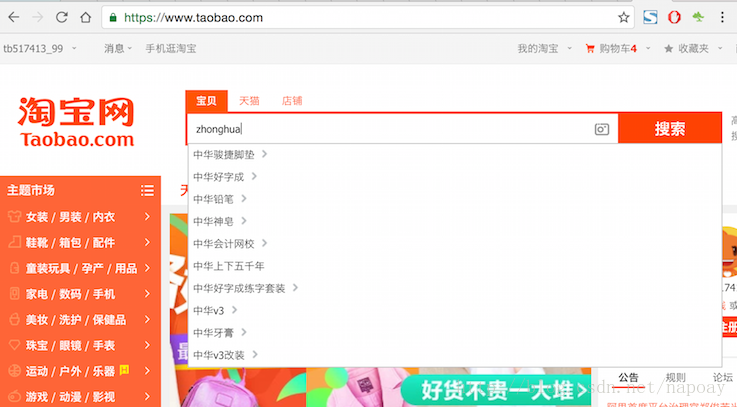
拼音分词是根据输入的拼音提示对应的中文,通过拼音分词提升搜索体验、加快搜索速度。下面介绍如何在Elasticsearch 5.1.1中配置和实现pinyin+iK分词。
二、IK分词器下载与安装
关于IK分词器的介绍不再多少,一言以蔽之,IK分词是目前使用非常广泛分词效果比较好的中文分词器。做ES开发的,中文分词十有八九使用的都是IK分词器。
下载地址:https://github.com/medcl/elasticsearch-analysis-ik
配置之前关闭elasticsearch,配置完成以后再重启。
IK的版本要和当前ES的版本一致,README中有说明。我使用的是ES是5.1.1,IK的版本为5.1.1(你也许会奇怪为什么IK上一个版本是1.X,下一个版本一下升到5.X?是因为Elastic官方为了统一版本号,之前es的版本是2.x,logstash的版本是2.x,同时Kibana的版本是4.x,ik的版本是1.x,这样版本很混乱。5.0之后,统一版本号,这样你使用5.1.1的es,其它软件的版本也使用5.1.1就好了)。
下载之后进入到elasticsearch-analysis-pinyin-master目录,mvn打包(没有安装maven的自行安装),运行命令:
mvn package打包成功以后,会生成一个target文件夹,在elasticsearch-analysis-ik-master/target/releases目录下,找到elasticsearch-analysis-ik-5.1.1.zip,这就是我们需要的安装文件。解压elasticsearch-analysis-ik-5.1.1.zip,得到下面内容:
commons-codec-1.9.jar

commons-logging-1.2.jar

config

elasticsearch-analysis-ik-5.1.1.jar

httpclient-4.5.2.jar

httpcore-4.4.4.jar

plugin-descriptor.properties
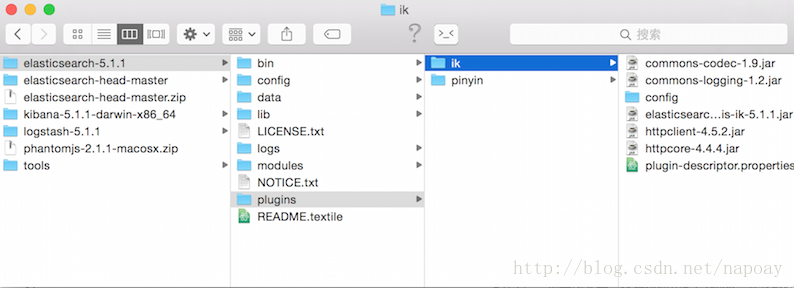
然后在elasticsearch-5.1.1/plugins目录下新建一个文件夹ik,把elasticsearch-analysis-ik-5.1.1.zip解压后的文件拷贝到elasticsearch-5.1.1/plugins/ik目录下.截图方便理解。
三、pinyin分词器下载与安装
pinyin分词器的下载地址:
https://github.com/medcl/elasticsearch-analysis-pinyin
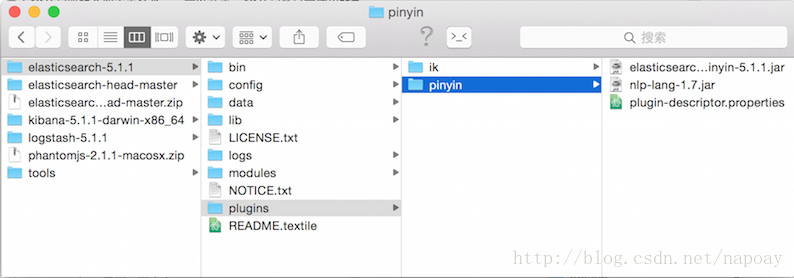
安装过程和IK一样,下载、打包、加入ES。这里不在重复上述步骤,给出最后配置截图
四、分词测试
IK和pinyin分词配置完成以后,重启ES。如果重启过程中ES报错,说明安装有错误,没有报错说明配置成功。
4.1 IK分词测试
创建一个索引:
curl -XPUT "http://localhost:9200/index"测试分词效果:
curl -XPOST "http://localhost:9200/index/_analyze?analyzer=ik_max_word&text=中华人民共和国"分词结果:
   {

    "tokens": [{

        "token": "中华人民共和国",

        "start_offset": 0,

        "end_offset": 7,

        "type": "CN_WORD",

        "position": 0

    }, {

        "token": "中华人民",

        "start_offset": 0,

        "end_offset": 4,

        "type": "CN_WORD",

        "position": 1

    }, {

        "token": "中华",

        "start_offset": 0,

        "end_offset": 2,

        "type": "CN_WORD",

        "position": 2

    }, {

        "token": "华人",

        "start_offset": 1,

        "end_offset": 3,

        "type": "CN_WORD",

        "position": 3

    }, {

        "token": "人民共和国",

        "start_offset": 2,

        "end_offset": 7,

        "type": "CN_WORD",

        "position": 4

    }, {

        "token": "人民",

        "start_offset": 2,

        "end_offset": 4,

        "type": "CN_WORD",

        "position": 5

    }, {

        "token": "共和国",

        "start_offset": 4,

        "end_offset": 7,

        "type": "CN_WORD",

        "position": 6

    }, {

        "token": "共和",

        "start_offset": 4,

        "end_offset": 6,

        "type": "CN_WORD",

        "position": 7

    }, {

        "token": "国",

        "start_offset": 6,

        "end_offset": 7,

        "type": "CN_CHAR",

        "position": 8

    }, {

        "token": "国歌",

        "start_offset": 7,

        "end_offset": 9,

        "type": "CN_WORD",

        "position": 9

    }]

}
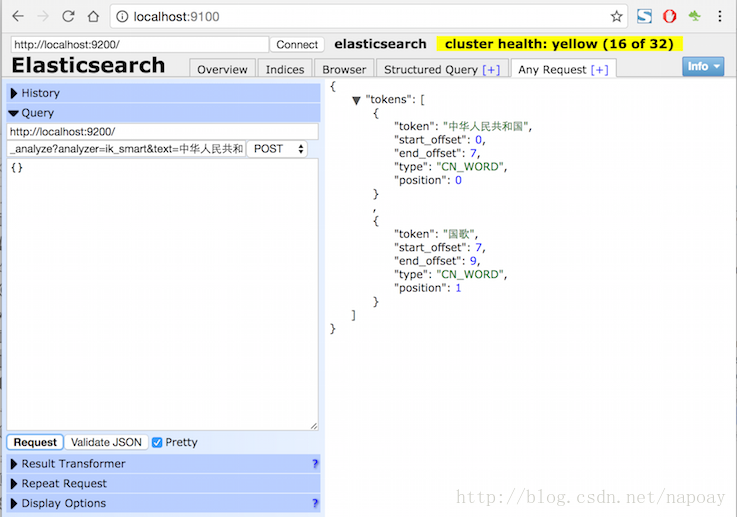
使用ik_smart分词:
curl -XPOST "http://localhost:9200/index/_analyze?analyzer=ik_smart&text=中华人民共和国"分词结果:
{

    "tokens": [{

        "token": "中华人民共和国",

        "start_offset": 0,

        "end_offset": 7,

        "type": "CN_WORD",

        "position": 0

    }, {

        "token": "国歌",

        "start_offset": 7,

        "end_offset": 9,

        "type": "CN_WORD",

        "position": 1

    }]

}
截图方便理解:
4.2拼音分词测试
测试拼音分词:
curl -XPOST "http://localhost:9200/index/_analyze?analyzer=pinyin&text=张学友"分词结果:
{

    "tokens": [{

        "token": "zhang",

        "start_offset": 0,

        "end_offset": 1,

        "type": "word",

        "position": 0

    }, {

        "token": "xue",

        "start_offset": 1,

        "end_offset": 2,

        "type": "word",

        "position": 1

    }, {

        "token": "you",

        "start_offset": 2,

        "end_offset": 3,

        "type": "word",

        "position": 2

    }, {

        "token": "zxy",

        "start_offset": 0,

        "end_offset": 3,

        "type": "word",

        "position": 3

    }]

}
五、IK+pinyin分词配置
5.1创建索引与分析器设置
创建一个索引,并设置index分析器相关属性:
curl -XPUT "http://localhost:9200/medcl/" -d'

{

    "index": {

        "analysis": {

            "analyzer": {

                "ik_pinyin_analyzer": {

                    "type": "custom",

                    "tokenizer": "ik_smart",

                    "filter": ["my_pinyin", "word_delimiter"]

                }

            },

            "filter": {

                "my_pinyin": {

                    "type": "pinyin",

                    "first_letter": "prefix",

                    "padding_char": " "

                }

            }

        }

    }

}'
创建一个type并设置mapping:
curl -XPOST http://localhost:9200/medcl/folks/_mapping -d'

{

    "folks": {

        "properties": {

            "name": {

                "type": "keyword",

                "fields": {

                    "pinyin": {

                        "type": "text",

                        "store": "no",

                        "term_vector": "with_positions_offsets",

                        "analyzer": "ik_pinyin_analyzer",

                        "boost": 10

                    }

                }

            }

        }

    }

}'
5.2索引测试文档
索引2份测试文档。
文档1:
curl -XPOST http://localhost:9200/medcl/folks/andy -d'{"name":"刘德华"}'文档2:
curl -XPOST http://localhost:9200/medcl/folks/tina -d'{"name":"中华人民共和国国歌"}'5.3测试(1)拼音分词
下面四条命命令都可以匹配”刘德华”
curl -XPOST "http://localhost:9200/medcl/folks/_search?q=name.pinyin:liu"

curl -XPOST "http://localhost:9200/medcl/folks/_search?q=name.pinyin:de"

curl -XPOST "http://localhost:9200/medcl/folks/_search?q=name.pinyin:hua"

curl -XPOST "http://localhost:9200/medcl/folks/_search?q=name.pinyin:ldh"
5.4测试(2)IK分词测试
curl -XPOST "http://localhost:9200/medcl/_search?pretty" -d'

{

  "query": {

    "match": {

      "name.pinyin": "国歌"

    }

  },

  "highlight": {

    "fields": {

      "name.pinyin": {}

    }

  }

}'
返回结果:
{

  "took" : 2,

  "timed_out" : false,

  "_shards" : {

    "total" : 5,

    "successful" : 5,

    "failed" : 0

  },

  "hits" : {

    "total" : 1,

    "max_score" : 16.698704,

    "hits" : [

      {

        "_index" : "medcl",

        "_type" : "folks",

        "_id" : "tina",

        "_score" : 16.698704,

        "_source" : {

          "name" : "中华人民共和国国歌"

        },

        "highlight" : {

          "name.pinyin" : [

            "<em>中华人民共和国</em><em>国歌</em>"

          ]

        }

      }

    ]

  }

}
说明IK分词器起到了效果。
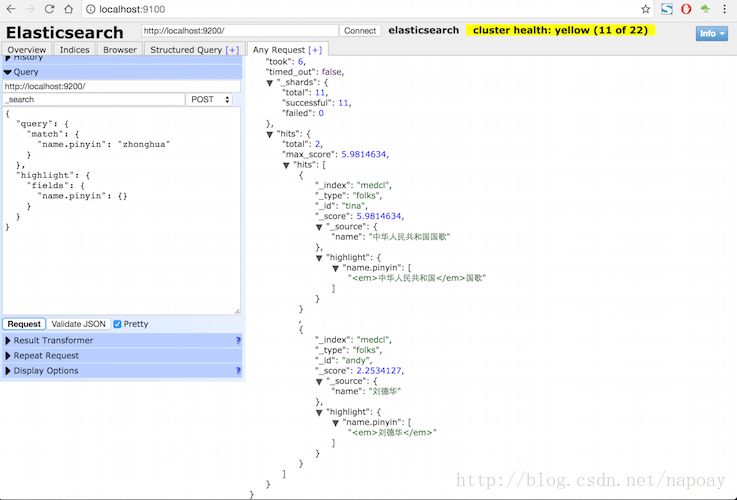
5.3测试(4)pinyin+ik分词测试:
curl -XPOST "http://localhost:9200/medcl/_search?pretty" -d'

{

  "query": {

    "match": {

      "name.pinyin": "zhonghua"

    }

  },

  "highlight": {

    "fields": {

      "name.pinyin": {}

    }

  }

}'
返回结果:
{

  "took" : 3,

  "timed_out" : false,

  "_shards" : {

    "total" : 5,

    "successful" : 5,

    "failed" : 0

  },

  "hits" : {

    "total" : 2,

    "max_score" : 5.9814634,

    "hits" : [

      {

        "_index" : "medcl",

        "_type" : "folks",

        "_id" : "tina",

        "_score" : 5.9814634,

        "_source" : {

          "name" : "中华人民共和国国歌"

        },

        "highlight" : {

          "name.pinyin" : [

            "<em>中华人民共和国</em>国歌"

          ]

        }

      },

      {

        "_index" : "medcl",

        "_type" : "folks",

        "_id" : "andy",

        "_score" : 2.2534127,

        "_source" : {

          "name" : "刘德华"

        },

        "highlight" : {

          "name.pinyin" : [

            "<em>刘德华</em>"

          ]

        }

      }

    ]

  }

}
截图如下:
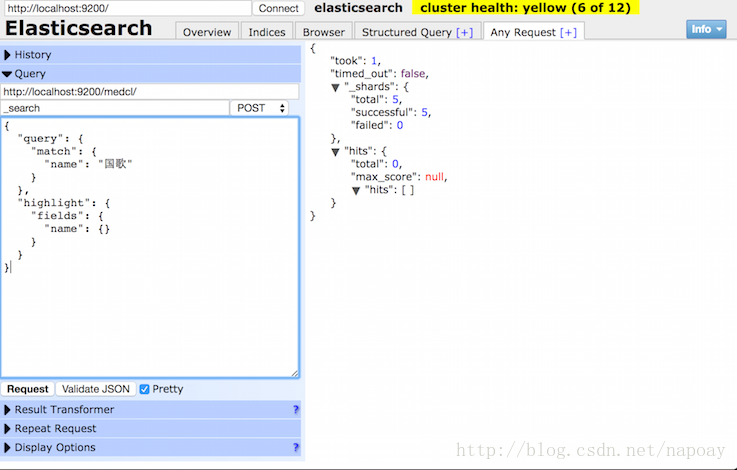
使用pinyin分词以后,原始的字段搜索要加上.pinyin后缀,搜索原始字段没有返回结果:
六、参考资料
https://blog.csdn.net/napoay/article/details/53907921
elasticsearch start的更多相关文章
- Elasticsearch之java的基本操作一
摘要 接触ElasticSearch已经有一段了.在这期间,遇到很多问题,但在最后自己的不断探索下解决了这些问题.看到网上或多或少的都有一些介绍ElasticSearch相关知识的文档,但个人觉得 ...
- Elasticsearch 5.0 中term 查询和match 查询的认识
Elasticsearch 5.0 关于term query和match query的认识 一.基本情况 前言:term query和match query牵扯的东西比较多,例如分词器.mapping ...
- 以bank account 数据为例,认识elasticsearch query 和 filter
Elasticsearch 查询语言(Query DSL)认识(一) 一.基本认识 查询子句的行为取决于 query context filter context 也就是执行的是查询(query)还是 ...
- Ubuntu 14.04中Elasticsearch集群配置
Ubuntu 14.04中Elasticsearch集群配置 前言:本文可用于elasticsearch集群搭建参考.细分为elasticsearch.yml配置和系统配置 达到的目的:各台机器配置成 ...
- ElasticSearch 5学习(10)——结构化查询(包括新特性)
之前我们所有的查询都属于命令行查询,但是不利于复杂的查询,而且一般在项目开发中不使用命令行查询方式,只有在调试测试时使用简单命令行查询,但是,如果想要善用搜索,我们必须使用请求体查询(request ...
- ElasticSearch 5学习(9)——映射和分析(string类型废弃)
在ElasticSearch中,存入文档的内容类似于传统数据每个字段一样,都会有一个指定的属性,为了能够把日期字段处理成日期,把数字字段处理成数字,把字符串字段处理成字符串值,Elasticsearc ...
- .net Elasticsearch 学习入门笔记
一. es安装相关1.elasticsearch安装 运行http://localhost:9200/2.head插件3.bigdesk插件安装(安装细节百度:windows elasticsear ...
- 自己写的数据交换工具——从Oracle到Elasticsearch
先说说需求的背景,由于业务数据都在Oracle数据库中,想要对它进行数据的分析会非常非常慢,用传统的数据仓库-->数据集市这种方式,集市层表会非常大,查询的时候如果再做一些group的操作,一个 ...
- 如何在Elasticsearch中安装中文分词器(IK+pinyin)
如果直接使用Elasticsearch的朋友在处理中文内容的搜索时,肯定会遇到很尴尬的问题--中文词语被分成了一个一个的汉字,当用Kibana作图的时候,按照term来分组,结果一个汉字被分成了一组. ...
- jar hell & elasticsearch ik 版本问题
想给es 安装一个ik 的插件, 我的es 是 2.4.0, 下载了一个版本是 1.9.5, [2016-10-09 16:56:26,248][INFO ][node ] [node-2] init ...
随机推荐
- 【】maze
[链接]点击打开链接 [题意] 小 T 被放到了一个迷宫之中,这个迷宫由 n 个节点构成,两个节点之间可能存在多条无 向边,小 T 的起点为 1 号节点,终点为 n 号节点.有 m 条无向边,对于每一 ...
- 加固linux
http://linoxide.com/linux-command/password-aging-secure-linux-access/
- HDU - 4552 怪盗基德的挑战书 (后缀数组)
Description "在树最漂亮的那天,当时间老人再次把大钟平均分开时,我会降临在灯火之城的金字塔前.带走那最珍贵的笑容."这是怪盗基德盗取巴黎卢浮宫的<蒙娜丽莎的微笑& ...
- 损失函数 - Andrew Ng机器学习公开课笔记1.2
线性回归中提到最小二乘损失函数及其相关知识.对于这一部分知识不清楚的同学能够參考上一篇文章<线性回归.梯度下降>. 本篇文章主要解说使用最小二乘法法构建损失函数和最小化损失函数的方法. 最 ...
- JavaFX2 - 文本可复制的Label
背景介绍 我的公司和我个人一直都使用JavaFX2来编写client应用程序,同一时候也作为Applet在浏览器中执行. 我们的客户以前拿我们的产品和网页对照,然后向我们提过两个需求: (1) 希望界 ...
- amazeui页面分析3
amazeui页面分析3 一.总结 1. 本质是list列表,是ul套li的形式,只不过li里面是图片 <li class="am-g am-list-item-desced am-l ...
- [TypeStyle] Compose CSS classes using TypeStyle
We will demonstrate composing classes using the utility classes function. classes is also what we re ...
- 《Java设计模式》之抽象工厂模式
场景问题 举个生活中常见的样例--组装电脑.我们在组装电脑的时候.通常须要选择一系列的配件,比方CPU.硬盘.内存.主板.电源.机箱等. 为讨论使用简单点.仅仅考虑选择CPU和主板的问题. 其实,在选 ...
- js中数组如何使用
js中数组如何使用 一.总结 一句话总结:new Array()和[]两种方法都可以创建数组. 二.js中创建数组,并往数组里添加元素 数组的创建 var arrayObj = new Array() ...
- Android学习笔记:Home Screen Widgets(2):关于Widget
通过widget定义,我们在widget列表中看到了我们的TestWidget.当我们拖拽widget到主页时,假设在appwidet-provider中定义了android:configure的ja ...