
The trust relationship between this workstation and the primary domain failed(断网可以登进来)(正确的解决方式用管理员登进去 :退域再加域)
The trust relationship between this workstation and the primary domain failed(断网可以登进来)(正确的解决方式用管理员登进去 :退域再加域)
一、总结
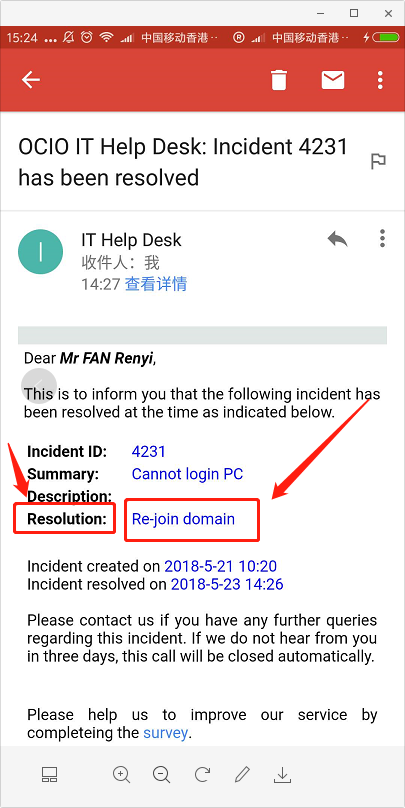
1、拔掉网线,然后登就登进来了,因为这样不用验证域,域账号本地计算机上面肯定是有备份的啊,优先用域的方式验证
2、英语啊:肯定官方文档说明和解决方法是最好的解决途径,英语啊,工具啊
3、说明问题是由window更新引起的,而我在出行问题之前windows的确自动更新了
4、可以用老毛桃等方式或者工具强制进入
5、正确的解决方式用管理员登进去 :退域再加域
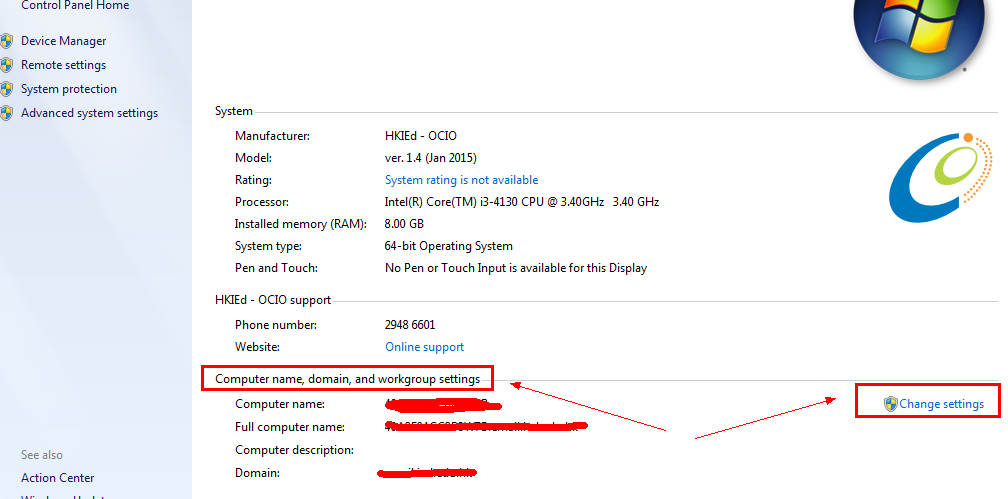
在这里改的
二、"The trust relationship between this workstation and the primary domain failed" error when you log in to Windows 7
Symptom
Resolution
- Use a local administrator account to log on to the computer.
- Select Start, press and hold (or right-click) Computer > Properties.
- Select Change settings next to the computer name.
- On the Computer Name tab, select Change.
- Under the Member of heading, select Workgroup, type a workgroup name, and then select OK.
- When you are prompted to restart the computer, select OK.
- On the Computer Name tab, select Change again.
- Under the Member of heading, select Domain, and then type the domain name.
- Select OK, and then type the credentials of the user who has permissions in the domain.
- When you are prompted to restart the computer, select OK.
- Restart the computer.
Last Updated: Mar 31, 2017
肯定官方文档说明和解决方法是最好的解决途径,英语啊,工具啊
三、"The trust relationship between this workstation and the primary domain failed
今天在我自己的环境上遇到了这样的奇怪的症状.
1. 我可以使用域账号登录SharePoint 2010的机器.
2. 我可以打开SharePoint 2010管理中心和普通站点.
3. 当我试图新建一个web application的时候, 管理中心弹出对话框, 报出如标题的错误:
"The trust relationship between this workstation and the primary domain failed"
4. 我尝试运行配置向导, 弹出相同的错误信息.
好在我使用的是hyper-V, 我还原到了之前的一个snapshot上, 那个节点跟当前的区别是, 安装了好多windows的更新. 还原之后, 发现没有这样的问题.
由此, 确定是打windows update补丁导致了这个问题的发生.
上网查了一下这个错误信息, 发现同样错误信息, 但是症状各不相同. 最终我还是决定使用KB162797的方法, 退域, 再重新加入域. 问题解决.
原因KB解释如下:
The computer's machine account has the incorrect role or its password has become mismatched with that of the domain database.
SharePoint 2010的问题还真不少. MOSS的环境跟SPS 2010一同打补丁, MOSS就没有任何问题.
不过这样也可能是windows 2008 R2的问题. Anyway, 遇到这样的问题, 简单地退域在重新加入域就可以解决了.
说明问题是由window更新引起的,而我在出行问题之前windows的确自动更新了
四、提示The trust relationship between this workstation and the primary domain failed
问题
公司有20多台电脑连这一台windows2008的服务器,今天早上有台win 7 提示“The trust relationship between this workstation and the primary domain failed” 然后所有账号都登不上,包括管理员账号。
之前有类似的问题重新添加一次domain就解决问题了
这次是登不上任何账号
本地管理员账号被禁用
解决
可以用类似的老毛桃PE软件(找个光盘启动也行),把本机管理员的帐号打开,改为空密码;
本地管理员进入,退域再加域。
提供相关解释如下
Cause:The computer's machine account has the incorrect role or its password has become mismatched with that of the domain database.Fix:Log on locally as a local administrator (If you can). In the Network tool of Control Panel, select Change and enter a Workgroup name, leaving the domain. Restart the computer and log on locally as a local administrator. OrYou can delete the existing computer account in Server Manager, recreate the computer account, synchronize the domain, and then on the client rejoin the domain.
可以用老毛桃等方式或者工具强制进入
The trust relationship between this workstation and the primary domain failed(断网可以登进来)(正确的解决方式用管理员登进去 :退域再加域)的更多相关文章
- [域|Domain] The trust relationship between this workstation and the primary domain failed 此工作站和主域间的信任关系失败
PS> $cred = Get-Credential domain.sample.com;Reset-ComputerMachinePassword -Credential $cred -Ser ...
- Windows ->> FIX: “The security database on the server does not have a computer account for this workstation trust relationship”
前几天在做AlwaysOn实验时遇到搭建活动目录域时某台已经加入AD的机器无法以域管理员账户登录的情况. 报错信息是:The security database on the server does ...
- EX:The underlying connection was closed: Could not establish trust relationship for the SSL/TLS secure channel.
EX:The underlying connection was closed: Could not establish trust relationship for the SSL/TLS secu ...
- Web Server 使用WebClient 发送https请求 The underlying connection was closed: Could not establish trust relationship for the SSL/TLS secure channel
使用WebClient 发送https请求 使用WebClient发送请求时,并且是以https协议: WebClient webClient = new WebClient(); string re ...
- https请求时出错:Could not establish trust relationship for the SSL/TLS secure channel
当我在用NET命名空间下获取URL的时候,提示如下错误: The underlying connection was closed: Could not establish trust relatio ...
- Could not establish trust relationship for the SSL/TLS secure channel 问题解决方法
最近在写一个跟第三方对接的数据同步服务,在本地都没有问题,今天放到生产环境测试报错: System.Net.WebException: The underlying connection was cl ...
- [bug]The underlying connection was closed: Could not establish trust relationship for the SSL/TLS secure channel.
写在前面 在模拟请求的时候,如果url为https的,会报这个错误.大概错误就是:基础连接已关闭:无法建立信任关系的SSL / TLS的安全通道. The underlying connection ...
- WebException: The underlying connection was closed: Could not establish trust relationship for the SSL/TLS secure channel
关于这个异常的问题网上有很多的解决方案. 最为靠谱的有: http://www.cnblogs.com/hjf1223/archive/2007/03/14/674502.html(若因为链接而导致不 ...
- VMware workstation 网络选择 NAT模式 访问外网
多年不用本地做测试 尽然被 nat 模式給卡着了 :动手的还是所以要记录一下: 1.根据自己需求创建 虚拟机 之后: 配置[网络适配器] -- 选择 nat 模式 ( 选择网卡 ) 虚拟机 ...
随机推荐
- Ubuntu 14 中给 APACHE2安装 SSL 模块 Enable SSL site on Ubuntu 14 LTS, Apache 2.4.7:
Ubuntu 14 中给 APACHE2安装 SSL 模块 Enable SSL site on Ubuntu 14 LTS, Apache 2.4.7: 参考 http://blog.csdn.ne ...
- android中图片倒影、圆角效果重绘
本文用来记录一些Android 操作图片的方法,方便查看. 1.将Drawable转化为Bitmap public static Bitmap drawableToBitmap(Drawable dr ...
- 将二级目录下的文件合并成一个文件的Python小脚本
这个小程序的目的是将二级目录下的文件全部合并成一个文件(其实几级目录都可以,只要做少许改动) #coding:utf8 import sys, os def process(path): new_fi ...
- 阅读笔记——Web应用程序
Web应用程序与DD文件 Web应用程序 web应用程序是一种可以通过Web访问的应用程序.Web应用程序最大的好处是永和很容易访问应用程序.用户只需要有浏览器即可,不需要安装其他任何软件.一个Web ...
- Windows环境下ARM集成开发环境的搭建与使用
Windows环境下能够使用Eclipse IDE for C/C++ Developers来搭建ARM开发环境 本文地址:http://blog.csdn.net/u011833609/articl ...
- String字符串操作--切割,截取,替换,查找,比较,去空格.....
字符串拼接 直接用+号:String a = "I"; String b = "love"; String c = "you";String ...
- git仓库搭建
第一步安装git [root@Centos-node2 ~]# yum -y install git 第二步创建git用户 [root@Centos-node2 ~]# useradd git [ro ...
- 认识一下JavaScript
1.什么是JavaScript? JavaScript简称“JS”,应用于HTML和WEB,广泛应用于服务器.PC.笔记本等设备. JavaScript 是 Web 的编程语言. 所有现代的 HTML ...
- Java Web学习总结(11)——Session使用示例教程
一.Session简单介绍 在WEB开发中,服务器可以为每个用户浏览器创建一个会话对象(session对象),注意:一个浏览器独占一个session对象(默认情况下).因此,在需要保存用户数据时,服务 ...
- 洛谷—— P1168 中位数
https://www.luogu.org/problem/show?pid=1168 题目描述 给出一个长度为N的非负整数序列A[i],对于所有1 ≤ k ≤ (N + 1) / 2,输出A[1], ...