
Centos6.6 编译安装nginx
一.基本环境
nginx 1.9版以后增加了一些新的特性,支持tcp负载均衡,不过这次还是用1.8.0,这里面有个memcached的代理模块,有时间再测试下
1.centos6.6
2.nginx1.8.0.tar.gz
二.安装
nginx缺省模块
--without-select_module disable select module #用来支持select模型
--without-poll_module disable poll module #用来支持poll模型
--without-http_charset_module disable ngx_http_charset_module #用来支持各种编码模块
--without-http_gzip_module disable ngx_http_gzip_module #用来支持压缩的模块
--without-http_ssi_module disable ngx_http_ssi_module
--without-http_userid_module disable ngx_http_userid_module
--without-http_access_module disable ngx_http_access_module
--without-http_auth_basic_module disable ngx_http_auth_basic_module #支持基本验证的模块
--without-http_autoindex_module disable ngx_http_autoindex_module
--without-http_geo_module disable ngx_http_geo_module
--without-http_map_module disable ngx_http_map_module
--without-http_split_clients_module disable ngx_http_split_clients_module
--without-http_referer_module disable ngx_http_referer_module #通过referer可验证来源地址是否一致
--without-http_rewrite_module disable ngx_http_rewrite_module #重写模块
--without-http_proxy_module disable ngx_http_proxy_module #反向代理模块
--without-http_fastcgi_module disable ngx_http_fastcgi_module #用来支持fastcgi
--without-http_uwsgi_module disable ngx_http_uwsgi_module #用来支持uwsgi
--without-http_scgi_module disable ngx_http_scgi_module #用来支持scgi
--without-http_memcached_module disable ngx_http_memcached_module #memcached代理模块
--without-http_limit_conn_module disable ngx_http_limit_conn_module #用来限制连接数的模块
--without-http_limit_req_module disable ngx_http_limit_req_module #用来限制请求数的模块
--without-http_empty_gif_module disable ngx_http_empty_gif_module #用来生成一张1x1的空白图片,可用来传递参数
--without-http_browser_module disable ngx_http_browser_module #用来匹配浏览器头部的模块
--without-http_upstream_hash_module disable ngx_http_upstream_hash_module #根据hash算法负载均衡
--without-http_upstream_ip_hash_module disable ngx_http_upstream_ip_hash_module #根据ip hash算法负载均衡
--without-http_upstream_least_conn_module disable ngx_http_upstream_least_conn_module #最少连接数负载均衡
--without-http_upstream_keepalive_module disable ngx_http_upstream_keepalive_module #用来支持长连接的模块,也就是连接复用
--without-http disable HTTP server #用来支持http服务器的模块
--without-http-cache disable HTTP cache #用来支持http缓存的模块
--without-mail_pop3_module disable ngx_mail_pop3_module #用来支持代理邮件pop3收件协议的模块
--without-mail_imap_module disable ngx_mail_imap_module #用来支持代理邮件imap收件协议的模块
--without-mail_smtp_module disable ngx_mail_smtp_module #用来支持代理邮件smtp发件协议的模块
--without-pcre disable PCRE library usage #用来支持正则的模块
#现在选取几个常用的模块 nginx状态监控和一个ssl模块
$ yum install -y wget pcre pcre-devel zlib zlib-devel openssl openssl-devel

$ useradd nginx -s /sbin/nologin -M

$ ./configure --prefix=/usr/local/nginx \

--user=nginx \

--group=nginx \

--with-http_stub_status_module

--with-http_ssl_module

$ make && make install

$ ln -s /usr/local/nginx/sbin/nginx /usr/sbin/

$ ln -s /usr/local/nginx/conf /etc/nginx
三.配置
$ touch /etc/init.d/nginx

$ chmod 755 /etc/init.d/nginx

$ vi /etc/init.d/nginx

#!/bin/bash

# nginx Startup script for the Nginx HTTP Server

# it is v.0.0.2 version.

# chkconfig: - 85 15

# description: Nginx is a high-performance web and proxy server.

#              It has a lot of features, but it's not for everyone.

# processname: nginx

# pidfile: /var/run/nginx.pid

# config: /usr/local/nginx/conf/nginx.conf

nginxd=/usr/local/nginx/sbin/nginx

nginx_config=/usr/local/nginx/conf/nginx.conf

nginx_pid=/usr/local/nginx/logs/nginx.pid

RETVAL=0

prog="nginx"

# Source function library.

.  /etc/rc.d/init.d/functions

# Source networking configuration.

.  /etc/sysconfig/network

# Check that networking is up.

[ ${NETWORKING} = "no" ] && exit 0

[ -x $nginxd ] || exit 0

# Start nginx daemons functions.

start() {

if [ -e $nginx_pid ];then

   echo "nginx already running...."

   exit 1

fi

   echo -n $"Starting $prog: "

   daemon $nginxd -c ${nginx_config}

   RETVAL=$?

   echo

   [ $RETVAL = 0 ] && touch /var/lock/subsys/nginx

   return $RETVAL

}

# Stop nginx daemons functions.

stop() {

        echo -n $"Stopping $prog: "

        killproc $nginxd

        RETVAL=$?

        echo

        [ $RETVAL = 0 ] && rm -f /var/lock/subsys/nginx /usr/local/nginx/logs/nginx.pid

}

reload() {

    echo -n $"Reloading $prog: "

    #kill -HUP `cat ${nginx_pid}`

    killproc $nginxd -HUP

    RETVAL=$?

    echo

}

# See how we were called.

case "$1" in

start)

        start

        ;;

stop)

        stop

        ;;

reload)

        reload

        ;;

restart)

        stop

        start

        ;;

status)

        status $prog

        RETVAL=$?

        ;;

*)

        echo $"Usage: $prog {start|stop|restart|reload|status|help}"

        exit 1

esac

exit $RETVAL
四.启动
/etc/init.d/nginx start

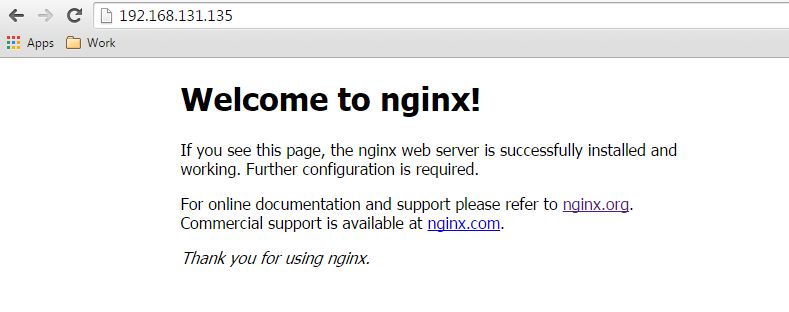
五.检查

结束!!!!
Centos6.6 编译安装nginx的更多相关文章
- Centos6.4 编译安装 nginx php
一. 准备依赖库 安装make: yum -y install gcc automake autoconf libtool make 安装g++: yum install gcc gcc-c++ 二. ...
- CentOS6.5 编译安装Nginx
一.准备编译环境 1. 系统为centos6.5最小安装,关闭selinux,关闭防火墙. 2. 安装编译工具 # yum -y install gcc gcc-c++ autoconf automa ...
- centos6.9编译安装nginx
1.安装nginx所需的依赖包: yum -y install gcc gcc-c++ autoconf automake zlib zlib-devel openssl openssl-devel ...
- centos6.5编译安装nginx
系统64位 centos6.5 nginx官网:http://nginx.org/ 下载nginx源码包: wget http://nginx.org/download/nginx-1.6.2.ta ...
- 【转】linux 编译安装nginx,配置自启动脚本
linux 编译安装nginx,配置自启动脚本 本文章来给各位同学介绍一篇关于linux 编译安装nginx,配置自启动脚本教程,希望有需要了解的朋友可一起来学习学习哦. 在公司的suse服务器装ng ...
- linux 编译安装nginx,配置自启动脚本
本文章来给各位同学介绍一篇关于linux 编译安装nginx,配置自启动脚本教程,希望有需要了解的朋友可一起来学习学习哦. 在公司的suse服务器装nginx,记录下安装过程: 参照这篇文章:Linu ...
- Linux.Centos6编译安装nginx
环境 系统环境:CentOS release 6.7 (Final) 需求 centos6.7编译安装nginx1.x 准备 安装依赖 yum install -y gcc gcc-c++ autoc ...
- CentOS6.6 32位 Minimal版本纯编译安装Nginx Mysql PHP Memcached
声明:部分编译指令在博客编辑器里好像被处理了,如双横线变成单横线了等等,于是在本地生成了一个pdf版本,在下面地址可以下载. LNMP+Memcached CentOS是红帽发行的免费的稳定Linux ...
- CentOS6.3编译安装Nginx1.4.7 + MySQL5.5.25a + PHP5.3.28
[准备工作] #在编译安装lnmp之前,首先先卸载已存在的rpm包. rpm -e httpd rpm -e mysql rpm -e php yum -y remove httpd yum -y r ...
随机推荐
- noip模拟赛 三部曲
分析:子树上操作,要用到线段树+dfs序,关键就是子树内k还要增加,这个就不是很好办.可以求出在根节点+0后每个点会加多少,记为d[i],如果要对点x进行A操作,实际上只需要对子树加k - d[i]再 ...
- ES解除索引只读限制
kibana dev Tools 执行:PUT _settings { "index": { "blocks": { "rea ...
- 一个手机图表(echarts)折线图的封装
//定义一组颜色值,按顺序取出 var colorGroup = ["#6ca3c4","#76bfa3","#ea8f7a"," ...
- Linux排查java程序占用cpu过高的线程代码
分几步骤: 1.通过top,查出占用CPU过高的java进程 ,比如: pid :6666 2.通过ps -mp 6666 -o THREAD,tid,time| sort -n -k1 -r 查看此 ...
- SSM(spring mvc+spring+mybatis)学习路径——2-1、spring MVC入门
目录 2-1 Spring MVC起步 一.回顾Servlet 二.SpringMVC简介 三.搭建SpringMVC第一个案例 四.简单流程及配置 五.使用注解开发Controller 六.参数绑定 ...
- Oracle推断值为非数字
select * from product_info t where t.contract_detailid is not null and length(translate(t.contract_d ...
- POJ 3370 Halloween treats 鸽巢原理 解题
Halloween treats 和POJ2356差点儿相同. 事实上这种数列能够有非常多,也能够有不连续的,只是利用鸽巢原理就是方便找到了连续的数列.并且有这种数列也必然能够找到. #include ...
- oracle capability i/o(压力測试数据库serveri/o性能)
今天是2014-04-21,今天简单仅仅说明一下怎么影响重做数据的一个因素,那就是i/o吞吐量,oracle的介质恢复依赖于i/o,假设i/o存在瓶颈,那么势必会影响备库的介质恢复. 那么i/o st ...
- NSRange and NSString对象
http://www.cnblogs.com/pengyingh/articles/2451292.html 当谈到NSString方法时,你会发现很多都涉及到NSRange.不必操心.它事实上仅仅只 ...
- MySql免安装版l配置方法
初次接触mysql,折腾了一天,总是安装不成功,服务启动不了.后来从官网下载了ZIP Archive版,不用安装,直接把它解压到磁盘,做一些简单的配置就可以. 软件下载地址:http://dev.my ...