
ubantu 14.04中安装npm+node.js+react antd
今天折腾了半天,各种安装问题,最终还是装上了:
1.安装npm
$ sudo apt install npm2.升级npm
$ sudo npm install npm@latest -g输入npm -v,即可看到当前npm的版本号,说明安装成功了。
3.安装用于安装nodejs的模块n
$ sudo npm install -g n4.n模块安装指定版本的nodejs
//安装官方最新版本

$ sudo n latest

//安装官方稳定版本

$ sudo n stable

//安装官方最新LTS版本

$ sudo n lts
输入命令node -v,可看node.js的安装版本。
下面就是跟着antd的官网做了,参考地址:https://ant.design/docs/react/practical-projects-cn,下面加了一个个人经验。
1.安装dev,此版本为实战项目版本
$ npm install dva-cli -g
$ dva -v
0.7.0
大概会等几分钟。。。
2.创建新应用
$ dva new dva-quickstart
此时可home目录下看到这个文件,也需要等几分钟。。。
然后我们 cd 进入 dva-quickstart 目录,并启动开发服务器:
$ cd dva-quickstart

$ npm start
几秒钟后,你会看到以下输出:
Compiled successfully!

The app is running at:

  http://localhost:8000/

Note that the development build is not optimized.

To create a production build, use npm run build.
在浏览器里打开 http://localhost:8000 ,你会看到 dva 的欢迎界面。
3.使用antd
在这里可能会遇到一些问题
首先安装babel-plugin-import
$ npm install antd babel-plugin-import --save
然后编辑 .roadhogrc,使 babel-plugin-import 插件生效。
{

  "entry": "src/index.js",

  "env": {

    "development": {

      "extraBabelPlugins": [

        "dva-hmr",

        "transform-runtime",

        ["import", { "libraryName": "antd", "style": "css" }]

      ]

    },

    "production": {

      "extraBabelPlugins": [

        "transform-runtime"

      ]

    }

  }

}
注意:.roadhogrc这个文件在你创建的dva-quickstart中,有些同学可能看不见,因为这是个隐藏文件,显示隐藏文件即可。
4.定义路由
在 routes文件夹中新建Products.js,内容如下:
import React from 'react';

const Products = (props) => (

  <h2>List of Products</h2>

);

export default Products;
添加路由信息到路由表,编辑 router.js :
+ import Products from './routes/Products';

...

+ <Route path="/products" component={Products} />
然后在浏览器里打开 http://localhost:8000/#/products ,你应该能看到前面定义的 <h2> 标签。
5.编写组件
新建 components/ProductList.js 文件:
import React, { PropTypes } from 'react';

import { Table, Popconfirm, Button } from 'antd';

const ProductList = ({ onDelete, products }) => {

  const columns = [{

    title: 'Name',

    dataIndex: 'name',

  }, {

    title: 'Actions',

    render: (text, record) => {

      return (

        <Popconfirm title="Delete?" onConfirm={() => onDelete(record.id)}>

          <Button>Delete</Button>

        </Popconfirm>

      );

    },

  }];

  return (

    <Table

      dataSource={products}

      columns={columns}

    />

  );

};

ProductList.propTypes = {

  onDelete: PropTypes.func.isRequired,

  products: PropTypes.array.isRequired,

};

export default ProductList;
6.定义model
完成 UI 后,现在开始处理数据和逻辑。
dva 通过 model 的概念把一个领域的模型管理起来,包含同步更新 state 的 reducers,处理异步逻辑的 effects,订阅数据源的 subscriptions 。
新建 model models/products.js :
import dva from 'dva';

export default {

  namespace: 'products',

  state: [],

  reducers: {

    'delete'(state, { payload: id }) {

      return state.filter(item => item.id !== id);

    },

  },

};
在index.js(在dva-quickstart文件夹下)中载入:
3. Model

app.model(require('./models/products'));
6.链接model和 component
重新编辑 routes/Products.js,替换为以下内容:
import React from 'react';

import { connect } from 'dva';

import ProductList from '../components/ProductList';

const Products = ({ dispatch, products }) => {

  function handleDelete(id) {

    dispatch({

      type: 'products/delete',

      payload: id,

    });

  }

  return (

    <div>

      <h2>List of Products</h2>

      <ProductList onDelete={handleDelete} products={products} />

    </div>

  );

};

// export default Products;

export default connect(({ products }) => ({

  products,

}))(Products);
最后,我们还需要一些初始数据让这个应用 run 起来。编辑 index.js:
- const app = dva();

+ const app = dva({

+   initialState: {

+     products: [

+       { name: 'dva', id: 1 },

+       { name: 'antd', id: 2 },

+     ],

+   },

+ });
刷新浏览器,应该能看到以下效果:
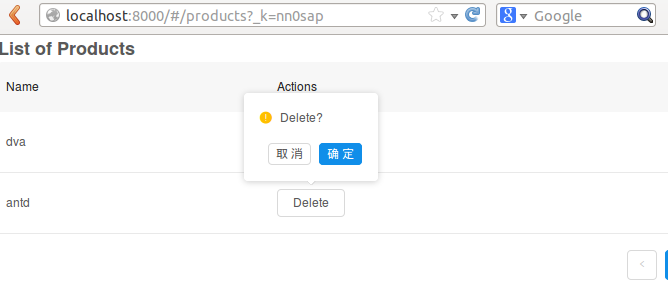
说明大功告成。。。
ubantu 14.04中安装npm+node.js+react antd的更多相关文章
- 在Sublime Text 3 中安装SublimeLinter,Node.js进行JS&CSS代码校验
转载自:http://www.wiibil.com/website/sublimelinter-jshint-csslint.html 在Sublime Text中安装SublimeLinter,No ...
- Ubuntu 14.04中安装最新版Eclipse
Ubuntu 14.04中安装最新版Eclipse 来源:Linux社区 作者:Linux 1.安装OpenJDK Java 7 如果你的系统中没有安装Java,我们需要按照如下步骤事先安装好 ...
- 怎样在Ubuntu 14.04中安装Java(转)
想知道如何在Ubuntu 14.04中安装Java?安装Java肯定是安装Ubuntu 14.04后首先要做的几件事情之一(见http://www.linuxidc.com/Linux/2014-04 ...
- Ubuntu 14.04 中 安装elasticsearch2.*+logstash2.*+kibana
在Ubuntu 14.04 上安装单机版ELK 2.*(脚本化) 1.判断是否为root权限 if [ "${UID}" -ne 0 ]; then echo "You ...
- 如何在Ubuntu 14.04中安装最新版Eclipse
想必很多开发人员都知道,Ubuntu 软件源中提供的并不是最新版本的 Eclipse,本教程就教大家如何在 Ubuntu 14.04 中快速安装 Eclipse 官方发布的最新版本. 到目前为止,Ec ...
- 转:如何在Ubuntu 14.04中安装最新版Eclipse
想必很多开发人员都知道,Ubuntu 软件源中提供的并不是最新版本的 Eclipse,本教程就教大家如何在 Ubuntu 14.04 中快速安装 Eclipse 官方发布的最新版本. 到目前为止,Ec ...
- ubuntu 14.04中安装 ruby on rails 环境
环境:在win7 上Vmware虚拟机环境中安装的ubuntu 14.04 1. bundle install 时,报json错误可以看出是在安装nokogiri时遇到了问题,此时执行 sudo ap ...
- ubuntu 14.04中安装 ruby on rails 环境(填坑版) 呕血推荐
环境:在win7 上Vmware虚拟机环境中安装的ubuntu 14.04 开发相关: ruby 2.2.0 rails 4.2.0 sublime text 3 本文说明:所有的命令均在$ 之后,若 ...
- 在Window IIS中安装运行node.js应用—你疯了吗
[原文发表地址]Installing and Running node.js applications within IIS on Windows - Are you mad? [原文发表时间]201 ...
随机推荐
- django----Form详细信息
Form类: 创建Form类时,主要涉及到 [字段] 和 [插件],字段用于对用户请求数据的验证,插件用于自动生成HTML; Django内置字段 Field required=True, 是否允许为 ...
- 远程执行shell脚本
ssh -p2016 apache@10.10.18.130 '/bin/sh /data/www/vhosts/WOStest3_ENV/update_env.sh' 需要设置shell远程免密码登 ...
- python压缩文件
#coding=utf-8 #压缩文件 import os,os.path import zipfile #压缩:传路径,文件名 def zip_compression(dirname,zipfile ...
- echarts + timeline 显示多个options
var option = { //timeline基本配置都写在baseoption 中 baseOption: { timeline: { //loop: false, axisType: 'cat ...
- JSON数据写入和解析
如何写入JSON 需要第三方jar包,JSON包 //写入json数据 public static String sendJson() { JSONObject json = new JSONObje ...
- java实现满天星swing&awt
一起有两个类 1.MyStar.java package day02; import java.awt.Color; import javax.swing.JFrame;import javax.sw ...
- 去掉A标签的点击选中边框
非IE a:focus { outline:none; }
- UEditor上传自定义文件夹
需求:使用UEditor上传时需要知道具体到哪个章节得图片,所以得根据Session中得文件重新定义 修改Handler类: public HttpSessionState Session {get; ...
- Spark的Streaming和Spark的SQL简单入门学习
1.Spark Streaming是什么? a.Spark Streaming是什么? Spark Streaming类似于Apache Storm,用于流式数据的处理.根据其官方文档介绍,Spark ...
- 一脸懵逼学习Hive的安装(将sql语句翻译成MapReduce程序的一个工具)
Hive只在一个节点上安装即可: 1.上传tar包:这个上传就不贴图了,贴一下上传后的,看一下虚拟机吧: 2.解压操作: [root@slaver3 hadoop]# tar -zxvf hive-0 ...