
Spring Boot SOAP Webservice例子
前言
本文将学习如何利用Spring boot快速创建SOAP webservice服务;
虽然目前REST和微服务越来越流行,但是SOAP在某些情况下,仍然有它的用武之地;
在本篇 spring boot SOAP教程中,我们会专注于和Spring boot相关的配置,感受下在Spring Boot中,创建SOAP webservice是如何的简便、快速;
本文将以一个"学生搜索"这个小功能作为示例,演示Spring Boot中SOAP webservice的创建过程;
技术栈
JDK 1.8, Eclipse, Maven– 开发环境Spring-boot– 基础开发框架wsdl4j– 发布WSDLSOAP-UI– 测试服务JAXB maven plugin- 代码生成
工程结构
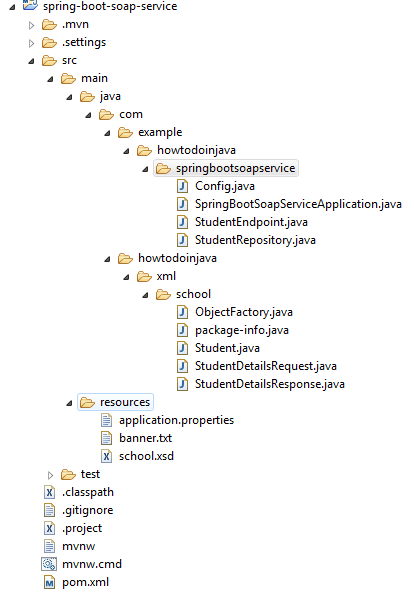
本工程的代码及文件目录结构如下
创建Spring Boot工程
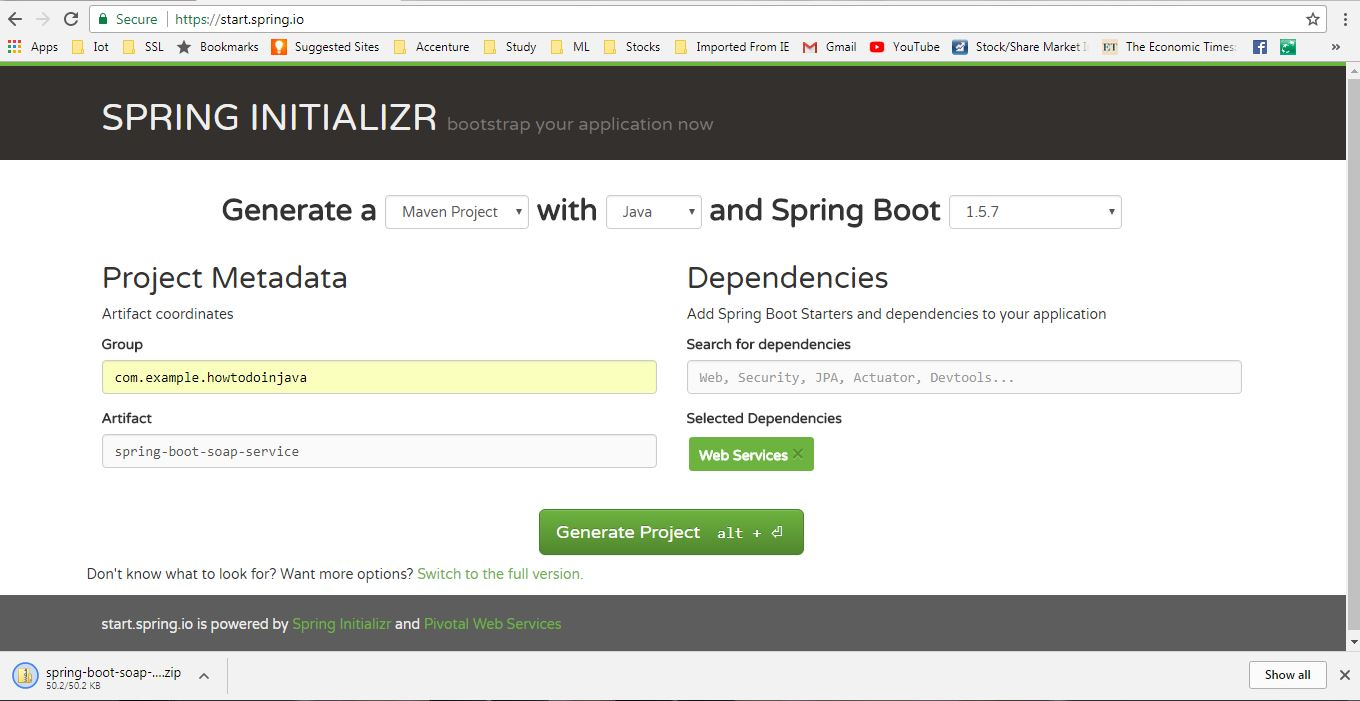
访问 SPRING INITIALIZR网站,添加Web Services依赖,输入maven的GAV 坐标,点击下载工程,下载完成后解压导入IDE即可;
修改pom.xml文件,添加Wsdl4j依赖:
<dependency>

    <groupId>wsdl4j</groupId>

    <artifactId>wsdl4j</artifactId>

</dependency>
创建SOAP Domain模型并生成Java代码
首先,我们需要给我们的服务创建domain(方法和参数),出于简便考虑,我将请求和响应放在了同一个XSD文件里,不过在实际应用开发的时候,通常需要放到多个XSD文件里;
创建student.xsd文件,并放到我们工程的resources 目录下
student.xsd
<xs:schema xmlns:xs="http://www.w3.org/2001/XMLSchema" xmlns:tns="http://www.howtodoinjava.com/xml/school"

targetNamespace="http://www.howtodoinjava.com/xml/school" elementFormDefault="qualified">

    <xs:element name="StudentDetailsRequest">

        <xs:complexType>

            <xs:sequence>

                <xs:element name="name" type="xs:string"/>

            </xs:sequence>

        </xs:complexType>

    </xs:element>

    <xs:element name="StudentDetailsResponse">

        <xs:complexType>

            <xs:sequence>

                <xs:element name="Student" type="tns:Student"/>

            </xs:sequence>

        </xs:complexType>

    </xs:element>

    <xs:complexType name="Student">

        <xs:sequence>

            <xs:element name="name" type="xs:string"/>

            <xs:element name="standard" type="xs:int"/>

            <xs:element name="address" type="xs:string"/>

        </xs:sequence>

    </xs:complexType>

</xs:schema>
添加JAXB maven插件用于生成代码
我们将使用jaxb2-maven-plugin来高效的生成domain代码,首先需要在pom.xml文件添加以下插件配置代码:
<plugin>

    <groupId>org.codehaus.mojo</groupId>

    <artifactId>jaxb2-maven-plugin</artifactId>

    <version>1.6</version>

    <executions>

        <execution>

            <id>xjc</id>

            <goals>

                <goal>xjc</goal>

            </goals>

        </execution>

    </executions>

    <configuration>

        <schemaDirectory>${project.basedir}/src/main/resources/</schemaDirectory>

        <outputDirectory>${project.basedir}/src/main/java</outputDirectory>

        <clearOutputDir>false</clearOutputDir>

    </configuration>

</plugin>
该插件将使用 XJC工具作为代码生成引擎,XJC能将XML schema 文件转成带注解的代码;
现在,我们就可以执行以上插件生成代码了;
创建SOAP Webservice Endpoint
StudentEndpoint类会处理所有访问该服务的请求,并委派给StudentRepository去处理,具体代码如下:
package com.example.howtodoinjava.springbootsoapservice;

import org.springframework.beans.factory.annotation.Autowired;

import org.springframework.ws.server.endpoint.annotation.Endpoint;

import org.springframework.ws.server.endpoint.annotation.PayloadRoot;

import org.springframework.ws.server.endpoint.annotation.RequestPayload;

import org.springframework.ws.server.endpoint.annotation.ResponsePayload;

import com.howtodoinjava.xml.school.StudentDetailsRequest;

import com.howtodoinjava.xml.school.StudentDetailsResponse;

@Endpoint

public class StudentEndpoint

{

    private static final String NAMESPACE_URI = "http://www.howtodoinjava.com/xml/school";

    private StudentRepository StudentRepository;

    @Autowired

    public StudentEndpoint(StudentRepository StudentRepository) {

        this.StudentRepository = StudentRepository;

    }

    @PayloadRoot(namespace = NAMESPACE_URI, localPart = "StudentDetailsRequest")

    @ResponsePayload

    public StudentDetailsResponse getStudent(@RequestPayload StudentDetailsRequest request) {

        StudentDetailsResponse response = new StudentDetailsResponse();

        response.setStudent(StudentRepository.findStudent(request.getName()));

        return response;

    }

}
对上面的几个注解做个简单说明(可以和Spring MVC的Controller做个类比,有点相似):
@Endpoint声明用于处理SOAP消息@PayloadRoot根据namespace和localPart映射对应的处理方法@RequestPayload声明进来的消息将会与该方法的参数映射@ResponsePayload方法返回值的映射
创建Data Repository
出于简便考虑,我们将直接在代码里初始化相关数据,代码如下:
创建StudentRepository.java,加上@Repository注解,添加findStudent()方法:
package com.example.howtodoinjava.springbootsoapservice;

import java.util.HashMap;

import java.util.Map;

import javax.annotation.PostConstruct;

import org.springframework.stereotype.Component;

import org.springframework.util.Assert;

import com.howtodoinjava.xml.school.Student;

@Component

public class StudentRepository {

    private static final Map<String, Student> students = new HashMap<>();

    @PostConstruct

    public void initData() {

        Student student = new Student();

        student.setName("Sajal");

        student.setStandard(5);

        student.setAddress("Pune");

        students.put(student.getName(), student);

        student = new Student();

        student.setName("Kajal");

        student.setStandard(5);

        student.setAddress("Chicago");

        students.put(student.getName(), student);

        student = new Student();

        student.setName("Lokesh");

        student.setStandard(6);

        student.setAddress("Delhi");

        students.put(student.getName(), student);

        student = new Student();

        student.setName("Sukesh");

        student.setStandard(7);

        student.setAddress("Noida");

        students.put(student.getName(), student);

    }

    public Student findStudent(String name) {

        Assert.notNull(name, "The Student's name must not be null");

        return students.get(name);

    }

}
添加SOAP Webservice 配置
添加一个带 @Configuration注解的配置类:
package com.example.howtodoinjava.springbootsoapservice;

import org.springframework.boot.web.servlet.ServletRegistrationBean;

import org.springframework.context.ApplicationContext;

import org.springframework.context.annotation.Bean;

import org.springframework.context.annotation.Configuration;

import org.springframework.core.io.ClassPathResource;

import org.springframework.ws.config.annotation.EnableWs;

import org.springframework.ws.config.annotation.WsConfigurerAdapter;

import org.springframework.ws.transport.http.MessageDispatcherServlet;

import org.springframework.ws.wsdl.wsdl11.DefaultWsdl11Definition;

import org.springframework.xml.xsd.SimpleXsdSchema;

import org.springframework.xml.xsd.XsdSchema;

@EnableWs

@Configuration

public class Config extends WsConfigurerAdapter

{

    @Bean

    public ServletRegistrationBean messageDispatcherServlet(ApplicationContext applicationContext)

    {

        MessageDispatcherServlet servlet = new MessageDispatcherServlet();

        servlet.setApplicationContext(applicationContext);

        servlet.setTransformWsdlLocations(true);

        return new ServletRegistrationBean(servlet, "/service/*");

    }

    @Bean(name = "studentDetailsWsdl")

    public DefaultWsdl11Definition defaultWsdl11Definition(XsdSchema countriesSchema)

    {

        DefaultWsdl11Definition wsdl11Definition = new DefaultWsdl11Definition();

        wsdl11Definition.setPortTypeName("StudentDetailsPort");

        wsdl11Definition.setLocationUri("/service/student-details");

        wsdl11Definition.setTargetNamespace("http://www.howtodoinjava.com/xml/school");

        wsdl11Definition.setSchema(countriesSchema);

        return wsdl11Definition;

    }

    @Bean

    public XsdSchema countriesSchema()

    {

        return new SimpleXsdSchema(new ClassPathResource("school.xsd"));

    }

}
- 该类继承了
WsConfigurerAdapter类配置了注解驱动的 Spring-WS编程模式; MessageDispatcherServlet- Spring-WS使用该类处理SOAP 请求,我们需要把该Servlet注入ApplicationContext ,以便Spring-WS能找到其它Bean;DefaultWsdl11Definition使用XsdSchema暴露了一个标准的的WSDL 1.1,bean的名字studentDetailsWsdl 将会作为wsdl 暴露出去的名称,我们可以通过http://localhost:8080/service/studentDetailsWsdl.wsdl路径访问;
Spring boot SOAP webservice例子演示
使用mvn clean install maven命名构建工程,并使用java -jar target\spring-boot-soap-service-0.0.1-SNAPSHOT.jar命令启动应用;
执行完以上操作后,将会以默认的8080端口启动一个tomcat服务,本应用将部署在该服务里;
现在我们可以访问http://localhost:8080/service/studentDetailsWsdl.wsdl路径,确认wsdl是否是正确的:
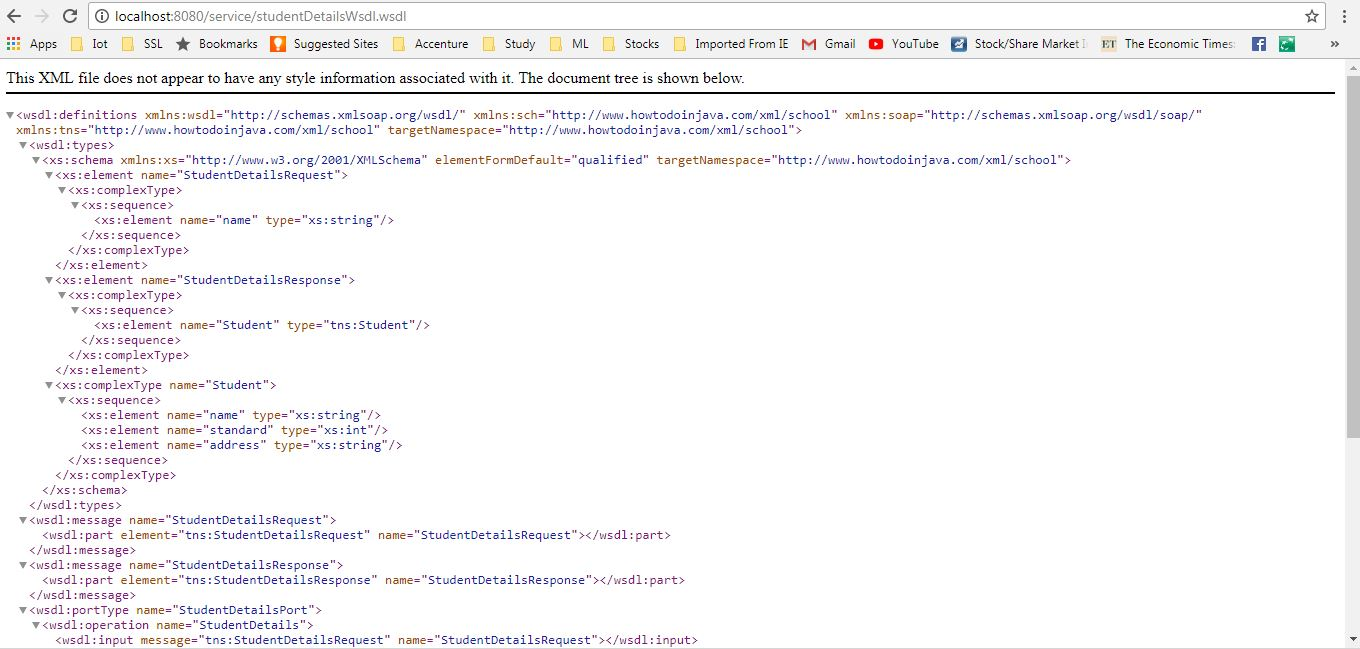
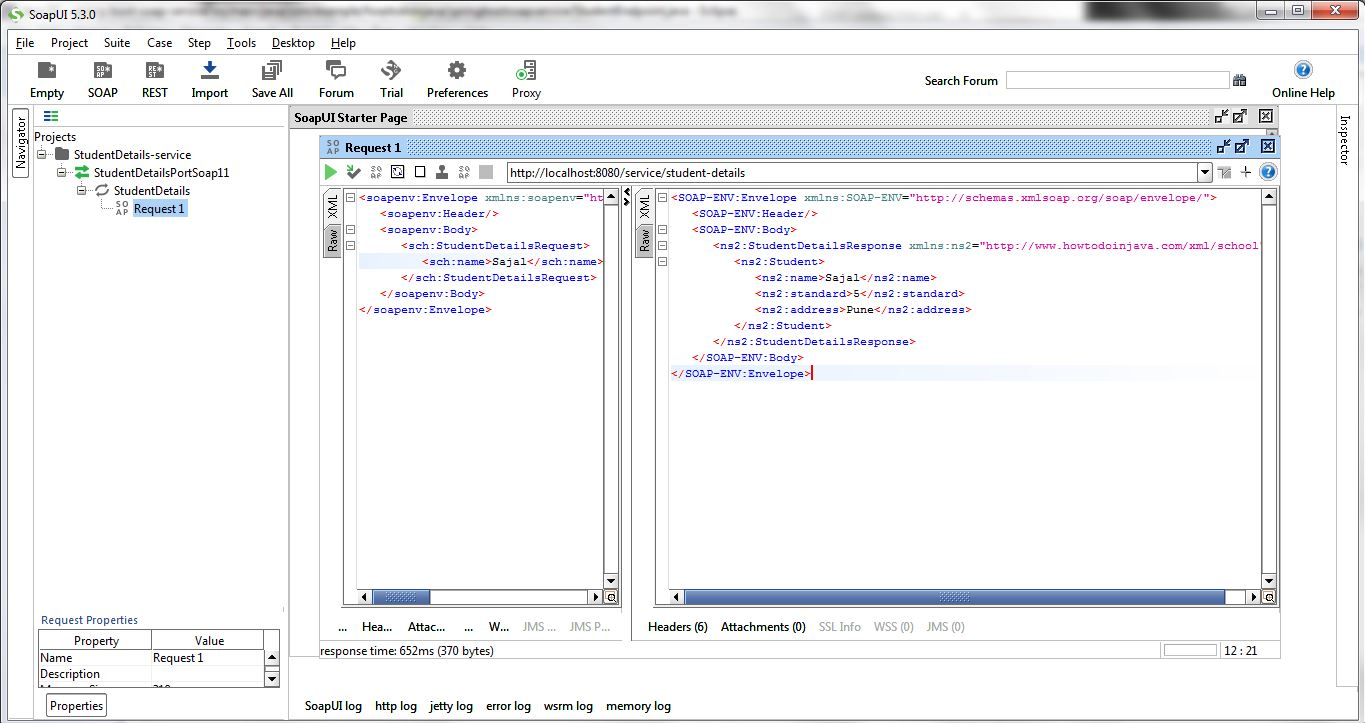
如果我们的wsdl没问题的话,我们可以使用该WSDL 在SOAP ui 里创建一个工程,并测试该应用,请求和响应示例如下:
请求:
<soapenv:Envelope xmlns:soapenv="http://schemas.xmlsoap.org/soap/envelope/" xmlns:sch="http://www.howtodoinjava.com/xml/school">

   <soapenv:Header/>

   <soapenv:Body>

      <sch:StudentDetailsRequest>

         <sch:name>Sajal</sch:name>

      </sch:StudentDetailsRequest>

   </soapenv:Body>

</soapenv:Envelope>
响应
<SOAP-ENV:Envelope xmlns:SOAP-ENV="http://schemas.xmlsoap.org/soap/envelope/">

   <SOAP-ENV:Header/>

   <SOAP-ENV:Body>

      <ns2:StudentDetailsResponse xmlns:ns2="http://www.howtodoinjava.com/xml/school">

         <ns2:Student>

            <ns2:name>Sajal</ns2:name>

            <ns2:standard>5</ns2:standard>

            <ns2:address>Pune</ns2:address>

         </ns2:Student>

      </ns2:StudentDetailsResponse>

   </SOAP-ENV:Body>

</SOAP-ENV:Envelope>
总结
本文学习了如何使用Spring Boot创建SOAP webservice,同时也学习了如何利用wsdl生成代码,以及Spring-WS如何处理SOAP 请求
Spring Boot SOAP Webservice例子的更多相关文章
- Spring Boot 开发 WebService 服务
WebService 虽然现在大部分互联网企业不太提倡使用,但在以第三方接口为主导的市场,对方来什么接口你还得用什么接口,不可能把接口重写了.例如大部分传统的大型企业都在用 WebService,并且 ...
- Spring boot 开发WebService遇到的问题之一
当pom.xml文件中的配置: <artifactId>spring-boot-starter-parent</artifactId><version>2.0.6. ...
- Spring Boot 2 + Redis例子
Redis是一个key-value数据库,支持存储的value类型包括string(字符串).list(链表).set(集合).zset(sorted set --有序集合)和hash(哈希类型).在 ...
- Spring Boot SockJS应用例子
1.SockJS用javascript实现的socket连接,兼容各种浏览器的WebSocket支持库2.WebSocket是H5的,不支持H5的浏览器没法使用.3.SockJS它提供类似于webso ...
- spring boot 微服务例子一
package com.example.hello.demo; import org.springframework.boot.SpringApplication;import org.springf ...
- spring boot整合JWT例子
application.properties jwt.expire_time=3600000 jwt.secret=MDk4ZjZiY2Q0NjIxZDM3M2NhZGU0ZTgzMjY34DFDSS ...
- Spring Boot 使用 CXF 调用 WebService 服务
上一张我们讲到 Spring Boot 开发 WebService 服务,本章研究基于 CXF 调用 WebService.另外本来想写一篇 xfire 作为 client 端来调用 webservi ...
- spring boot面试问题集锦
译文作者:david 原文链接:https://www.javainuse.com/spring/SpringBootInterviewQuestions Q: 什么是spring boot? A: ...
- 面试那点小事,你从未见过的spring boot面试集锦(附详细答案)
一, 什么是spring boot? 多年来,随着新功能的增加,spring变得越来越复杂.只需访问页面https://spring.io/projects,我们将看到所有在应用程序中使用的不同功能的 ...
随机推荐
- supervisor简要使用说明
安装方法(之一) pip install supervisor 主要组件 supervisord: 用于控制启用和退出子进程,记录子进程的标准输出和标准错误输出. supervisorctl: she ...
- ArrayList增加扩容问题 源码分析
public class ArrayList<E>{ private static final int DEFAULT_CAPACITY = 10;//默认的容量是10 private s ...
- HTTPie命令介绍
HTTPie 是一个 HTTP 的命令行客户端.其目标是让 CLI 和 web 服务之间的交互尽可能的人性化.HTTPie 可用于与 HTTP 服务器做测试.调试和常规交互. 1 定制 HTTP 方法 ...
- python (创建虚拟环境)
Python python 介绍 Python是一门计算机编程语言.是一种面向对象的动态类型语言,最初被设计用于编写自动化脚本(shell),随着版本的不断更新和语言新功能的添加,越来越多被用于独立的 ...
- 2019.03.29 NOIP训练 友好国度(点分治+容斥)
传送门 思路: 直接上点分治+容斥计算每个因数对应的贡献即可. 代码: #include<bits/stdc++.h> #define ri register int using name ...
- mysql 数据库链接 过期产品
注意下面的"@" 必须要加的!否则会报错! $link = @mysql_connect('localhost','root','root') or die("link ...
- Unity3D InputManager详解
首先说一下 Input 类,这个类很常用,API 大家基本都知道,这里记录几个使用频率没那么高的 API Input.acceleration:重力加速度传感器的值,加速度的方向,适用于移动平台. I ...
- 09-JS的事件流的概念(重点)
在学习jQuery的事件之前,大家必须要对JS的事件有所了解.看下文 事件的概念 HTML中与javascript交互是通过事件驱动来实现的,例如鼠标点击事件.页面的滚动事件onscroll等等,可以 ...
- Python爬虫的学习经历
在准备学习人工智能之前呢,我看了一下大体的学习纲领.发现排在前面的是PYTHON的基础知识和爬虫相关的知识,再者就是相关的数学算法与金融分析.不过想来也是,如果想进行大量的数据运算与分析,宏大的基础数 ...
- CentOS5.5 - lnmp环境安装与使用
CentOS5.5 - lnmp环境安装与使用 到公司搭建环境可以直接使用YUM. 安装一.rpm包安装(安装方便) yum:下载软件包并且安装.前提:连网. yum 使用流程: 1. yum lis ...