
Elastic Stack之Logstash进阶
Elastic Stack之Logstash进阶
作者:尹正杰
版权声明:原创作品,谢绝转载!否则将追究法律责任。
一.使用GeoLite2和logstash 过滤插件的geoip案例
1>.GeoLite2概述
GeoLite2数据库是免费的IP地理定位数据库,与MaxMind的GeoIP2数据库相当,但不太准确。GeoLite2国家和城市数据库在每个月的第一个星期二更新。GeoLite2 ASN数据库每周二更新一次。官方网址:https://www.maxmind.com/en/home。
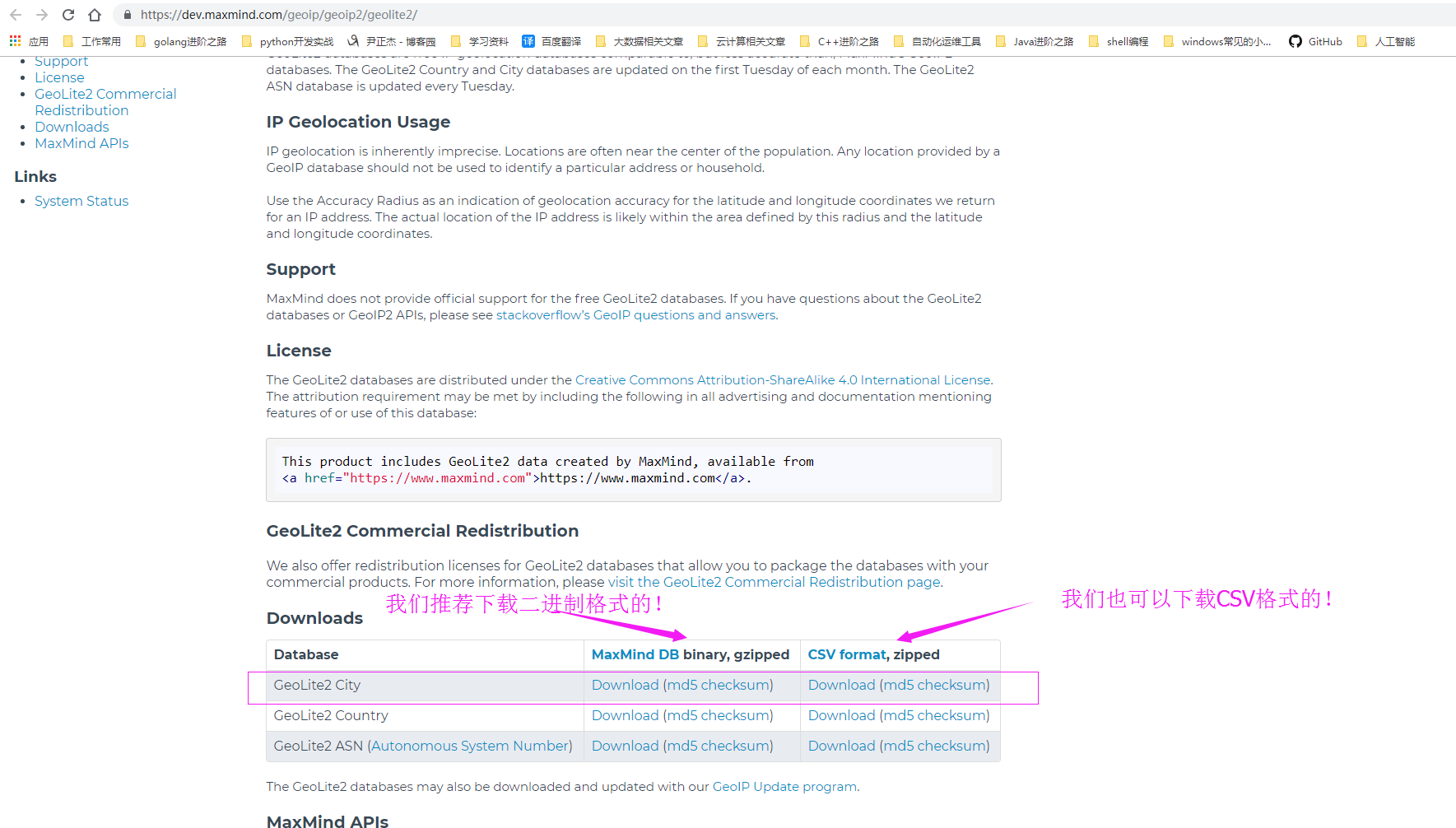
2>.下载GeoLite2的免费库(下载地址:https://dev.maxmind.com/geoip/geoip2/geolite2/)
[root@node105 ~]# ll

total

-rw-r--r--.  root root  Sep  : logstash-5.6..rpm

[root@node105 ~]#

[root@node105 ~]#

[root@node105 ~]# wget https://geolite.maxmind.com/download/geoip/database/GeoLite2-City.tar.gz

---- ::--  https://geolite.maxmind.com/download/geoip/database/GeoLite2-City.tar.gz

Resolving geolite.maxmind.com (geolite.maxmind.com)... 104.17.201.89, 104.17.200.89, ::::c959, ...

Connecting to geolite.maxmind.com (geolite.maxmind.com)|104.17.201.89|:... connected.

HTTP request sent, awaiting response...  OK

Length:  (27M) [application/gzip]

Saving to: ‘GeoLite2-City.tar.gz’

%[===========================================================================================================================================================>] ,,   197KB/s   in 1m 59s

-- :: ( KB/s) - ‘GeoLite2-City.tar.gz’ saved [/]

[root@node105 ~]#

[root@node105 ~]# ll

total

-rw-r--r--.  root root   Mar   : GeoLite2-City.tar.gz

-rw-r--r--.  root root  Sep  : logstash-5.6..rpm

[root@node105 ~]#

[root@node105 ~]#
[root@node105 ~]# wget https://geolite.maxmind.com/download/geoip/database/GeoLite2-City.tar.gz
3>.解压GeoLite并创建软连接
[root@node105 ~]#

[root@node105 ~]# mkdir /etc/logstash/maxmind

[root@node105 ~]#

[root@node105 ~]# ll

total

-rw-r--r--.  root root   Mar   : GeoLite2-City.tar.gz

-rw-r--r--.  root root  Sep  : logstash-5.6..rpm

[root@node105 ~]#

[root@node105 ~]#

[root@node105 ~]#

[root@node105 ~]# tar -xf GeoLite2-City.tar.gz -C /etc/logstash/maxmind/

[root@node105 ~]#

[root@node105 ~]# ll /etc/logstash/maxmind/GeoLite2-City_20190305/

total

-rw-r--r--.           Mar   : COPYRIGHT.txt

-rw-r--r--.     Mar   : GeoLite2-City.mmdb

-rw-r--r--.          Mar   : LICENSE.txt

-rw-r--r--.          Mar   : README.txt

[root@node105 ~]#

[root@node105 ~]#
[root@node105 ~]# tar -xf GeoLite2-City.tar.gz -C /etc/logstash/maxmind/
[root@node105 ~]# ln -sv /etc/logstash/maxmind/GeoLite2-City_20190305/GeoLite2-City.mmdb /etc/logstash/maxmind/

‘/etc/logstash/maxmind/GeoLite2-City.mmdb’ -> ‘/etc/logstash/maxmind/GeoLite2-City_20190305/GeoLite2-City.mmdb’

[root@node105 ~]#

[root@node105 ~]# ll /etc/logstash/maxmind/

total

drwxr-xr-x.     Mar   : GeoLite2-City_20190305

lrwxrwxrwx.  root root  Mar  : GeoLite2-City.mmdb -> /etc/logstash/maxmind/GeoLite2-City_20190305/GeoLite2-City.mmdb

[root@node105 ~]#

[root@node105 ~]#
[root@node105 ~]# ln -sv /etc/logstash/maxmind/GeoLite2-City_20190305/GeoLite2-City.mmdb /etc/logstash/maxmind/
4>.编写logstash配置文件并测试语法()
[root@node105 ~]#

[root@node105 ~]# cp /etc/logstash/conf.d/file-date-stdout.conf /etc/logstash/conf.d/file-date-geoip-stdout.conf

[root@node105 ~]#

[root@node105 ~]#

[root@node105 ~]# cat /etc/logstash/conf.d/file-date-geoip-stdout.conf

input {

    file {

        path => ["/var/log/httpd/access_log"]

        start_position => "beginning"

    }

}

filter {

    grok {

        match => { "message" => "%{HTTPD_COMBINEDLOG}" }

        remove_field => "message"

    }

    date {

        match => ["timestamp","dd/MMM/YYYY:H:m:s Z"]

        remove_field => "timestamp"

    }

    geoip {

        source => "clientip"

        target => "geoip"

        database => "/etc/logstash/maxmind/GeoLite2-City.mmdb"

    }

}

output {

    stdout {

        codec => rubydebug

    }

}

[root@node105 ~]#

[root@node105 ~]# logstash -f /etc/logstash/conf.d/file-date-geoip-stdout.conf -t

WARNING: Could not find logstash.yml which is typically located in $LS_HOME/config or /etc/logstash. You can specify the path using --path.settings. Continuing using the defaults

Could not find log4j2 configuration at path /usr/share/logstash/config/log4j2.properties. Using default config which logs errors to the console

Configuration OK

[root@node105 ~]#
[root@node105 ~]# cat /etc/logstash/conf.d/file-date-geoip-stdout.conf
5>.启动logstash的geoip相关配置文件(参考链接:https://www.elastic.co/guide/en/logstash/5.6/plugins-filters-geoip.html)
[root@node103 ~]#

[root@node103 ~]#

[root@node103 ~]# while true; do curl -H "X-Forwarded-For:$[$RANDOM%223+1].$[$RANDOM%255].1.1" http://node105.yinzhengjie.org.cn/test$[$RANDOM%50+1].html;sleep 1;done

Page

Page

Page

Page

Page

Page

Page

Page

Page

Page

Page

Page

Page

Page

Page

Page

Page

Page

Page

Page

Page

Page

Page

Page

Page

Page

Page

Page

Page

Page

Page

Page

Page

Page

Page

Page

Page

Page

Page

Page

Page

Page

Page

Page

Page

Page

Page

Page

Page

Page

Page

Page

Page

Page

Page

Page

Page

Page

Page

Page

Page

Page

Page

Page

Page

Page

Page

Page

Page

Page

Page

Page

Page

Page

Page

Page

Page

Page

Page

Page

Page

Page

Page

Page

Page

Page

Page

Page

Page

Page

Page

Page

Page

Page

Page

Page

Page

Page

Page

Page

Page

Page

Page

Page

Page

Page

Page

Page

Page

Page

Page

Page

Page

Page

Page

Page

Page

Page

Page

Page

Page

Page

Page

Page

Page

Page

Page

Page

Page

Page

^C

[root@node103 ~]#
[root@node103 ~]# while true; do curl -H "X-Forwarded-For:$[$RANDOM%223+1].$[$RANDOM%255].1.1" http://node105.yinzhengjie.org.cn/test$[$RANDOM%50+1].html;sleep 1;done
[root@node105 ~]#

[root@node105 ~]# logstash -f /etc/logstash/conf.d/file-date-geoip-stdout.conf

WARNING: Could not find logstash.yml which is typically located in $LS_HOME/config or /etc/logstash. You can specify the path using --path.settings. Continuing using the defaults

Could not find log4j2 configuration at path /usr/share/logstash/config/log4j2.properties. Using default config which logs errors to the console

{

        "request" => "/test35.html",

          "agent" => "\"curl/7.29.0\"",

          "geoip" => {

              "timezone" => "Europe/London",

                    "ip" => "85.211.1.1",

              "latitude" => 52.4768,

        "continent_code" => "EU",

             "city_name" => "Birmingham",

          "country_name" => "United Kingdom",

         "country_code2" => "GB",

         "country_code3" => "GB",

           "region_name" => "Birmingham",

              "location" => {

            "lon" => -1.9341,

            "lat" => 52.4768

        },

           "postal_code" => "B16",

           "region_code" => "BIR",

             "longitude" => -1.9341

    },

           "auth" => "-",

          "ident" => "-",

           "verb" => "GET",

           "path" => "/var/log/httpd/access_log",

       "referrer" => "\"-\"",

     "@timestamp" => --11T13::.000Z,

       "response" => "",

          "bytes" => "",

       "clientip" => "85.211.1.1",

       "@version" => "",

           "host" => "0.0.0.0",

    "httpversion" => "1.1"

}

{

        "request" => "/test12.html",

          "agent" => "\"curl/7.29.0\"",

          "geoip" => {

              "timezone" => "America/New_York",

                    "ip" => "108.5.1.1",

              "latitude" => 40.7667,

        "continent_code" => "NA",

             "city_name" => "Union City",

          "country_name" => "United States",

         "country_code2" => "US",

              "dma_code" => ,

         "country_code3" => "US",

           "region_name" => "New Jersey",

              "location" => {

            "lon" => -74.0311,

            "lat" => 40.7667

        },

           "postal_code" => "",

           "region_code" => "NJ",

             "longitude" => -74.0311

    },

           "auth" => "-",

          "ident" => "-",

           "verb" => "GET",

           "path" => "/var/log/httpd/access_log",

       "referrer" => "\"-\"",

     "@timestamp" => --11T13::.000Z,

       "response" => "",

          "bytes" => "",

       "clientip" => "108.5.1.1",

       "@version" => "",

           "host" => "0.0.0.0",

    "httpversion" => "1.1"

}

{

        "request" => "/test37.html",

          "agent" => "\"curl/7.29.0\"",

          "geoip" => {

              "timezone" => "America/Chicago",

                    "ip" => "24.118.1.1",

              "latitude" => 45.0139,

        "continent_code" => "NA",

             "city_name" => "Saint Paul",

          "country_name" => "United States",

         "country_code2" => "US",

              "dma_code" => ,

         "country_code3" => "US",

           "region_name" => "Minnesota",

              "location" => {

            "lon" => -93.1545,

            "lat" => 45.0139

        },

           "postal_code" => "",

           "region_code" => "MN",

             "longitude" => -93.1545

    },

           "auth" => "-",

          "ident" => "-",

           "verb" => "GET",

           "path" => "/var/log/httpd/access_log",

       "referrer" => "\"-\"",

     "@timestamp" => --11T13::.000Z,

       "response" => "",

          "bytes" => "",

       "clientip" => "24.118.1.1",

       "@version" => "",

           "host" => "0.0.0.0",

    "httpversion" => "1.1"

}

{

        "request" => "/test38.html",

          "agent" => "\"curl/7.29.0\"",

          "geoip" => {

                    "ip" => "55.27.1.1",

              "latitude" => 37.751,

          "country_name" => "United States",

         "country_code2" => "US",

        "continent_code" => "NA",

         "country_code3" => "US",

              "location" => {

            "lon" => -97.822,

            "lat" => 37.751

        },

             "longitude" => -97.822

    },

           "auth" => "-",

          "ident" => "-",

           "verb" => "GET",

           "path" => "/var/log/httpd/access_log",

       "referrer" => "\"-\"",

     "@timestamp" => --11T13::.000Z,

       "response" => "",

          "bytes" => "",

       "clientip" => "55.27.1.1",

       "@version" => "",

           "host" => "0.0.0.0",

    "httpversion" => "1.1"

}

{

        "request" => "/test11.html",

          "agent" => "\"curl/7.29.0\"",

          "geoip" => {

              "timezone" => "America/Los_Angeles",

                    "ip" => "3.173.1.1",

              "latitude" => 47.6348,

        "continent_code" => "NA",

             "city_name" => "Seattle",

          "country_name" => "United States",

         "country_code2" => "US",

              "dma_code" => ,

         "country_code3" => "US",

           "region_name" => "Washington",

              "location" => {

            "lon" => -122.3451,

            "lat" => 47.6348

        },

           "postal_code" => "",

           "region_code" => "WA",

             "longitude" => -122.3451

    },

           "auth" => "-",

          "ident" => "-",

           "verb" => "GET",

           "path" => "/var/log/httpd/access_log",

       "referrer" => "\"-\"",

     "@timestamp" => --11T13::.000Z,

       "response" => "",

          "bytes" => "",

       "clientip" => "3.173.1.1",

       "@version" => "",

           "host" => "0.0.0.0",

    "httpversion" => "1.1"

}

{

        "request" => "/test14.html",

          "agent" => "\"curl/7.29.0\"",

          "geoip" => {

             "city_name" => "Guayaquil",

              "timezone" => "America/Guayaquil",

                    "ip" => "191.99.1.1",

              "latitude" => -2.1664,

          "country_name" => "Ecuador",

         "country_code2" => "EC",

        "continent_code" => "SA",

         "country_code3" => "EC",

           "region_name" => "Provincia del Guayas",

              "location" => {

            "lon" => -79.9011,

            "lat" => -2.1664

        },

           "region_code" => "G",

             "longitude" => -79.9011

    },

           "auth" => "-",

          "ident" => "-",

           "verb" => "GET",

           "path" => "/var/log/httpd/access_log",

       "referrer" => "\"-\"",

     "@timestamp" => --11T13::.000Z,

       "response" => "",

          "bytes" => "",

       "clientip" => "191.99.1.1",

       "@version" => "",

           "host" => "0.0.0.0",

    "httpversion" => "1.1"

}

^C[root@node105 ~]#
[root@node105 ~]# logstash -f /etc/logstash/conf.d/file-date-geoip-stdout.conf
二.logstash 过滤插件的Mutate案例
1>.mutate概述
mutate过滤器允许您在字段上执行常规突变。您可以重命名,删除,替换和修改事件中的字段。详情请参考:https://www.elastic.co/guide/en/logstash/5.6/plugins-filters-mutate.html。
2>.编写mutate案例
[root@node105 ~]#

[root@node105 ~]# cp /etc/logstash/conf.d/file-date-geoip-stdout.conf  /etc/logstash/conf.d/file-date-geoip-mutate-stdout.conf

[root@node105 ~]#

[root@node105 ~]# vi  /etc/logstash/conf.d/file-date-geoip-mutate-stdout.conf

[root@node105 ~]#

[root@node105 ~]# cat  /etc/logstash/conf.d/file-date-geoip-mutate-stdout.conf

input {

    file {

        path => ["/var/log/httpd/access_log"]

        start_position => "beginning"

    }

}

filter {

    grok {

        match => { "message" => "%{HTTPD_COMBINEDLOG}" }

        remove_field => "message"

    }

    date {

        match => ["timestamp","dd/MMM/YYYY:H:m:s Z"]

        remove_field => "timestamp"

    }

    geoip {

        source => "clientip"

        target => "geoip"

        database => "/etc/logstash/maxmind/GeoLite2-City.mmdb"

    }

    mutate {

        rename => {

            "agent" => "user_agent"

        }

    }

}

output {

    stdout {

        codec => rubydebug

    }

}

[root@node105 ~]#

[root@node105 ~]# cp /etc/logstash/conf.d/file-date-geoip-stdout.conf  /etc/logstash/conf.d/file-date-geoip-mutate-stdout.conf ^C

[root@node105 ~]# logstash -f /etc/logstash/conf.d/file-date-geoip-mutate-stdout.conf -t

WARNING: Could not find logstash.yml which is typically located in $LS_HOME/config or /etc/logstash. You can specify the path using --path.settings. Continuing using the defaults

Could not find log4j2 configuration at path /usr/share/logstash/config/log4j2.properties. Using default config which logs errors to the console

Configuration OK

[root@node105 ~]#
[root@node105 ~]# cat /etc/logstash/conf.d/file-date-geoip-mutate-stdout.conf
3>.启动案例
[root@node103 ~]#

[root@node103 ~]#

[root@node103 ~]# while true; do curl -H "X-Forwarded-For:$[$RANDOM%223+1].$[$RANDOM%255].1.1" http://node105.yinzhengjie.org.cn/test$[$RANDOM%50+1].html;sleep 1;done

Page

Page

Page

Page

Page

Page

Page

Page

Page

Page

Page

Page

Page

Page

Page

Page

Page

Page

Page

Page

Page

Page

Page

Page

Page

Page

Page

Page

Page

Page

Page

Page

Page

Page

Page

Page

Page

Page

Page

Page

Page

Page

Page

Page

Page

^C

[root@node103 ~]#
[root@node103 ~]# while true; do curl -H "X-Forwarded-For:$[$RANDOM%223+1].$[$RANDOM%255].1.1" http://node105.yinzhengjie.org.cn/test$[$RANDOM%50+1].html;sleep 1;done
[root@node105 ~]# logstash -f /etc/logstash/conf.d/file-date-geoip-mutate-stdout.conf

WARNING: Could not find logstash.yml which is typically located in $LS_HOME/config or /etc/logstash. You can specify the path using --path.settings. Continuing using the defaults

Could not find log4j2 configuration at path /usr/share/logstash/config/log4j2.properties. Using default config which logs errors to the console

{

        "request" => "/test32.html",

          "geoip" => {

              "timezone" => "America/New_York",

                    "ip" => "73.137.1.1",

              "latitude" => 33.9135,

        "continent_code" => "NA",

             "city_name" => "Powder Springs",

          "country_name" => "United States",

         "country_code2" => "US",

              "dma_code" => ,

         "country_code3" => "US",

           "region_name" => "Georgia",

              "location" => {

            "lon" => -84.6859,

            "lat" => 33.9135

        },

           "postal_code" => "",

           "region_code" => "GA",

             "longitude" => -84.6859

    },

           "auth" => "-",

          "ident" => "-",

           "verb" => "GET",

           "path" => "/var/log/httpd/access_log",

       "referrer" => "\"-\"",

     "@timestamp" => --11T13::.000Z,

       "response" => "",

          "bytes" => "",

       "clientip" => "73.137.1.1",

       "@version" => "",

           "host" => "0.0.0.0",

    "httpversion" => "1.1",

     "user_agent" => "\"curl/7.29.0\""

}

{

        "request" => "/test32.html",

          "geoip" => {

             "city_name" => "Daegu",

              "timezone" => "Asia/Seoul",

                    "ip" => "119.201.1.1",

              "latitude" => 35.8723,

          "country_name" => "South Korea",

         "country_code2" => "KR",

        "continent_code" => "AS",

         "country_code3" => "KR",

           "region_name" => "Daegu",

              "location" => {

            "lon" => 128.5924,

            "lat" => 35.8723

        },

           "region_code" => "",

             "longitude" => 128.5924

    },

           "auth" => "-",

          "ident" => "-",

           "verb" => "GET",

           "path" => "/var/log/httpd/access_log",

       "referrer" => "\"-\"",

     "@timestamp" => --11T13::.000Z,

       "response" => "",

          "bytes" => "",

       "clientip" => "119.201.1.1",

       "@version" => "",

           "host" => "0.0.0.0",

    "httpversion" => "1.1",

     "user_agent" => "\"curl/7.29.0\""

}

^C[root@node105 ~]#
[root@node105 ~]# logstash -f /etc/logstash/conf.d/file-date-geoip-mutate-stdout.conf
三.logstash 输出插件之elasticsearch输出插件
1>.elasticsearch输出插件概述
此插件是在Elasticsearch中存储日志的推荐方法。如果您打算使用Kibana Web界面,则需要使用此输出。此输出仅说HTTP协议。从Logstash 2.0开始,HTTP是与Elasticsearch交互的首选协议。出于多种原因,我们强烈建议在节点协议上使用HTTP。HTTP只是稍微慢一点,但更容易管理和使用。使用HTTP协议时,可以升级Elasticsearch版本,而无需在锁定步骤中升级Logstash。官方文档:https://www.elastic.co/guide/en/logstash/5.6/plugins-outputs-elasticsearch.html。
2>.配置elasticsearch集群输出
[root@node105 ~]#

[root@node105 ~]# cat /etc/logstash/conf.d/file-filter-elasticsearch.conf

input {

    file {

        path => ["/var/log/httpd/access_log"]

        start_position => "beginning"

    }

}

filter {

    grok {

        match => { "message" => "%{HTTPD_COMBINEDLOG}" }

        remove_field => "message"

    }

    date {

        match => ["timestamp","dd/MMM/YYYY:H:m:s Z"]

        remove_field => "timestamp"

    }

    geoip {

        source => "clientip"

        target => "geoip"

        database => "/etc/logstash/maxmind/GeoLite2-City.mmdb"

    }

    mutate {

        rename => {

            "agent" => "user_agent"

        }

    }

}

output {

    elasticsearch {

        hosts => ["http://node101.yinzhengjie.org.cn:9200/","http://node102.yinzhengjie.org.cn:9200/","http://node103.yinzhengjie.org.cn:9200/"]

        index => "logstash-%{+YYYY.MM.dd}"

        document_type => "httpd_access_logs"

    }

}

[root@node105 ~]#
[root@node105 ~]# cat /etc/logstash/conf.d/file-filter-elasticsearch.conf
[root@node105 ~]#

[root@node105 ~]# logstash -f /etc/logstash/conf.d/file-filter-elasticsearch.conf -t

WARNING: Could not find logstash.yml which is typically located in $LS_HOME/config or /etc/logstash. You can specify the path using --path.settings. Continuing using the defaults

Could not find log4j2 configuration at path /usr/share/logstash/config/log4j2.properties. Using default config which logs errors to the console

Configuration OK

[root@node105 ~]#
[root@node105 ~]# logstash -f /etc/logstash/conf.d/file-filter-elasticsearch.conf -t
3>.运行logstash 配置文件并查看es集群是否有新的索引
[root@node103 ~]#

[root@node103 ~]# while true; do curl -H "X-Forwarded-For:$[$RANDOM%223+1].$[$RANDOM%255].1.1" http://node105.yinzhengjie.org.cn/test$[$RANDOM%60+1].html;sleep 1;done

<!DOCTYPE HTML PUBLIC "-//IETF//DTD HTML 2.0//EN">

<html><head>

<title> Not Found</title>

</head><body>

<h1>Not Found</h1>

<p>The requested URL /test59.html was not found on this server.</p>

</body></html>

Page

Page

<!DOCTYPE HTML PUBLIC "-//IETF//DTD HTML 2.0//EN">

<html><head>

<title> Not Found</title>

</head><body>

<h1>Not Found</h1>

<p>The requested URL /test53.html was not found on this server.</p>

</body></html>

Page

<!DOCTYPE HTML PUBLIC "-//IETF//DTD HTML 2.0//EN">

<html><head>

<title> Not Found</title>

</head><body>

<h1>Not Found</h1>

<p>The requested URL /test60.html was not found on this server.</p>

</body></html>

<!DOCTYPE HTML PUBLIC "-//IETF//DTD HTML 2.0//EN">

<html><head>

<title> Not Found</title>

</head><body>

<h1>Not Found</h1>

<p>The requested URL /test58.html was not found on this server.</p>

</body></html>

<!DOCTYPE HTML PUBLIC "-//IETF//DTD HTML 2.0//EN">

<html><head>

<title> Not Found</title>

</head><body>

<h1>Not Found</h1>

<p>The requested URL /test60.html was not found on this server.</p>

</body></html>

<!DOCTYPE HTML PUBLIC "-//IETF//DTD HTML 2.0//EN">

<html><head>

<title> Not Found</title>

</head><body>

<h1>Not Found</h1>

<p>The requested URL /test57.html was not found on this server.</p>

</body></html>

Page

Page

Page

Page

<!DOCTYPE HTML PUBLIC "-//IETF//DTD HTML 2.0//EN">

<html><head>

<title> Not Found</title>

</head><body>

<h1>Not Found</h1>

<p>The requested URL /test55.html was not found on this server.</p>

</body></html>

Page

Page

Page

Page

<!DOCTYPE HTML PUBLIC "-//IETF//DTD HTML 2.0//EN">

<html><head>

<title> Not Found</title>

</head><body>

<h1>Not Found</h1>

<p>The requested URL /test53.html was not found on this server.</p>

</body></html>

Page

Page

<!DOCTYPE HTML PUBLIC "-//IETF//DTD HTML 2.0//EN">

<html><head>

<title> Not Found</title>

</head><body>

<h1>Not Found</h1>

<p>The requested URL /test52.html was not found on this server.</p>

</body></html>

Page

Page

<!DOCTYPE HTML PUBLIC "-//IETF//DTD HTML 2.0//EN">

<html><head>

<title> Not Found</title>

</head><body>

<h1>Not Found</h1>

<p>The requested URL /test52.html was not found on this server.</p>

</body></html>

Page

<!DOCTYPE HTML PUBLIC "-//IETF//DTD HTML 2.0//EN">

<html><head>

<title> Not Found</title>

</head><body>

<h1>Not Found</h1>

<p>The requested URL /test51.html was not found on this server.</p>

</body></html>

Page

Page

Page

Page

Page

Page

Page

Page

Page

Page

Page

Page

Page

<!DOCTYPE HTML PUBLIC "-//IETF//DTD HTML 2.0//EN">

<html><head>

<title> Not Found</title>

</head><body>

<h1>Not Found</h1>

<p>The requested URL /test58.html was not found on this server.</p>

</body></html>

Page

Page

Page

Page

Page

Page

Page

Page

Page

<!DOCTYPE HTML PUBLIC "-//IETF//DTD HTML 2.0//EN">

<html><head>

<title> Not Found</title>

</head><body>

<h1>Not Found</h1>

<p>The requested URL /test51.html was not found on this server.</p>

</body></html>

Page

Page

Page

Page

Page

Page

Page

Page

Page

Page

<!DOCTYPE HTML PUBLIC "-//IETF//DTD HTML 2.0//EN">

<html><head>

<title> Not Found</title>

</head><body>

<h1>Not Found</h1>

<p>The requested URL /test54.html was not found on this server.</p>

</body></html>

Page

Page

Page

Page

Page

<!DOCTYPE HTML PUBLIC "-//IETF//DTD HTML 2.0//EN">

<html><head>

<title> Not Found</title>

</head><body>

<h1>Not Found</h1>

<p>The requested URL /test53.html was not found on this server.</p>

</body></html>

Page

Page

Page

Page

<!DOCTYPE HTML PUBLIC "-//IETF//DTD HTML 2.0//EN">

<html><head>

<title> Not Found</title>

</head><body>

<h1>Not Found</h1>

<p>The requested URL /test55.html was not found on this server.</p>

</body></html>

Page

Page

Page

Page

Page

Page

Page

Page

Page

Page

Page

Page

<!DOCTYPE HTML PUBLIC "-//IETF//DTD HTML 2.0//EN">

<html><head>

<title> Not Found</title>

</head><body>

<h1>Not Found</h1>

<p>The requested URL /test56.html was not found on this server.</p>

</body></html>

Page

Page

Page

Page

Page

Page

Page

<!DOCTYPE HTML PUBLIC "-//IETF//DTD HTML 2.0//EN">

<html><head>

<title> Not Found</title>

</head><body>

<h1>Not Found</h1>

<p>The requested URL /test57.html was not found on this server.</p>

</body></html>

Page

Page

Page

Page

Page

Page

<!DOCTYPE HTML PUBLIC "-//IETF//DTD HTML 2.0//EN">

<html><head>

<title> Not Found</title>

</head><body>

<h1>Not Found</h1>

<p>The requested URL /test51.html was not found on this server.</p>

</body></html>

Page

Page

<!DOCTYPE HTML PUBLIC "-//IETF//DTD HTML 2.0//EN">

<html><head>

<title> Not Found</title>

</head><body>

<h1>Not Found</h1>

<p>The requested URL /test57.html was not found on this server.</p>

</body></html>

Page

^C

[root@node103 ~]#
[root@node103 ~]# while true; do curl -H "X-Forwarded-For:$[$RANDOM%223+1].$[$RANDOM%255].1.1" http://node105.yinzhengjie.org.cn/test$[$RANDOM%60+1].html;sleep 1;done #我改动了该脚本,运行时会访问不到某些网站,模拟404!
[root@node105 ~]# logstash -f /etc/logstash/conf.d/file-filter-elasticsearch.conf

WARNING: Could not find logstash.yml which is typically located in $LS_HOME/config or /etc/logstash. You can specify the path using --path.settings. Continuing using the defaults

Could not find log4j2 configuration at path /usr/share/logstash/config/log4j2.properties. Using default config which logs errors to the console
[root@node105 ~]# logstash -f /etc/logstash/conf.d/file-filter-elasticsearch.conf #运行脚本,数据会被写入到es集群中
[root@node101 ~]#

[root@node101 ~]# curl -X GET http://node101.yinzhengjie.org.cn:9200/logstash-*/_search?q=clientip:187.152.1.2 | jq .

  % Total    % Received % Xferd  Average Speed   Time    Time     Time  Current

                                 Dload  Upload   Total   Spent    Left  Speed

                          --:--:-- --:--:-- --:--:--

{

  "took": ,

  "timed_out": false,

  "_shards": {

    "total": ,

    "successful": ,

    "skipped": ,

    "failed":

  },

  "hits": {

    "total": ,

    "max_score": null,

    "hits": []

  }

}

[root@node101 ~]#
[root@node101 ~]# curl -X GET http://node101.yinzhengjie.org.cn:9200/logstash-*/_search?q=clientip:187.152.1.2 | jq . #查询一条不存在的数据
[root@node101 ~]#

[root@node101 ~]# curl -X GET http://node101.yinzhengjie.org.cn:9200/logstash-*/_search?q=clientip:187.152.1.1 | jq .

  % Total    % Received % Xferd  Average Speed   Time    Time     Time  Current

                                 Dload  Upload   Total   Spent    Left  Speed

                          --:--:-- --:--:-- --:--:--

{

  "took": ,

  "timed_out": false,

  "_shards": {

    "total": ,

    "successful": ,

    "skipped": ,

    "failed":

  },

  "hits": {

    "total": ,

    "max_score": 2.0794415,

    "hits": [

      {

        "_index": "logstash-2019.03.11",

        "_type": "httpd_access_logs",

        "_id": "AWltCr5Hsru-A5a8RIhU",

        "_score": 2.0794415,

        "_source": {

          "request": "/test17.html",

          "geoip": {

            "timezone": "America/Mexico_City",

            "ip": "187.152.1.1",

            "latitude": 20.6347,

            "continent_code": "NA",

            "city_name": "Guadalajara",

            "country_name": "Mexico",

            "country_code2": "MX",

            "country_code3": "MX",

            "region_name": "Jalisco",

            "location": {

              "lon": -103.4344,

              "lat": 20.6347

            },

            "postal_code": "",

            "region_code": "JAL",

            "longitude": -103.4344

          },

          "auth": "-",

          "ident": "-",

          "verb": "GET",

          "path": "/var/log/httpd/access_log",

          "referrer": "\"-\"",

          "@timestamp": "2019-03-11T13:40:15.000Z",

          "response": "",

          "bytes": "",

          "clientip": "187.152.1.1",

          "@version": "",

          "host": "0.0.0.0",

          "httpversion": "1.1",

          "user_agent": "\"curl/7.29.0\""

        }

      }

    ]

  }

}

[root@node101 ~]#
[root@node101 ~]# curl -X GET http://node101.yinzhengjie.org.cn:9200/logstash-*/_search?q=clientip:187.152.1.1 | jq . #查询一条已经存在的数据
[root@node101 ~]#

[root@node101 ~]#

[root@node101 ~]# curl -X GET http://node101.yinzhengjie.org.cn:9200/logstash-*/_search?q=response:404 | jq .

  % Total    % Received % Xferd  Average Speed   Time    Time     Time  Current

                                 Dload  Upload   Total   Spent    Left  Speed

                  250k       --:--:-- --:--:-- --:--:--  256k

{

  "took": ,

  "timed_out": false,

  "_shards": {

    "total": ,

    "successful": ,

    "skipped": ,

    "failed":

  },

  "hits": {

    "total": ,

    "max_score": 2.3795462,

    "hits": [

      {

        "_index": "logstash-2019.03.11",

        "_type": "httpd_access_logs",

        "_id": "AWltEH9tsru-A5a8RIhq",

        "_score": 2.3795462,

        "_source": {

          "request": "/test51.html",

          "geoip": {

            "timezone": "Europe/Madrid",

            "ip": "83.47.1.1",

            "latitude": 36.54,

            "continent_code": "EU",

            "city_name": "Fuengirola",

            "country_name": "Spain",

            "country_code2": "ES",

            "country_code3": "ES",

            "region_name": "Malaga",

            "location": {

              "lon": -4.6247,

              "lat": 36.54

            },

            "postal_code": "",

            "region_code": "MA",

            "longitude": -4.6247

          },

          "auth": "-",

          "ident": "-",

          "verb": "GET",

          "path": "/var/log/httpd/access_log",

          "referrer": "\"-\"",

          "@timestamp": "2019-03-11T14:03:11.000Z",

          "response": "",

          "bytes": "",

          "clientip": "83.47.1.1",

          "@version": "",

          "host": "0.0.0.0",

          "httpversion": "1.1",

          "user_agent": "\"curl/7.29.0\""

        }

      },

      {

        "_index": "logstash-2019.03.11",

        "_type": "httpd_access_logs",

        "_id": "AWltEUMs3WCT5NaOiwE7",

        "_score": 2.3795462,

        "_source": {

          "request": "/test51.html",

          "geoip": {

            "city_name": "Central",

            "timezone": "Asia/Hong_Kong",

            "ip": "13.94.1.1",

            "latitude": 22.2909,

            "country_name": "Hong Kong",

            "country_code2": "HK",

            "continent_code": "AS",

            "country_code3": "HK",

            "region_name": "Central and Western District",

            "location": {

              "lon": 114.15,

              "lat": 22.2909

            },

            "region_code": "HCW",

            "longitude": 114.15

          },

          "auth": "-",

          "ident": "-",

          "verb": "GET",

          "path": "/var/log/httpd/access_log",

          "referrer": "\"-\"",

          "@timestamp": "2019-03-11T14:04:01.000Z",

          "response": "",

          "bytes": "",

          "clientip": "13.94.1.1",

          "@version": "",

          "host": "0.0.0.0",

          "httpversion": "1.1",

          "user_agent": "\"curl/7.29.0\""

        }

      },

      {

        "_index": "logstash-2019.03.11",

        "_type": "httpd_access_logs",

        "_id": "AWltECF4sru-A5a8RIhi",

        "_score": 2.0794415,

        "_source": {

          "request": "/test51.html",

          "geoip": {

            "timezone": "Europe/Oslo",

            "ip": "78.91.1.1",

            "latitude": 63.4167,

            "continent_code": "EU",

            "city_name": "Trondheim",

            "country_name": "Norway",

            "country_code2": "NO",

            "country_code3": "NO",

            "region_name": "Trøndelag",

            "location": {

              "lon": 10.4167,

              "lat": 63.4167

            },

            "postal_code": "",

            "region_code": "",

            "longitude": 10.4167

          },

          "auth": "-",

          "ident": "-",

          "verb": "GET",

          "path": "/var/log/httpd/access_log",

          "referrer": "\"-\"",

          "@timestamp": "2019-03-11T14:02:46.000Z",

          "response": "",

          "bytes": "",

          "clientip": "78.91.1.1",

          "@version": "",

          "host": "0.0.0.0",

          "httpversion": "1.1",

          "user_agent": "\"curl/7.29.0\""

        }

      },

      {

        "_index": "logstash-2019.03.11",

        "_type": "httpd_access_logs",

        "_id": "AWltD9sF3WCT5NaOiwEd",

        "_score": 2.0794415,

        "_source": {

          "request": "/test57.html",

          "geoip": {

            "ip": "175.91.1.1",

            "latitude": 34.7725,

            "country_name": "China",

            "country_code2": "CN",

            "continent_code": "AS",

            "country_code3": "CN",

            "location": {

              "lon": 113.7266,

              "lat": 34.7725

            },

            "longitude": 113.7266

          },

          "auth": "-",

          "ident": "-",

          "verb": "GET",

          "path": "/var/log/httpd/access_log",

          "referrer": "\"-\"",

          "@timestamp": "2019-03-11T14:02:28.000Z",

          "response": "",

          "bytes": "",

          "clientip": "175.91.1.1",

          "@version": "",

          "host": "0.0.0.0",

          "httpversion": "1.1",

          "user_agent": "\"curl/7.29.0\""

        }

      },

      {

        "_index": "logstash-2019.03.11",

        "_type": "httpd_access_logs",

        "_id": "AWltD-6fXxXllWpXYACG",

        "_score": 2.0794415,

        "_source": {

          "request": "/test55.html",

          "geoip": {

            "ip": "100.242.1.1",

            "latitude": 37.751,

            "country_name": "United States",

            "country_code2": "US",

            "continent_code": "NA",

            "country_code3": "US",

            "location": {

              "lon": -97.822,

              "lat": 37.751

            },

            "longitude": -97.822

          },

          "auth": "-",

          "ident": "-",

          "verb": "GET",

          "path": "/var/log/httpd/access_log",

          "referrer": "\"-\"",

          "@timestamp": "2019-03-11T14:02:33.000Z",

          "response": "",

          "bytes": "",

          "clientip": "100.242.1.1",

          "@version": "",

          "host": "0.0.0.0",

          "httpversion": "1.1",

          "user_agent": "\"curl/7.29.0\""

        }

      },

      {

        "_index": "logstash-2019.03.11",

        "_type": "httpd_access_logs",

        "_id": "AWltD7u03WCT5NaOiwEZ",

        "_score": 2.0794415,

        "_source": {

          "request": "/test59.html",

          "geoip": {

            "timezone": "Asia/Tokyo",

            "ip": "126.210.1.1",

            "latitude": 35.69,

            "country_name": "Japan",

            "country_code2": "JP",

            "continent_code": "AS",

            "country_code3": "JP",

            "location": {

              "lon": 139.69,

              "lat": 35.69

            },

            "longitude": 139.69

          },

          "auth": "-",

          "ident": "-",

          "verb": "GET",

          "path": "/var/log/httpd/access_log",

          "referrer": "\"-\"",

          "@timestamp": "2019-03-11T14:02:20.000Z",

          "response": "",

          "bytes": "",

          "clientip": "126.210.1.1",

          "@version": "",

          "host": "0.0.0.0",

          "httpversion": "1.1",

          "user_agent": "\"curl/7.29.0\""

        }

      },

      {

        "_index": "logstash-2019.03.11",

        "_type": "httpd_access_logs",

        "_id": "AWltEKqCsru-A5a8RIhw",

        "_score": 2.0512707,

        "_source": {

          "request": "/test54.html",

          "geoip": {

            "timezone": "Asia/Tokyo",

            "ip": "60.137.1.1",

            "latitude": 34.9667,

            "continent_code": "AS",

            "city_name": "Nagoya",

            "country_name": "Japan",

            "country_code2": "JP",

            "country_code3": "JP",

            "region_name": "Aichi",

            "location": {

              "lon": 136.9667,

              "lat": 34.9667

            },

            "postal_code": "470-2101",

            "region_code": "",

            "longitude": 136.9667

          },

          "auth": "-",

          "ident": "-",

          "verb": "GET",

          "path": "/var/log/httpd/access_log",

          "referrer": "\"-\"",

          "@timestamp": "2019-03-11T14:03:22.000Z",

          "response": "",

          "bytes": "",

          "clientip": "60.137.1.1",

          "@version": "",

          "host": "0.0.0.0",

          "httpversion": "1.1",

          "user_agent": "\"curl/7.29.0\""

        }

      },

      {

        "_index": "logstash-2019.03.11",

        "_type": "httpd_access_logs",

        "_id": "AWltD9Mu3WCT5NaOiwEc",

        "_score": 2.0512707,

        "_source": {

          "request": "/test58.html",

          "geoip": {

            "ip": "12.254.1.1",

            "latitude": 37.751,

            "country_name": "United States",

            "country_code2": "US",

            "continent_code": "NA",

            "country_code3": "US",

            "location": {

              "lon": -97.822,

              "lat": 37.751

            },

            "longitude": -97.822

          },

          "auth": "-",

          "ident": "-",

          "verb": "GET",

          "path": "/var/log/httpd/access_log",

          "referrer": "\"-\"",

          "@timestamp": "2019-03-11T14:02:26.000Z",

          "response": "",

          "bytes": "",

          "clientip": "12.254.1.1",

          "@version": "",

          "host": "0.0.0.0",

          "httpversion": "1.1",

          "user_agent": "\"curl/7.29.0\""

        }

      },

      {

        "_index": "logstash-2019.03.11",

        "_type": "httpd_access_logs",

        "_id": "AWltEVLT3WCT5NaOiwE9",

        "_score": 2.0512707,

        "_source": {

          "request": "/test57.html",

          "geoip": {

            "timezone": "Asia/Shanghai",

            "ip": "113.8.1.1",

            "latitude": 45.75,

            "country_name": "China",

            "country_code2": "CN",

            "continent_code": "AS",

            "country_code3": "CN",

            "region_name": "Heilongjiang",

            "location": {

              "lon": 126.65,

              "lat": 45.75

            },

            "region_code": "HL",

            "longitude": 126.65

          },

          "auth": "-",

          "ident": "-",

          "verb": "GET",

          "path": "/var/log/httpd/access_log",

          "referrer": "\"-\"",

          "@timestamp": "2019-03-11T14:04:04.000Z",

          "response": "",

          "bytes": "",

          "clientip": "113.8.1.1",

          "@version": "",

          "host": "0.0.0.0",

          "httpversion": "1.1",

          "user_agent": "\"curl/7.29.0\""

        }

      },

      {

        "_index": "logstash-2019.03.11",

        "_type": "httpd_access_logs",

        "_id": "AWltESfDsru-A5a8RIh5",

        "_score": 2.0512707,

        "_source": {

          "request": "/test57.html",

          "geoip": {

            "timezone": "America/Bogota",

            "ip": "179.19.1.1",

            "latitude": 4.5981,

            "country_name": "Colombia",

            "country_code2": "CO",

            "continent_code": "SA",

            "country_code3": "CO",

            "location": {

              "lon": -74.0758,

              "lat": 4.5981

            },

            "longitude": -74.0758

          },

          "auth": "-",

          "ident": "-",

          "verb": "GET",

          "path": "/var/log/httpd/access_log",

          "referrer": "\"-\"",

          "@timestamp": "2019-03-11T14:03:54.000Z",

          "response": "",

          "bytes": "",

          "clientip": "179.19.1.1",

          "@version": "",

          "host": "0.0.0.0",

          "httpversion": "1.1",

          "user_agent": "\"curl/7.29.0\""

        }

      }

    ]

  }

}

[root@node101 ~]#
[root@node101 ~]# curl -X GET http://node101.yinzhengjie.org.cn:9200/logstash-*/_search?q=response:404 | jq . #查询响应码为404的网站
Elastic Stack之Logstash进阶的更多相关文章
- 浅尝 Elastic Stack (二) Logstash
一.安装与启动 Logstash 依赖 Java 8 或者 Java 11,需要先安装 JDK 1.1 下载 curl -L -O https://artifacts.elastic.co/downl ...
- 浅尝 Elastic Stack (三) Logstash + Beats
本文使用 Filebeat,如果没有安装需要安装: curl -L -O https://artifacts.elastic.co/downloads/beats/filebeat/filebeat- ...
- 浅尝 Elastic Stack (五) Logstash + Beats + Kafka
在 Elasticsearch.Kibana.Beats 安装 中讲到推荐架构: 本文基于 Logstash + Beats 读取 Spring Boot 日志 将其改为上述架构 如果没有安装 Kaf ...
- 浅尝 Elastic Stack (四) Logstash + Beats 读取 Spring Boot 日志
一.Spring Boot 日志配置 采用 Spring Boot 默认的 Logback: <?xml version="1.0" encoding="UTF-8 ...
- Elastic Stack核心产品介绍-Elasticsearch、Logstash和Kibana
Elastic Stack 是一系列开源产品的合集,包括 Elasticsearch.Kibana.Logstash 以及 Beats 等等,能够安全可靠地获取任何来源.任何格式的数据,并且能够实时地 ...
- Elastic Stack(ElasticSearch 、 Kibana 和 Logstash) 实现日志的自动采集、搜索和分析
Elastic Stack 包括 Elasticsearch.Kibana.Beats 和 Logstash(也称为 ELK Stack).能够安全可靠地获取任何来源.任何格式的数据,然后实时地对数据 ...
- Elastic Stack
Elastic Stack 开发人员不能登陆线上服务器查看详细日志 各个系统都有日志,日志数据分散难以查找 日志数据量大,查询速度慢,或者数据不够实时 官网地址:https://www.elastic ...
- Elastic Stack之kibana入门
为了解决公司的项目在集群环境下查找日志不便的问题,我在做过简单调研后,选用Elastic公司的Elastic Stack产品作为我们的日志收集,存储,分析工具. Elastic Stack是ELK(E ...
- Elastic Stack之kibana使用
Elastic Stack之kibana使用 作者:尹正杰 版权声明:原创作品,谢绝转载!否则将追究法律责任. 本篇博客数据流走向:FileBeat ===>Redis ===>log ...
随机推荐
- POJ2763-Housewife Wind-树上单点修改区间求和
这道题可以树链剖分做.但是最近在给学弟搞数据结构复习了LCA树状数组RMQ 然后就搞了一发LCA+树状数组维护. dis数组维护当前点到根节点的权值和.则dis(u,v) = dis[u]+dis[v ...
- Python中csv模块解析
导入模块 import csv 2.读取csv文件 file1 = open('test1.csv', 'rb') reader = csv.reader(file1) rows = [row for ...
- Python中第三方模块requests解析
一.简述 Requests HTTP Library 二.模块框架 ''' __version__ _internal_utils adapters api auth certs compat coo ...
- P2084 进制转换
原题链接 https://www.luogu.org/problemnew/show/P2084 这个题的思路就是先将输入的数字存到字符数组里,然后求出这一串数字中的非0元素的个数total,并记录最 ...
- Matplotlib学习---用seaborn画联合分布图(joint plot)
有时我们不仅需要查看单个变量的分布,同时也需要查看变量之间的联系,这时就需要用到联合分布图. 这里利用Jake Vanderplas所著的<Python数据科学手册>一书中的数据,学习画图 ...
- Linux 检查端口gps命令
由于是游戏业务,环境主要是Nginx+Tomcat+Java Program gps脚本环境以及效果图如下: #!/bin/bash function Printf (){ == ];then pri ...
- 【比赛】NOIP2018 填数游戏
打表找规律.... #include<bits/stdc++.h> #define ui unsigned int #define ll long long #define db doub ...
- Hdoj 1160.FatMouse's Speed 题解
Problem Description FatMouse believes that the fatter a mouse is, the faster it runs. To disprove th ...
- 利用纯粹的CSS3替代小图标---向右箭头
1.向右的箭头> . 看到很多网站里面向右的箭头都是图片代替的,但是为了网站的性能,我们一般的原则是能够避免使用图片的尽量不用图片 比如看下携程个人中心首页面,向右的箭头 其实现思路是这样 ...
- thinkphp5 上传服务器后 Access denied
服务器报 Access denied,要么报 No input files,但是在网上查了查说是将 PHP 的cgi.fix_pathinfo 改成 1 即可,但是改成 1 显然是有解析漏洞的,尝试寻 ...