
【整理】Linux 下 自己使用的 debug宏 printf
#ifdef __DEBUG_PRINTF__

/*

*

* Some Debug printf kit for devlopment

*

* Date   : 2019.03.04

*

* Editor : SCHIPS

*

*/

#include <stdio.h>

/* Debug with file name and line. */

#define DEBUG(format,...)           printf(""format"\n",  ##__VA_ARGS__ )

#define DEBUG_RED(format,...)       printf("\033[30m\033[31m"format"\033[0m\n", ##__VA_ARGS__)

#define DEBUG_GREEN(format,...)     printf("\033[30m\033[32m"format"\033[0m\n", ##__VA_ARGS__)

#define DEBUG_YELLOW(format,...)    printf("\033[30m\033[33m"format"\033[0m\n", ##__VA_ARGS__)

#define DEBUG_PURP(format,...)      printf("\033[30m\033[35m"format"\033[0m\n", ##__VA_ARGS__)

#define DEBUG_BLUE(format,...)      printf("\033[30m\033[36m"format"\033[0m\n", ##__VA_ARGS__)

/* Debug printf infomration with color. */

#define DEBUG_FL(format,...)        printf("["__FILE__"](%05d) - %s]\n  "format"\n", __LINE__, ##__VA_ARGS__ ,  __FUNCTION__)

#define DEBUG_FLR(format,...)       printf("\033[30m\033[31m["__FILE__"](%05d) - %s]\n\033[0m  "format"\n", __LINE__, __FUNCTION__,##__VA_ARGS__)

#define DEBUG_FLG(format,...)       printf("\033[30m\033[32m["__FILE__"](%05d) - %s]\n\033[0m  "format"\n", __LINE__, __FUNCTION__,##__VA_ARGS__)

#define DEBUG_FLY(format,...)       printf("\033[30m\033[33m["__FILE__"](%05d) - %s]\n\033[0m  "format"\n", __LINE__, __FUNCTION__,##__VA_ARGS__)

#define DEBUG_FLP(format,...)       printf("\033[30m\033[35m["__FILE__"](%05d) - %s]\n\033[0m  "format"\n", __LINE__, __FUNCTION__,##__VA_ARGS__)

#define DEBUG_FLB(format,...)       printf("\033[30m\033[36m["__FILE__"](%05d) - %s]\n\033[0m  "format"\n", __LINE__, __FUNCTION__,##__VA_ARGS__)

#define DEBUG_SFL(format,...)       printf("["__FILE__"](%05d) - %s]  "format"\n", __LINE__, ##__VA_ARGS__ ,  __FUNCTION__)

#define DEBUG_SFLR(format,...)      printf("\033[30m\033[31m["__FILE__"](%05d) - %s]\033[0m  "format"\n", __LINE__, __FUNCTION__,##__VA_ARGS__)

#define DEBUG_SFLG(format,...)      printf("\033[30m\033[32m["__FILE__"](%05d) - %s]\033[0m  "format"\n", __LINE__, __FUNCTION__,##__VA_ARGS__)

#define DEBUG_SFLY(format,...)      printf("\033[30m\033[33m["__FILE__"](%05d) - %s]\033[0m  "format"\n", __LINE__, __FUNCTION__,##__VA_ARGS__)

#define DEBUG_SFLP(format,...)      printf("\033[30m\033[35m["__FILE__"](%05d) - %s]\033[0m  "format"\n", __LINE__, __FUNCTION__,##__VA_ARGS__)

#define DEBUG_SFLB(format,...)      printf("\033[30m\033[36m["__FILE__"](%05d) - %s]\033[0m  "format"\n", __LINE__, __FUNCTION__,##__VA_ARGS__)

#define SC_CLEAR() printf("\033[2J")

#if 0

    /* Another format to Print (Too ugly to me to use.)*/

    #define DEBUGA(fmt,args...)         printf("[%s(%05d) - %s]\n  "#fmt"\n", __FILE__, __LINE__, __FUNCTION__, ##args)

#endif

#else

#define DEBUG(format,...)

#define DEBUG_RED(format,...)

#define DEBUG_GREEN(format,...)

#define DEBUG_YELLOW(format,...)

#define DEBUG_PURP(format,...)

#define DEBUG_BLUE(format,...)

#define DEBUG_FL(format,...)

#define DEBUG_FLR(format,...)

#define DEBUG_FLG(format,...)

#define DEBUG_FLY(format,...)

#define DEBUG_FLP(format,...)

#define DEBUG_FLB(format,...)

#define DEBUG_SFL(format,...)

#define DEBUG_SFLR(format,...)

#define DEBUG_SFLG(format,...)

#define DEBUG_SFLY(format,...)

#define DEBUG_SFLP(format,...)

#define DEBUG_SFLB(format,...)

#define SC_CLEAR(format,...)

#endif
debug.h
#include <stdio.h>

#if 1

//    To turn on/off Debug printf;

    #define __DEBUG_PRINTF__

#endif

#include "debug.h"

void fun1(void)

{

    DEBUG("DEBUG");

    DEBUG_RED("RED.");

    DEBUG_GREEN("GREEN.");

    DEBUG_YELLOW("YELLOW.");

    return ;

}

void fun2(char* buff)

{

    int i = ;

    DEBUG_FL("fun2");

    DEBUG_FLB("i = %d", i);

    DEBUG_FLR("buff = %s", buff);

    DEBUG_FLP("buff = %s", buff);

    return ;

}

void fun3(char* buff, int i)

{

    DEBUG_SFL("fun3");

    DEBUG_SFLB("i = %d", i);

    DEBUG_SFLR("buff = %s", buff);

    DEBUG_SFLP("buff = %s", buff);

    return ;

}

int main(void)

{

    SC_CLEAR();

    fun1();

    printf("---------\n");

    fun2("fun 2");

    printf("---------\n");

    fun3("fun3",);

    return ;

}
demo_main.c
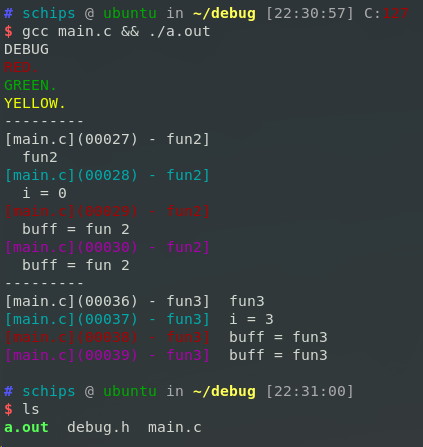
【整理】Linux 下 自己使用的 debug宏 printf的更多相关文章
- Linux下Tomcat启动设置debug模式启动
原文: https://blog.csdn.net/li295214001/article/details/42077247 https://blog.csdn.net/jackie_xiaonan/ ...
- Linux下的两个经典宏定义 转
http://www.linuxidc.com/Linux/2016-08/134481.htm http://www.linuxidc.com/Linux/2013-01/78003.htm htt ...
- Linux下的两个经典宏定义【转】
转自:http://www.linuxidc.com/Linux/2015-07/120014.htm 本文首先介绍Linux下的经典宏定义,感受极客的智慧,然后根据该经典定义为下篇文章作铺垫. of ...
- 笔记整理——Linux下C语言正则表达式
Linux下C语言正则表达式使用详解 - Google Chrome (2013/5/2 16:40:37) Linux下C语言正则表达式使用详解 2012年6月6日Neal627 views发表评论 ...
- 归纳整理Linux下C语言常用的库函数----文件操作
在没有IDE的时候,记住一些常用的库函数的函数名.参数.基本用法及注意事项是很有必要的. 参照Linux_C_HS.chm的目录,我大致将常用的函数分为一下几类: 1. 内存及字符串控制及操作 2. ...
- 整理 Linux下列出目录内容的命令
在 Linux 中,有非常多的命令可以让我们用来执行各种各样的任务.当我们想要像使用文件浏览器一样列出一个目录下的内容时,大家第一时间想到的是 ls 命令.但只有 ls 命令能实现这个目的吗?显然不是 ...
- C语言:类似linux内核的分等级DEBUG宏(打印宏)
总结几种log打印printf函数的宏定义 http://blog.chinaunix.net/uid-20564848-id-73402.html #include <stdio.h> ...
- 归纳整理Linux下C语言常用的库函数----时间日期数学及算法
在没有IDE的时候,记住一些常用的库函数的函数名.参数.基本用法及注意事项是很有必要的. 参照Linux_C_HS.chm的目录,我大致将常用的函数分为一下几类: 1. 内存及字符串控制及操作 2. ...
- 归纳整理Linux下C语言常用的库函数----内存及字符串控制及操作
在没有IDE的时候,记住一些常用的库函数的函数名.参数.基本用法及注意事项是很有必要的. 参照Linux_C_HS.chm的目录,我大致将常用的函数分为一下几类: 1. 内存及字符串控制及操作 2. ...
随机推荐
- BZOJ2809 dispatching 【可并堆】
题目分析: yy一下就知道了,合并用可并堆少个log. 代码: #include<bits/stdc++.h> using namespace std; ; int n,m; int b[ ...
- SpringBoot整合ssm
1.创建工程 使用idea可以快速创建SpringBoot的工程 这里选择常用的类库,SpringBoot将各种框架类库都进行了封装,可以减少pom文件中的引用配置: 比如Spring和Mybatis ...
- IDEA 新建 module
maven项目可以创建多个module,在IDEA中具体操作 1.在已经建好的maven项目上右键 2.新建: 效果如下: 这时在子pom.xml中 <parent> <artifa ...
- php获取用户真实IP和防刷机制
一. 如何获取用户IP地址 public static function getClientIp() { if (getenv('HTTP_CLIENT_IP')) { $ip = getenv( ...
- Centos7 Install Kubernetes
环境搭建配置官方 k8s yum 源: cat <<EOF > /etc/yum.repos.d/virt7-docker-common-release.repo [virt7-do ...
- Hdoj 1392.Surround the Trees 题解
Problem Description There are a lot of trees in an area. A peasant wants to buy a rope to surround a ...
- 【AtCoder2134】ZigZag MST(最小生成树)
[AtCoder2134]ZigZag MST(最小生成树) 题面 洛谷 AtCoder 题解 这题就很鬼畜.. 既然每次连边,连出来的边的权值是递增的,所以拿个线段树xjb维护一下就可以做了.那么意 ...
- C++ 中 const、volatile、mutable的用法
@2019-01-14 [小记] C++中const.volatile.mutable的用法
- W10笔记本电脑弄成WIFI
用网线连接的笔记本弄成WIFI供手机上网.以前是买了一个随身 WIFI,可以当网卡使用.后来使用命令 // 建立WIFI netsh wlan set hostednetwork mode=allow ...
- 「TJOI2015」线性代数 解题报告
「TJOI2015」线性代数 和牛客某题很像 在和里面有\(B_{i,j}\)要求是\(A_i,A_j\)都为\(1\),和里面减去\(C_i\)要求\(A_i\)为\(1\),然后先把贡献也就是\( ...