
Postgres Plus Advanced Server installation
# setenforce Permissive
# ./ppasmeta-9.3.1.3-linux-x64.run --mode text
Installation Directory [/opt/PostgresPlus/9.3AS]:
----------------------------------------------------------------------------
Select the components you want to install.
Database Server [Y/n] :Y
Connectors [Y/n] :Y
Infinite Cache [Y/n] :Y
Migration Toolkit [Y/n] :Y
Postgres Enterprise Manager Client [Y/n] :Y
pgpool-II [Y/n] :Y
EDB*Plus [Y/n] :Y
Slony Replication [Y/n] :Y
PgBouncer [Y/n] :Y
Additional Directories
Please select a directory under which to store your data.
Data Directory [/opt/PostgresPlus/9.3AS/data]:
Please select a directory under which to store your Write-Ahead Logs.
Write-Ahead Log (WAL) Directory [/opt/PostgresPlus/9.3AS/data/pg_xlog]:
Configuration Mode
[1] Oracle Compatible
[2] PostgreSQL Compatible
Please choose an option [1] : 1
----------------------------------------------------------------------------
Please provide a password for the database superuser (enterprisedb). A locked
Unix user account (enterprisedb) will be created if not present.
Password:enterprisedb
Additional Configuration
Please select the port number the server should listen on.
Port [5444]:
Select the locale to be used by the new database cluster.
Locale
[1] [Default locale]
tune Dynamic Tuning:
Server Utilization
Please select the type of server to determine the amount of system resources
that may be utilized:
[1] Development (e.g. a developer's laptop)
[2] General Purpose (e.g. a web or application server)
[3] Dedicated (a server running only Postgres Plus)
Please choose an option [2] :
----------------------------------------------------------------------------
Dynatune Dynamic Tuning:
Workload Profile
Please select the type of workload this server will be used for:
[1] Transaction Processing (OLTP systems)
[2] General Purpose (OLTP and reporting workloads)
[3] Reporting (Complex queries or OLAP workloads)
PgBouncer Listening Port [6432]:
Service Configuration
Autostart PgBouncer Service [Y/n]:
Service Configuration
Autostart PgBouncer Service [Y/n]: Y
Autostart pgAgent Service [Y/n]: Y
Update Notification Service [Y/n]:
Pre Installation Summary
Following settings will be used for installation:
Installation Directory: /opt/PostgresPlus/9.3AS
Data Directory: /opt/PostgresPlus/9.3AS/data
WAL Directory: /opt/PostgresPlus/9.3AS/data/pg_xlog
Database Port: 5444
Database Superuser: enterprisedb
Operating System Account: enterprisedb
Database Service: ppas-9.3
PgBouncer Listening Port: 6432
Please wait while Setup installs Postgres Plus Advanced Server on your computer.
Installing Postgres Plus Advanced Server
0% ______________ 50% ______________ 100%
#########################################
Installing Database Server ...
Installing pgAgent ...
Installing Connectors ...
Installing Migration Toolkit ...
Installing EDB*Plus ...
Installing Infinite Cache ...
Installing Postgres Enterprise Manager Client ...
Installing Slony Replication ...
Installing pgpool-II ...
Installing PgBouncer ...
Installing StackBuilder Plus ...
----------------------------------------------------------------------------
Setup has finished installing Postgres Plus Advanced Server on your computer.
[root@test05 ppasmeta-9.3.1.3-linux-x64]# ps -ef|grep postgres
500 15072 1 0 22:40 ? 00:00:00 /opt/PostgresPlus/9.3AS/bin/edb-postgres -D /opt/PostgresPlus/9.3AS/data
500 15073 15072 0 22:40 ? 00:00:00 postgres: logger process
500 15075 15072 0 22:40 ? 00:00:00 postgres: checkpointer process
500 15076 15072 0 22:40 ? 00:00:00 postgres: writer process
500 15077 15072 0 22:40 ? 00:00:00 postgres: wal writer process
500 15078 15072 0 22:40 ? 00:00:00 postgres: autovacuum launcher process
500 15079 15072 0 22:40 ? 00:00:00 postgres: stats collector process
500 15313 15072 0 22:40 ? 00:00:00 postgres: enterprisedb edb ::1[40882] idle
root 17618 12769 0 22:43 pts/1 00:00:00 grep postgres
service scripts
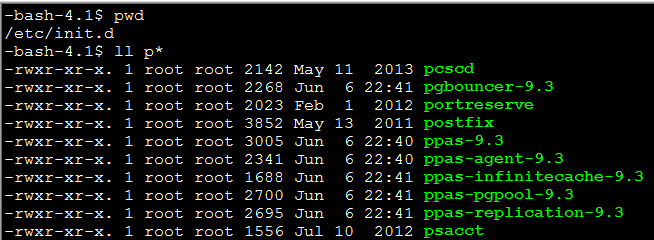


default user:enterprisedb ,default database edb

[root@test05 bin]# service ppas-9.3 stop
Stopping Postgres Plus Advanced Server 9.3:
waiting for server to shut down.... done
server stopped
[root@test05 bin]# service ppas-9.3 start
Starting Postgres Plus Advanced Server 9.3:
waiting for server to start.... done
server started
Postgres Plus Advanced Server 9.3 started successfully
# EnterpriseDB shell environment loader
#
# Instructions:
# This file contains additions to the user environment
# that make accessing Postgres Plus Advanced Server
# executables easier.
#
# To load the environment for a single user:
# cp pgplus_env.sh /home/<username>
# chown <username> /home/<username>/pgplus_env.sh
# vi /home/<username>/.bash_profile
# At the bottom, add the line:
# . /home/<username>/pgplus_env.sh
# ( Note the '.' followed by a space )
# To load the environment for all users:
# cp pgplus_env.sh /etc
# vi /etc/profile
# At the bottom, add the line:
# . /etc/pgplus_env.sh
# ( Note the '.' followed by a space )
更改enterprisedb home目录下的所有则为enterprisedb
在enterprisedb home目录下创建.bash_profile
在.ba_profile的底部添加如下一行
. /opt/PostgresPlus/9.3AS/pgplus_env.sh #To load the environment for enterprisedb user:
Postgres Plus Advanced Server installation的更多相关文章
- [原创]PostgreSQL Plus Advanced Server监控工具PEM(四)
四.PEM管理工具 1.编辑配置 选择进行管理的目标服务器,点击菜单Tools->Server Configuration->postgresql.conf管理服务器配置,可以看到我们经常 ...
- [原创]PostgreSQL Plus Advanced Server监控工具PEM(二)
2.安装PEM Client 简单两条命令,开始PEM Client的安装. 我们在SUSE 11sp2上安装PEM Client 安装结束,运行PEM Client后可以看到如下的界面: 目前我们并 ...
- [原创]使用benchmarksql和pgbench对PostgreSQL Plus Advanced Server进行性能测试
一.测试环境 benchmarksql version:4.0.8 rhel 6.3 vmware esxi 二.理解benchmarksql性能测试原理TPC-C 1.理解TPC-C TPC-C模拟 ...
- [原创] PostgreSQL Plus Advanced Server在Windows中配置双机热备流复制
一.系统环境 操作系统:Windows Server 2003/2008 两个节点分别为master与slave. 主节点master:172.27.19.28 备机点slave:172.27.19. ...
- [原创]PostgreSQL Plus Advanced Server配合crontab实现定时维护工作
本文要实现的目标1.PostgreSQL定时全备2.定时删除归档WAL文件3.定时删除全备文件4.删除n天之前的数据库日志文件 实验环境操作系统:RHEL 6.3数据库:PostgreSQL Plus ...
- Domino Server installation on Linux (Centos or Redhat) – something somewhere
something somewhere welcome in there…:) Just another techki site howto / Linux / Lotus Domino 0 Domi ...
- [RK3399] Jack server installation not found
CPU:RK3399 系统:Android 7.1 服务器上第一次编译 Android 7.1 的代码,提示 Jack server 没有安装. Jack server installation no ...
- [原创]PostgreSQL Plus Advanced Server监控工具PEM(三)
三.使用PEM Client 在PEM Client中连接PEM Server 点击上图所示的按钮或点击菜单-> 第一次连接PEM Server,会有一次导入证书的操作,点击Yes按钮. 接下来 ...
- Spacewalk server Installation on RHEL6
[root@yum01 ~]# rpm -Uvh http://yum.spacewalkproject.org/2.1/RHEL/6/x86_64/spacewalk-repo-2.1-2.el6. ...
随机推荐
- AIX日常维护
1 /etc/security/limits与limit命令 AIX 5.3上 下面是文件/etc/security/limits文件里面有关软限制和硬限制的部分. * * Sizes are in ...
- get,post 区别,HTTP通信
GET & POST GET 1.GET 的本质是"得" 2.从服务器拿数据,效率更高 3.从数学的角度来讲,GET 的结果是"幂等" ...
- Linux_记录ping命令的日志包括时间戳
while true; do ping -c 1 www.baidu.com | awk '{print "["strftime("%F %H:%M:%S")& ...
- php xls 导出乱码解决方案
采用phpmyadmin的处理方式 //这个很关键 BU 订单号 产品ID 产品名称 原价 售价 房间 成人数 小孩数 总人数 出团日期 出团天数差 客人信息 姓名 性别 年龄 总价 下单日期 订单状 ...
- Java语言基础
Java 语言是面向对象的程序设计语言,Java 程序的基本组成单元是类,类体中又包括属性与方法两部分.每一个应用程序都必须包含一个main()方法,含有main()方法的类成为主类. 一.Java ...
- Eclipse设置注释模板
设置注释模板的入口: Window->Preference->Java->Code Style->Code Template 然后展开Comments节点就是所有需设置注释的元 ...
- CMD中常用命令
打开CMD的几种方法: 搜索一下 1: 打开我的电脑,在地址栏输入该地址后按回车键打开:C:\WINDOWS\system32\cmd.exe 2: 打开我的电脑,进入C盘WINDOWS\system ...
- 【HDU4630 No Pain No Game】 dp思想+线段树的离线操作
题目链接:http://acm.hdu.edu.cn/showproblem.php?pid=4630 题意:给你n个数据范围在[1,n]中的数,m个操作,每个操作一个询问[L,R],让你求区间[L, ...
- bug1
1从相册中获取图片,低版本可以,高版本不行.看见抛出 Bitmap too large to be uploaded into a texture 原来是高版本的android,机子好点,相机就好点, ...
- Unity UGUI 裁剪TTF字体
BitBucket上找到了一个perl工程,font-optimizer.拉取代码到本地.为了运行它,还需要装Perl解释器,可以在Perl的官网上下载ActivePerl.装好ActivePerl后 ...