
LTE Module User Documentation(翻译15)——示例程序、参考场景以及故障检测和调试技巧
LTE用户文档
(如有不当的地方,欢迎指正!)
21 Examples Programs(示例程序)
22 Reference scenarios(参考场景)
- [TR36814] 的 A.2 节提到的系统仿真场景。
- dual stripe model [R4-092042], 在示例程序 src/lte/examples/lena-dual-stripe.cc 中有部分提及。该示例程序的特点是有很多可配置的参数,可以通过修改相关的全局变量来自定义。可以使用下列命令来获取所有这些全局变量的列表:
./waf --run lena-dual-stripe --command-template="%s --PrintGlobals"
下面小节给出了运行仿真程序的例子。
22.1 Handover simulation campaign
void

NotifyHandoverEndOkUe (std::string context, uint64_t imsi,

                      uint16_t cellId, uint16_t rnti)

{

  std::cout << "Handover IMSI " << imsi << std::endl;

}

int

main (int argc, char *argv[])

{

  /*** SNIP ***/

  Config::Connect ("/NodeList/*/DeviceList/*/LteUeRrc/HandoverEndOk",

                  MakeCallback (&NotifyHandoverEndOkUe));

  lteHelper->EnablePhyTraces ();

  lteHelper->EnableRlcTraces ();

  Ptr<RadioBearerStatsCalculator> rlcStats = lteHelper->GetRlcStats ();

  rlcStats->SetAttribute ("StartTime", TimeValue (Seconds ()));

  rlcStats->SetAttribute ("EpochDuration", TimeValue (Seconds (simTime)));

  Simulator::Run ();

  Simulator::Destroy ();

  return ;

}
- 将六边形小区划分为3个扇区,每个扇区有 7 个宏基站站点(例如,21个宏小区),站点间的距离为 500 m 。
- 尽管 lena-dual-stripe 最初用于两层网络( macrocell 和 femtocell)仿真,我们简化为只有一层(macrocell)。
- 用户随机部署在站点周围,使用空闲模式小区选择自动连接到网络。此后,用户以 60 kmph 的移动速度在仿真环境中移动。
- 仿真持续时间为 50 秒,因此用户有足够的时间来触发一些切换。
- 宏小区传输功率为 46 dBm ,用户传输功率为 10 dBm。
- 使用 EPC 模式(因为 X2 切换需要)。
- 下行和上行业务为全缓存,5 MHz 带宽,使用 TCP 协议和 Proportional Fair (比例公平)调度器。
- 理想的 RRC 协议。
| Parameter name | Value | Description |
| simTime | 50 | 50 seconds simulation duration |
| nBlocks | 0 | Disabling apartment buildings and femtocells |
| nMacroEnbSites | 7 | Number of macrocell sites (each site has 3 cells) |
| nMacroEnbSitesX | 2 | The macrocell sites will be positioned in a 2-3-2 formation |
| interSiteDistance | 500 | 500 m distance between adjacent macrocell sites |
| macroEnbTxPowerDbm | 46 | 46 dBm Tx power for each macrocell |
| epc | 1 | Enable EPC mode |
| epcDl | 1 | Enable full-buffer DL traffic |
| epcUl | 1 | Enable full-buffer UL traffic |
| useUdp | 0 | Disable UDP traffic and enable TCP instead |
| macroUeDensity | 0.00002 | Determines number of UEs (translates to 48 UEs in our simulation) |
| outdoorUeMinSpeed | 16.6667 | Minimum UE movement speed in m/s (60 kmph) |
| outdoorUeMaxSpeed | 16.6667 | Maximum UE movement speed in m/s (60 kmph) |
| macroEnbBandwidth | 25 | 5 MHz DL and UL bandwidth |
| generateRem | 1 | (Optional) For plotting the Radio Environment Map |
| Default value name | Value | Description |
| ns3::LteHelper::HandoverAlgorithm | ns3::NoOpHandoverAlgorithm,ns3::A3RsrpHandoverAlgorithm, orns3::A2A4RsrqHandoverAlgorithm | Choice of handover algorithm |
| ns3::LteHelper::Scheduler | ns3::PfFfMacScheduler | Proportional Fair scheduler |
| ns3::LteHelper::UseIdealRrc | 1 | Ideal RRC protocol |
| ns3::RadioBearerStatsCalculator::DlRlcOutputFilename | <run>-DlRlcStats.txt | File name for DL RLC trace output |
| ns3::RadioBearerStatsCalculator::UlRlcOutputFilename | <run>-UlRlcStats.txt | File name for UL RLC trace output |
| ns3::PhyStatsCalculator::DlRsrpSinrFilename | <run>-DlRsrpSinrStats.txt | File name for DL PHY RSRP/SINR trace output |
| ns3::PhyStatsCalculator::UlSinrFilename | <run>-UlSinrStats.txt | File name for UL PHY SINR trace output |
$ ./waf --run="lena-dual-stripe

  --simTime= --nBlocks= --nMacroEnbSites= --nMacroEnbSitesX=

  --epc= --useUdp= --outdoorUeMinSpeed=16.6667 --outdoorUeMaxSpeed=16.6667

  --ns3::LteHelper::HandoverAlgorithm=ns3::NoOpHandoverAlgorithm

  --ns3::RadioBearerStatsCalculator::DlRlcOutputFilename=no-op-DlRlcStats.txt

  --ns3::RadioBearerStatsCalculator::UlRlcOutputFilename=no-op-UlRlcStats.txt

  --ns3::PhyStatsCalculator::DlRsrpSinrFilename=no-op-DlRsrpSinrStats.txt

  --ns3::PhyStatsCalculator::UlSinrFilename=no-op-UlSinrStats.txt

  --RngRun=" > no-op.txt

$ ./waf --run="lena-dual-stripe

  --simTime= --nBlocks= --nMacroEnbSites= --nMacroEnbSitesX=

  --epc= --useUdp= --outdoorUeMinSpeed=16.6667 --outdoorUeMaxSpeed=16.6667

  --ns3::LteHelper::HandoverAlgorithm=ns3::A3RsrpHandoverAlgorithm

  --ns3::RadioBearerStatsCalculator::DlRlcOutputFilename=a3-rsrp-DlRlcStats.txt

  --ns3::RadioBearerStatsCalculator::UlRlcOutputFilename=a3-rsrp-UlRlcStats.txt

  --ns3::PhyStatsCalculator::DlRsrpSinrFilename=a3-rsrp-DlRsrpSinrStats.txt

  --ns3::PhyStatsCalculator::UlSinrFilename=a3-rsrp-UlSinrStats.txt

  --RngRun=" > a3-rsrp.txt

$ ./waf --run="lena-dual-stripe

  --simTime= --nBlocks= --nMacroEnbSites= --nMacroEnbSitesX=

  --epc= --useUdp= --outdoorUeMinSpeed=16.6667 --outdoorUeMaxSpeed=16.6667

  --ns3::LteHelper::HandoverAlgorithm=ns3::A2A4RsrqHandoverAlgorithm

  --ns3::RadioBearerStatsCalculator::DlRlcOutputFilename=a2-a4-rsrq-DlRlcStats.txt

  --ns3::RadioBearerStatsCalculator::UlRlcOutputFilename=a2-a4-rsrq-UlRlcStats.txt

  --ns3::PhyStatsCalculator::DlRsrpSinrFilename=a2-a4-rsrq-DlRsrpSinrStats.txt

  --ns3::PhyStatsCalculator::UlSinrFilename=a2-a4-rsrq-UlSinrStats.txt

  --RngRun=" > a2-a4-rsrq.txt
- 注意,有些参数没有指定,因为它们和默认值一样,我们也保持切换算法为各自的默认设置。
- 注意仿真输出的文件名,例如 RLC traces 和 PHY traces,因为我们必须确保它们不被下一次仿真运行覆盖。在本例中,我们通过使用命令行参数来命名。
- --RngRun=1 参数在最后是用于设置被 random number generator(随机数字产生器)使用的运行次数。 我们使用不同的 RngRun 值再次运行仿真, 因此会创建同一仿真的几个独立副本。然后我们把这些副本所得结果进行平均,实现统计意义上的confidence 。
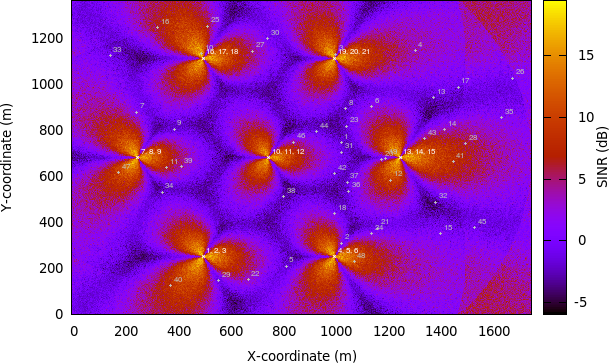
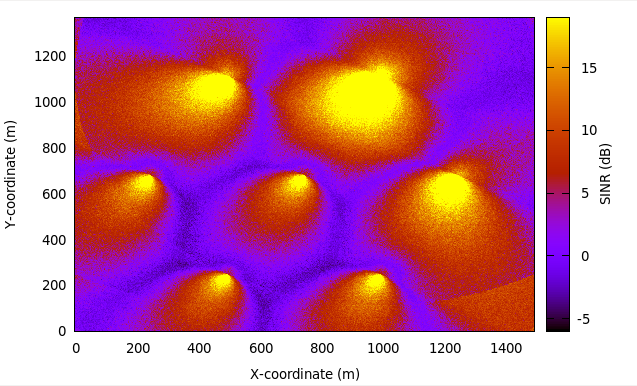
- 我们可以增加一个参数 --generateRem=1 来生成必要的文件——生成仿真的 REM。 结果如下图 REM obtained from a simulation in handover campaign, 产生的步骤参见前面的章节 Radio Environment Maps 。该图也表明在仿真开始使用RngRun = 1 时基站和用户的位置。其他的 RngRun 值可能产生不同的用户位置。
.png)
% RxBytes is the 10th column

DlRxBytes = load ("no-op-DlRlcStats.txt") (:,);

DlAverageThroughputKbps = sum (DlRxBytes) *  /  /

% RxBytes is the 10th column

UlRxBytes = load ("no-op-UlRlcStats.txt") (:,);

UlAverageThroughputKbps = sum (UlRxBytes) *  /  /

% Sinr is the 6th column

DlSinr = load ("no-op-DlRsrpSinrStats.txt") (:,);

% eliminate NaN values

idx = isnan (DlSinr);

DlSinr (idx) = ;

DlAverageSinrDb =  * log10 (mean (DlSinr)) % convert to dB

% Sinr is the 5th column

UlSinr = load ("no-op-UlSinrStats.txt") (:,);

% eliminate NaN values

idx = isnan (UlSinr);

UlSinr (idx) = ;

UlAverageSinrDb =  * log10 (mean (UlSinr)) % convert to dB
$ grep "Handover" no-op.txt | wc -l
| Statistics | No-op | A2-A4-RSRQ | Strongest cell |
| Average DL system throughput | 6 615 kbps | 20 509 kbps | 19 709 kbps |
| Average UL system throughput | 4 095 kbps | 5 705 kbps | 6 627 kbps |
| Average DL SINR | -0.10 dB | 5.19 dB | 5.24 dB |
| Average UL SINR | 9.54 dB | 81.57 dB | 79.65 dB |
| Number of handovers per UE per second | 0 | 0.05694 | 0.04771 |
22.2 Frequency Reuse examples(频率复用例子)
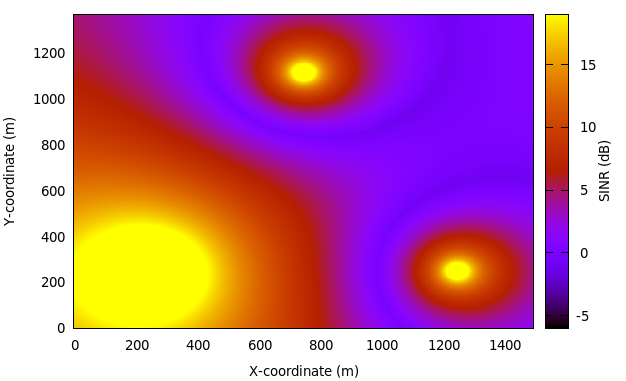
$ ./waf --run "lena-frequency-reuse --ns3::LteHelper::FfrAlgorithm=ns3::LteFrSoftAlgorithm"
$ ./waf --run "lena-frequency-reuse --ns3::LteHelper::FfrAlgorithm=ns3::LteFrSoftAlgorithm

  --generateRem=true --remRbId="
.png)
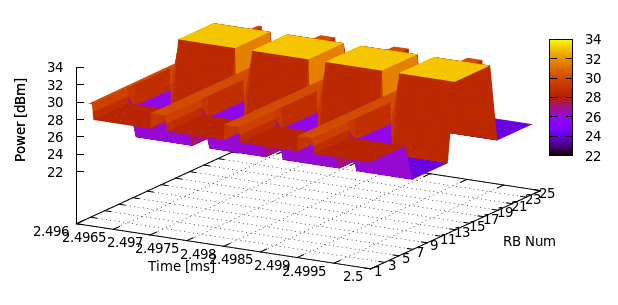
$ ./waf --run "lena-frequency-reuse --ns3::LteHelper::FfrAlgorithm=ns3::LteFfrSoftAlgorithm

  --generateSpectrumTrace=true"
.png)
$ ./waf --run="lena-dual-stripe

  --simTime= --nBlocks= --nMacroEnbSites= --nMacroEnbSitesX=

  --epc= --useUdp= --outdoorUeMinSpeed=16.6667 --outdoorUeMaxSpeed=16.6667

  --ns3::LteHelper::HandoverAlgorithm=ns3::NoOpHandoverAlgorithm

  --ns3::LteHelper::FfrAlgorithm=ns3::LteFrHardAlgorithm

  --ns3::RadioBearerStatsCalculator::DlRlcOutputFilename=no-op-DlRlcStats.txt

  --ns3::RadioBearerStatsCalculator::UlRlcOutputFilename=no-op-UlRlcStats.txt

  --ns3::PhyStatsCalculator::DlRsrpSinrFilename=no-op-DlRsrpSinrStats.txt

  --ns3::PhyStatsCalculator::UlSinrFilename=no-op-UlSinrStats.txt

  --RngRun=" > no-op.txt
$ ./waf --run="lena-dual-stripe

  --simTime= --nBlocks= --nMacroEnbSites= --nMacroEnbSitesX=

  --epc= --useUdp= --outdoorUeMinSpeed=16.6667 --outdoorUeMaxSpeed=16.6667

  --ns3::LteHelper::HandoverAlgorithm=ns3::NoOpHandoverAlgorithm

  --ns3::LteHelper::FfrAlgorithm=ns3::LteFrHardAlgorithm

  --ns3::RadioBearerStatsCalculator::DlRlcOutputFilename=no-op-DlRlcStats.txt

  --ns3::RadioBearerStatsCalculator::UlRlcOutputFilename=no-op-UlRlcStats.txt

  --ns3::PhyStatsCalculator::DlRsrpSinrFilename=no-op-DlRsrpSinrStats.txt

  --ns3::PhyStatsCalculator::UlSinrFilename=no-op-UlSinrStats.txt

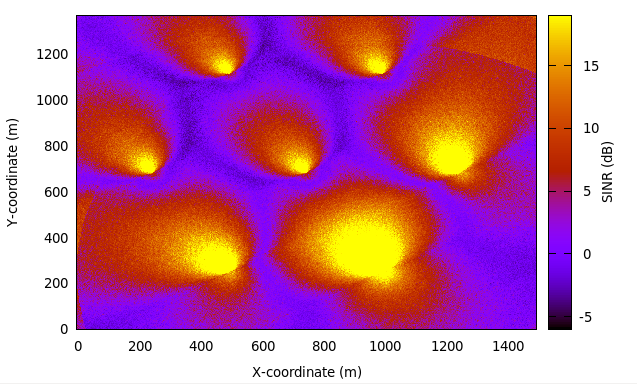
  --RngRun= --generateRem=true --remRbId=" > no-op.txt

.png)
.png)
.png)
23 故障检测和调试技巧
- 首先检查控制面,特别是 RRC 连接建立过程,通过使能日志组件 LteUeRrc 和 LteEnbRrc。
- 然后检查数据面的数据包传输,首先使能日志组件 LteUeNetDevice 和 EpcSgwPgwApplication,然后是 EpcEnbApplication,接着向下移动到 LTE 无线协议栈 (PDCP, RLC, MAC, 和 PHY), 直到你找到数据包停止处理/转发的位置(All his until you find where packets stop being processed / forwarded)。
参考文献
LTE Module User Documentation(翻译15)——示例程序、参考场景以及故障检测和调试技巧的更多相关文章
- LTE Module User Documentation(翻译9)——Using the EPC with emulation mode
LTE用户文档 (如有不当的地方,欢迎指正!) 15 Using the EPC with emulation mode(使用仿真方式的 EPC) 在上一节中,我们使用点对点链路连接基站和服务 ...
- LTE Module User Documentation(翻译12)——X2切换(X2-based handover)
LTE用户文档 (如有不当的地方,欢迎指正!) 18 X2-based handover 正如 3GPP 定义的,切换是改变用户服务小区的连接方式的过程.这一过程中涉及的两个基站通常称为源基站和目 ...
- LTE Module User Documentation(翻译7)——无线环境地图(REM)、AMC 模型 和 CQI 计算
LTE用户文档 (如有不当的地方,欢迎指正!) 12 Radio Environment Maps 通过使用类 RadioEnvironmentMapHelper 是可能输出文件 Radio E ...
- LTE Module User Documentation(翻译14)——Uplink Power Control(上行功率控制)
LTE用户文档 (如有不当的地方,欢迎指正!) 20 Uplink Power Control(上行功率控制) 上行功率控制功能默认是开启的.用户可以通过设置布尔属性 ns3::LteUePhy: ...
- LTE Module User Documentation(翻译13)——频率复用算法(Frequency Reuse Algorithms)
LTE用户文档 (如有不当的地方,欢迎指正!) 19 Frequency Reuse Algorithms(频率复用算法) 本节我们将描述如何在 LTE 仿真中使用频率复用(FR)算法.共有两 ...
- LTE Module User Documentation(翻译3)——仿真输出
LTE用户文档 (如有不当的地方,欢迎指正!) 6 仿真输出 ns-3 LTE 模型当前支持输出 PHY, MAC, RLC 和 PDCP 级别的 Key Performance Indicators ...
- LTE Module User Documentation(翻译1)——背景、使用概述、基本的仿真程序和配置LTE模型参数
LTE用户文档 (如有不当的地方,欢迎指正!) 1.背景 假定读者已经熟悉 ns-3 simulator ,能运行一般的仿真程序.如果不是的话,强烈推荐读者参考 [ns3tutorial]. 2. ...
- LTE Module User Documentation(翻译11)——配置用户测量
LTE用户文档 (如有不当的地方,欢迎指正!) 17 Configure UE measurements 仿真中激活的用户测量配置取决于所选的 “consumers”,例如切换算法.用户可能需要添 ...
- LTE Module User Documentation(翻译10)——网络连接(Network Attachment)
LTE用户文档 (如有不当的地方,欢迎指正!) 16 Network Attachment(网络连接) 正如前面章节 Basic simulation program 所述,连接用户到基站时通过调 ...
随机推荐
- CGContextAddCurveToPoint 的深入理解
CGContextAddCurveToPoint 这个函数看上去一般般,仔细琢磨发现不简单,为什么三个点就可以确定一条曲线呢? 网上查了查,小小研究了一下下. 1.关键知识 窃取自 (http://l ...
- 8 ways rich people view the world differently than the average person
Self-made millionaire Steve Siebold spent 26 years interviewing some of the wealthiest people in the ...
- Diablo2 1.13版&PlugY10.00 男巫存档
下载地址: http://files.cnblogs.com/files/xiandedanteng/20160805D2113NanwuL83Backup.rar 解压后文件放到Diablo2游戏的 ...
- Jmeter进行数据库压测
一.配置并发用户 新建线程组,设置线程数,Ramp-up和循环次数 二.添加JDBC请求 先选中JDBC Users(线程组),右键选中ADD-Config Element--JDBC Connect ...
- html5 canvas围绕中心点旋转
<!DOCTYPE html PUBLIC "-//W3C//DTD XHTML 1.0 Transitional//EN" "http://www.w3.org/ ...
- 委托(delegate)的三种调用方式:同步调用,异步调用,异步回调(转载)
下面为即将被调用的方法: public delegate int AddHandler(int a,int b); public class 加法类 { public static int Add(i ...
- 一个iOS项目中包含多个xcodeproj文件,如何运行其中的一个项目
从GitHub上下载的Masonry的iOS源码,打开发现有多个项目,直接运行,模拟器没反应.由于Masonry是一个多工程的项目,每个项目都依赖Masonry的源码,所以要运行Masonry的Exa ...
- LuaSocket http笔记
LuaSocket 基于Lua平台开发的一套socket的lua接口库程序, 为lua程序的扩展 ,http://w3.impa.br/~diego/software/luasocket/home.h ...
- oracle重建控制文件
根据已有数据库创建新的控制文件#数据库必须是mounted或open状态 sql> alter database backup controlfile to trace; 可以使用以下快捷方式找 ...
- 模板 BFS
[模板]BFS #include <stdio.h> #include <string.h> #include <queue> using namespace st ...