
react-native run-ios “Could not find iPhone X simulator”
问题
这个问题发生在旧的RN版本(0.57,0.58(<0.58.4),…)和Xcode 10.3中,其中可用模拟器的名称得到了一些调整 在文件node_modules/@react native community/cli/build/commands/runIOS/findMatchingSimulator.js中,react native尝试通过简单的.startsWith检查选择正确的模拟器。由于重命名,检查现在应该使用.includes(ref)
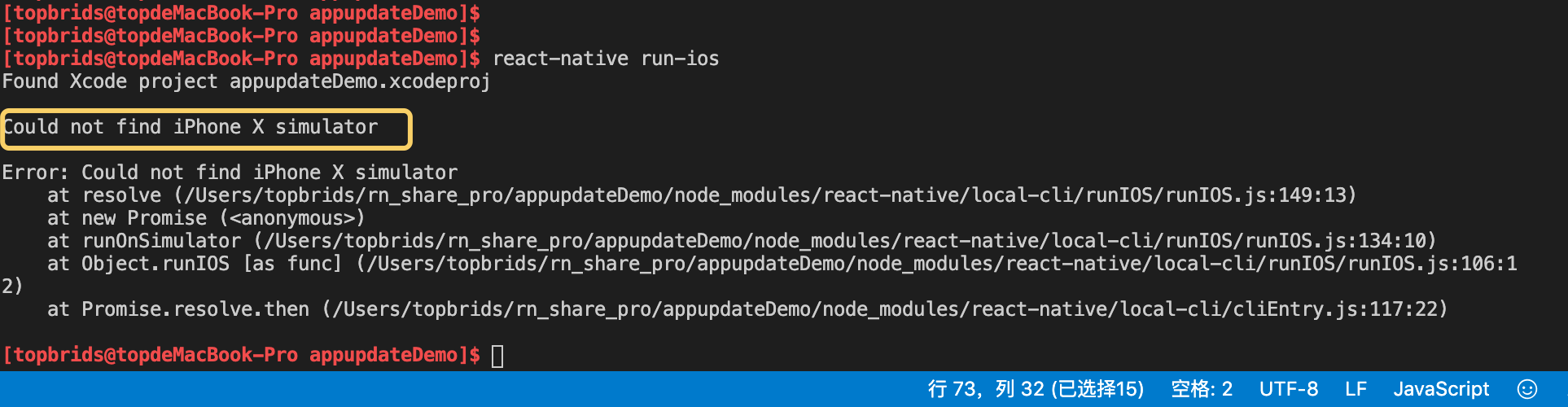
Found Xcode project appupdateDemo.xcodeproj

Could not find iPhone X simulator

Error: Could not find iPhone X simulator

    at resolve (/Users/topbrids/rn_share_pro/appupdateDemo/node_modules/react-native/local-cli/runIOS/runIOS.js:149:13)

    at new Promise (<anonymous>)

    at runOnSimulator (/Users/topbrids/rn_share_pro/appupdateDemo/node_modules/react-native/local-cli/runIOS/runIOS.js:134:10)

    at Object.runIOS [as func] (/Users/topbrids/rn_share_pro/appupdateDemo/node_modules/react-native/local-cli/runIOS/runIOS.js:106:12)

    at Promise.resolve.then (/Users/topbrids/rn_share_pro/appupdateDemo/node_modules/react-native/local-cli/cliEntry.js:117:22)
解决方案
- 跟新你的RN版本到0.58.4 +
- 如果您无法或不会升级到新的RN版本,则可以使用以下命令自动调整findMatchingSimulator.js文件:
sed -i '' 's/startsWith/includes/g' node_modules/react-native/local-cli/runIOS/findMatchingSimulator.js
用这个命令就不用我们去node_modules下面手动修改源码了
还可以把这个命令 放到package.json 的 script节点下面 指定命令 然后用npm run xx 直接执行这个命令 这样用起来更方便一些
{

  "name": "appupdateDemo",

  "version": "0.0.1",

  "private": true,

  "scripts": {

    "start": "node node_modules/react-native/local-cli/cli.js start",

    "test": "jest",

    "fixOldRnVersion": "sed -i '' 's/startsWith/includes/g' node_modules/react-native/local-cli/runIOS/findMatchingSimulator.js"

  },

  "dependencies": {

    "react": "16.6.1",

    "react-native": "0.57.7",

    "rn-app-upgrade": "^1.0.4"

  },

  "devDependencies": {

    "babel-jest": "24.9.0",

    "jest": "24.9.0",

    "metro-react-native-babel-preset": "0.57.0",

    "react-test-renderer": "16.6.1"

  },

  "jest": {

    "preset": "react-native"

  }

}
[topbrids@topdeMacBook-Pro appupdateDemo]$ npm run fixOldRnVersion

> appupdateDemo@0.0.1 fixOldRnVersion /Users/topbrids/rn_share_pro/appupdateDemo

> sed -i '' 's/startsWith/includes/g' node_modules/react-native/local-cli/runIOS/findMatchingSimulator.js
react-native run-ios “Could not find iPhone X simulator”的更多相关文章
- React Native运行出现Could not find "iPhone X" simulator
打开项目文件夹下 node_modules/react-native/local-cli/runIOS/findMatchingSimulator.js 查找 if (!version.startsW ...
- React Native & Android & iOS & APK
React Native & Android & iOS & APK https://play.google.com/apps/publish/signup/ $ 25 bui ...
- React Native & Android & iOS
React Native & Android & iOS React Native & Android & iOS https://facebook.github.io ...
- React Native (二) ios打包到真机
每当在模拟器上完成了开发,都想到真机上试试,正好前段时候淘了一个imac. 这里就以打包rndemo到iphone为例,讲一下react ntive ios打包到真机的流程. 一.前置 1.有个iph ...
- React Native视频播放(iOS)
网站链接:http://www.ncloud.hk/%E6%8A%80%E6%9C%AF%E5%88%86%E4%BA%AB/learn-react-native-video/ React Nativ ...
- [React Native] Basic iOS Routing -- NavigatorIOS
Inside the app component, we use NavigatiorIOS to render the compoent: class githubnotetaker extends ...
- React Native(十三)——ios键盘挡住textInput
渐入佳境 用React Native重构的项目也快接近尾声,剩下的就是适配ios的功能了.慢慢地也从中琢磨出了一点门道,于是就遇见了键盘遮挡textInput问题斑斑: 正常页面: android点击 ...
- React Native之iOS App打包
iOS打包步骤(一.二.三可不按照顺序) 步骤一: 选择iOS Device(以下两者选其中一个即可) 选择 Generic iOS Device (个人建议使用这个) 选择Generic iOS D ...
- 一个资深iOS开发者对于React Native的看法
一个资深iOS开发者对于React Native的看法 当我第一次尝试ReactNative的时候,我觉得这只是网页开发者涉足原生移动应用领域的歪门邪道. 我认为一个js开发者可以使用javasc ...
- [转] 一个资深iOS开发者对于React Native的看法
当我第一次尝试ReactNative的时候,我觉得这只是网页开发者涉足原生移动应用领域的歪门邪道. 我认为一个js开发者可以使用javascript来构建iPhone应用确实是一件很酷的事情,但是我很 ...
随机推荐
- 从零开始手写 spring ioc 框架,深入学习 spring 源码
IoC Ioc 是一款 spring ioc 核心功能简化实现版本,便于学习和理解原理. 创作目的 使用 spring 很长时间,对于 spring 使用非常频繁,实际上对于源码一直没有静下心来学习过 ...
- IDEA的控制台拖拽出来之后,如何恢复?
大家搜到这个的时候,肯定遇到了如下图展示的尴尬情况,我们的控制台在不小心之间被拖拽出来,然后不知如何再拖回去?放心,我来告诉你怎么办. 点击左下角的 恢复按钮 就可以了.
- openssl的移植
下载openssl1.1并解压,进入openssl根目录,执行配置命令 ./Configure linux-armv4 --prefix=$(pwd)/__install 这里使用当前目录下的__in ...
- unity3D 游戏物体同时绑定单击、双击事件
前言 在unity中我们常用的获取鼠标点击的方法有 在3D场景中,一般用在Update方法中,每一帧调用 void Update(){ )){ Debug.log("鼠标左键点击" ...
- Java 从入门到进阶之路(十一)
之前的文章我们介绍了一下 Java 中的继承,接下来我们继续看一下 Java 中的继承. 在有些时候,我们通过类继承的方式可以获取父类的方法,但是有些时候父类为我们提供的方法并不完全符合我们的需求,这 ...
- nginx的部署及配置文件的介绍 域名 用户认证 SSL加密模块
步骤一:构建Nginx服务器 yum -y install gcc pcre-devel openssl-devel #安装依赖包 wget http://nginx.org/dow ...
- Mysql 执行计划以及常见索引问题总结
Mysql 执行计划以及常见索引问题总结
- Mac 中环境变量的配置
1. 基本了解 1.1. 查看当前path 在讲解Mac环境变量配置之前,大家可以打开dos框,输入 echo $PATH 查看当前的path. 本机结果: /usr/local/bin:/usr/l ...
- maven与ecplise的整合
Maven 概念: Maven 使用项目对象模型(POM)的概念,可以通过一小段描述信息来管理项目的构建,报告和文档的软件项目管理工具. Maven 除了以程序构建能力为特色之外,还提供高级项目管理工 ...
- 2017 ACM/ICPC 沈阳 I题 Little Boxes
Little boxes on the hillside. Little boxes made of ticky-tacky. Little boxes. Little boxes. Little b ...