
SpringBoot 源码解析 (九)----- Spring Boot的核心能力 - 整合Mybatis
本篇我们在SpringBoot中整合Mybatis这个orm框架,毕竟分析一下其自动配置的源码,我们先来回顾一下以前Spring中是如何整合Mybatis的,大家可以看看我这篇文章Mybaits 源码解析 (十)----- Spring-Mybatis框架使用与源码解析
Spring-Mybatis使用
添加maven依赖
<dependency>

    <groupId>org.springframework</groupId>

    <artifactId>spring-jdbc</artifactId>

    <version>4.3.8.RELEASE</version>

</dependency>

<!-- https://mvnrepository.com/artifact/org.mybatis/mybatis-spring -->

<dependency>

    <groupId>org.mybatis</groupId>

    <artifactId>mybatis-spring</artifactId>

    <version>1.3.2</version>

</dependency>
在src/main/resources下添加mybatis-config.xml文件
<?xml version="1.0" encoding="UTF-8"?>

<!DOCTYPE configuration

        PUBLIC "-//mybatis.org//DTD Config 3.0//EN"

        "http://mybatis.org/dtd/mybatis-3-config.dtd">

<configuration>

    <typeAliases>

        <typeAlias alias="User" type="com.chenhao.bean.User" />

    </typeAliases>

    <plugins>

        <plugin interceptor="com.github.pagehelper.PageInterceptor">

            <property name="helperDialect" value="mysql"/>

        </plugin>

    </plugins>

</configuration>
在src/main/resources/mapper路径下添加User.xml
<?xml version="1.0" encoding="UTF-8"?>

<!DOCTYPE mapper PUBLIC "-//mybatis.org//DTD Mapper 3.0//EN"

"http://mybatis.org/dtd/mybatis-3-mapper.dtd">

<mapper namespace="com.chenhao.mapper.UserMapper">

    <select id="getUser" parameterType="int"

        resultType="com.chenhao.bean.User">

        SELECT *

        FROM USER

        WHERE id = #{id}

    </select>

</mapper>
在src/main/resources/路径下添加beans.xml
<?xml version="1.0" encoding="UTF-8"?>

<beans xmlns="http://www.springframework.org/schema/beans"

    xmlns:xsi="http://www.w3.org/2001/XMLSchema-instance"

    xsi:schemaLocation="http://www.springframework.org/schema/beans

        http://www.springframework.org/schema/beans/spring-beans.xsd">

    <bean id="dataSource" class="org.springframework.jdbc.datasource.DriverManagerDataSource">

        <property name="driverClassName" value="com.mysql.jdbc.Driver"></property>

        <property name="url" value="jdbc:mysql://127.0.0.1:3306/test"></property>

        <property name="username" value="root"></property>

        <property name="password" value="root"></property>

    </bean>

    <bean id="sqlSessionFactory" class="org.mybatis.spring.SqlSessionFactoryBean">

        <property name="configLocation" value="classpath:mybatis-config.xml"></property>

        <property name="dataSource" ref="dataSource" />

        <property name="mapperLocations" value="classpath:mapper/*.xml" />

    </bean>

    <bean class="org.mybatis.spring.mapper.MapperScannerConfigurer">

        <property name="basePackage" value="com.chenhao.mapper" />

    </bean>

</beans>
注解的方式
- 以上分析都是在spring的XML配置文件applicationContext.xml进行配置的,mybatis-spring也提供了基于注解的方式来配置sqlSessionFactory和Mapper接口。
- sqlSessionFactory主要是在@Configuration注解的配置类中使用@Bean注解的名为sqlSessionFactory的方法来配置;
- Mapper接口主要是通过在@Configuration注解的配置类中结合@MapperScan注解来指定需要扫描获取mapper接口的包。
@Configuration

@MapperScan("com.chenhao.mapper")

public class AppConfig {

  @Bean

  public DataSource dataSource() {

     return new EmbeddedDatabaseBuilder()

            .addScript("schema.sql")

            .build();

  }

  @Bean

  public DataSourceTransactionManager transactionManager() {

    return new DataSourceTransactionManager(dataSource());

  }

  @Bean

  public SqlSessionFactory sqlSessionFactory() throws Exception {

    //创建SqlSessionFactoryBean对象

    SqlSessionFactoryBean sessionFactory = new SqlSessionFactoryBean();

    //设置数据源

    sessionFactory.setDataSource(dataSource());

    //设置Mapper.xml路径

    sessionFactory.setMapperLocations(new PathMatchingResourcePatternResolver().getResources("classpath:mapper/*.xml"));

    // 设置MyBatis分页插件

    PageInterceptor pageInterceptor = new PageInterceptor();

    Properties properties = new Properties();

    properties.setProperty("helperDialect", "mysql");

    pageInterceptor.setProperties(properties);

    sessionFactory.setPlugins(new Interceptor[]{pageInterceptor});

    return sessionFactory.getObject();

  }

}
最核心的有两点:
- 创建一个SqlSessionFactoryBean,并设置数据源和Mapper.xml路径,其中会解析Mapper.xml文件,最后通过getObject()返回一个SqlSessionFactory 注入Spring容器中
- 通过@MapperScan扫描所有Mapper接口,扫描过程会将Mapper接口生成MapperFactoryBean这个特殊的Bean,并且在其getObject()通过SqlSession().getMapper(this.mapperInterface)生成每个mapper接口真实的代理类
MapperFactoryBean
//最终注入Spring容器的就是这里的返回对象

public T getObject() throws Exception {

    //获取父类setSqlSessionFactory方法中创建的SqlSessionTemplate

    //通过SqlSessionTemplate获取mapperInterface的代理类

    //我们例子中就是通过SqlSessionTemplate获取com.chenhao.mapper.UserMapper的代理类

    //获取到Mapper接口的代理类后,就把这个Mapper的代理类对象注入Spring容器

    return this.getSqlSession().getMapper(this.mapperInterface);

}
接下来我们看看SpringBoot是如何引入Mybatis的
SpringBoot引入Mybatis
添加mybatis依赖
<dependency>

    <groupId>com.alibaba</groupId>

    <artifactId>druid</artifactId>

    <version>1.1.9</version>

</dependency>

<dependency>

    <groupId>org.mybatis.spring.boot</groupId>

    <artifactId>mybatis-spring-boot-starter</artifactId>

    <version>1.3.2</version>

</dependency>
全局配置文件中配置数据源和mybatis属性
spring:

  datasource:

    url: jdbc:mysql:///springboot

    username: root

    password: admin

    type: com.alibaba.druid.pool.DruidDataSource

    initialSize:

    minIdle:

    maxActive:

mybatis:

  config-location: classpath:mybatis/mybatis-config.xml

  mapper-locations: classpath:mybatis/mapper/*.xml

  type-aliases-package: org.com.cay.spring.boot.entity
加入Mapper扫描注解@MapperScan
@SpringBootApplication

@EnableScheduling

@ServletComponentScan

@MapperScan("com.supplychain.app.mapper")

public class Application {

    public static void main(String[] args) {

        TimeZone.setDefault(TimeZone.getTimeZone("GMT+8"));

        System.setProperty("user.timezone", "GMT+8");

        SpringApplication.run(Application.class, args);

    }

}
源码解析
mybatis-spring-boot-starter

我们看到mybatis-spring-boot-starter实际上引入了jdbc的场景启动器,这一块我们上一篇文章已经分析过了,还引入了mybatis-spring的依赖,最终还引入了mybatis-spring-boot-autoconfigure这个依赖,其实mybatis-spring-boot-starter只是引入各种需要的依赖,最核心的代码是在引入的mybatis-spring-boot-autoconfigure这个项目当中,我们来看看这个项目
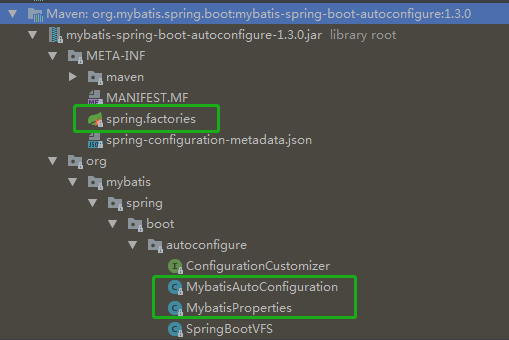
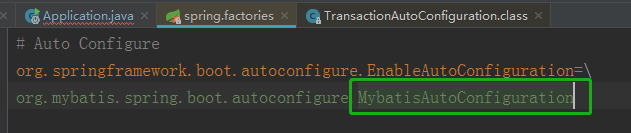
我们看到mybatis-spring-boot-autoconfigure也像spring-boot-autoconfigure一样配置了spring.factories这个配置文件,并且在配置文件中配置了MybatisAutoConfiguration这个自动配置类,我们知道SpringBoot启动时会获取所有spring.factories配置文件中的自动配置类并且进行解析其中的Bean,那么我们就来看看MybatisAutoConfiguration这个自动配置类做了啥?
MybatisAutoConfiguration
 @org.springframework.context.annotation.Configuration

 @ConditionalOnClass({ SqlSessionFactory.class, SqlSessionFactoryBean.class })

 @ConditionalOnBean(DataSource.class)

 //引入MybatisProperties配置类

 @EnableConfigurationProperties(MybatisProperties.class)

 @AutoConfigureAfter(DataSourceAutoConfiguration.class)

 public class MybatisAutoConfiguration {

     private final MybatisProperties properties;

     private final Interceptor[] interceptors;

     private final ResourceLoader resourceLoader;

     private final DatabaseIdProvider databaseIdProvider;

     private final List<ConfigurationCustomizer> configurationCustomizers;

     public MybatisAutoConfiguration(MybatisProperties properties,

                                     ObjectProvider<Interceptor[]> interceptorsProvider,

                                     ResourceLoader resourceLoader,

                                     ObjectProvider<DatabaseIdProvider> databaseIdProvider,

                                     ObjectProvider<List<ConfigurationCustomizer>> configurationCustomizersProvider) {

         this.properties = properties;

         this.interceptors = interceptorsProvider.getIfAvailable();

         this.resourceLoader = resourceLoader;

         this.databaseIdProvider = databaseIdProvider.getIfAvailable();

         this.configurationCustomizers = configurationCustomizersProvider.getIfAvailable();

     }

     @Bean

     @ConditionalOnMissingBean

     //往Spring容器中注入SqlSessionFactory对象

     //并且设置数据源、MapperLocations(Mapper.xml路径)等

     public SqlSessionFactory sqlSessionFactory(DataSource dataSource) throws Exception {

         SqlSessionFactoryBean factory = new SqlSessionFactoryBean();

         factory.setDataSource(dataSource);

         factory.setVfs(SpringBootVFS.class);

         if (StringUtils.hasText(this.properties.getConfigLocation())) {

             factory.setConfigLocation(this.resourceLoader.getResource(this.properties.getConfigLocation()));

         }

         Configuration configuration = this.properties.getConfiguration();

         if (configuration == null && !StringUtils.hasText(this.properties.getConfigLocation())) {

             configuration = new Configuration();

         }

         if (configuration != null && !CollectionUtils.isEmpty(this.configurationCustomizers)) {

             for (ConfigurationCustomizer customizer : this.configurationCustomizers) {

                 customizer.customize(configuration);

             }

         }

         factory.setConfiguration(configuration);

         if (this.properties.getConfigurationProperties() != null) {

             factory.setConfigurationProperties(this.properties.getConfigurationProperties());

         }

         if (!ObjectUtils.isEmpty(this.interceptors)) {

             factory.setPlugins(this.interceptors);

         }

         if (this.databaseIdProvider != null) {

             factory.setDatabaseIdProvider(this.databaseIdProvider);

         }

         if (StringUtils.hasLength(this.properties.getTypeAliasesPackage())) {

             factory.setTypeAliasesPackage(this.properties.getTypeAliasesPackage());

         }

         if (StringUtils.hasLength(this.properties.getTypeHandlersPackage())) {

             factory.setTypeHandlersPackage(this.properties.getTypeHandlersPackage());

         }

         if (!ObjectUtils.isEmpty(this.properties.resolveMapperLocations())) {

             factory.setMapperLocations(this.properties.resolveMapperLocations());

         }

         //获取SqlSessionFactoryBean的getObject()中的对象注入Spring容器,也就是SqlSessionFactory对象

         return factory.getObject();

     }

     @Bean

     @ConditionalOnMissingBean

     //往Spring容器中注入SqlSessionTemplate对象

     public SqlSessionTemplate sqlSessionTemplate(SqlSessionFactory sqlSessionFactory) {

         ExecutorType executorType = this.properties.getExecutorType();

         if (executorType != null) {

             return new SqlSessionTemplate(sqlSessionFactory, executorType);

         } else {

             return new SqlSessionTemplate(sqlSessionFactory);

         }

     }

     //other code...

 }
在自动配置的时候会导入一个Properties配置类MybatisProperties,咱们来看一下
@ConfigurationProperties(prefix = MybatisProperties.MYBATIS_PREFIX)

public class MybatisProperties {

    public static final String MYBATIS_PREFIX = "mybatis";

    /**

     * Location of MyBatis xml config file.

     */

    private String configLocation;

    /**

     * Locations of MyBatis mapper files.

     */

    private String[] mapperLocations;

    /**

     * Packages to search type aliases. (Package delimiters are ",; \t\n")

     */

    private String typeAliasesPackage;

    /**

     * Packages to search for type handlers. (Package delimiters are ",; \t\n")

     */

    private String typeHandlersPackage;

    /**

     * Indicates whether perform presence check of the MyBatis xml config file.

     */

    private boolean checkConfigLocation = false;

    /**

     * Execution mode for {@link org.mybatis.spring.SqlSessionTemplate}.

     */

    private ExecutorType executorType;

    /**

     * Externalized properties for MyBatis configuration.

     */

    private Properties configurationProperties;

    /**

     * A Configuration object for customize default settings. If {@link #configLocation}

     * is specified, this property is not used.

     */

    @NestedConfigurationProperty

    private Configuration configuration;

    //other code...

}
该Properties配置类作用主要用于与yml/properties中以mybatis开头的属性进行一一对应,如下
mybatis:

  config-location: classpath:mybatis/mybatis-config.xml

  mapper-locations: classpath:mybatis/mapper/*.xml

  type-aliases-package: org.com.cay.spring.boot.entity
<bean id="sqlSessionFactory" class="org.mybatis.spring.SqlSessionFactoryBean">

        <property name="dataSource" ref="dataSource"></property>

        <!-- 自动扫描mapping.xml文件 -->

        <property name="mapperLocations" value="classpath:com/cn/mapper/*.xml"></property>

        ...

</bean>
另外一个Bean为SqlSessionTemplate,通过SqlSessionFactory来生成SqlSession代理类:
public class SqlSessionTemplate implements SqlSession, DisposableBean {

    private final SqlSessionFactory sqlSessionFactory;

    private final ExecutorType executorType;

    private final SqlSession sqlSessionProxy;

    private final PersistenceExceptionTranslator exceptionTranslator;

    //other code...

    public SqlSessionTemplate(SqlSessionFactory sqlSessionFactory, ExecutorType executorType,

          PersistenceExceptionTranslator exceptionTranslator) {

        notNull(sqlSessionFactory, "Property 'sqlSessionFactory' is required");

        notNull(executorType, "Property 'executorType' is required");

        this.sqlSessionFactory = sqlSessionFactory;

        this.executorType = executorType;

        this.exceptionTranslator = exceptionTranslator;

        //生成SqlSessioin代理类

        this.sqlSessionProxy = (SqlSession) newProxyInstance(

            SqlSessionFactory.class.getClassLoader(),

            new Class[] { SqlSession.class },

            new SqlSessionInterceptor());

    }

}
而@MapperScan注解是和Spring整合Mybatis的使用是一样的,都是在配置类上指定Mapper接口的路径,大家可以看一下我以前的一篇文章Mybaits 源码解析 (十一)----- @MapperScan将Mapper接口生成代理注入到Spring-静态代理和动态代理结合使用
SpringBoot 源码解析 (九)----- Spring Boot的核心能力 - 整合Mybatis的更多相关文章
- springboot源码解析-管中窥豹系列之自动装配(九)
一.前言 Springboot源码解析是一件大工程,逐行逐句的去研究代码,会很枯燥,也不容易坚持下去. 我们不追求大而全,而是试着每次去研究一个小知识点,最终聚沙成塔,这就是我们的springboot ...
- springboot源码解析-管中窥豹系列之BeanDefine如何加载(十三)
一.前言 Springboot源码解析是一件大工程,逐行逐句的去研究代码,会很枯燥,也不容易坚持下去. 我们不追求大而全,而是试着每次去研究一个小知识点,最终聚沙成塔,这就是我们的springboot ...
- springboot源码解析-管中窥豹系列之总体结构(一)
一.简介 Springboot源码解析是一件大工程,逐行逐句的去研究代码,会很枯燥,也不容易坚持下去. 我们不追求大而全,而是试着每次去研究一个小知识点,最终聚沙成塔,这就是我们的springboot ...
- springboot源码解析-管中窥豹系列之项目类型(二)
一.前言 Springboot源码解析是一件大工程,逐行逐句的去研究代码,会很枯燥,也不容易坚持下去. 我们不追求大而全,而是试着每次去研究一个小知识点,最终聚沙成塔,这就是我们的springboot ...
- springboot源码解析-管中窥豹系列之Runner(三)
一.前言 Springboot源码解析是一件大工程,逐行逐句的去研究代码,会很枯燥,也不容易坚持下去. 我们不追求大而全,而是试着每次去研究一个小知识点,最终聚沙成塔,这就是我们的springboot ...
- springboot源码解析-管中窥豹系列之Initializer(四)
一.前言 Springboot源码解析是一件大工程,逐行逐句的去研究代码,会很枯燥,也不容易坚持下去. 我们不追求大而全,而是试着每次去研究一个小知识点,最终聚沙成塔,这就是我们的springboot ...
- springboot源码解析-管中窥豹系列之web服务器(七)
一.前言 Springboot源码解析是一件大工程,逐行逐句的去研究代码,会很枯燥,也不容易坚持下去. 我们不追求大而全,而是试着每次去研究一个小知识点,最终聚沙成塔,这就是我们的springboot ...
- springboot源码解析-管中窥豹系列之BeanPostProcessor(十二)
一.前言 Springboot源码解析是一件大工程,逐行逐句的去研究代码,会很枯燥,也不容易坚持下去. 我们不追求大而全,而是试着每次去研究一个小知识点,最终聚沙成塔,这就是我们的springboot ...
- springboot源码解析-管中窥豹系列之bean如何生成?(十四)
一.前言 Springboot源码解析是一件大工程,逐行逐句的去研究代码,会很枯燥,也不容易坚持下去. 我们不追求大而全,而是试着每次去研究一个小知识点,最终聚沙成塔,这就是我们的springboot ...
随机推荐
- 开源造轮子:一个简洁,高效,轻量级,酷炫的不要不要的canvas粒子运动插件库
一:开篇 哈哈哈,感谢标题党的莅临~ 虽然标题有点夸张的感觉,但实际上,插件库确实是简洁,高效,轻量级,酷炫酷炫的咯.废话不多说,先来看个标配例子吧: (codepen在线演示编辑:http://co ...
- C#事件浅淡(1)
最近在写C#,感觉事件这个机制很好,可是怎么实现自己定义的事件呢?查了资料有的不全有的不完整,有的太深,自己写一个简单的例子. 原则 1,定义一个事件信息类(标准的都继承EventArgs) 2.定义 ...
- fenby C语言 P25
二维数组 #include <stdio.h> int main(){ int a[3][4]={{1,2,3,4},{5,6,7,8},{9,10,11,12}}; int sum=0, ...
- CET4
Directions: For this part, you are allowed 30 minutes to write a short essay on the challenges of st ...
- Navicate12激活教程(完整详细版)
写在前面 最近身边的小伙伴苦于没有Navicat12的激活工具,不能使用最新版的Navicat,鉴于此,遂将自己整理的文章贴出来,供大家参考,不过个人还是主张维护正版的意愿,如果经济实力允许的话,还是 ...
- Python中的is和==的区别
Python中的is和==的区别 1. is 是比较内存地址id() a = "YongJie" b = "YongJie" print(id(a)) #233 ...
- Unity5-ABSystem(一):AssetBundle原理
转载自:http://blog.csdn.net/lodypig/article/details/51863683 说明 AssetBundle简介 AssetBundle内部格式 normal bu ...
- 9、pytest -- 集成文档测试
目录 1. 集成doctest模块 1.1. 通过指定文本文件的方式 1.2. 通过编写文档字符串的方式 1.3. 指定额外的选项 2. 失败时继续执行 3. 指定输出的格式 4. 文档测试中使用fi ...
- Feeling after reading《Jane Eyre》
Yesterday I read and listened over the book named <Jane Eyre>, the book is very thoughtful, th ...
- MVC5用户控件
1. 添加一个model,用于给用户控件传递数据: 2.添加一个部分视图 . 3. 部分视图中,引入model,用于传递数据 4. 在要插入用户控件的地方,这样写 @Html.Partial(&quo ...