
linux下vscode的c++工程配置
准备
安装vscode,可直接下载deb包进行安装,完成后安装C/C++ for Visual Studio Code插件,安装后重启(最新1.3版本以后不需要重启)。

生成目录和文件
新建文件夹【test】,并新建文件helloworld.cpp文件,文件中内容如下,
#include <iostream>

#include <string>

using namespace std;

int main(int argc, char const *argv[])

{

    cout<< "hello world" << endl;

    return 0;

}
使用vscode打开文件夹

配置c++ IntelliSense
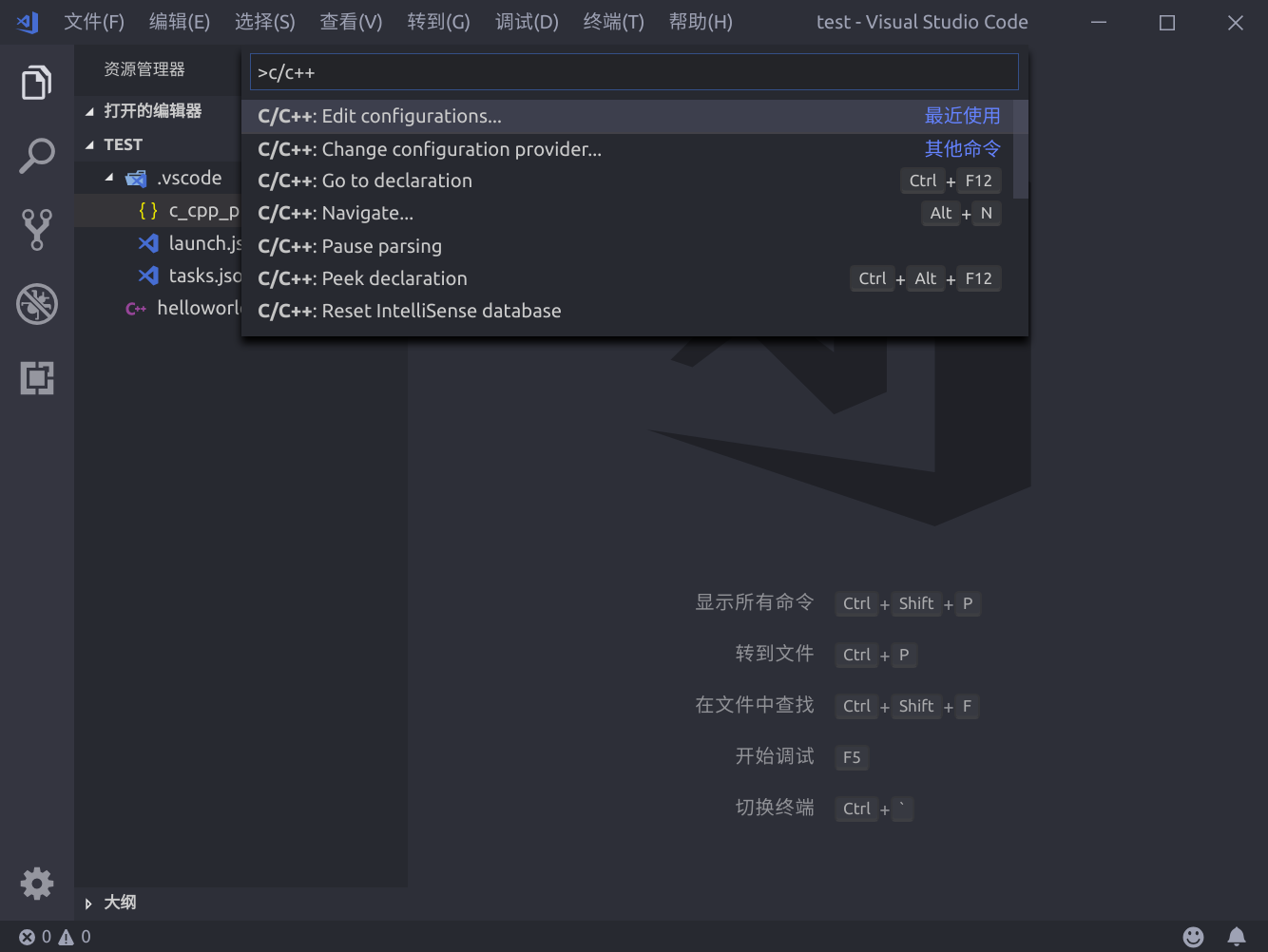
使用F1,打开命令选项,输入C/C++,选择C/C++:Edit configuration,生成c_cpp_properties.json配置文件。
{

    "configurations": [

        {

            "name": "Linux",

            "includePath": [

                "${workspaceFolder}/**"

            ],

            "defines": [],

            "compilerPath": "/usr/bin/gcc",

            "cStandard": "c11",

            "cppStandard": "c++17",

            "intelliSenseMode": "clang-x64"

        }

    ],

    "version": 4

}
其中最主要为"includePath"的引用和库的路径,根据引用内容进行配置。
launch
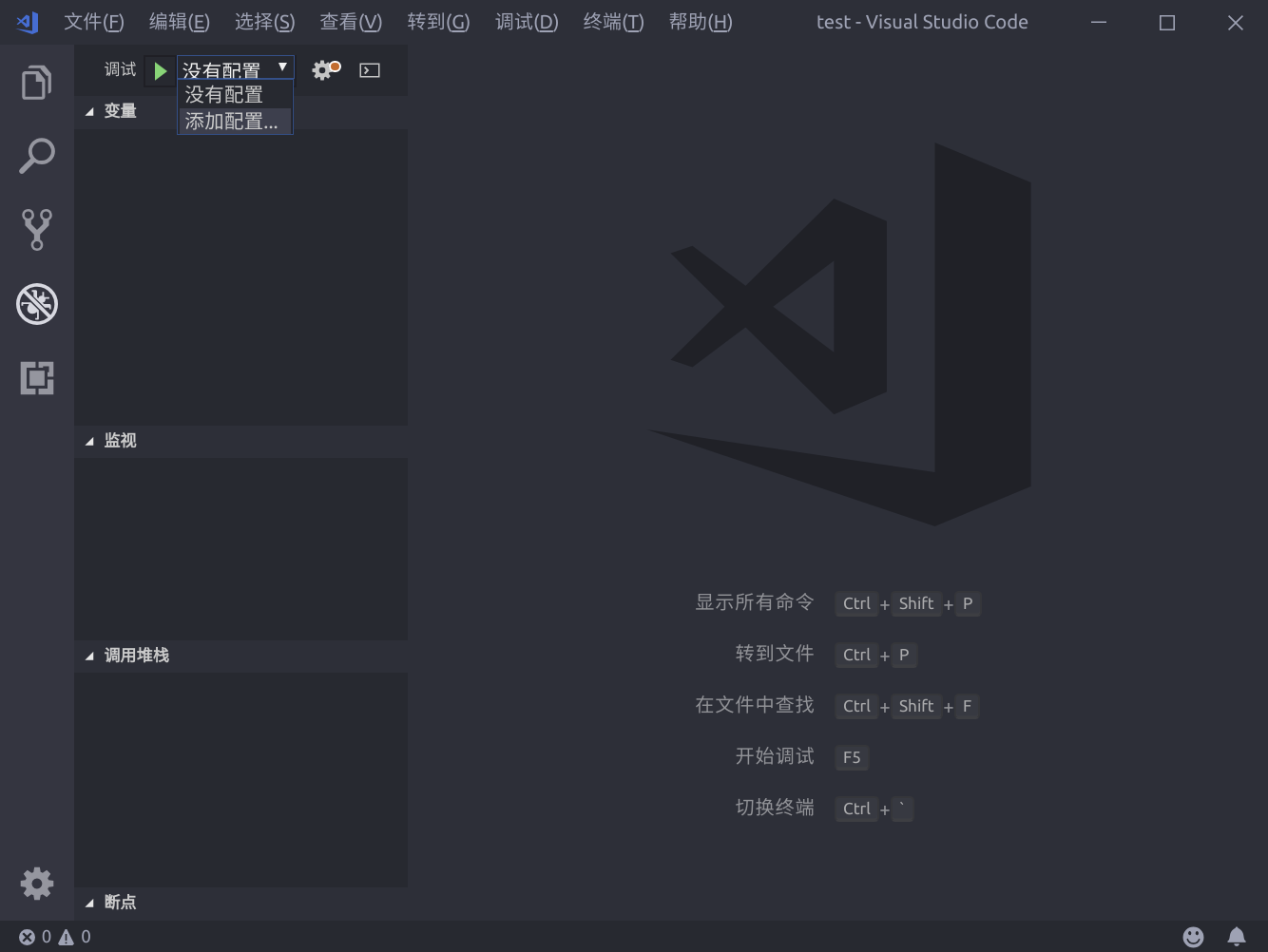
在debug界面中选择添加配置,然后选择才c++(gdb/lgdb)选项,生成launch.json 顾名思义此文件主要服务于调试时的加载控制
{

    "version": "0.2.0",

    "configurations": [

        {

            "name": "(gdb) Launch",

            "type": "cppdbg",

            "request": "launch",

            "program": "${workspaceFolder}/helloworld",

            "args": [],

            "stopAtEntry": false,

            "cwd": "${workspaceFolder}",

            "environment": [],

            "externalConsole": true,

            "MIMode": "gdb",

            "preLaunchTask": "build",

            "setupCommands": [

                {

                    "description": "Enable pretty-printing for gdb",

                    "text": "-enable-pretty-printing",

                    "ignoreFailures": true

                }

            ]

        }

    ]

}
需要注意的参数为"program",此为需要调试的目标文件,应当设置为编译输出的文件位置;其次需要添加"preLaunchTask",此项的名字应与下面所建的tasks.json中的任务名称一致。
tasks.json
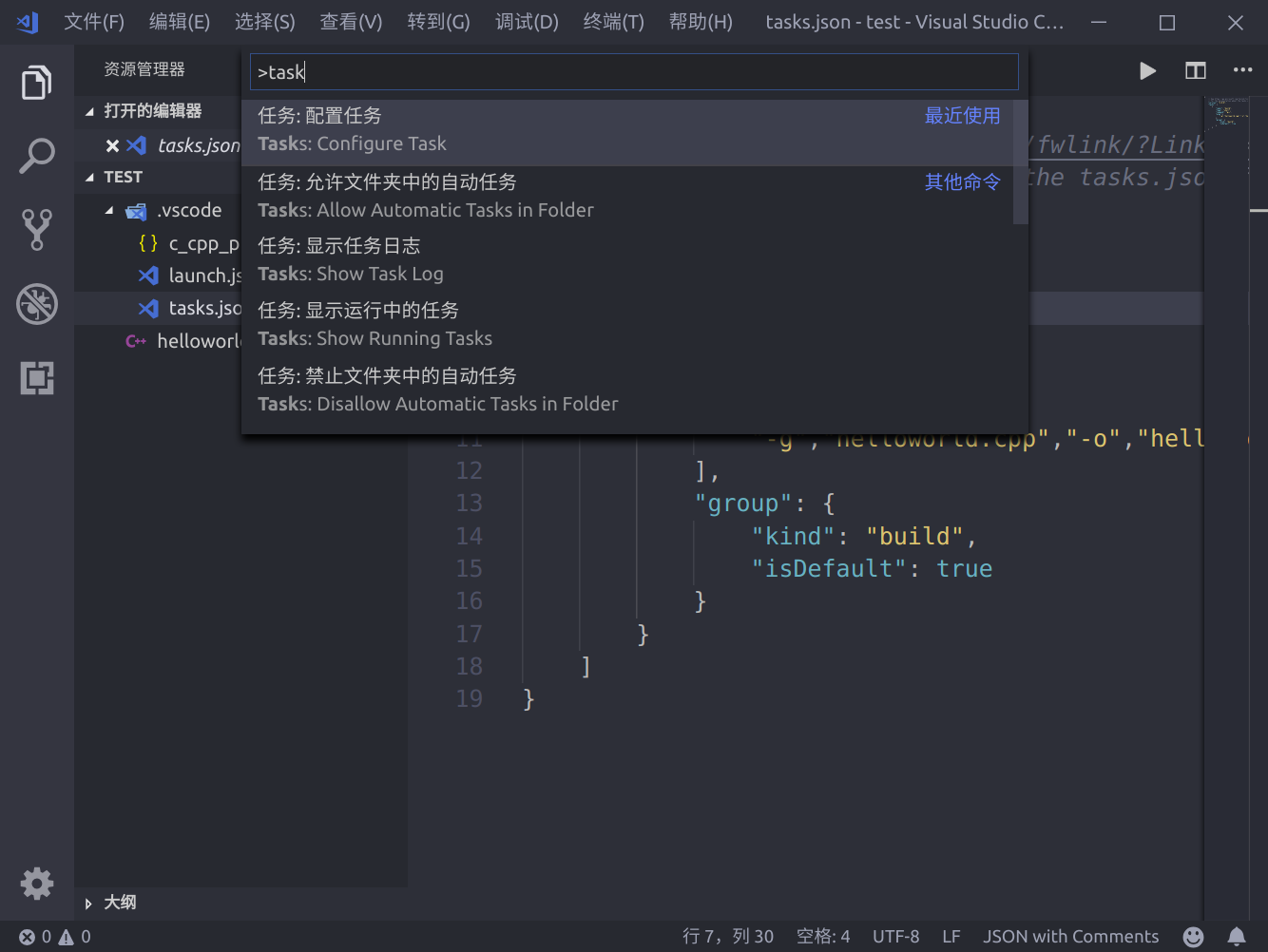
在命令窗口中输入task,选择task: configure task选项生成tasks.json文件
{

    "version": "2.0.0",

    "tasks": [

        {

            "label": "build",

            "type": "shell",

            "command": "g++",

            "args":[

                "-g","helloworld.cpp","-o","helloworld"

            ],

            "group": {

                "kind": "build",

                "isDefault": true

            }

        }

    ]

}
注意launch.json中的"preLaunchTask"调用与“label”相同的task。
开始调试
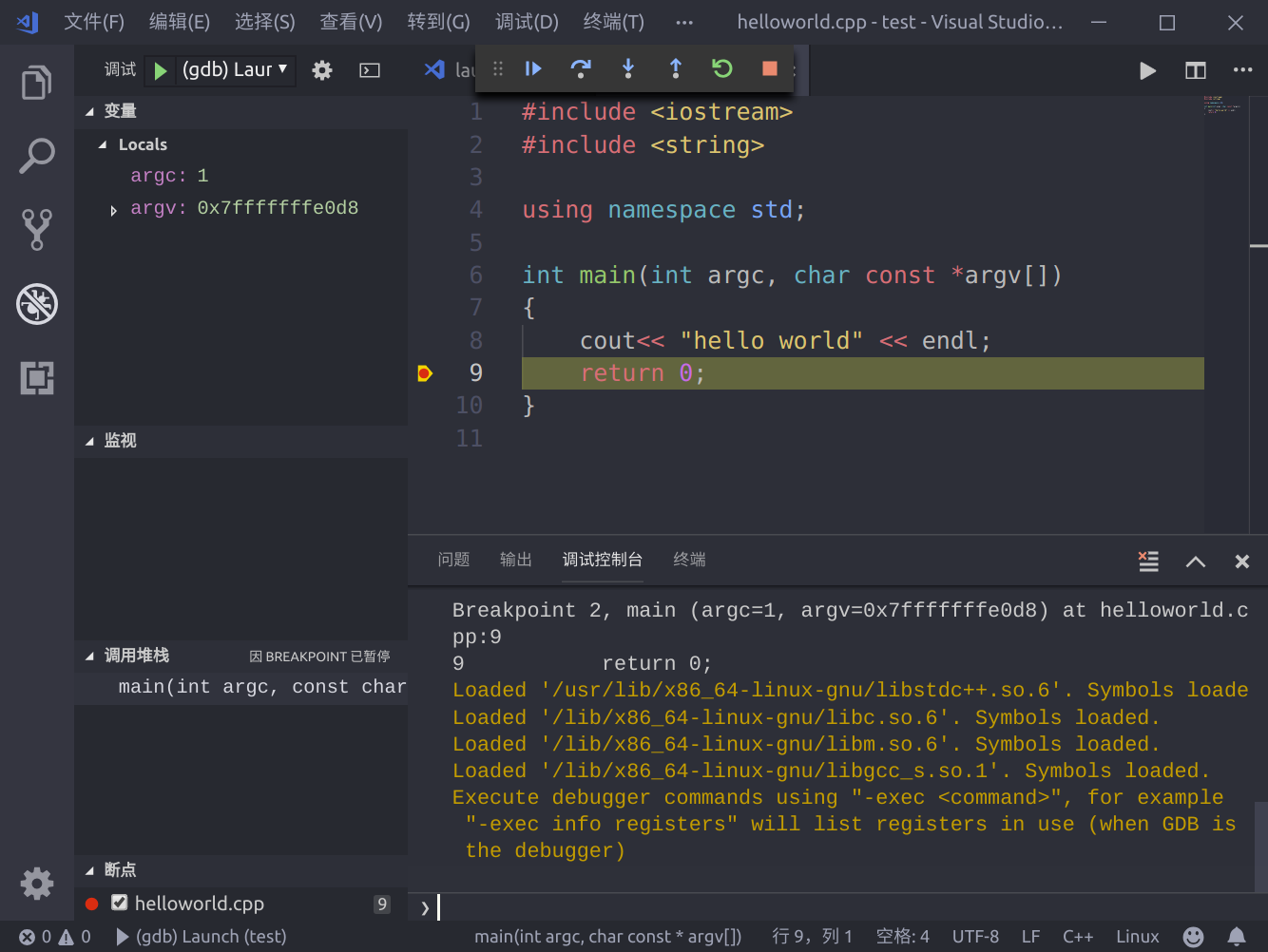
按下F5开始调试吧,一切就是这么简单,开始美好的旅程。
linux下vscode的c++工程配置的更多相关文章
- Linux下apache+phppgadmin+postgresql安装配置
Linux下apache+phppgadmin+postgresql安装配置 操作系统:CentOS 安装包:httpd(首选yum), php(包括php以及php-pgsql,php-mbstri ...
- Linux下Qt的安装与配置
参考资料:http://www.cnblogs.com/emouse/archive/2013/01/28/2880142.html Linux 下编译.安装.配置 QT 下载qt 这里用的是4.7. ...
- Linux 下编译、安装、配置 QT
转自Linux 下编译.安装.配置 QT 注意:编译安装耗时费力,且很容易出错,要不断调整编译参数,不推荐使用,否则这将会是一个纠结痛苦的过程. 打算做嵌入式图像处理,计划方案嵌入式Linux+Ope ...
- 在Linux下,在网络没有配置好前,怎样查看网卡的MAC地址?
在Linux下,在网络没有配置好前,怎样查看网卡的MAC地址? 使用 dmesg 与 grep 命令来实际,例如以下: [root@localhost ~]# dmesg | grep eth e10 ...
- .Neter玩转Linux系列之六:Linux下MySQL的安装、配置、使用
一.Linux安装MySQL (1)下载安装包:https://dev.mysql.com/downloads/mysql/ (2)解压并安装 命令:tar zxvf 文件名 解压完成之后,重名一下文 ...
- linux下svn的安装与配置
---恢复内容开始--- linux下svn的安装与配置 Linux发行版本:CentOS6.5 1.安装subversion sudo yum -y install subversion 2.创建s ...
- linux下redis的安装及配置启动
linux下redis的安装及配置启动 标签: redisnosql 2014-10-24 14:04 19732人阅读 评论(0) 收藏 举报 分类: 数据与性能(41) wget http:/ ...
- Linux下ffmpeg安装与开发配置
Linux下ffmpeg安装与开发配置 1. ffmpeg安装 安装环境: ubuntu 12.04 (1)删除已安装的文件,避免冲突 sudo apt-get remove ffmpeg x26 ...
- Linux下MySQL数据库主从同步配置
说明: 操作系统:CentOS 5.x 64位 MySQL数据库版本:mysql-5.5.35 MySQL主服务器:192.168.21.128 MySQL从服务器:192.168.21.129 准备 ...
随机推荐
- UniDBGrid增加显示记录数的label及隐藏refresh按钮
1. 在UniDBgrid的extEvent属性中写入以下代码: function OnAfterCreate(sender){ var toolbar=sender.getDockedItems() ...
- 读入挂(IO)
快如闪电,清华杜瑜皓的读入挂,一模一样代码,加了这个之后... 细思极恐,and 整整行!!! namespace IO{ #define BUF_SIZE 100000 #define OUT_SI ...
- myeclipise生成javadoc
1.点击项目,右键,选择export: 点击next: 点击next:VM options中输入-encoding UTF-8 -charset UTF-8
- ubuntu解压rar文件
一般通过默认安装的ubuntu是不能解压rar文件的,只有在安装了rar解压工具之后,才可以解压.其实在ubuntu下安装rar解压工具是非常简 单的,只需要两个步骤就可以迅速搞定. ubuntu 下 ...
- 一个隐蔽的C语言问题反思
今天在编译一个C代码的时候,从别的编译ok的头文件中拷贝了一份在上面做修改,没想到修改好之后一直 无法调用这个头文件中的函数和变量.看了好久,才在预编译宏中找到了问题的根源.代码 如下所示: 头文件A ...
- 排序算法系列:插入排序算法JAVA版(靠谱、清晰、真实、可用、不罗嗦版)
在网上搜索算法的博客,发现一个比较悲剧的现象非常普遍: 原理讲不清,混乱 啰嗦 图和文对不上 不可用,甚至代码还出错 我总结一个清晰不罗嗦版: 原理: 和选择排序类似的是也分成“已排序”部分,和“未排 ...
- 【Collection、泛型】
[Collection.泛型] 主要内容 Collection集合 迭代器 增强for 泛型 第一章 Collection集合 1.1 集合概述 集合:集合是java中提供的一种容器,可以用来存储多个 ...
- [P4318] 完全平方数
想不出什么办法能直接算的(别跟我提分块打表),不如二分答案吧:设\(f(x)=\sum_{i=1}^n [i不是"完全平方数"]\), 显然f(x)与x正相关.再结合筛法.容斥,不 ...
- CSRF理解和实战
目录 啥是CSRF攻击 写一个CSRF攻击 如何避免CSRF攻击 啥是CSRF攻击 CSRF(Cross-site request forgery)跨站请求伪造,CSRF通过伪装来自受信任用户的请求来 ...
- vue-01
1, vue优势 虚拟daom, 易用, 灵活, 高效 2, 介绍 渐进式框架 3, 兼容性 es5的星特性, 不支持ie8 4, 新版本内置 webpack