
Struts2中的图片验证码
1.Struts中建一个action
<action name="Code" class="LoginAction" method="code">

		<result name="success" type="stream">

		      <param name="contentType">image/jpeg</param>

		      <param name="inputName">inputStream</param>

		      <param name="bufferSize">2048</param>

			</result></action>
2.写Code.action
首先定义inputStream,并get,set
private ByteArrayInputStream inputStream;
 public ByteArrayInputStream getInputStream() {

		return inputStream;

	}

	public void setInputStream(ByteArrayInputStream inputStream) {

		this.inputStream = inputStream;

	}
然后Code.action代码如下
 public String code() throws Exception {

    	 int WIDTH = 60;

    	 int HEIGHT = 20;

    	HttpServletResponse response = ServletActionContext.getResponse();

        // 设置浏览器不要缓存此图片

        response.setHeader("Pragma", "no-cache");

        response.setHeader("Cache-Control", "no-cache");

        response.setDateHeader("Expires", 0);

        String str = "0123456789qwertyuiopasdfghjklzxcvbnm";

        char[] rand = new char[4];

        Random random = new Random();

        for (int i = 0; i < 4; i++)

        {

            rand[i] = str.charAt(random.nextInt(36));

        }

        String rands =new String(rand);

        BufferedImage image = new BufferedImage(WIDTH, HEIGHT,BufferedImage.TYPE_INT_RGB);

        Graphics g = image.getGraphics();

        // 产生图像

        // 画背景

        g.setColor(new Color(0xDCDCDC));

        g.fillRect(0, 0, WIDTH, HEIGHT);

        // 随机产生 120 个干扰点

        for (int i = 0; i < 120; i++)

        {

            int x = (int) (Math.random() * WIDTH);

            int y = (int) (Math.random() * HEIGHT);

            int red = (int) (Math.random() * 255);

            int green = (int) (Math.random() * 255);

            int blue = (int) (Math.random() * 255);

            g.setColor(new Color(red, green, blue));

            g.drawOval(x, y, 1, 0);

        }

        g.setColor(Color.BLACK);

        g.setFont(new Font(null, Font.ITALIC | Font.BOLD, 18));

        // 在不同的高度上输出验证码的每个字符

        g.drawString("" + rands.charAt(0), 1, 17);

        g.drawString("" + rands.charAt(1), 16, 15);

        g.drawString("" + rands.charAt(2), 31, 18);

        g.drawString("" + rands.charAt(3), 46, 16);

        System.out.println(rands);

        // 结束图像 的绘制 过程, 完成图像

        g.dispose();

        ByteArrayOutputStream outputStream = new ByteArrayOutputStream();

        ImageIO.write(image, "jpeg", outputStream);

        ByteArrayInputStream input = new ByteArrayInputStream(outputStream.toByteArray());

        this.setInputStream(input);

        HttpSession session = ServletActionContext.getRequest().getSession();

        session.setAttribute("checkCode", rands);

        input.close();

        outputStream.close();

		return SUCCESS;

    }
3.jsp中调用
 <form id="form" action="Login.action" method="post">

    <table border=0 cellpadding="4">

    <tr><td><input type="text" name="username" placeholder="学号/工号/用户名" size="22" style="background-image: url(img/user.JPG);"><br></td></tr>

    <tr><td><input type="password" name="password" placeholder="密码" size="22" style="background-image: url(img/password.JPG);"><br></td></tr>

    <tr><td>

	<input type="text" placeholder="验证码" name="checkCode" size="10"/>

	<img alt="" src="Code.action" onclick="this.src='Code.action?'+ Math.random();" title="点击图片刷新验证码">

   </td> </tr>

    <tr><td><input type="submit" class="btnCheck" value="登录" onclick="validate()" style="width:100%;"></button></td>

    </tr>

    </table>

    </form>
4.在另一个action中验证
HttpSession session = ServletActionContext.getRequest().getSession();

    String checkCode2 = (String)session.getAttribute("checkCode");

    System.out.println(checkCode+"aaa"+checkCode2);

    if(!checkCode.equals(checkCode2))

    {

    	return "chekCodeerror";

    }
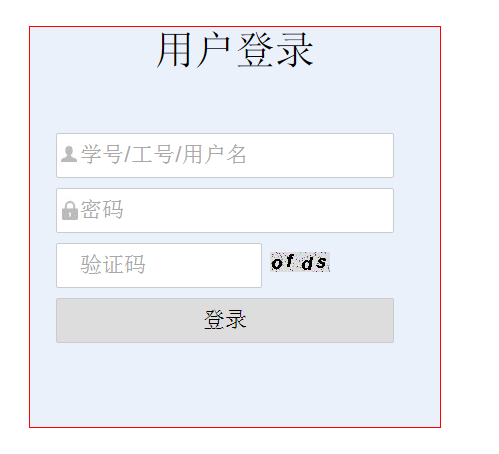
5.结果截图
Struts2中的图片验证码的更多相关文章
- 在mvc中实现图片验证码的刷新
首先,在项目模型(Model)层中建立一个生成图片验证码的类ValidationCodeHelper,代码如下: public class ValidationCodeHelper { //用户存取验 ...
- django项目登录中使用图片验证码
应用下创建untils文件夹放置封装图片验证码的函数 创建validCode.py文件定义验证码规则 import random def get_random_color(): return (ran ...
- Struts2中实现随机验证码
一.创建RandomNum类 1: import java.awt.Color; 2: import java.awt.Font; 3: import java.awt.Graphics; 4: im ...
- struts向网页输出图片验证码
前言:今天做个功能需要展示图片到页面,并不是下载,在网上搜了老半天,大部分都是下载,有的话也是只能在IE下进行输出,其它浏览器就都是下载了. Action代码: public String proce ...
- ASP.NET图片验证码
1. 新建一个Validate.aspx,然后在Validate.aspx.cs编写代码: using System; using System.Collections; using System.C ...
- ASP.NET图片验证码学习!
1. 新建一个Validate.aspx,然后在Validate.aspx.cs编写代码: using System; using System.Collections; using System.C ...
- Django实战(一)-----用户登录与注册系统5(图片验证码)
为了防止机器人频繁登录网站或者破坏分子恶意登录,很多用户登录和注册系统都提供了图形验证码功能. 验证码(CAPTCHA)是一种区分用户是计算机还是人的公共全自动程序. 可以防止恶意破解密码.刷票.论坛 ...
- Django商城项目笔记No.4用户部分-注册接口-图片验证码
Django商城项目笔记No.4用户部分-注册接口-图片验证码 1.首先分析注册业务接口 1.1.分析可得,至少这么几个接口 图片验证码 短信验证码 用户名是否存在 手机号是否存在 整体注册接口 图片 ...
- linux下tomcat6无法显示图片验证码 少了图形插件
linux下tomcat6无法显示图片验证码(windows下显示正常) 原创 2015年10月20日 10:31:47 3526 linux下tomcat6无法显示图片验证码(windows下显示正 ...
随机推荐
- 如何创建一个 mongo 数据库并为它添加一个认证用户?
0.登录 admin 库,开启一个 mongo shell mongo --port 27017 -u "adminUser" -p "adminPass" - ...
- Linux 小知识翻译 - 「克隆」
最近比较流行的Linux发行版,得是连新闻都报道的,刚刚发布新版的「CentOS」了. 「CentOS」一般被称为Red Hat EnterpriseLinux的克隆版本,这是什么意思呢? Linux ...
- Alpha版本 - 展示博客
Alpha版本 - 展示博客 S.W.S.D 成员简介 演示动态图 注册 登录 新建记录 分享记录 修改主页时间查看记录 文章模块 流星模块 修改用户信息(以头像为例) 用户使用概况 预期的典型用户 ...
- 转载 线程初步了解 - <第一篇>
操作系统通过线程对程序的执行进行管理,当操作系统运行一个程序的时候,首先,操作系统将为这个准备运行的程序分配一个进程,以管理这个程序所需要的各种资源.在这些资源之中,会包含一个称为主线程的线程数据结构 ...
- 图、dfs、bfs
graphdfsbfs 1.clone graph2.copy list with random pointer3.topological sorting4.permutations5.subsets ...
- mongodb数据库中插入数据
mongodb数据库中插入数据 一:connection 访问集合: 在mongodb数据库中,数据是存储在许多数据集合中,可以使用数据库对象的collection方法访问一个集合.该方法使用如下: ...
- ubuntu系统的谷歌浏览器的安装
Ubuntu 系统通过一下四步能安装谷歌浏览器 1. sudo wget http://www.linuxidc.com/files/repo/google-chrome.list -P /etc/a ...
- omcat+java的web程序持续占cpu高问题调试【转】
1.top -c 2.查看具体线程 ps -m -p 30997 -o tid,%cpu,%mem > threads.log 3.printf %x 31865 其次将需要的线程ID转换为16 ...
- 如何利用Skyline的TerraExplorer Pro 6.5提供的API接口实现矢量图层数据的动态投影
Skyline 支持国内常见的地图投影坐标系,包括WGS84.Beijing54.西安80.2000坐标系等,也可以自定义坐标系,比如一些做过参数变换加密的坐标系等. <!DOCTYPE htm ...
- VSCode Install Go
首先是VScode官网下载:https://code.visualstudio.com/ 然后在电脑上安装go的环境 如下图在VSCode上搜go的插件进行安装: 推荐:vscode-icons这个插 ...