
Struts2中的图片验证码
1.Struts中建一个action
<action name="Code" class="LoginAction" method="code">

		<result name="success" type="stream">

		      <param name="contentType">image/jpeg</param>

		      <param name="inputName">inputStream</param>

		      <param name="bufferSize">2048</param>

			</result></action>
2.写Code.action
首先定义inputStream,并get,set
private ByteArrayInputStream inputStream;
 public ByteArrayInputStream getInputStream() {

		return inputStream;

	}

	public void setInputStream(ByteArrayInputStream inputStream) {

		this.inputStream = inputStream;

	}
然后Code.action代码如下
 public String code() throws Exception {

    	 int WIDTH = 60;

    	 int HEIGHT = 20;

    	HttpServletResponse response = ServletActionContext.getResponse();

        // 设置浏览器不要缓存此图片

        response.setHeader("Pragma", "no-cache");

        response.setHeader("Cache-Control", "no-cache");

        response.setDateHeader("Expires", 0);

        String str = "0123456789qwertyuiopasdfghjklzxcvbnm";

        char[] rand = new char[4];

        Random random = new Random();

        for (int i = 0; i < 4; i++)

        {

            rand[i] = str.charAt(random.nextInt(36));

        }

        String rands =new String(rand);

        BufferedImage image = new BufferedImage(WIDTH, HEIGHT,BufferedImage.TYPE_INT_RGB);

        Graphics g = image.getGraphics();

        // 产生图像

        // 画背景

        g.setColor(new Color(0xDCDCDC));

        g.fillRect(0, 0, WIDTH, HEIGHT);

        // 随机产生 120 个干扰点

        for (int i = 0; i < 120; i++)

        {

            int x = (int) (Math.random() * WIDTH);

            int y = (int) (Math.random() * HEIGHT);

            int red = (int) (Math.random() * 255);

            int green = (int) (Math.random() * 255);

            int blue = (int) (Math.random() * 255);

            g.setColor(new Color(red, green, blue));

            g.drawOval(x, y, 1, 0);

        }

        g.setColor(Color.BLACK);

        g.setFont(new Font(null, Font.ITALIC | Font.BOLD, 18));

        // 在不同的高度上输出验证码的每个字符

        g.drawString("" + rands.charAt(0), 1, 17);

        g.drawString("" + rands.charAt(1), 16, 15);

        g.drawString("" + rands.charAt(2), 31, 18);

        g.drawString("" + rands.charAt(3), 46, 16);

        System.out.println(rands);

        // 结束图像 的绘制 过程, 完成图像

        g.dispose();

        ByteArrayOutputStream outputStream = new ByteArrayOutputStream();

        ImageIO.write(image, "jpeg", outputStream);

        ByteArrayInputStream input = new ByteArrayInputStream(outputStream.toByteArray());

        this.setInputStream(input);

        HttpSession session = ServletActionContext.getRequest().getSession();

        session.setAttribute("checkCode", rands);

        input.close();

        outputStream.close();

		return SUCCESS;

    }
3.jsp中调用
 <form id="form" action="Login.action" method="post">

    <table border=0 cellpadding="4">

    <tr><td><input type="text" name="username" placeholder="学号/工号/用户名" size="22" style="background-image: url(img/user.JPG);"><br></td></tr>

    <tr><td><input type="password" name="password" placeholder="密码" size="22" style="background-image: url(img/password.JPG);"><br></td></tr>

    <tr><td>

	<input type="text" placeholder="验证码" name="checkCode" size="10"/>

	<img alt="" src="Code.action" onclick="this.src='Code.action?'+ Math.random();" title="点击图片刷新验证码">

   </td> </tr>

    <tr><td><input type="submit" class="btnCheck" value="登录" onclick="validate()" style="width:100%;"></button></td>

    </tr>

    </table>

    </form>
4.在另一个action中验证
HttpSession session = ServletActionContext.getRequest().getSession();

    String checkCode2 = (String)session.getAttribute("checkCode");

    System.out.println(checkCode+"aaa"+checkCode2);

    if(!checkCode.equals(checkCode2))

    {

    	return "chekCodeerror";

    }
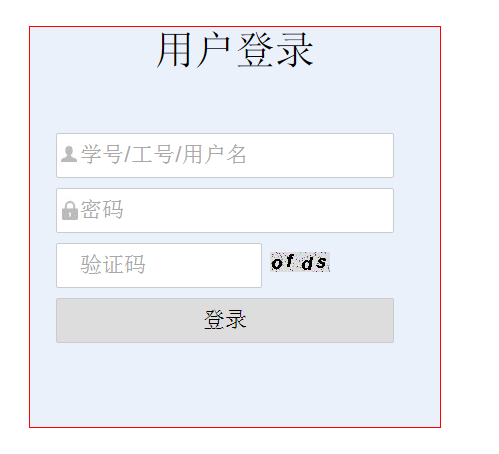
5.结果截图
Struts2中的图片验证码的更多相关文章
- 在mvc中实现图片验证码的刷新
首先,在项目模型(Model)层中建立一个生成图片验证码的类ValidationCodeHelper,代码如下: public class ValidationCodeHelper { //用户存取验 ...
- django项目登录中使用图片验证码
应用下创建untils文件夹放置封装图片验证码的函数 创建validCode.py文件定义验证码规则 import random def get_random_color(): return (ran ...
- Struts2中实现随机验证码
一.创建RandomNum类 1: import java.awt.Color; 2: import java.awt.Font; 3: import java.awt.Graphics; 4: im ...
- struts向网页输出图片验证码
前言:今天做个功能需要展示图片到页面,并不是下载,在网上搜了老半天,大部分都是下载,有的话也是只能在IE下进行输出,其它浏览器就都是下载了. Action代码: public String proce ...
- ASP.NET图片验证码
1. 新建一个Validate.aspx,然后在Validate.aspx.cs编写代码: using System; using System.Collections; using System.C ...
- ASP.NET图片验证码学习!
1. 新建一个Validate.aspx,然后在Validate.aspx.cs编写代码: using System; using System.Collections; using System.C ...
- Django实战(一)-----用户登录与注册系统5(图片验证码)
为了防止机器人频繁登录网站或者破坏分子恶意登录,很多用户登录和注册系统都提供了图形验证码功能. 验证码(CAPTCHA)是一种区分用户是计算机还是人的公共全自动程序. 可以防止恶意破解密码.刷票.论坛 ...
- Django商城项目笔记No.4用户部分-注册接口-图片验证码
Django商城项目笔记No.4用户部分-注册接口-图片验证码 1.首先分析注册业务接口 1.1.分析可得,至少这么几个接口 图片验证码 短信验证码 用户名是否存在 手机号是否存在 整体注册接口 图片 ...
- linux下tomcat6无法显示图片验证码 少了图形插件
linux下tomcat6无法显示图片验证码(windows下显示正常) 原创 2015年10月20日 10:31:47 3526 linux下tomcat6无法显示图片验证码(windows下显示正 ...
随机推荐
- Alpha冲刺! Day3 - 砍柴
Alpha冲刺! Day3 - 砍柴 今日已完成 晨瑶:补充安卓技能树: review接口文档:看了点七牛云安卓API. 昭锡:没有团队项目相关贡献. 永盛: API 文档基本完成:根据 API 文档 ...
- python五十六课——正则表达式(常用函数之compile())
2).compile(regex,[flags=0]):返回一个Pattern对象(认为:它内部已经封装了一套regex和flags) 可以再通过Pattern对象继续调用match函数(此时只需要传 ...
- 死磕nginx系列--nginx 目录
死磕nginx系列--nginx入门 死磕nginx系列--nginx配置文件 死磕nginx系统-nginx日志配置 死磕nginx系列--nginx服务器做web服务器 死磕nginx系列--使用 ...
- 安装eclipse、maven等JAVA开发环境
一 下载JAVA,这是官方JAVA8的下载地址,包含了JDK和JRE: http://www.oracle.com/technetwork/java/javase/downloads/jdk8-dow ...
- 分布式服务化系统一致性(分布式事务、ACID、BASE、CAP)原理与解决方案
https://blog.csdn.net/rickiyeat/article/details/70224722
- 20145236《网络攻防》Exp4 恶意代码分析
20145236<网络攻防>Exp4 恶意代码分析 一.基础问题回答 如果在工作中怀疑一台主机上有恶意代码,但只是猜想,所有想监控下系统一天天的到底在干些什么.请设计下你想监控的操作有哪些 ...
- java 文件字节和字符流 缓冲流
流的原理 1) 在 Java 程序中,对于数据的输入/输出操作以“流”(stream) 方式进行:2) J2SDK 提供了各种各样的“流”类,用以获取不同种类的数据:程序中通过标准的方法输入或输出数据 ...
- GIT 管理修改、删除文件
管理修改 现在,假定你已经完全掌握了暂存区的概念.下面,我们要讨论的就是,为什么Git比其他版本控制系统设计得优秀,因为Git跟踪并管理的是修改,而非文件. 你会问,什么是修改?比如你新增了一行,这就 ...
- MYSQL表情存储数据库报错
1.windows安装5.5.5.9的服务器 2.打开window服务找到mysql的服务,右键属性查看路径 3.打开路径,修改mysql配置文件my.ini 4.修改[client]中的defaul ...
- MSComm控件与Win32 API操作串口有何区别?
MSComm控件与Win32 API操作串口有何区别? [问题点数:50分,结帖人shell_shell] 收藏帖子 回复 我是一个小兵,在战场上拼命! 结帖率 83.33% 我以前用MSCo ...