
Vue组件的基础用法(火柴)
前面的话
组件(component)是Vue最强大的功能之一。组件可以扩展HTML元素,封装可重用的代码,根据项目需求,抽象出一些组件,每个组件里包含了展现、功能和样式。每个页面,根据自己的需要,使用不同的组件来拼接页面。这种开发模式使得前端页面易于扩展,且灵活性高,而且组件之间也实现了解耦。本文将详细介绍Vue组件基础用法。
概述
在Vue里,一个组件本质上是一个拥有预定义选项的一个Vue实例。组件是一个自定义元素或称为一个模块,包括所需的模板、逻辑和样式。在HTML模板中,组件以一个自定义标签的形式存在,起到占位符的功能。通过Vue.js的声明式渲染后,占位符将会被替换为实际的内容。
注册组件
组件注册包括全局注册和局部注册两种
【全局注册】
要注册一个全局组件,可以使用Vue.component(tagName,option)
Vue.component("my-component",{

    //选项

})
组件在注册之后,便可以在父实例的模块中以自定义元素<my-component></my-component>的形式使用
[注意]要确保在初始化根实例之前注册了组件
<!DOCTYPE html>

<html>

  <head>

    <meta charset="UTF-8">

    <title></title>

    <script src="https://cdn.jsdelivr.net/npm/vue"></script>

  </head>

  <body>

    <div id="app">

      <my-component></my-component>

    </div>

    <script>

      Vue.component("my-component",{

          template:"<div>组件化开发</div>"

      })

      var vm = new Vue({

        el: "#app"

      })

    </script>

  </body>

</html>
【局部注册】
通过使用组件实例选项component注册,可以使组件仅在另一个实例或者组件的作用域中可用
<!DOCTYPE html>

<html>

  <head>

    <meta charset="UTF-8">

    <title></title>

    <script src="https://cdn.jsdelivr.net/npm/vue"></script>

  </head>

  <body>

    <div id="app">

      <my-component></my-component>

    </div>

    <script>

      //注册

      var child = {

          template:"<div>局部组件化开发</div>"

      };

      var vm = new Vue({

        el: "#app",

        components:{

            //<my-component> 将只在父模板可用

            "my-component":child

        }

      })

    </script>

  </body>

</html>
组件树
使用组件实例选项components注册,可以实现组件树的效果
<!DOCTYPE html>

<html>

  <head>

    <meta charset="UTF-8">

    <title></title>

    <script src="https://cdn.jsdelivr.net/npm/vue"></script>

  </head>

  <body>

    <div id="app">

      <my-component></my-component>

    </div>

    <script>

      //注册

      var headerTitle = {

          template:"<h1>标题</h1>"

      };

      var headerContent = {

          template:"<p>段落</p>"

      };

      var header = {

          template:`

            <div class="hd">

                <header-content></header-content>

                <header-title></header-title>

            </div>

          `,

          components:{

            "header-content":headerContent,

            "header-title":headerTitle

          }

      };

      //创建实例

      var vm = new Vue({

        el: "#app",

        components:{

            "my-component":header

        }

      })

    </script>

  </body>

</html>
对于大型应用来说,有必要将整个应用程序划分为组件,以便开发可管理。一般的组件应用模板如下所示:
<div id="app">

  <app-nav></app-nav>

  <app-view>

    <app-sidebar></app-sidebar>

    <app-content></app-content>

  </app-view>

</div>
【v-once】
尽管在Vue中渲染HTML很快,不过当组件中包含大量静态内容时,可以考虑使用v-once将渲染结果缓存起来。
Vue.component('my-component', {

  template: '<div v-once>hello world!...</div>'

})
模板分离
在组件注册中,使用template选项中拼接HTML元素比较麻烦,这也导致了HTML和JavaScript的高耦合性。庆幸的是,Vue.js提供了两种方式将定义在JavaScript中的HTML模板分离出来。
【script】
<script type="text/x-template" id="hello-world-template">

  <p>Hello hello hello</p>

</script>

Vue.component('hello-world', {

  template: '#hello-world-template'

})
上面的代码等价于
Vue.component('hello-world',{

    template:'<p>Hello hello hello</p>'

})
下面是一个简单的示例
<!DOCTYPE html>

<html>

  <head>

    <meta charset="UTF-8">

    <title></title>

    <script src="https://cdn.jsdelivr.net/npm/vue"></script>

  </head>

  <body>

    <div id="app">

      <my-component></my-component>

    </div>

    <script type="text/x-template" id="hello-world-template">

      <div>hello world</div>

    </script>

    <script>

      //注册

      Vue.component("my-component",{

          template:"#hello-world-template"

      });

      //创建实例

      var vm = new Vue({

        el: "#app"

      })

    </script>

  </body>

</html>
【template】
如果使用template标签,则不需要指定type属性
<!DOCTYPE html>

<html>

  <head>

    <meta charset="UTF-8">

    <title></title>

    <script src="https://cdn.jsdelivr.net/npm/vue"></script>

  </head>

  <body>

    <div id="app">

      <my-component></my-component>

    </div>

    <template id="hello-world-template">

      <div>hello world</div>

    </template>

    <script>

      //注册

      Vue.component("my-component",{

          template:"#hello-world-template"

      });

      //创建实例

      var vm = new Vue({

        el: "#app"

      })

    </script>

  </body>

</html>
命名约定
对于组件的命名,W3C规范是字母小写且包含一个中划线(-),虽然Vue没有强制要求,但是最好遵循规范
<!-- 在HTML模版中始终使用 kebab-case -->

<kebab-cased-component></kebab-cased-component>

<camel-cased-component></camel-cased-component>

<pascal-cased-component></pascal-cased-component>
当注册组件时,使用中划线、小驼峰和大驼峰这三种任意一种都可以
// 在组件定义中

components: {

  // 使用 中划线 形式注册

  'kebab-cased-component': { /* ... */ },

  // 使用 小驼峰 形式注册

  'camelCasedComponent': { /* ... */ },

  // 使用 大驼峰 形式注册

  'PascalCasedComponent': { /* ... */ }

}
嵌套限制
并不是所有的元素都可以嵌套模板,因为要受到HTML元素嵌套规则的限制,尤其像<ul>、<ol>、<table>和<select>等限制了能被它包裹的元素,而一些像<option>这样的元素只能出现在某些其他元素内部。在自定义组件中使用这些受限制的元素时会导致一些问题,例如:
<table id="app">

    <my-row>...</my-row>

</table>
自定义组件<my-row>被认为是无效的内容,因此在渲染的时候会导致错误
<script>

    //注册

    var header = {

        template:'<div class="hd">我是标题</div>'

    };

    //创建实例

    new Vue({

       el:'#app',

       components:{

          'my-row' :header

       }

    })

</script>
【is属性】
变通的方案是使用特殊的is属性
<!DOCTYPE html>

<html>

  <head>

    <meta charset="UTF-8">

    <title></title>

    <script src="https://cdn.jsdelivr.net/npm/vue"></script>

  </head>

  <body>

    <table id="app">

        <tr is="my-row"></tr>

    </table>

    <script>

      //注册

      var header = {

          template:"<div class='hd'>我是标题</div>"

      }

      //创建实例

      var vm = new Vue({

        el: "#app",

        components:{

            "my-row":header

        }

      })

    </script>

  </body>

</html>
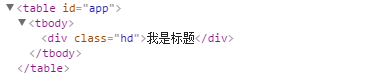
根元素
Vue强制要求每一个Vue实例(组件的本质上就是一个Vue实例)需要有一个根元素,如下所示,则会出现异常(只出现“第一段”。小火柴这里有点错误,估计是vue版本更新导致)
<!DOCTYPE html>

<html>

  <head>

    <meta charset="UTF-8">

    <title></title>

    <script src="https://cdn.jsdelivr.net/npm/vue"></script>

  </head>

  <body>

    <div id="app">

      <my-component></my-component>

    </div>

    <script>

      // 注册

      Vue.component('my-component', {

        template: `

          <p>第一段</p>

          <p>第二段</p>

        `,

      })

      // 创建根实例

      new Vue({

        el: '#app'

      })

    </script>

  </body>

</html>
需要改写成如下所示
<!DOCTYPE html>

<html>

  <head>

    <meta charset="UTF-8">

    <title></title>

    <script src="https://cdn.jsdelivr.net/npm/vue"></script>

  </head>

  <body>

    <div id="app">

      <my-component></my-component>

    </div>

    <script>

      // 注册

      Vue.component('my-component', {

        template: `

          <div>

            <p>第一段</p>

            <p>第二段</p>

          </div>

          `,

      })

      // 创建根实例

      new Vue({

        el: '#app'

      })

    </script>

  </body>

</html>
data数据
一般的,我们在Vue实例对象或Vue组件对象中,我们通过data来传递数据
<!DOCTYPE html>

<html>

  <head>

    <meta charset="UTF-8">

    <title></title>

    <script src="https://cdn.jsdelivr.net/npm/vue"></script>

  </head>

  <body>

    <div id="app">

      <my-component></my-component>

      <my-component></my-component>

      <my-component></my-component>

    </div>

    <script>

      // 注册

      Vue.component('my-component', {

        template: '<div>{{message}}</div>',

        data:{

            message:'hello'

        }

      })

      // 创建根实例

      new Vue({

        el: '#app'

      })

    </script>

  </body>

</html>
执行上面的代码,会使Vue停止运行,并在控制台发出错误提示

可以使用下面方式来绕开Vue的错误提示
<!DOCTYPE html>

<html>

  <head>

    <meta charset="UTF-8">

    <title></title>

    <script src="https://cdn.jsdelivr.net/npm/vue"></script>

  </head>

  <body>

    <div id="app">

      <my-component></my-component>

      <my-component></my-component>

      <my-component></my-component>

    </div>

    <script>

      // 注册

      Vue.component('my-component', {

        template: '<div>{{message}}</div>',

        data:function(){

            return {message:'hello'}

        }

      })

      // 创建根实例

      new Vue({

        el: '#app'

      })

    </script>

  </body>

</html>
【data数据共享问题】
<!DOCTYPE html>

<html>

  <head>

    <meta charset="UTF-8">

    <title></title>

    <script src="https://cdn.jsdelivr.net/npm/vue"></script>

  </head>

  <body>

    <div id="app">

      <my-component></my-component>

      <my-component></my-component>

      <my-component></my-component>

    </div>

    <script>

      // 注册

      var data = {counter:0}

      Vue.component('my-component', {

        template: '<button v-on:click="counter +=1">{{counter}}</button>',

        data:function(){

            return data

        }

      })

      // 创建根实例

      new Vue({

        el: '#app'

      })

    </script>

  </body>

</html>
由于这三个组件共享了同一个data,因此增加一个counter会影响所有组件。当一个组件被定义,data需要声明为返回一个初始数据对象的函数,因为组件可能被用来创建多个实例。如果data仍然是一个纯粹的对象,则所有的实例将共享引用同一个数据对象,通过提供data函数,每次创建一个新实例后,能够调用data函数,从而返回初始数据的一个全新副本数据对象。因此,可以通过为每个组件返回全新的data对象来解决这个问题
<!DOCTYPE html>

<html>

  <head>

    <meta charset="UTF-8">

    <title></title>

    <script src="https://cdn.jsdelivr.net/npm/vue"></script>

  </head>

  <body>

    <div id="app">

      <my-component></my-component>

      <my-component></my-component>

      <my-component></my-component>

    </div>

    <script>

      // 注册

      Vue.component('my-component', {

        template: '<button v-on:click="counter +=1">{{counter}}</button>',

        data:function(){

            return {counter:0};

        }

      })

      // 创建根实例

      new Vue({

        el: '#app'

      })

    </script>

  </body>

</html>
原生事件
有时候,可能想在某个组件的根元素上监听一个原生事件。直接使用v-bind指令是不生效的
<!DOCTYPE html>

<html>

  <head>

    <meta charset="UTF-8">

    <title></title>

    <script src="https://cdn.jsdelivr.net/npm/vue"></script>

  </head>

  <body>

    <div id="app">

      <my-component @click="doSomething"></my-component>

      <p>{{message}}</p>

    </div>

    <script>

      // 注册

      Vue.component('my-component', {

        template: '<button>按钮</button>',

      })

      // 创建根实例

      new Vue({

        el: '#app',

        data:{

          message:0

        },

        methods:{

          doSomething(){

            this.message++

          }

        }

      })

    </script>

  </body>

</html>
要实现这个效果,使用.native 修饰v-on指令即可
<!DOCTYPE html>

<html>

  <head>

    <meta charset="UTF-8">

    <title></title>

    <script src="https://cdn.jsdelivr.net/npm/vue"></script>

  </head>

  <body>

    <div id="app">

      <my-component @click.native="doSomething"></my-component>

      <p>{{message}}</p>

    </div>

    <script>

      // 注册

      Vue.component('my-component', {

        template: '<button>按钮</button>',

      })

      // 创建根实例

      new Vue({

        el: '#app',

        data:{

          message:0

        },

        methods:{

          doSomething(){

            this.message++

          }

        }

      })

    </script>

  </body>

</html>
Vue组件的基础用法(火柴)的更多相关文章
- Vue组件的继承用法
Vue组件的继承用法 点击打开视频讲解 vue组件的继承适用于UI几乎一样,只是数据不一样的情况下,但是这种情况通过统一封装组件也是能实现的,小功能建议用封装,大功能建议用组件继承,因为大功能在结合搜 ...
- Vue组件使用基础
这篇博文用来记录 .vue 组件的使用方法. 可以把组件代码按照 template.style.script 的拆分方式,放置到对应的 .vue 文件中. 模板(template).初始数据(data ...
- react入门----组件的基础用法
1.组件 <!-- React 允许将代码封装成组件(component),然后像插入普通 HTML 标签一样,在网页中插入这个组件.React.createClass 方法就用于生成一个组件类 ...
- Vue 组件的基础介绍
1.组件定义 1.定义组件并引用 2.父组件向子组件传值 3.子组件向父组件传值 # 组件间传值:vuex (https://www.cnblogs.com/xiaonq/p/9697921.html ...
- vue组件中 IS 用法
//html <link rel="stylesheet" href="http://www.jq22.com/demo/animate-141106223642/ ...
- Vue组件基础用法
前面的话 组件(Component)是Vue.js最强大的功能之一.组件可以扩展HTML元素,封装可重用的代码.根据项目需求,抽象出一些组件,每个组件里包含了展现.功能和样式.每个页面,根据自己所需, ...
- 【Vue】详解组件的基础与高级用法
Vue.js 最核心的功能就是组件(Component),从组件的构建.注册到组件间通信,Vue 2.x 提供了更多方式,让我们更灵活地使用组件来实现不同需求. 一.构建组件 1.1 组件基础 一个组 ...
- vue学习-第三个DEMO(计算属性和监视) v-model基础用法
<div id="demo"> 姓:<input type="text" placeholder="First Name" ...
- 第四节:Vue表单标签和组件的基本用法,父子组件间的通信
vue表单标签和组件的基本用法,父子组件间的通信,直接看例子吧. <!DOCTYPE html> <html> <head> <meta charset=&q ...
随机推荐
- USB插入电脑的硬件检测和枚举流程
USB协议定义了设备的6种状态,仅在枚举过程种,设备就经历了4个状态的迁移:上电状态(Powered),默认状态(Default),地址状态(Address)和配置状态(Configured)(其他两 ...
- 机器学习技法笔记:05 Kernel Logistic Regression
Roadmap Soft-Margin SVM as Regularized Model SVM versus Logistic Regression SVM for Soft Binary Clas ...
- LeetCode: 107_Binary Tree Level Order Traversal II | 二叉树自底向上的层次遍历 | Easy
本题和上题一样同属于层次遍历,不同的是本题从底层往上遍历,如下: 代码如下: struct TreeNode { int val; TreeNode* left; TreeNode* right; T ...
- win10 + gtx1060 + cuda8.0 + caffe + vs2013 + Tensorflow + PyTorch
一. 安装cuda8.0 1)先去官网下载cuda8.0 https://developer.nvidia.com/cuda-toolkit 2)下载完之后进行安装,安装时间有点长,请耐心等待,默认 ...
- oc中的oop基础及类的基本介绍
面向对象的(OOP)的基础知识 类(class):表示一组对象数据的结构体,对象通类来得到自身.类名首字母大写. 对象(objcet):是一种包含值和指向其类的隐藏指针的结构体.运行中的程序中通常会有 ...
- jq的ajax交互封装
jq封装的ajax,然后 在此前和此后都是很多要考虑的 ,何不 想想构思封装下. 下面: 基本上网页都存在各种ajax,使得网页变得更加易于操作. 举个长长的例子吧: <input type= ...
- TCP/IP 笔记 - 超时和重传
TCP协议为了提供可靠的数据传输服务,会启动数据重传来解决下层网络层(IP)可能出现的数据包丢失. 超时重传介绍 TCP重传由两套独立机制来完成重传,基于时间的超时重传(RTO,TCP发送数据时会设置 ...
- C++ 输入、输出运算符重载
C++ 能够使用流提取运算符 >> 和流插入运算符 << 来输入和输出内置的数据类型.我们可以重载流提取运算符和流插入运算符来操作对象等用户自定义的数据类型. 在这里,有一点很 ...
- .net core Identity集成IdentityServer(2) 实现IprofileService接口在accesstoken中增加自定义claims
导读 1. 如何添加自定义的claims. 前请提要 目前我们拥有了三个web应用. localhost:40010, 验证服务器 localhost:40011, mvc客户端, 充当webapp请 ...
- 钉钉接口:获取accessToken和打卡记录【分享】
post和get方法工具类:HttpUtils package weaver.dingtalk.utils; import com.alibaba.fastjson.JSONObject; impor ...