
Vue组件的基础用法(火柴)
前面的话
组件(component)是Vue最强大的功能之一。组件可以扩展HTML元素,封装可重用的代码,根据项目需求,抽象出一些组件,每个组件里包含了展现、功能和样式。每个页面,根据自己的需要,使用不同的组件来拼接页面。这种开发模式使得前端页面易于扩展,且灵活性高,而且组件之间也实现了解耦。本文将详细介绍Vue组件基础用法。
概述
在Vue里,一个组件本质上是一个拥有预定义选项的一个Vue实例。组件是一个自定义元素或称为一个模块,包括所需的模板、逻辑和样式。在HTML模板中,组件以一个自定义标签的形式存在,起到占位符的功能。通过Vue.js的声明式渲染后,占位符将会被替换为实际的内容。
注册组件
组件注册包括全局注册和局部注册两种
【全局注册】
要注册一个全局组件,可以使用Vue.component(tagName,option)
Vue.component("my-component",{

    //选项

})
组件在注册之后,便可以在父实例的模块中以自定义元素<my-component></my-component>的形式使用
[注意]要确保在初始化根实例之前注册了组件
<!DOCTYPE html>

<html>

  <head>

    <meta charset="UTF-8">

    <title></title>

    <script src="https://cdn.jsdelivr.net/npm/vue"></script>

  </head>

  <body>

    <div id="app">

      <my-component></my-component>

    </div>

    <script>

      Vue.component("my-component",{

          template:"<div>组件化开发</div>"

      })

      var vm = new Vue({

        el: "#app"

      })

    </script>

  </body>

</html>
【局部注册】
通过使用组件实例选项component注册,可以使组件仅在另一个实例或者组件的作用域中可用
<!DOCTYPE html>

<html>

  <head>

    <meta charset="UTF-8">

    <title></title>

    <script src="https://cdn.jsdelivr.net/npm/vue"></script>

  </head>

  <body>

    <div id="app">

      <my-component></my-component>

    </div>

    <script>

      //注册

      var child = {

          template:"<div>局部组件化开发</div>"

      };

      var vm = new Vue({

        el: "#app",

        components:{

            //<my-component> 将只在父模板可用

            "my-component":child

        }

      })

    </script>

  </body>

</html>
组件树
使用组件实例选项components注册,可以实现组件树的效果
<!DOCTYPE html>

<html>

  <head>

    <meta charset="UTF-8">

    <title></title>

    <script src="https://cdn.jsdelivr.net/npm/vue"></script>

  </head>

  <body>

    <div id="app">

      <my-component></my-component>

    </div>

    <script>

      //注册

      var headerTitle = {

          template:"<h1>标题</h1>"

      };

      var headerContent = {

          template:"<p>段落</p>"

      };

      var header = {

          template:`

            <div class="hd">

                <header-content></header-content>

                <header-title></header-title>

            </div>

          `,

          components:{

            "header-content":headerContent,

            "header-title":headerTitle

          }

      };

      //创建实例

      var vm = new Vue({

        el: "#app",

        components:{

            "my-component":header

        }

      })

    </script>

  </body>

</html>
对于大型应用来说,有必要将整个应用程序划分为组件,以便开发可管理。一般的组件应用模板如下所示:
<div id="app">

  <app-nav></app-nav>

  <app-view>

    <app-sidebar></app-sidebar>

    <app-content></app-content>

  </app-view>

</div>
【v-once】
尽管在Vue中渲染HTML很快,不过当组件中包含大量静态内容时,可以考虑使用v-once将渲染结果缓存起来。
Vue.component('my-component', {

  template: '<div v-once>hello world!...</div>'

})
模板分离
在组件注册中,使用template选项中拼接HTML元素比较麻烦,这也导致了HTML和JavaScript的高耦合性。庆幸的是,Vue.js提供了两种方式将定义在JavaScript中的HTML模板分离出来。
【script】
<script type="text/x-template" id="hello-world-template">

  <p>Hello hello hello</p>

</script>

Vue.component('hello-world', {

  template: '#hello-world-template'

})
上面的代码等价于
Vue.component('hello-world',{

    template:'<p>Hello hello hello</p>'

})
下面是一个简单的示例
<!DOCTYPE html>

<html>

  <head>

    <meta charset="UTF-8">

    <title></title>

    <script src="https://cdn.jsdelivr.net/npm/vue"></script>

  </head>

  <body>

    <div id="app">

      <my-component></my-component>

    </div>

    <script type="text/x-template" id="hello-world-template">

      <div>hello world</div>

    </script>

    <script>

      //注册

      Vue.component("my-component",{

          template:"#hello-world-template"

      });

      //创建实例

      var vm = new Vue({

        el: "#app"

      })

    </script>

  </body>

</html>
【template】
如果使用template标签,则不需要指定type属性
<!DOCTYPE html>

<html>

  <head>

    <meta charset="UTF-8">

    <title></title>

    <script src="https://cdn.jsdelivr.net/npm/vue"></script>

  </head>

  <body>

    <div id="app">

      <my-component></my-component>

    </div>

    <template id="hello-world-template">

      <div>hello world</div>

    </template>

    <script>

      //注册

      Vue.component("my-component",{

          template:"#hello-world-template"

      });

      //创建实例

      var vm = new Vue({

        el: "#app"

      })

    </script>

  </body>

</html>
命名约定
对于组件的命名,W3C规范是字母小写且包含一个中划线(-),虽然Vue没有强制要求,但是最好遵循规范
<!-- 在HTML模版中始终使用 kebab-case -->

<kebab-cased-component></kebab-cased-component>

<camel-cased-component></camel-cased-component>

<pascal-cased-component></pascal-cased-component>
当注册组件时,使用中划线、小驼峰和大驼峰这三种任意一种都可以
// 在组件定义中

components: {

  // 使用 中划线 形式注册

  'kebab-cased-component': { /* ... */ },

  // 使用 小驼峰 形式注册

  'camelCasedComponent': { /* ... */ },

  // 使用 大驼峰 形式注册

  'PascalCasedComponent': { /* ... */ }

}
嵌套限制
并不是所有的元素都可以嵌套模板,因为要受到HTML元素嵌套规则的限制,尤其像<ul>、<ol>、<table>和<select>等限制了能被它包裹的元素,而一些像<option>这样的元素只能出现在某些其他元素内部。在自定义组件中使用这些受限制的元素时会导致一些问题,例如:
<table id="app">

    <my-row>...</my-row>

</table>
自定义组件<my-row>被认为是无效的内容,因此在渲染的时候会导致错误
<script>

    //注册

    var header = {

        template:'<div class="hd">我是标题</div>'

    };

    //创建实例

    new Vue({

       el:'#app',

       components:{

          'my-row' :header

       }

    })

</script>
【is属性】
变通的方案是使用特殊的is属性
<!DOCTYPE html>

<html>

  <head>

    <meta charset="UTF-8">

    <title></title>

    <script src="https://cdn.jsdelivr.net/npm/vue"></script>

  </head>

  <body>

    <table id="app">

        <tr is="my-row"></tr>

    </table>

    <script>

      //注册

      var header = {

          template:"<div class='hd'>我是标题</div>"

      }

      //创建实例

      var vm = new Vue({

        el: "#app",

        components:{

            "my-row":header

        }

      })

    </script>

  </body>

</html>
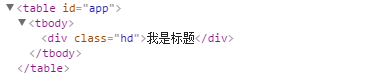
根元素
Vue强制要求每一个Vue实例(组件的本质上就是一个Vue实例)需要有一个根元素,如下所示,则会出现异常(只出现“第一段”。小火柴这里有点错误,估计是vue版本更新导致)
<!DOCTYPE html>

<html>

  <head>

    <meta charset="UTF-8">

    <title></title>

    <script src="https://cdn.jsdelivr.net/npm/vue"></script>

  </head>

  <body>

    <div id="app">

      <my-component></my-component>

    </div>

    <script>

      // 注册

      Vue.component('my-component', {

        template: `

          <p>第一段</p>

          <p>第二段</p>

        `,

      })

      // 创建根实例

      new Vue({

        el: '#app'

      })

    </script>

  </body>

</html>
需要改写成如下所示
<!DOCTYPE html>

<html>

  <head>

    <meta charset="UTF-8">

    <title></title>

    <script src="https://cdn.jsdelivr.net/npm/vue"></script>

  </head>

  <body>

    <div id="app">

      <my-component></my-component>

    </div>

    <script>

      // 注册

      Vue.component('my-component', {

        template: `

          <div>

            <p>第一段</p>

            <p>第二段</p>

          </div>

          `,

      })

      // 创建根实例

      new Vue({

        el: '#app'

      })

    </script>

  </body>

</html>
data数据
一般的,我们在Vue实例对象或Vue组件对象中,我们通过data来传递数据
<!DOCTYPE html>

<html>

  <head>

    <meta charset="UTF-8">

    <title></title>

    <script src="https://cdn.jsdelivr.net/npm/vue"></script>

  </head>

  <body>

    <div id="app">

      <my-component></my-component>

      <my-component></my-component>

      <my-component></my-component>

    </div>

    <script>

      // 注册

      Vue.component('my-component', {

        template: '<div>{{message}}</div>',

        data:{

            message:'hello'

        }

      })

      // 创建根实例

      new Vue({

        el: '#app'

      })

    </script>

  </body>

</html>
执行上面的代码,会使Vue停止运行,并在控制台发出错误提示

可以使用下面方式来绕开Vue的错误提示
<!DOCTYPE html>

<html>

  <head>

    <meta charset="UTF-8">

    <title></title>

    <script src="https://cdn.jsdelivr.net/npm/vue"></script>

  </head>

  <body>

    <div id="app">

      <my-component></my-component>

      <my-component></my-component>

      <my-component></my-component>

    </div>

    <script>

      // 注册

      Vue.component('my-component', {

        template: '<div>{{message}}</div>',

        data:function(){

            return {message:'hello'}

        }

      })

      // 创建根实例

      new Vue({

        el: '#app'

      })

    </script>

  </body>

</html>
【data数据共享问题】
<!DOCTYPE html>

<html>

  <head>

    <meta charset="UTF-8">

    <title></title>

    <script src="https://cdn.jsdelivr.net/npm/vue"></script>

  </head>

  <body>

    <div id="app">

      <my-component></my-component>

      <my-component></my-component>

      <my-component></my-component>

    </div>

    <script>

      // 注册

      var data = {counter:0}

      Vue.component('my-component', {

        template: '<button v-on:click="counter +=1">{{counter}}</button>',

        data:function(){

            return data

        }

      })

      // 创建根实例

      new Vue({

        el: '#app'

      })

    </script>

  </body>

</html>
由于这三个组件共享了同一个data,因此增加一个counter会影响所有组件。当一个组件被定义,data需要声明为返回一个初始数据对象的函数,因为组件可能被用来创建多个实例。如果data仍然是一个纯粹的对象,则所有的实例将共享引用同一个数据对象,通过提供data函数,每次创建一个新实例后,能够调用data函数,从而返回初始数据的一个全新副本数据对象。因此,可以通过为每个组件返回全新的data对象来解决这个问题
<!DOCTYPE html>

<html>

  <head>

    <meta charset="UTF-8">

    <title></title>

    <script src="https://cdn.jsdelivr.net/npm/vue"></script>

  </head>

  <body>

    <div id="app">

      <my-component></my-component>

      <my-component></my-component>

      <my-component></my-component>

    </div>

    <script>

      // 注册

      Vue.component('my-component', {

        template: '<button v-on:click="counter +=1">{{counter}}</button>',

        data:function(){

            return {counter:0};

        }

      })

      // 创建根实例

      new Vue({

        el: '#app'

      })

    </script>

  </body>

</html>
原生事件
有时候,可能想在某个组件的根元素上监听一个原生事件。直接使用v-bind指令是不生效的
<!DOCTYPE html>

<html>

  <head>

    <meta charset="UTF-8">

    <title></title>

    <script src="https://cdn.jsdelivr.net/npm/vue"></script>

  </head>

  <body>

    <div id="app">

      <my-component @click="doSomething"></my-component>

      <p>{{message}}</p>

    </div>

    <script>

      // 注册

      Vue.component('my-component', {

        template: '<button>按钮</button>',

      })

      // 创建根实例

      new Vue({

        el: '#app',

        data:{

          message:0

        },

        methods:{

          doSomething(){

            this.message++

          }

        }

      })

    </script>

  </body>

</html>
要实现这个效果,使用.native 修饰v-on指令即可
<!DOCTYPE html>

<html>

  <head>

    <meta charset="UTF-8">

    <title></title>

    <script src="https://cdn.jsdelivr.net/npm/vue"></script>

  </head>

  <body>

    <div id="app">

      <my-component @click.native="doSomething"></my-component>

      <p>{{message}}</p>

    </div>

    <script>

      // 注册

      Vue.component('my-component', {

        template: '<button>按钮</button>',

      })

      // 创建根实例

      new Vue({

        el: '#app',

        data:{

          message:0

        },

        methods:{

          doSomething(){

            this.message++

          }

        }

      })

    </script>

  </body>

</html>
Vue组件的基础用法(火柴)的更多相关文章
- Vue组件的继承用法
Vue组件的继承用法 点击打开视频讲解 vue组件的继承适用于UI几乎一样,只是数据不一样的情况下,但是这种情况通过统一封装组件也是能实现的,小功能建议用封装,大功能建议用组件继承,因为大功能在结合搜 ...
- Vue组件使用基础
这篇博文用来记录 .vue 组件的使用方法. 可以把组件代码按照 template.style.script 的拆分方式,放置到对应的 .vue 文件中. 模板(template).初始数据(data ...
- react入门----组件的基础用法
1.组件 <!-- React 允许将代码封装成组件(component),然后像插入普通 HTML 标签一样,在网页中插入这个组件.React.createClass 方法就用于生成一个组件类 ...
- Vue 组件的基础介绍
1.组件定义 1.定义组件并引用 2.父组件向子组件传值 3.子组件向父组件传值 # 组件间传值:vuex (https://www.cnblogs.com/xiaonq/p/9697921.html ...
- vue组件中 IS 用法
//html <link rel="stylesheet" href="http://www.jq22.com/demo/animate-141106223642/ ...
- Vue组件基础用法
前面的话 组件(Component)是Vue.js最强大的功能之一.组件可以扩展HTML元素,封装可重用的代码.根据项目需求,抽象出一些组件,每个组件里包含了展现.功能和样式.每个页面,根据自己所需, ...
- 【Vue】详解组件的基础与高级用法
Vue.js 最核心的功能就是组件(Component),从组件的构建.注册到组件间通信,Vue 2.x 提供了更多方式,让我们更灵活地使用组件来实现不同需求. 一.构建组件 1.1 组件基础 一个组 ...
- vue学习-第三个DEMO(计算属性和监视) v-model基础用法
<div id="demo"> 姓:<input type="text" placeholder="First Name" ...
- 第四节:Vue表单标签和组件的基本用法,父子组件间的通信
vue表单标签和组件的基本用法,父子组件间的通信,直接看例子吧. <!DOCTYPE html> <html> <head> <meta charset=&q ...
随机推荐
- Testing - 软件测试知识梳理 - 比较质量保证(QA)与质量控制(QC)
QA QC QM 概念 Quality Assurance (质量保证) Quality Control (质量控制) Quality Manage (质量管理) 定义 为达到质量要求所采取的作业技术 ...
- OC学习5——类和对象
1.OC是在C语言基础上进行扩展得到的一门面向对象的程序设计语言,它也提供了定义类.成员变量和方法的基本功能.类可以被认为是一种自定义的数据类型,使用它可以定义变量,所有使用类定义的变量都是指针类型的 ...
- ajax接口和后台交互
//定义一个公众处理ajax的方法 function handelAjax(url,method,parm,callback) { $.ajax({ url:url, type:method, dat ...
- JAVA代理分析
JAVA的动态代理 代理模式 代理模式是常用的java设计模式,他的特征是代理类与委托类有同样的接口,代理类主要负责为委托类预处理消息.过滤消息.把消息转发给委托类,以及事后处理消息等.代理类与委托类 ...
- mysql 开发进阶篇系列 35 工具篇 mysqldump(数据导出工具)
一.概述 mysqldump客户端工具是用来备份数据库或在不同数据库之间进行数据迁移.备份内容包含创建表或装载表的sql语句.mysqldump目前是mysql中最常用的备份工具. 三种方式来调用my ...
- python selenium 对浏览器标签页进行关闭和切换
1.关闭浏览器全部标签页 driver.quit() 2.关闭当前标签页(从标签页A打开新的标签页B,关闭标签页A) driver.close() 3.关闭当前标签页(从标签页A打开新的标签页B,关闭 ...
- Git学习系列之Windows上安装Git详细步骤(图文详解)
前言 最初,Git是用于Linux下的内核代码管理.因为其非常好用,目前,已经被成功移植到Mac和Windows操作系统下. 鉴于大部分使用者使用的是Windows操作系统,故,这里详细讲解Windo ...
- 最全的maven的pom.xml文件详解
pom.xml代码: <project xmlns="http://maven.apache.org/POM/4.0.0" xmlns:xsi="http://ww ...
- 面试:C++工厂模式实现
#include <iostream> enum CTYPE {PRODUCTA,PRODUCTB}; class Product{ public: ; virtual ~Product( ...
- 120分钟React快速扫盲教程
在教程开端先说些题外话,我喜欢在学习一门新技术或读过一本书后,写一篇教程或总结,既能帮助消化,也能加深印象和发现自己未注意的细节,写的过程其实仍然是一个学习的过程.有个记录的话,在未来需要用到相关知识 ...