
json数据 二级联动
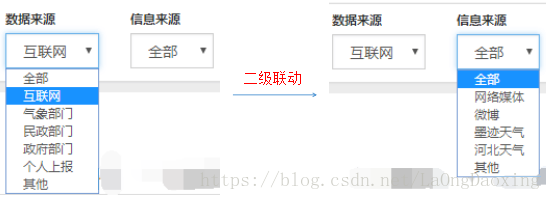
 <head>

     <link href="static/bootstrap-3.3.5-dist/css/bootstrap.css" rel="stylesheet" />

     <link href="static/bootstrap-table/bootstrap-table.css" rel="stylesheet" />

     <link rel="stylesheet" href="static/bootstrap-select/bootstrap-select.min.css" />

 </head>

 <body>

     <div class="panel-body" style="padding-bottom:0px;">

         <div class="panel panel-default" style="margin:10px;">

             <div class="panel-heading">

                 <span>查询条件</span>

             </div>

             <input id="query_dataSource" type="hidden"   value="${dataSource}">

             <input name="id"             type="hidden"   value="${id}">

             <div class="panel-body">

                                 <!-- form表单 -->

                 <form class="form-horizontal" id="formSearch">

                     <div class="form-group" style="margin:0px">

                         <!-- 一级选择框 -->

                         <div class="col-sm-2" style="width:110px;">

                             <label class="control-label" for="txt_search_departmentname">数据来源</label>

                             <select class="form-control" id="dataSource">

                                 <option code="" value="" selected="selected">全部</option>

                                 <c:forEach var="dataSource" items="${dataSources }">

                                     <c:choose>

                                         <c:when test="${obj.dataSources == dataSource.dataSourceName}">

                                             <option code="${dataSource.dataSourceCode}" value="${dataSource.dataSourceName }" selected="selected">${dataSource.dataSourceName}</option>

                                         </c:when>

                                         <c:otherwise>

                                             <option code="${dataSource.dataSourceCode}" value="${dataSource.dataSourceName }">${dataSource.dataSourceName}</option>

                                         </c:otherwise>

                                     </c:choose>

                                 </c:forEach>

                             </select>

                         </div>

                         <!-- 二级选择框 -->

                         <div class="col-sm-2" style="width:110px;">

                             <label class="control-label" for="txt_search_departmentname">信息来源</label>

                             <select class="form-control" id="infoSource">

                               <option value="" selected="selected">全部</option>

                             </select>

                         </div>

                         <div class="col-sm-1" style="text-align:left;">

                             <button class="btn btn-primary" id="btn_query" type="button" style="margin-top:29px">查询</button>

                         </div>

                     </div>

                 </form>

             </div>

         </div>

         <!-- 查询结果的列表显示位置 -->

         <div class=table-responsive">

             <table id="Table_queryList" class="table text-nowrap"></table>

         </div>

     </div>

     <script src="static/js/jquery-1.10.1.min.js"></script>

     <script src="static/bootstrap-3.3.5-dist/js/bootstrap.js"></script>

     <script src="static/bootstrap-table/bootstrap-table.js"></script>

         <script src="static/bootstrap-table/locale/bootstrap-table-zh-CN.js"></script>

     <script src="static/bootstrap-select/bootstrap-select.js"></script>

     <script src="static/jsUtil/jquery.form.js"></script>

     <script src="static/js/zaiqing_shenhe.js"></script>

 </body>
zaiqing_shenhe.jsp
 $(function () {

     //二级联动    绑定事件  :数据来源》信息来源

     $("#dataSource").change(function(){

         var infoSourceArr=[

                             {

                                 "全部":[

                                     "灾害大典",

                                     "灾情普查",

                                     "灾情直报",

                                     "网络媒体",

                                     "微博",

                                     "墨迹天气",

                                     "河北天气",

                                     "其他"

                                 ]

                             },

                             {

                                 "互联网":[

                                     "网络媒体",

                                     "微博",

                                     "墨迹天气",

                                     "河北天气",

                                     "其他"

                                 ]

                             },

                             {

                                 "气象部门":[

                                     "灾害大典",

                                     "灾情普查",

                                     "灾情直报",

                                     "其他"

                                 ]

                             }

                         ]

         var dataSourceVal=$("#dataSource").find("option:selected").val();//一级下拉框,选中值

         dataSourceVal  = dataSourceVal.replace( /^\s+|\s+$/g, "" );//去除字符中 空格

         var infoSource=$("#infoSource");

         for(var i in infoSourceArr){

             for(var j in infoSourceArr[i]){

                 j  = j.replace( /^\s+|\s+$/g, "" );

                 if(dataSourceVal==j){

                     var infoSourceSecondArrVal=infoSourceArr[i][j];

                 }

             }

         }

         document.getElementById("infoSource").options.length = 1; //清空select标签中option选项=0,只留一项=1

         //根据一级下拉框选中值,加载相应的二级下拉框选项

         for (var k in infoSourceSecondArrVal){//(var k=0;k<infoSourceSecondArrVal.length;k++)则浏览器调试出错:Uncaught TypeError: Cannot read property 'length' of undefined

             infoSource.append('<option  value="'+infoSourceSecondArrVal[k]+'" >'+infoSourceSecondArrVal[k]+'</option>')

         }

     });

 });

 //查询》列表显示

 var TableInit = function () {

     ...

     //初始化Table

     oTableInit.Init = function (pageNumber) {

         ...

                 //得到查询的参数

         oTableInit.queryParams = function (params) {

             var temp = {   //这里的键的名字和控制器Controller里的变量名必须一致

                 ...

                 dataSource: $("#dataSource").find("option:selected").val(),

                 infoSource: $("#infoSource").find("option:selected").val(),

                 ...

             };

             ...

         };

         $('#Table_queryList').bootstrapTable('destroy').bootstrapTable({

             ...

         })

     };

     ...

 };
zaiqing_shenhe.js
json数据 二级联动的更多相关文章
- 中国省市区json数据 三级联动
<label> <span>购买地址</span> <select name="PurchaseProvince" style=" ...
- jquery 实现省市二级联动,附带完整的省市json数据 (粘贴即用)
1.可以单独定义一个js,保存省市json数据. citydata = { "安徽": [ "合肥", "芜湖", "蚌埠&quo ...
- 利用Ajax和JSON实现关于查找省市名称的二级联动功能
功能实现的思路:我们经常碰见网上购物时候填写收件地址会用到这个查找省市县的三级联动查找功能,我们可以利用Ajax和JSON技术模拟这个功能,说白了同样是使用Ajax的局部数据更新功能这个特性.因为省市 ...
- jquery json实现二级动态联动
以下为代码!需要导入json架包 function getCity1(){ var unitid = document.getElementById('addformunitid').value; $ ...
- JavaScript+Json写的二级联动
省市区的联动,相当常见 我就不写这么大数据的了,先写个简单的试一试 <!DOCTYPE html> <html> <head> <title></ ...
- 根据参数显示类别(三级联动,需要JSON数据)
根据参数显示类别(三级联动,需要JSON数据) Scripts/Category.js 调用方法: $(function () { BindCategory(); //默认绑定文本框中的值 BindC ...
- Jquery select 三级联动 (需要JSON数据)
Scripts/Category.js //Jquery三级类别联动 $(function () { BindCategory(); }) function BindCategory() { var ...
- javascript 省市区三级联动 附: json数据
html: <label> <span>购买地址</span> <select name="PurchaseProvince" style ...
- 中国省市 Json 二级联动
Json数据: var cities = {'北京': ['北京'], '广东': ['广州', '深圳', '珠海', '汕头', '韶关', '佛山', '江门', '湛江', '茂名', '肇庆 ...
随机推荐
- 常用的 git 命令清单
(来自阮一峰的网络日志,看别人对git命令掌握的如此熟练,羡慕,但每次又记不得,无奈.供自己学习) git工作区,暂存区,版本库之间的关系: 我们建立的项目文件夹就是工作区,在初始化git(git i ...
- python中selenium操作下拉滚动条方法汇总
UI自动化中经常会遇到元素识别不到,找不到的问题,原因有很多,比如不在iframe里,xpath或id写错了等等:但有一种是在当前显示的页面元素不可见,拖动下拉条后元素就出来了. 比如下面这样一个网页 ...
- RockChip RK3326 系统编译问题总结
1. 序言 本文主要记录了RK3326平台系统编译过程中遇到的各种问题,并加以解决! 环境: 宿主Linux:Ubuntu 16.04 目标机:RK3326 (64bit) Toolchain:gcc ...
- Spring Integration实现分布式锁
学习本篇之前,可以先看下文章 什么是分布式锁,了解下基本概念. 之前都是手写一个分布式锁,其实Spring早就提供了分布式锁的实现.早期,分布式锁的相关代码存在于Spring Cloud的子项目Spr ...
- CTE(公用表表达式)
-> 将复杂的派生表写在中间from子句中变得十分臃肿,给为维护等操作带来麻烦 -> 将这个派生表要是能提前到前面,给一个别名,后面查询的时候直接使用别名即可语法: with 表的别名 a ...
- 【Java基础】15、负数的二进制表示方法
在计算机中,负数以其正值的补码形式表达. 什么叫补码呢?这得从原码,反码说起. 原码:一个整数,按照绝对值大小转换成的二进制数,称为原码. 比如 00000000 00000000 00000000 ...
- 设计模式之责任链模式(Chain of Responsibility )
责任链的目的是通过特定的设计对请求者和接收者之间进行解耦,请求者调用操作的对象,接收者接收请求并执行相关操作,通过解耦请求者不需要关心接收者的接口,同时也可增强职责的灵活性,通过改变链内的成员或调用次 ...
- 复盘价值1000万的腾讯云硬盘固件"BUG"
摘要: 除了吃瓜,还是得吸取教训啊同学们! 这次,我从纯技术角度分析腾讯云与前沿数控的磁盘数据丢失事件,不站队. 硬盘门 这里说的硬盘门不是10年前陈老师的那一次,而聊的是最近"腾讯云&qu ...
- 洛谷P4719 【模板】动态dp(ddp LCT)
题意 题目链接 Sol 动态dp板子题.有些细节还没搞懂,待我研究明白后再补题解... #include<bits/stdc++.h> #define LL long long using ...
- Docker简单使用
镜像是一种轻量级.可执行的独立软件包,它包含运行某个软件所需的所有内容,包括代码.运行时.库.环境变量和配置文件. 容器是镜像的运行时实例 - 实际执行时镜像会在内存中变成什么.默认情况下,它完全独立 ...