
jquery实现当前页面编辑
实现效果
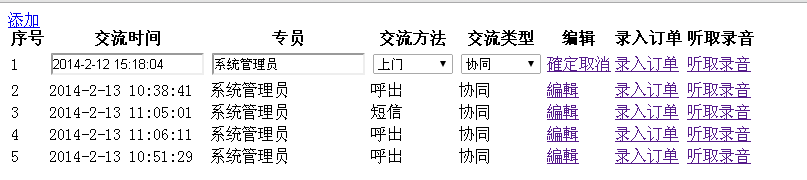
代码:
<!DOCTYPE html PUBLIC "-//W3C//DTD XHTML 1.0 Transitional//EN" "http://www.w3.org/TR/xhtml1/DTD/xhtml1-transitional.dtd">

<html xmlns="http://www.w3.org/1999/xhtml">

<head id="Head1" runat="server">

    <title></title>

    <script type="text/javascript">

        $(function () {

            //点击行变色

            $("[id$='rpInterCourse'] tr").slice(1).each(function () {

                $(this).click(function () {

                    if ($(this).hasClass("selected")) {

                        $(this).removeClass("selected");

                    }

                    else {

                        $(this).addClass("selected");

                    }

                });

            });

        })

        // 更多

        function moreInterCourse() {

            var url = "/Client/ShowGvClientInterCourseList";

            ws.base.showDialog({ url: url, height: "500px", width: "800px" });

        }

        // 编辑

        function returnEdit(ProductID, data) {

            var pricetd = $(data).parent().parent("tr");

            var tr = pricetd.children("td");

            // 交流时间

            var inputInterTime = tr.eq(1).find("input");

            var lableInterTime = tr.eq(1).find("label");

            inputInterTime.attr('style', 'display: block');

            lableInterTime.attr('style', 'display: none');

            // 专员

            var inputCreator = tr.eq(2).find("input");

            var lableCreator = tr.eq(2).find("label");

            inputCreator.attr('style', 'display: block');

            lableCreator.attr('style', 'display: none');

            // 交流方法

            var selectInterMethod = tr.eq(3).find("select");

            var lableInterMethod = tr.eq(3).find("label");

            selectInterMethod.attr('style', 'display: block');

            lableInterMethod.attr('style', 'display: none');

            // 交流类型

            var selectInterType = tr.eq(4).find("select");

            var lableInterType = tr.eq(4).find("label");

            selectInterType.attr('style', 'display: block');

            lableInterType.attr('style', 'display: none');

            // 添加确定取消

            $(data).css("display", "none").parent().append("<span id='SumitOrCancel'><a href='#' onclick='returnSumit(this," + ProductID + ")'>確定</a><a href='#' onclick='returnCancel(this)'>取消</a></span>");

        }

        // 取消操作

        function returnCancel(data) {

            $(data).parent().prev().css("display", "");

            var tr = $(data).parent().parent().parent("tr").children("td"); ;

            // 交流时间

            var inputInterTime = tr.eq(1).find("input");

            var lableInterTime = tr.eq(1).find("label");

            inputInterTime.attr('style', 'display: none');

            lableInterTime.attr('style', 'display: block');

            // 专员

            var inputCreator = tr.eq(2).find("input");

            var lableCreator = tr.eq(2).find("label");

            inputCreator.attr('style', 'display: none');

            lableCreator.attr('style', 'display: block');

            // 交流方法

            var selectInterMethod = tr.eq(3).find("select");

            var lableInterMethod = tr.eq(3).find("label");

            selectInterMethod.attr('style', 'display: none');

            lableInterMethod.attr('style', 'display: block');

            // 交流类型

            var selectInterType = tr.eq(4).find("select");

            var lableInterType = tr.eq(4).find("label");

            selectInterType.attr('style', 'display: none');

            lableInterType.attr('style', 'display: block');

            // 将确定根取消按钮移除

            $("#SumitOrCancel").remove();

        }

        // 添加客户交流记录

        function AddInterCourse() {

            var url = "/Client/ClientInterCourseAdd?clientID=2C1FD8F7-9C6D-4507-91BA-01B28B8FFB77";

            ws.base.showDialog({ url: url, height: "500px", width: "800px" });

        }

    </script>

    <script src="../../Scripts/jquery-1.5.1.min.js" type="text/javascript"></script>

    <script src="../../Scripts/ws.base.js" type="text/javascript"></script>

</head>

<body>

    <form id="form1" runat="server">

    <div>

        <div style="position: absolute; display: inline; width: 60px">

            <a id="btnMail" href="javascript:void(0);" title="添加" class="easyui-linkbutton" iconcls="icon-add"

                plain="true" visible="false" onclick="AddInterCourse()">添加</a>

        </div>

        <div style="float: right; width: 40px;">

            <div style="float: right; width: 40px;">

                <a href="javascript:void(0)" onclick="moreInterCourse()">更多</a></div>

        </div>

        <div style="height: 15px;">

        </div>

        <table>

            <asp:Repeater ID="rpInterCourse" runat="server">

                <HeaderTemplate>

                    <thead>

                        <tr>

                            <th>

                                序号

                            </th>

                            <th>

                                交流时间

                            </th>

                            <th>

                                专员

                            </th>

                            <th>

                                交流方法

                            </th>

                            <th>

                                交流类型

                            </th>

                            <th>

                                编辑

                            </th>

                            <th>

                                录入订单

                            </th>

                            <th>

                                听取录音

                            </th>

                        </tr>

                    </thead>

                </HeaderTemplate>

                <ItemTemplate>

                    <tbody>

                        <td>

                            <%# this.rpInterCourse.Items.Count + 1 %>

                        </td>

                        <td>

                            <label>

                                <%#Eval("InterTime")%></label>

                            <%#Html.TextBox("InterTime", Eval("InterTime"), new { @class = "easyui-datebox", style = "display:none;" })%>

                        </td>

                        <td>

                            <label>

                                <%#Eval("CreatorName")%></label>

                            <%#Html.TextBox("Creator", Eval("CreatorName"), new { style = "display:none;" })%>

                        </td>

                        <td>

                            <%#Html.Label("interMethod", WS.Base.App.Business.CodeBusiness.GetCode("interMethod", Eval("InterMethod")).DetailName)%>

                            <%#Html.DropDownList("interMethod2", WS.Base.App.Business.CodeBusiness.GetCode("interMethod",

                                                                                                                                                                                Eval("InterMethod").ToString(), true), new { @class = "easyui-combobox", style = "width:150px;display:none;", panelHeight = "auto" })%>

                        </td>

                        <td>

                            <%#Html.Label("interType", WS.Base.App.Business.CodeBusiness.GetCode("interType", Eval("interType")).DetailName)%>

                            <%#Html.DropDownList("interType2", WS.Base.App.Business.CodeBusiness.GetCode("interType",

                                                                                                                                                    Eval("InterType").ToString(), true), new { @class = "easyui-combobox", style = "width:150px;display:none;", panelHeight = "auto" })%>

                        </td>

                        <td>

                            <a href="#" onclick="returnEdit('@item.ID',this)">編輯</a>

                        </td>

                        <td>

                            <a href="#" onclick="returnEdit('@item.ID',this)">

                                <%#Eval("OrderInfo")%></a>

                        </td>

                        <td>

                            <a href="#" onclick="returnEdit('@item.ID',this)">听取录音</a>

                        </td>

                    </tbody>

                </ItemTemplate>

            </asp:Repeater>

        </table>

    </div>

    </form>

</body>

</html>
jquery实现当前页面编辑的更多相关文章
- Jquery easyui开启行编辑模式增删改操作
Jquery easyui开启行编辑模式增删改操作 Jquery easyui开启行编辑模式增删改操作先上图 Html代码: <table id="dd"> </ ...
- [转]Jquery easyui开启行编辑模式增删改操作
本文转自:http://www.cnblogs.com/nyzhai/archive/2013/05/14/3077152.html Jquery easyui开启行编辑模式增删改操作先上图 Html ...
- myeclipse页面编辑框空格、回车符、对齐出现特殊字符
myeclipse页面编辑框空格.回车符.对齐出现特殊字符 解决办法:window-preferences-general-editors-Text Editors 把show whitespa ...
- jquery加载页面的方法
jquery加载页面的方法(页面加载完成就执行),建议大家看下windows.onload与$(document).ready之间的区别. 1.$(function(){ $("#a&q ...
- jquery加载页面的方法(页面加载完成就执行)
jquery加载页面的方法(页面加载完成就执行),建议大家看下windows.onload与$(document).ready之间的区别. 1.$(function(){ $("#a&qu ...
- jQuery自定义Web页面鼠标右键菜单
jQuery自定义Web页面鼠标右键菜单 右键菜单是固定的,很多时候,我们需要自定义web页面自定义菜单,指定相应的功能. 自定义的原理是:jQuery封装了鼠标右键的点击事件(“contextmen ...
- jquery如何获得页面元素的坐标值
http://www.cnblogs.com/pansly/archive/2011/05/25/2056222.html jquery如何获得页面元素的坐标值 yulutxt是输入经典语录的输入 ...
- js/jquery获取当前页面URL地址并判断URL字符串中是否包含某个具体值
js/jquery获取当前页面URL地址并判断URL字符串中是否包含某个具体值本文介绍jquery/js获取当前页面url地址的方法,在jquery与js中获取当前页面url方法是一样的,因为jque ...
- jquery mobile切换页面的几种方法
jquery mobile切换页面的几种方法 - 不厚道青蛙之焦油潭 - 博客频道 - CSDN.NET jquery mobile切换页面的几种方法 分类: phonegap html5 2012- ...
随机推荐
- 关于js事件冒泡和时间捕获
(1)冒泡型事件:事件按照从最特定的事件目标到最不特定的事件目标(document对象)的顺序触发. IE 5.5: div -> body -> document IE 6.0: div ...
- (摘)DataGuard物理standby管理 - 主备切换
DataGuard物理standby管理 - 主备切换 Dataguard的切换分为两种,switchover和failover. switchover一般用于数据库或硬件升级,这时只需要较短时间中断 ...
- QDialog 模态对话框与事件循环(exec其实就是调用了show和eventLoop.exec)
起源 qtcn中文论坛中有网友问到: 假设程序正常运行时,只有一个简单的窗体A,此时只有一个GUI主线程,在这个主线程中有一个事件循环处理窗体上的事件.当此程序运行到某阶段时,弹出一个模态窗体B(书上 ...
- 关于NotePad++ v1.0的编译和源码分析
最近想读读开源项目,windows下的.文本编辑器是一个很好的选择,因为里面的很多技术,算法(字符串搜索,匹配等)都是被程序员实现过千万遍了,代码里面有很多精髓可以让我们这些菜鸟学学. 首先:下载源码 ...
- B树叶子节点split
一.B-Tree索引的分裂 1. 创建测试表 SQL> create table split_tab (id number, name varchar2(100)); 表已创建. SQL> ...
- 【转】Excel快捷键大全
原文网址:http://www.bm8.com.cn/keyboard/excel.asp 显示和使用"Office 助手"注意 若要执行以下操作,"Microsoft ...
- 黑马程序员_Java面向对象3_多态
5.面向对象_多态 多态定义:某一种事物存在的多种形态. 例:动物中猫,狗. 猫这个对象对应的类型是猫类型. 猫 x = new 猫(); 同时猫也是动物的一种,也可以把猫称为动物. 动物 y = n ...
- jQuery鼠标悬停图片放大显示
jQuery鼠标悬浮放于图片上之后图片放大显示的效果,即鼠标移到图片上图片突出显示,鼠标移开后恢复原来的模样,你可以在图片滚动效果中加上本特效,相信会更炫一些. <!DOCTYPE html P ...
- zoj 3547 The Boss on Mars
需要用到概率论的容斥定理以及计算1 ^ 4 + 2 ^ 4 + ……+ n ^ 4的计算公式1^4+2^4+……+n^4=n(n+1)(2n+1)(3n^2+3n-1)/30 #pragma comm ...
- [转]使用Composer管理PHP依赖关系
简介 现在软件规模越来越大,PHP项目的开发模式和许多年前已经有了很大变化.记得初学PHP那会儿,boblog是一个很好的例子,几乎可以代表 PHP项目的开发模式.当时PHP 5.x以上的版本刚开始流 ...