
[备查]使用 SPQuery 查询 "Person or Group" 字段
Querying the “Person or Group” field using SPQuery (Update)
One of the weak points of Sharepoint 2007 is documentation. If you want to query a “Person or Group” field, the documentation on MSDN is a bit sparse.
Here is how to query a person:
<where>

  <eq>

    <fieldref name="PersonFieldName"/>

    <value type="User">User Display Name</value>

  </eq>

</where>
Replace PersonFieldName with the internal Name of the Field.
The two important things here: Value Type is “User”, and the String to search for is the Display Name. So if you have a user called “John Doe” whose login is “mydomain\jdoe”, you have to search for “John Doe”, not for “mydomain\jdoe”.
There is an obvious drawback to this: What if you have two users called John Doe?
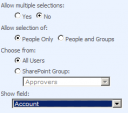 I was quite disappointed that the Person field does not store the LoginName by default and can therefore not be queried for it.
There are two workarounds. The first one: Go to the properties of the field in the list, and at the bottom you can change “Show Field” to “Account”.
This has the advantage that you can use the “domain\username” Syntax now. The drawback: The field looks bad in the list as it does now show the Login, not the Display Name with the neat presence status.
The second workaround: Use the undocumented LookupId property and search for the numeric ID:
<where>

  <eq>

    <fieldref name="PersonFieldName" LookupId="TRUE"/>

    <value type="int">UserID</value>

  </eq>

</where>
The UserID is not the “domain\username”, but the numeric internal ID (SPUser.ID). As I use this in a workflow, I can easily access this through workflowProperties.OriginatorUser.ID, which is good enough for me.
Update: The second code example was incorrect, I fixed it now.
[备查]使用 SPQuery 查询 "Person or Group" 字段的更多相关文章
- SQL查询每个表的字段数量
--SQL查询每个表的字段数量select b.[name], count(*) As AllCount,ISNULL(ISNULL(sum(case when isnullable=0 then 1 ...
- [转]SQL数据库查询到的汉字字段是乱码
使用英文版SQL数据库查询到的汉字字段是乱码的解决方案 2007-12-04 14:55:45 标签:函数 SQL 数据库 乱码 排序规则 原创作品,允许转载,转载时请务必以超链接形式标明文章 原始出 ...
- Mysql 单表查询-排序-分页-group by初识
Mysql 单表查询-排序-分页-group by初识 对于select 来说, 分组聚合(((group by; aggregation), 排序 (order by** ), 分页查询 (limi ...
- MongoDB查询操作限制返回字段的方法
这篇文章主要介绍了MongoDB查询操作限制返回字段的方法,需要的朋友可以参考下 映射(projection )声明用来限制所有查询匹配文档的返回字段.projection以文档的形式列举结果集中 ...
- linq查询结果转换为指定字段类型的list集合
转换查询结果为ProductId字段的类型的list集合 (from s in _db.Mobile_TeamAction || s.ActionStatus == select new { s.Pr ...
- Java 通过JDBC查询数据库表结构(字段名称,类型,长度等)
Java 通过JDBC查询数据库表结构(字段名称,类型,长度等) 发布者:唛唛家的豆子 时间:2012-11-20 17:54:02 Java 通过JDBC查询数据库表结构(字段名称,类型,长 ...
- mysql查询order by 指定字段排序
当MySQL查询时排序的字段不是数字时而是汉字的时候也可以用when then 来指定排序. 列如yewu_check表的status 字段不是0,1,2而是汉字待办,已办,退回.可以如下写法: S ...
- Oracle数据库里面查询字符串类型的字段不为空和为空的SQL语句:
一:查询字符串类型的字段的值不为空的SQL: select * from TB_CMS_FLGTINFO_A t where (t.fsta is not null and t.fsta <&g ...
- Qt+QGIS二次开发:自定义类实现查询矢量数据的属性字段值(图查属性)
在GIS领域,有两种重要的查询操作,图查属性和属性查图. 本文主要介绍如何在QGIS中通过从QgsMapToolIdentify中派生自定义类实现查询矢量数据的属性字段值(图查属性). 重点参考资料: ...
随机推荐
- BZOJ 4199: [Noi2015]品酒大会 [后缀数组 带权并查集]
4199: [Noi2015]品酒大会 UOJ:http://uoj.ac/problem/131 一年一度的“幻影阁夏日品酒大会”隆重开幕了.大会包含品尝和趣味挑战两个环节,分别向优胜者颁发“首席品 ...
- 转: 如何高效利用GitHub
注:写了很多使用哲学,有意思 from: http://www.yangzhiping.com/tech/github.html
- 马哥linux运维初级+中级+高级 视频教程 教学视频 全套下载(近50G)
马哥linux运维初级+中级+高级 视频教程 教学视频 全套下载(近50G)目录详情:18_02_ssl协议.openssl及创建私有CA18_03_OpenSSH服务及其相关应用09_01_磁盘及文 ...
- ABP(现代ASP.NET样板开发框架)系列之20、ABP展现层——动态生成WebApi
点这里进入ABP系列文章总目录 ABP(现代ASP.NET样板开发框架)系列之20.ABP展现层——动态生成WebApi ABP是“ASP.NET Boilerplate Project (ASP.N ...
- Javascript数组操作
使用JS也算有段时日,然对于数组的使用,总局限于很初级水平,且每每使用总要查下API,或者写个小Demo测试下才算放心,一来二去,浪费不少时间:思虑下,堪能如此继续之?当狠心深学下方是正道. 原文链接 ...
- 在PC上测试移动端网站和模拟手机浏览器的5大方
查了很多资料,尝试了大部分方法,下面将这一天的努力总结下分享给大家,也让大家免去看那么多文章,以下介绍的方法,都是本人亲自测试成功的方法,测试环境winxp. 一.Chrome*浏览器 chrome模 ...
- OpenCASCADE Ring Type Spring Modeling
OpenCASCADE Ring Type Spring Modeling eryar@163.com Abstract. The general method to directly create ...
- C# 给PDF文件添加水印
水印种类及功能介绍 PDF水印分为两种:文本水印和图片水印.文本水印一般被用在商业领域,提醒读者该文档是受版权保护的,其他人不能抄袭或者免费使用.除了这个特征,水印还可以用来标记这个文档 的一些基 ...
- 网站实现微信登录之回调函数中登录逻辑的处理--基于yii2开发的描述
上一篇文章网站实现微信登录之嵌入二维码中描述了如何在自己的登录页面内嵌入登录二维码,今天的这篇文章主要是描述下在扫码成功之后微信重定向回网站后登录逻辑的处理,其实也就是验证身份信息,授权用户登录的逻辑 ...
- Effective前端4:尽可能地使用伪元素
伪元素是一个好东西,但是很多人都没怎么用,因为他们觉得伪元素太诡异了.其实使用伪元素有很多好处,最大的好处是它可以简化页面的html标签,同时用起来也很方便,善于使用伪元素可以让你的页面更加地简洁优雅 ...