
SpringBoot + docker + neo4j
下拉镜像
docker pull neo4j
启动镜像
docker run -d -p 7473:7473 -p 7687:7687 -p 7474:7474 neo4j
打开浏览器:http://192.168.31.146:7474/browser/
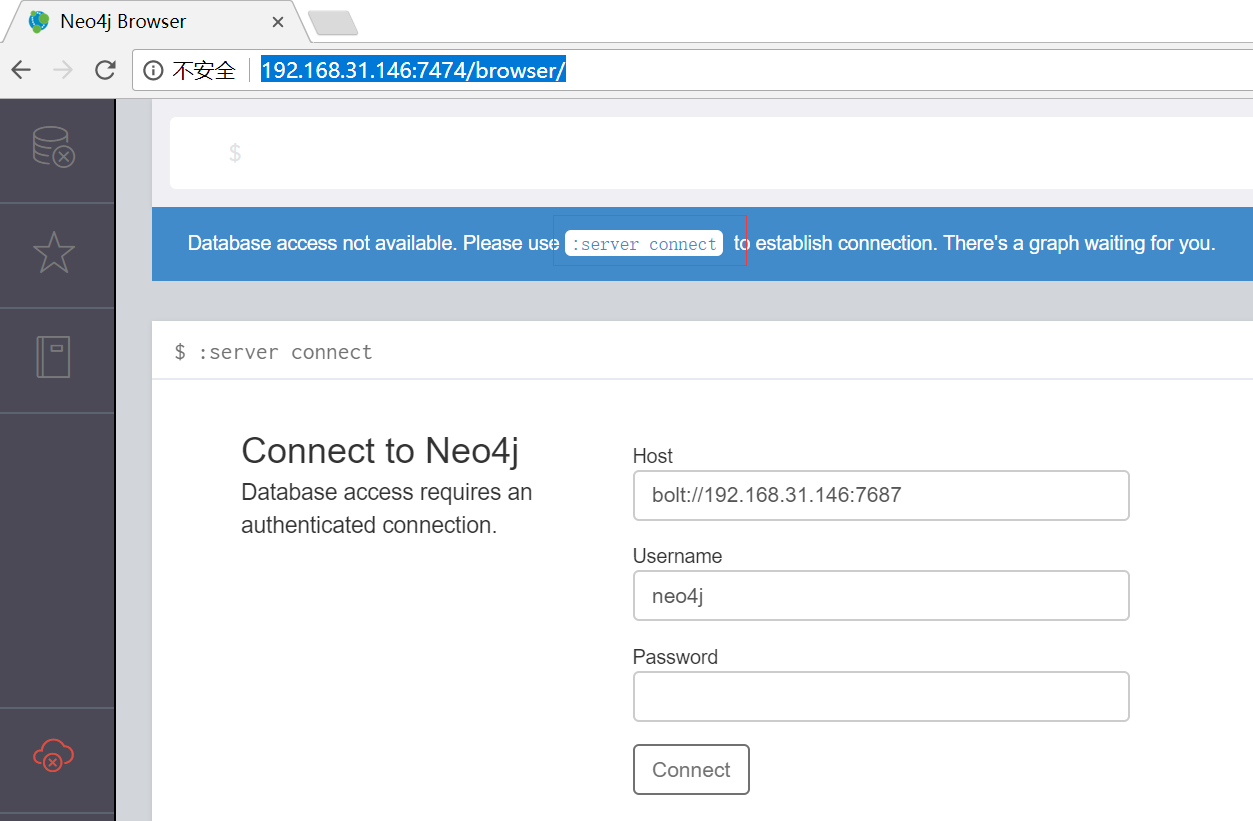
用户名/密码初始值为:neo4j
首次登陆需要修改密码

登陆后界面
新建springboot项目,添加pom引用
<dependency>

            <groupId>org.springframework.boot</groupId>

            <artifactId>spring-boot-starter-data-neo4j</artifactId>

        </dependency>

        <!-- https://mvnrepository.com/artifact/com.voodoodyne.jackson.jsog/jackson-jsog -->

        <dependency>

            <groupId>com.voodoodyne.jackson.jsog</groupId>

            <artifactId>jackson-jsog</artifactId>

            <version>1.1.</version>

        </dependency>
添加Actor类
package org.mythsky.neo4jdemo;

import com.fasterxml.jackson.annotation.JsonIdentityInfo;

import com.voodoodyne.jackson.jsog.JSOGGenerator;

import org.neo4j.ogm.annotation.GraphId;

import org.neo4j.ogm.annotation.NodeEntity;

@JsonIdentityInfo(generator = JSOGGenerator.class)

@NodeEntity

public class Actor {

    @GraphId Long id;

    private String name;

    private int born;

    public Long getId() {

        return id;

    }

    public void setId(Long id) {

        this.id = id;

    }

    public String getName() {

        return name;

    }

    public void setName(String name) {

        this.name = name;

    }

    public int getBorn() {

        return born;

    }

    public void setBorn(int born) {

        this.born = born;

    }

}
添加Movie类
package org.mythsky.neo4jdemo;

import com.fasterxml.jackson.annotation.JsonIdentityInfo;

import com.voodoodyne.jackson.jsog.JSOGGenerator;

import org.neo4j.ogm.annotation.GraphId;

import org.neo4j.ogm.annotation.NodeEntity;

import org.neo4j.ogm.annotation.Relationship;

import java.util.ArrayList;

import java.util.List;

@JsonIdentityInfo(generator = JSOGGenerator.class)

@NodeEntity

public class Movie {

    @GraphId

    Long id;

    String title;

    String year;

    String tagline;

    @Relationship(type = "ACTS_IN",direction =Relationship.INCOMING)

    List<Role> roles = new ArrayList<>();

    public Long getId() {

        return id;

    }

    public void setId(Long id) {

        this.id = id;

    }

    public String getTitle() {

        return title;

    }

    public void setTitle(String title) {

        this.title = title;

    }

    public String getYear() {

        return year;

    }

    public void setYear(String year) {

        this.year = year;

    }

    public String getTagline() {

        return tagline;

    }

    public void setTagline(String tagline) {

        this.tagline = tagline;

    }

    public List<Role> getRoles() {

        return roles;

    }

    public void setRoles(List<Role> roles) {

        this.roles = roles;

    }

    public Movie() {

    }

    public Role addRole(Actor actor, String name){

        Role role=new Role(name,actor,this);

        this.roles.add(role);

        return role;

    }

}
添加Role类
package org.mythsky.neo4jdemo;

import com.fasterxml.jackson.annotation.JsonIdentityInfo;

import com.voodoodyne.jackson.jsog.JSOGGenerator;

import org.neo4j.ogm.annotation.EndNode;

import org.neo4j.ogm.annotation.GraphId;

import org.neo4j.ogm.annotation.RelationshipEntity;

import org.neo4j.ogm.annotation.StartNode;

@JsonIdentityInfo(generator = JSOGGenerator.class)

@RelationshipEntity(type = "ACTS_IN")

public class Role {

    @GraphId

    Long id;

    String role;

    @StartNode

    Actor actor;

    @EndNode

    Movie movie;

    public Long getId() {

        return id;

    }

    public void setId(Long id) {

        this.id = id;

    }

    public String getRole() {

        return role;

    }

    public void setRole(String role) {

        this.role = role;

    }

    public Actor getActor() {

        return actor;

    }

    public void setActor(Actor actor) {

        this.actor = actor;

    }

    public Movie getMovie() {

        return movie;

    }

    public void setMovie(Movie movie) {

        this.movie = movie;

    }

    public Role(String role, Actor actor, Movie movie) {

        this.role = role;

        this.actor = actor;

        this.movie = movie;

    }

    public Role() {

    }

}
添加查询接口MovieRepository
package org.mythsky.neo4jdemo;

import org.springframework.data.neo4j.repository.GraphRepository;

import org.springframework.data.repository.query.Param;

import org.springframework.stereotype.Repository;

@Repository

public interface MovieRepository extends GraphRepository<Movie> {

    Movie findByTitle(@Param("title") String title);

}
添加配置类
package org.mythsky.neo4jdemo;

import org.neo4j.ogm.session.SessionFactory;

import org.springframework.context.annotation.Bean;

import org.springframework.context.annotation.Configuration;

import org.springframework.data.neo4j.repository.config.EnableNeo4jRepositories;

import org.springframework.data.neo4j.transaction.Neo4jTransactionManager;

import org.springframework.transaction.annotation.EnableTransactionManagement;

@Configuration

@EnableTransactionManagement

@EnableNeo4jRepositories

public class Neo4jConfig   {

    @Bean

    public SessionFactory sessionFactory() {

        return new SessionFactory("org.mythsky.neo4jdemo");

    }

    @Bean

    public Neo4jTransactionManager transactionManager() {

        return new Neo4jTransactionManager(sessionFactory());

    }

}
添加配置文件ogm.properties
compiler=org.neo4j.ogm.compiler.MultiStatementCypherCompiler

driver=org.neo4j.ogm.drivers.http.driver.HttpDriver

URI=http://192.168.31.146:7474

username = neo4j

password = your own password
单元测试
package org.mythsky.neo4jdemo;

import org.junit.Assert;

import org.junit.Before;

import org.junit.Test;

import org.junit.runner.RunWith;

import org.slf4j.Logger;

import org.slf4j.LoggerFactory;

import org.springframework.beans.factory.annotation.Autowired;

import org.springframework.boot.test.context.SpringBootTest;

import org.springframework.test.context.ContextConfiguration;

import org.springframework.test.context.junit4.SpringRunner;

@RunWith(SpringRunner.class)

@ContextConfiguration(classes = {Neo4jConfig.class})

@SpringBootTest

public class Neo4jDemoApplicationTests {

    private static Logger logger= LoggerFactory.getLogger(Neo4jDemoApplicationTests.class);

    @Autowired

    MovieRepository movieRepository;

    @Before

    public void initData(){

        movieRepository.deleteAll();

        Movie matrix1=new Movie();

        matrix1.setTitle("The Matrix");

        matrix1.setYear("1999-03-31");

        Movie matrix2=new Movie();

        matrix2.setTitle("The Matrix Reloaded");

        matrix2.setYear("2003-05-07");

        Movie matrix3=new Movie();

        matrix3.setTitle("The Matrix Revolutions");

        matrix3.setYear("2003-10-27");

        Actor keanu=new Actor();

        keanu.setName("Keanu Reeves");

        Actor laurence=new Actor();

        laurence.setName("Laurence Fishburne");

        Actor carrieanne=new Actor();

        carrieanne.setName("Carrie-Anne Moss");

        matrix1.addRole(keanu,"Neo");

        matrix1.addRole(laurence,"Morpheus");

        matrix1.addRole(carrieanne,"Trinity");

        movieRepository.save(matrix1);

        Assert.assertNotNull(matrix1.getId());

        matrix2.addRole(keanu,"Neo");

        matrix2.addRole(laurence,"Morpheus");

        matrix2.addRole(carrieanne,"Trinity");

        movieRepository.save(matrix2);

        Assert.assertNotNull(matrix2.getId());

        matrix3.addRole(keanu,"Neo");

        matrix3.addRole(laurence,"Morpheus");

        matrix3.addRole(carrieanne,"Trinity");

        movieRepository.save(matrix3);

        Assert.assertNotNull(matrix3.getId());

    }

    @Test

    public void get() {

        Movie movie=movieRepository.findByTitle("The Matrix");

        Assert.assertNotNull(movie);

        logger.info("===movie===movie:{},{}",movie.getTitle(),movie.getYear());

        for(Role role:movie.getRoles()){

            logger.info("=====actor:{},role:{}",role.getActor().getName(),role.getRole());

        }

    }

}
运行测试

在浏览器查看数据

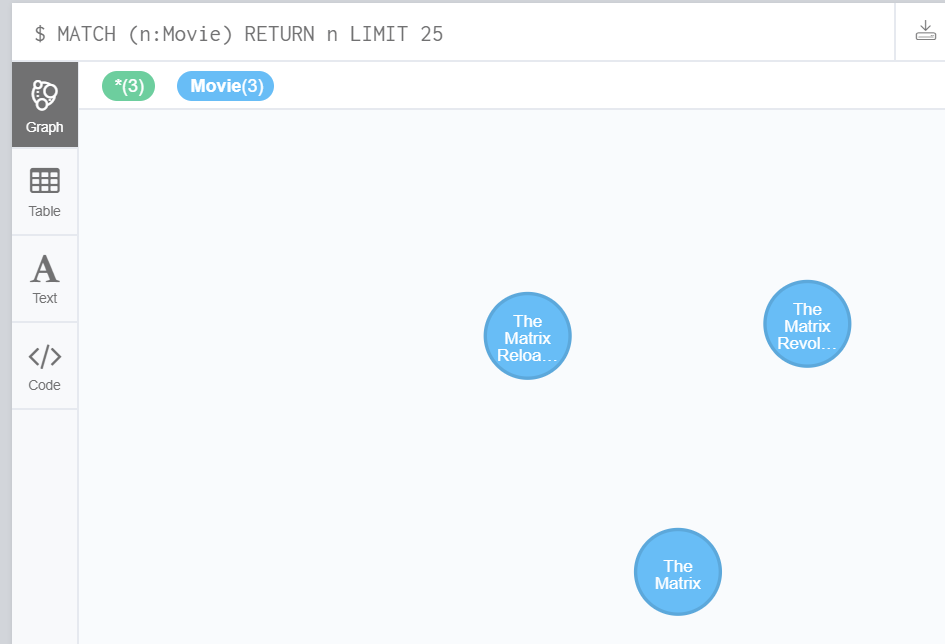
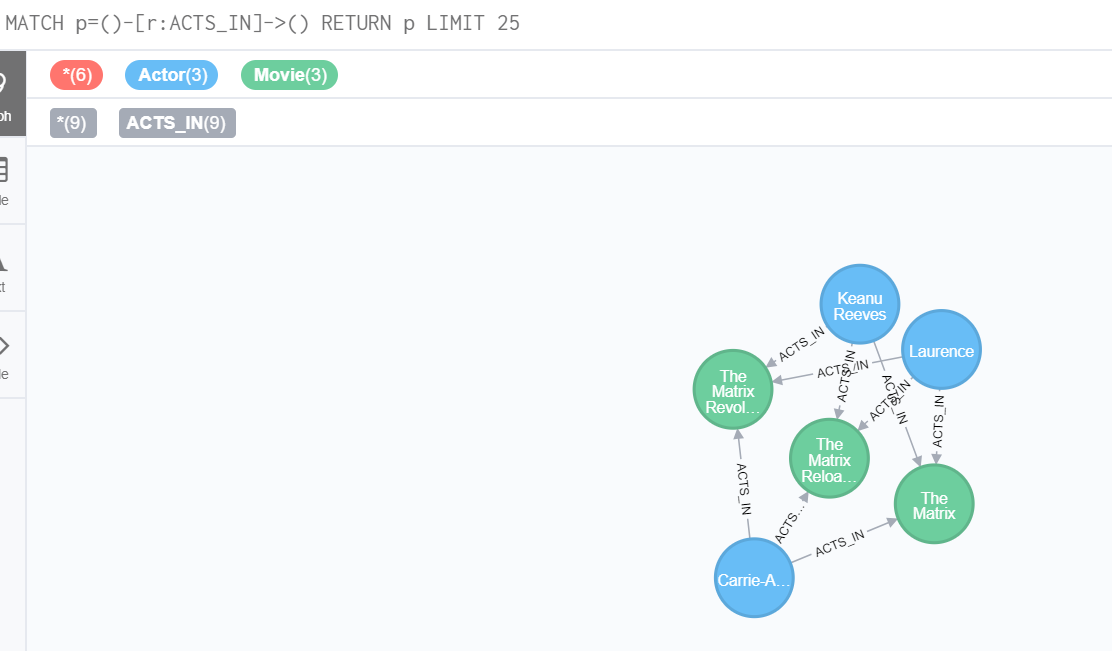
SpringBoot + docker + neo4j的更多相关文章
- windows环境 springboot+docker开发环境搭建与hello word
1,下载安装 docker toolbox 下载地址:http://mirrors.aliyun.com/docker-toolbox/windows/docker-toolbox/ docker t ...
- SpringBoot Docker Mysql安装,Docker安装Mysql
SpringBoot Docker Mysql安装,Docker安装Mysql ================================ ©Copyright 蕃薯耀 2018年4月8日 ht ...
- SpringBoot Docker入门,SpringBoot Docker安装
SpringBoot Docker入门,SpringBoot Docker安装 ================================ ©Copyright 蕃薯耀 2018年4月8日 ht ...
- 【快学SpringBoot】SpringBoot+Docker构建、运行、部署应用
前言 Docker技术发展为当前流行的微服务提供了更加便利的环境,使用SpringBoot+Docker部署和发布应用,其实也是一件比较简单的事情.当前,前提是得有Docker的基础. 源码在文末 文 ...
- springboot docker jenkins 自动化部署并上传镜像
springboot + docker + jenkins自动化部署项目,jenkins.mysql.redis都是docker运行的,并且没有使用虚拟机,就在阿里云服务器(centos7)运行 1. ...
- 凭借SpringBoot整合Neo4j,我理清了《雷神》中错综复杂的人物关系
原创:微信公众号 码农参上,欢迎分享,转载请保留出处. 哈喽大家好啊,我是Hydra. 虽然距离中秋放假还要熬过漫长的两天,不过也有个好消息,今天是<雷神4>上线Disney+流媒体的日子 ...
- 第三十七章 springboot+docker(手动部署)
一.下载centos镜像 docker pull hub.c.163.com/library/centos:latest docker tag containId centos:7 docker ru ...
- Java开源博客My-Blog(SpringBoot+Docker)系列文章
My Blog 1.Docker+SpringBoot+Mybatis+thymeleaf的Java博客系统开源啦 2.My-Blog搭建过程:如何让一个网站从零到可以上线访问 3.将数据的初始化放到 ...
- 【第三十七章】 springboot+docker(手动部署)
一.下载centos镜像 docker pull hub.c.163.com/library/centos:latest docker tag containId centos:7 docker ru ...
随机推荐
- 基础运动move.js
/* * 事件绑定 */ function myAddEvent(obj,ev,fn){ if(obj.attachEvent){ obj.attachEvent('on' + ev,fn); }el ...
- java通过sftp对linux服务器文件夹进行操作
本文主要讲sftp对linux服务器的文件和文件夹进行操作,windows server 服务器不支持. package com.lx.ftp; import java.io.File; import ...
- 从晶体管到web浏览器
几年前写了这个,想放到网上,招聘很困难,很多现代计算机科学教育真的很糟,很难找到懂得现代计算机堆栈的第一(基本)原理的人. 如果我曾经再次得到了12周的自由,我会提供这个作为课余学习的play,我也想 ...
- Max Sum—hdu1003(简单DP) 标签: dp 2016-05-05 20:51 92人阅读 评论(0)
Max Sum Time Limit: 2000/1000 MS (Java/Others) Memory Limit: 65536/32768 K (Java/Others) Total Submi ...
- Hausdorff Distance(豪斯多夫距离)
Hausdorff Distance(豪斯多夫距离) 参考博客:http://cgm.cs.mcgill.ca/~godfried/teaching/cg-projects/98/normand/ma ...
- Linux Shell学习笔记:exit退出状态代码
inux提供$?特殊变量来保存最后一条命令执行结束的退出状态.执行完一条命令后,立即执行echo$?,可以查看最后一条命令的退出状态值. 正常的情况下,命令成功执行完成的退出状态是0,如果非0,则命令 ...
- 转:mysql触发器
原文地址:http://www.cnblogs.com/nicholas_f/archive/2009/09/22/1572050.html CREATE TRIGGER <触发器名称> ...
- MCU编程_基础
包含头文件符号的区别 有这样的包含头文件语句 #include <reg52.h> #include"reg52.h" 两者区别在于: <>:编译器先进入软 ...
- poj 3083 Children of th
#include <iostream> #include<stdio.h> #include<string.h> using namespace std; int ...
- 有人在用fastReport作报表时处理过字体自动缩小的问题吗,怎么做
有人在用fastReport作报表时处理过字体自动缩小的问题吗,怎么做 我来答 浏览 49 次 1个回答 #吃瓜大会# Angelababy演技被吐槽, 你觉得她的演技怎么样? 最佳答案 热心 ...