
Django项目之cookie+session
原文:https://www.cnblogs.com/sss4/p/7071334.html
HTTP协议 是短连接、且状态的,所以在客户端向服务端发起请求后,服务端在响应头 加入cokie响应给浏览器,以此记录客户端状态;
cook是来自服务端,保存在浏览器的键值对,主要应用于用户登录;
cookie如此重要!!那么如何在Django应用cookie呢?cookie又有什么缺陷呢?
一、Django应用cookie
参数介绍
1、max_age=1 :cookie生效的时间,单位是秒
2、expires:具体过期日期
3、path='/':指定那个url可以访问到cookie;‘/’是所有; path='/'
4、 domain=None(None代表当前域名):指定那个域名以及它下面的二级域名(子域名)可以访问这个cookie
5、secure=False:https安全相关
6、httponly=False:限制只能通过http传输,JS无法在传输中获取和修改
设置cookie
1.普通
obj.set_cookie("tile","zhanggen",expires=value,path='/' )
2.加盐
普通cookie是明文传输的,可以直接在客户端直接打开,所以需要加盐,解盐之后才能查看
obj.set_signed_cookie('k','v',salt="zhangge")
获取cookie
1、普通
request.COOKIES.get(‘k’)
2、加盐
cookies=request.get_signed_cookie('k',salt='zhanggen')
cookie之登录应用
1.简单应用:longin界面和index界面,访问index界面先判断是否登录,若登录可以访问,若未登录跳转到登录界面。
【代码】
#settings.py文件 :设置静态文件路径,将css样式放到该路径中

STATIC_URL = '/static/'

STATICFILES_DIRS = (

    os.path.join(BASE_DIR,'static'),

)

#urls.py文件:设置url路由

urlpatterns = [

    url(r'^admin/', admin.site.urls),

    url(r'^identify/', views.identify),

    url(r'^login/', views.login),

    url(r'^index/', views.index),

]

#views.py文件

def login(request):

    if request.method == "GET":

        return render(request,'login.html',{'msg':''})

    elif request.method == 'POST':

        username = request.POST.get('username')

        password = request.POST.get('password')

        if username == 'lijun25' and password == 'lijun25':

            obj = redirect('/index/')

            obj.set_cookie('',username,max_age=10)

            return obj

        else:

            return render(request, 'login.html',{'msg':'用户名或密码错误'})

def index(request):

    v = request.COOKIES.get('')

    print v

    if v:

        return render(request, 'index.html')

    else:

        return redirect('/login/')
<!DOCTYPE html>

<html>

<head>

<meta http-equiv="Content-Type" content="text/html; charset=UTF-8">

<meta http-equiv="Pragma" content="no-cache">

<meta http-equiv="Cache-Control" content="no-cache">

<meta http-equiv="Expires" content="">

<title>后台管理</title>

<link href="/static/login.css" rel="stylesheet" type="text/css" />

</head>

<body>

<div class="login_box">

      <div class="login_l_img"><img src="/static/images/login-img.png" /></div>

      <div class="login">

          <div class="login_logo"><a href="#"><img src="/static/images/login_logo.png" /></a></div>

          <div class="login_name">

               <p>后台管理系统</p>

          </div>

          <form method="post">

              <input name="username" type="text"  value="用户名" onfocus="this.value=''" onblur="if(this.value==''){this.value='用户名'}">

              <span id="password_text" onclick="this.style.display='none';document.getElementById('password').style.display='block';document.getElementById('password').focus().select();" >密码</span>

              <input name="password" type="password" id="password" style="display:none;" onblur="if(this.value==''){document.getElementById('password_text').style.display='block';this.style.display='none'};"/>

              <input value="登录" style="width:100%;" type="submit">

              <div color="red" align="center">{{ msg }}</div>

          </form>

      </div>

</div>

<div style="text-align:center;">

</div>

</body>

</html>
login.html
【验证】
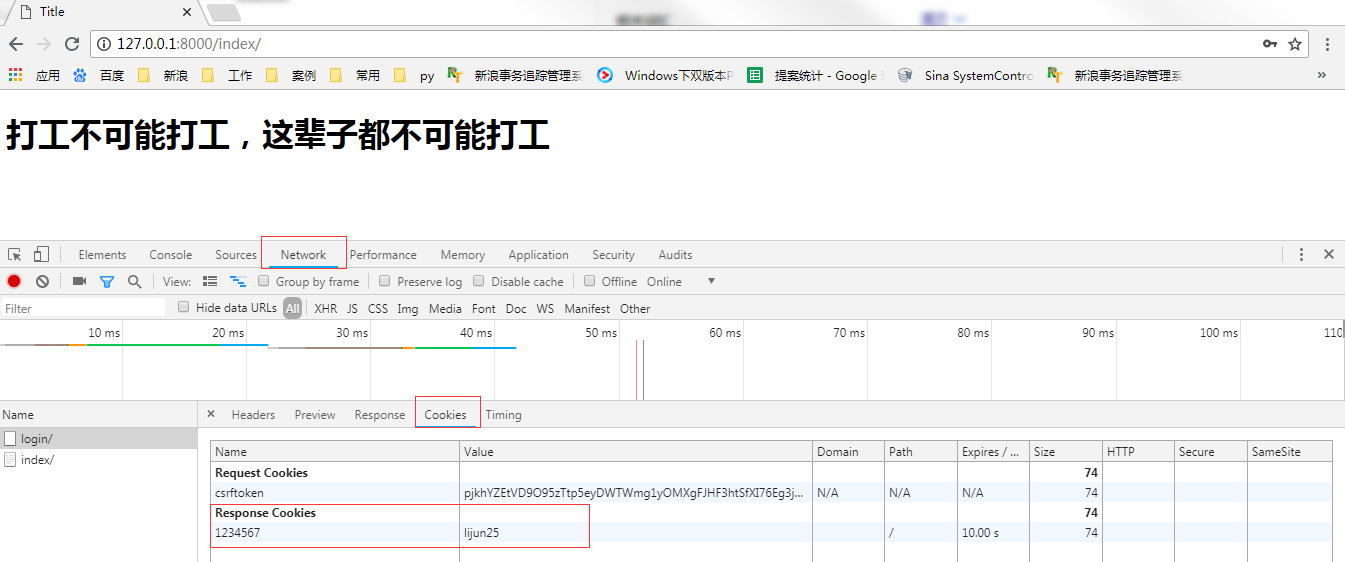
登录成功后可以看到浏览器上的定义的一对键值,会跳转到index页面,过10s钟后再cookies会失效,刷新会返回到登录界面重新认证
2.进阶应用:以上这样cookies是明文的,很不安全
#views.py

def login(request):

    if request.method == "GET":

        return render(request,'login.html',{'msg':''})

    elif request.method == 'POST':

        username = request.POST.get('username')

        password = request.POST.get('password')

        if username == 'lijun25' and password == 'lijun25':

            obj = redirect('/index/')

            # obj.set_cookie('k',username,max_age=10,)

            obj.set_signed_cookie('k','v',salt='auto',max_age=10)

            return obj

        else:

            return render(request, 'login.html',{'msg':'用户名或密码错误'})

def index(request):
    # cookie = request.COOKIES.get('k')
    try:
        cookie = request.get_signed_cookie('k',salt='auto')
        print cookie
        return render(request, 'index.html')
    except:
        return redirect('/login/')
【验证】
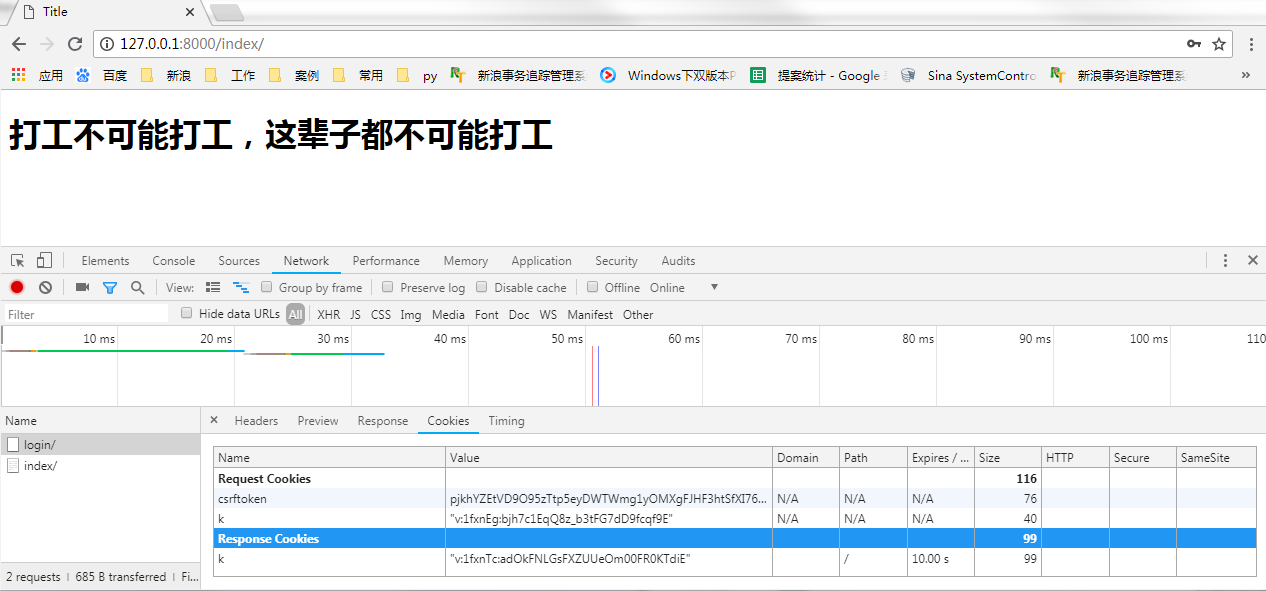
第一次访问Djanao程序会给浏览器一对键值对(Response Cookies),是加盐的,在一次访问Request Cookies里会带着这对键值对给Django程序。
3.继续进阶应用,若views函数后续持续增加,那么就需要在每个视图函数前加入cookie认证,代码重复,在不修改源代码和不修改调用方式的前提下,这时候就需要用装饰器了
def cookie_auth(func):

    def weaper(request,*args,**kwargs):

        #cookies = request.get_signed_cookie('k', salt='zhanggen')

        try:

            cookie = request.get_signed_cookie('k', salt='auto')

            print cookie

            if cookie == 'v':

                return func(request)

            else:

                return redirect('/login/')

        except:

            return redirect('/login/')

    return weaper

def login(request):

    if request.method == "GET":

        return render(request,'login.html',{'msg':''})

    elif request.method == 'POST':

        username = request.POST.get('username')

        password = request.POST.get('password')

        if username == 'lijun25' and password == 'lijun25':

            obj = redirect('/index/')

            # obj.set_cookie('k',username,max_age=10,)

            obj.set_signed_cookie('k','v',salt='auto',max_age=10)

            return obj

        else:

            return render(request, 'login.html',{'msg':'用户名或密码错误'})

@cookie_auth

def home(request):

    return HttpResponse('欢迎来得home界面')

@cookie_auth

def index(request):

    return render(request, 'index.html')
装饰器
Django项目之cookie+session的更多相关文章
- Django学习手册 - cookie / session
cookie """ cookie属性: obj.set_cookie(key,value,....) obj.set_signed_cookie(key,value,s ...
- django项目搭建及Session使用
django+session+中间件 一.使用命令行创建django项目 在指定路径下创建django项目 django-admin startproject djangocommon 在项目目录 ...
- Django 认证系统 cookie & session & auth模块
概念 cookie不属于http协议范围,由于http协议无法保持状态,但实际情况,我们却又需要“保持状态”,因此cookie就是在这样一个场景下诞生. cookie的工作原理是:由服务器产生内容,浏 ...
- 49、django工程(cookie+session)
49.1.介绍: 1.cookie不属于http协议范围,由于http协议无法保持状态,但实际情况,我们却又需要"保持状态",因此cookie就是在这样一个场景下诞生. cooki ...
- Django框架 之 Cookie和Session初识
Django框架 之 Cookie和Session初识 浏览目录 Cookie介绍 Django中的Cookie Session 一.Cookie介绍 1.Cookie产生的意义 众所周知,HTTP协 ...
- Django Cookie,Session
Cookie Cookie的由来 HTTP协议是无状态的,每次请求都是独立的,对服务器来说,每次的请求都是全新的,上一次的访问是数 据是无法保留到下一次的 某些场景需要状态数据或者中间数据等相关对下一 ...
- Django 中的 cookie 和 session
一.cookie 由于HTTP协议是无状态的,而服务器端的业务必须是要有状态的.Cookie诞生的最初目的是为了存储web中的状态信息,以方便服务器端使用.比如判断用户是否是第一次访问网站.目前最新的 ...
- python 全栈开发,Day76(Django组件-cookie,session)
昨日内容回顾 1 json 轻量级的数据交换格式 在python 序列化方法:json.dumps() 反序列化方法:json.loads() 在JS中: 序列化方法:JSON.stringfy() ...
- django框架--cookie/session
目录 一.http协议无状态问题 二.会话跟踪技术--cookie 1.对cookie的理解 2.cookie的使用接口 3.cookie的属性 4.使用cookie的问题 三.会话跟踪技术--ses ...
随机推荐
- Tomcat下bootstrap启动分析
"C:\Program Files\Java\jdk1.7.0\bin\javaw.exe" -agentlib:jdwp=transport=dt_socket,suspend= ...
- 初征——NOIP2018游记
前言 从最初接触oi到今年noip到来,也已经将近有一年了.从对于程序一窍不懂到现在开始学习算法,只是短短的不到一年的时间罢了.这次noip,不仅仅是我oi生涯的第一次noip,更是相当于是对我这一年 ...
- 自学Zabbix3.5.3-监控项item-zabbix agent 类型所有key
点击返回:自学Zabbix之路 点击返回:自学Zabbix4.0之路 点击返回:自学zabbix集锦 1. 温习 Zabbix server是Zabbix软件的中心进程. Server执行 ...
- 【转】I²C总线上拉电阻阻值如何选择?
I2C总线为何需要上拉电阻? I2C(Inter-Intergrated Circuit)总线是微电子通信控制领域中常用的一种总线标准,具有接线少,控制方式简单,通信速率高等优点. I2C总线的内部结 ...
- SQL记录-PLSQL集合
PL/SQL集合 集合是一个有序组具有相同的数据类型的元素.每个元素进行标识的唯一标表示其在集合中的位置. PL/SQL提供了三种集合类型: 索引表或关联数组 嵌套表 可变大小的数组或变长数组 Ora ...
- hdu 6166 Senior Pan
http://acm.hdu.edu.cn/showproblem.php?pid=6166 题意: 给出一张无向图,给定k个特殊点 求这k个特殊点两两之间的最短路 二进制分组 枚举一位二进制位 这一 ...
- 那些年的 网络通信之 TCP/IP 传输控制协议 ip 加 端口 ---
/* 一个文本小写转换为大写的小程序,当客户端从键盘录入一串字符串发送到服务端服务端转换为大写返回给客户端 */ import java.io.*; import java.net.*; class ...
- Kafka 温故(四):Kafka的安装
Step 1: 下载Kafka > tar -xzf kafka_2.9.2-0.8.1.1.tgz> cd kafka_2.9.2-0.8.1.1 Step 2: 启动服务Kafka用到 ...
- Kafka 温故(二):Kafka的基本概念和结构
一.Kafka中的核心概念 Producer: 特指消息的生产者Consumer :特指消息的消费者Consumer Group :消费者组,可以并行消费Topic中partition的消息Broke ...
- jQuery下实现等待指定元素加载完毕
先声明下这个方法的使用场合,以免误导大家..比如在博客园,我们没法修改他的源代码,那么只能想办法监视元素的出现了.所以下面方法是在修改不了源码的情况下使用,而非写自己的项目.. 今天在改博客几个样式的 ...