
一个轻巧高效的多线程c++stream风格异步日志(二)
一个轻巧高效的多线程c++stream风格异步日志(二)
前言
本文紧接上一篇文章: 介绍上文中的一条条日志是如何异步导入本地文件的.
首先会简单介绍下LogFile类,之后会具体讲解下AsyncLogging中的双缓冲机制.
整个日志模块的结构图,
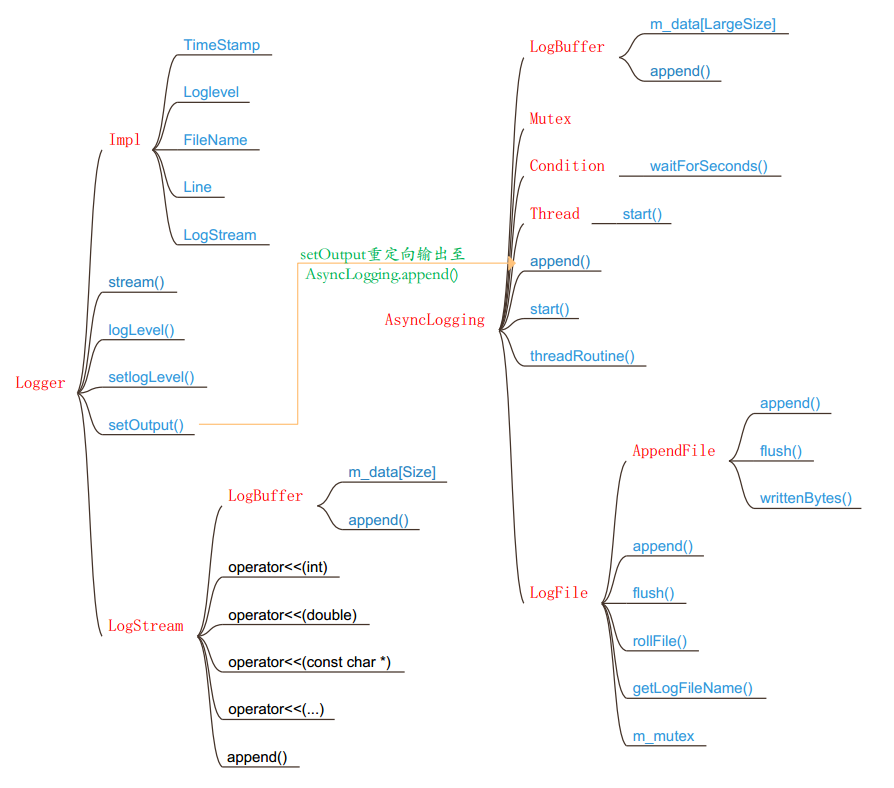
LogFile类
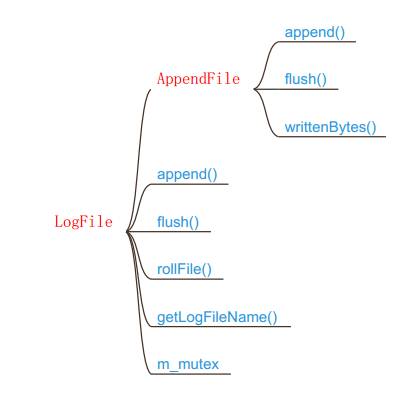
LogFile日志文件类 完成日志文件的管理工作.
rollFile() :滚动文件 当日志超过m_rollSize大小时会滚动一个新的日志文件出来.
getLogFileName() :用与滚动日志时,给日志文件取名,以滚动时间作为后缀.
m_mutex :用于append()数据时,给文件上锁.
append() :黏入日志.
flush() :冲刷缓冲.
LogFile 有一个AppendFIle类,它是最终用于操作本地文件的类.
append() : 里面会调用系统函数fwrite()写入本地文件.
flush() : 冲刷缓冲.
writtenBytes() : 获取已写字节数.
AsyncLogging类
AsyncLogging异步日志类, 完成日志的异步写入工作.
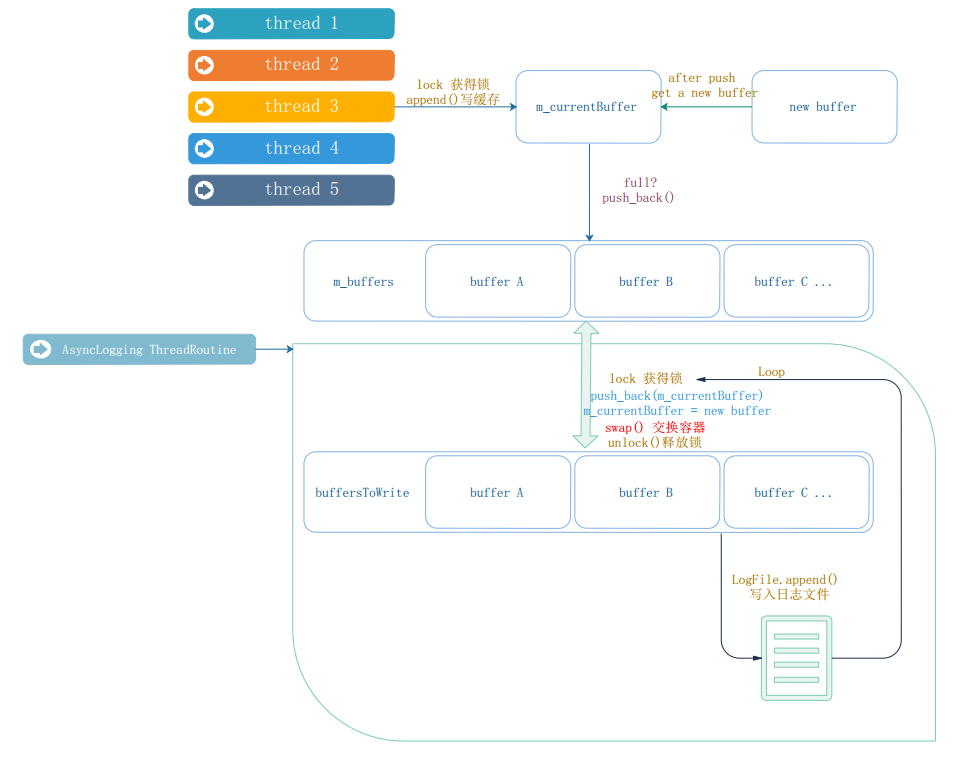
介绍它的接口前,先描述下它的工作逻辑.
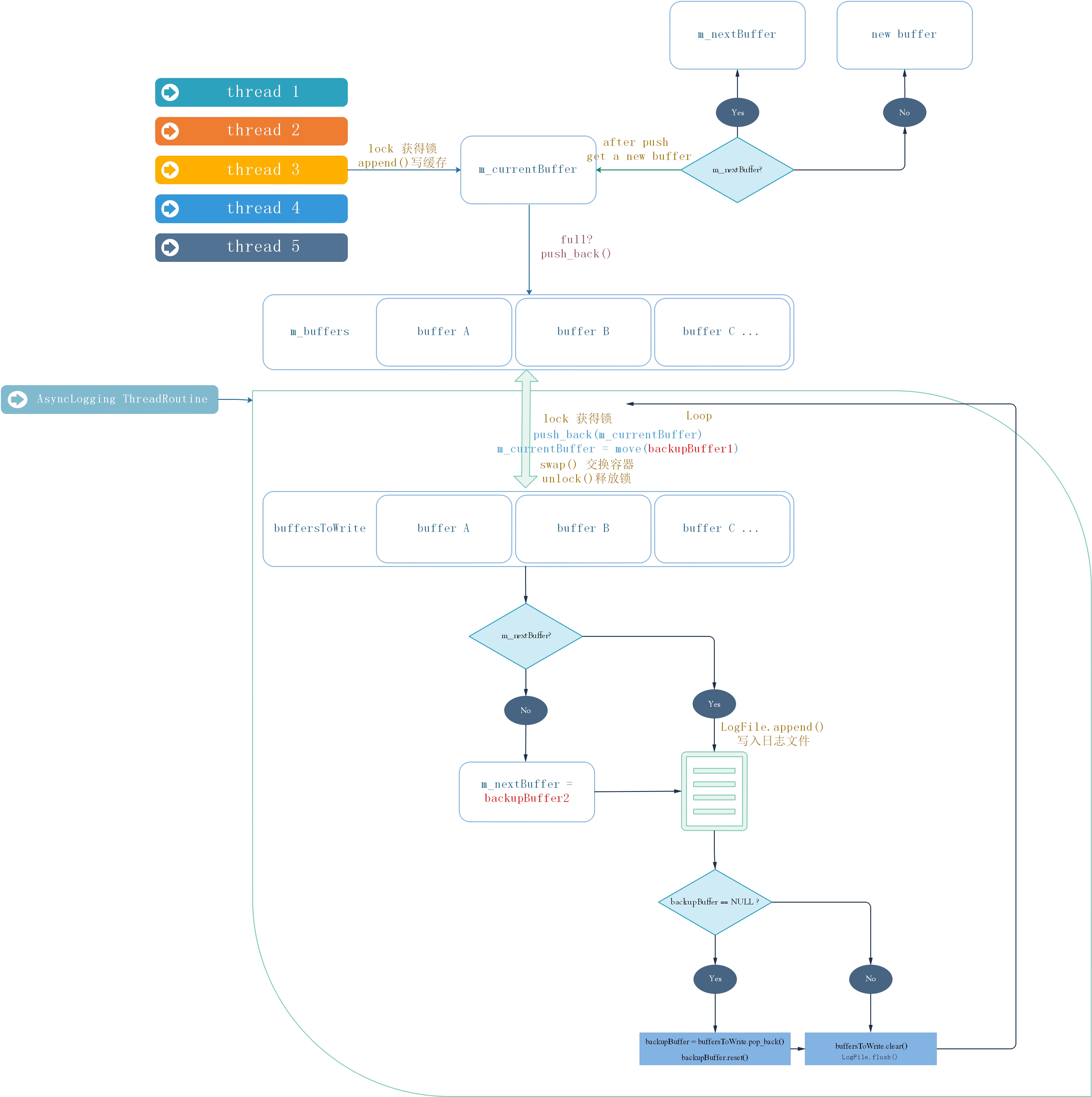
AsyncLogging 有以下述几类缓存.
m_currentBuffer : 指向当前接收其他线程append过来的日志的缓存.
m_buffers : 用于存放当前已写满或过了冲刷周期的日志缓存的指针容器.
m_nextBuffer : 指向当m_currentBuffer满后用于替代m_currentBuffer的缓存.
backupBuffer1 : 备用缓存.
backupBuffer2 : 备用缓存.
buffersToWrite : 和m_buffers通过交换swap()后append()到LogFile的指针容器.
AsyncLogging 使用的双缓冲机制 有两个缓存容器 : m_buffers 、buffersToWrite 交替使用 . 一下我们简称为 A 和 B .
A 用于接收 其他线程 append() 进来的日志.
B 用于将目前已接受的缓存 写入 日志文件. 当B写完时 , clean() B , 交换A,B,如此往复.
优点 : 新建的日志不必等待磁盘操作,也避免了每条新日志都触发日志线程,而是将多条日志拼程一个大的buffer 传送给日志线程写入文件. 相当于批处理, 减少线程唤醒频率 ,降低开销。
另外 ,为了及时将 日志消息写入文件, 即是 buffer A 中还没有push进来日志 也会每三秒 执行一次上述的写入操作.
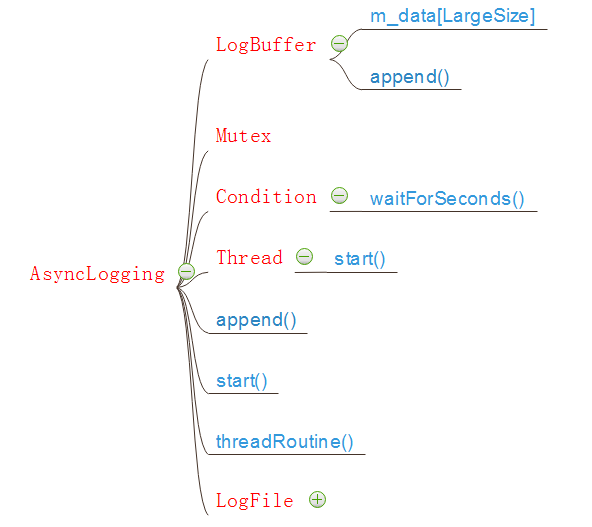
AsyncLogging使用一个更大的LogBuffer来保存一条条Logger传送过来的日志.
Mutex :用来控制多线程的写入.
Condition : 用来等待缓冲区中的数据.
Thread : 使用一个线程处理缓存的交换,以及日志的写入.
AsyncLogging实现
下面会给出AsyncLogging的简单实现.
实际上还有几个备用缓存,这里没有加上去,以便于理解程序; 备用缓存主要是为了减少反复new 操作带来的系统开销,
#ifndef _ASYNC_LOGGING_HH

#define _ASYNC_LOGGING_HH

#include "MutexLock.hh"

#include "Thread.hh"

#include "LogStream.hh"

#include "ptr_vector.hh"

#include "Condition.hh"

#include <string>

class AsyncLogging

{

public:

	AsyncLogging(const std::string filePath, off_t rollSize, int flushInterval = 3);

	~AsyncLogging();

	void start(){

		m_isRunning = true;

		m_thread.start();

	}

	void stop(){

		m_isRunning = false;

		m_cond.notify();

	}

	void append(const char *logline, int len);

private:

	AsyncLogging(const AsyncLogging&);

	AsyncLogging& operator=(const AsyncLogging&);

	void threadRoutine();

	typedef LogBuffer<kLargeBuffer> Buffer;

	typedef oneself::ptr_vector<Buffer> BufferVector;

	typedef oneself::auto_ptr<Buffer> BufferPtr;

	const int m_flushInterval;

	bool m_isRunning;

	off_t m_rollSize;

	std::string m_filePath;

	Thread m_thread;

	MutexLock m_mutex;

	Condition m_cond;

	BufferPtr m_currentBuffer;

	BufferVector m_buffers;

};

#endif

//AsyncLogging.cpp

#include "AsyncLogging.hh"

#include "LogFile.hh"

#include <assert.h>

#include <stdio.h>

AsyncLogging::AsyncLogging(const std::string filePath, off_t rollSize, int flushInterval)

	:m_filePath(filePath),

	 m_rollSize(2048),

	 m_flushInterval(flushInterval),

	 m_isRunning(false),

	 m_thread(std::bind(&AsyncLogging::threadRoutine, this)),

	 m_mutex(),

	 m_cond(m_mutex),

	 m_currentBuffer(new Buffer),

	 m_buffers()

{

}

AsyncLogging::~AsyncLogging(){

	if(m_isRunning) stop();

}

void AsyncLogging::append(const char* logline, int len){

	MutexLockGuard lock(m_mutex);

	if(m_currentBuffer->avail() > len){

		m_currentBuffer->append(logline, len);

	}

	else{

		m_buffers.push_back(m_currentBuffer.release());

		m_currentBuffer.reset(new Buffer);

		m_currentBuffer->append(logline, len);

		m_cond.notify();

	}

}

void AsyncLogging::threadRoutine(){

	assert(m_isRunning == true);

	LogFile output(m_filePath, m_rollSize, false);

	BufferVector buffersToWrite;

	buffersToWrite.reserve(8);

	while(m_isRunning){

		assert(buffersToWrite.empty());

		{

			MutexLockGuard lock(m_mutex);

			if(m_buffers.empty()){

				m_cond.waitForSeconds(m_flushInterval);

			}

			m_buffers.push_back(m_currentBuffer.release());

			m_currentBuffer.reset(new Buffer);

			m_buffers.swap(buffersToWrite);

		}

		assert(!buffersToWrite.empty());

		for(size_t i = 0; i < buffersToWrite.size(); ++i){

			output.append(buffersToWrite[i]->data(), buffersToWrite[i]->length());

		}

		buffersToWrite.clear();

		output.flush();

	}

	output.flush();

}
增加备用缓存
增加备用缓存优化上面程序,上面程序一共在两个地方执行了new操作.
1.m_currentBuffer 填满时,需要把它填进容器的时候.
2.到时间了需要把m_currentBuffer里面的内容写入本地文件时,会把它当前的内容移出来,这时候需要new一个新缓存来给m_currentBuffer.
于是我们准备一个m_nextBuffer来做m_currentBuffer的备用缓存.同时在线程中增加两个backupBuffer 给m_nextBuffer 当备用缓存;当日志量大到不够用的时候, 再考虑用new 操作来动态添加缓存。
#ifndef _ASYNC_LOGGING_HH

#define _ASYNC_LOGGING_HH

#include "MutexLock.hh"

#include "Thread.hh"

#include "LogStream.hh"

#include "ptr_vector.hh"

#include "Condition.hh"

#include <memory>

#include <string>

class AsyncLogging

{

public:

	AsyncLogging(const std::string filePath, off_t rollSize, int flushInterval = 3);

	~AsyncLogging();

	void start(){

		m_isRunning = true;

		m_thread.start();

	}

	void stop(){

		m_isRunning = false;

		m_cond.notify();

	}

	void append(const char *logline, int len);

private:

	AsyncLogging(const AsyncLogging&);

	AsyncLogging& operator=(const AsyncLogging&);

	void threadRoutine();

	typedef LogBuffer<kLargeBuffer> Buffer;

	typedef myself::ptr_vector<Buffer> BufferVector;

	typedef std::unique_ptr<Buffer> BufferPtr;

	const int m_flushInterval;

	bool m_isRunning;

	off_t m_rollSize;

	std::string m_filePath;

	Thread m_thread;

	MutexLock m_mutex;

	Condition m_cond;

	BufferPtr m_currentBuffer;

	BufferPtr m_nextBuffer;

	BufferVector m_buffers;

};

#endif

//AsynvLogging.cpp

#include "AsyncLogging.hh"

#include "LogFile.hh"

#include <assert.h>

#include <stdio.h>

AsyncLogging::AsyncLogging(const std::string filePath, off_t rollSize, int flushInterval)

	:m_filePath(filePath),

	 m_rollSize(rollSize),

	 m_flushInterval(flushInterval),

	 m_isRunning(false),

	 m_thread(std::bind(&AsyncLogging::threadRoutine, this)),

	 m_mutex(),

	 m_cond(m_mutex),

	 m_currentBuffer(new Buffer),

	 m_nextBuffer(new Buffer),

	 m_buffers()

{

}

AsyncLogging::~AsyncLogging(){

	if(m_isRunning) stop();

}

void AsyncLogging::append(const char* logline, int len){

	MutexLockGuard lock(m_mutex);

	if(m_currentBuffer->avail() > len){

		m_currentBuffer->append(logline, len);

	}

	else{

		m_buffers.push_back(m_currentBuffer.release());

		if(m_nextBuffer){

			m_currentBuffer = std::move(m_nextBuffer);

		}

		else{

			m_currentBuffer.reset(new Buffer);

		}

		m_currentBuffer->append(logline, len);

		m_cond.notify();

	}

}

void AsyncLogging::threadRoutine(){

	assert(m_isRunning == true);

	LogFile output(m_filePath, m_rollSize, false);

	BufferPtr backupBuffer1(new Buffer);

	BufferPtr backupBuffer2(new Buffer);

	BufferVector buffersToWrite;

	buffersToWrite.reserve(8);

	while(m_isRunning){

		assert(buffersToWrite.empty());

		{

			MutexLockGuard lock(m_mutex);

			if(m_buffers.empty()){

				m_cond.waitForSeconds(m_flushInterval);

			}

			m_buffers.push_back(m_currentBuffer.release());

			m_currentBuffer = std::move(backupBuffer1);

			m_buffers.swap(buffersToWrite);

			if(!m_nextBuffer)

				m_nextBuffer = std::move(backupBuffer2);

		}

		assert(!buffersToWrite.empty());

		for(size_t i = 0; i < buffersToWrite.size(); ++i){

			output.append(buffersToWrite[i]->data(), buffersToWrite[i]->length());

		}

		if(buffersToWrite.size() > 2)

		{

		    // drop non-bzero-ed buffers, avoid trashing

			buffersToWrite.resize(2);

		}

		if(!backupBuffer1)

		{

			assert(!buffersToWrite.empty());

			backupBuffer1 = std::move(buffersToWrite.pop_back());

			backupBuffer1->reset();

		}

		if(!backupBuffer2)

		{

			assert(!buffersToWrite.empty());

			backupBuffer2 = std::move(buffersToWrite.pop_back());

			backupBuffer2->reset();

		}

		buffersToWrite.clear();

		output.flush();

	}

	output.flush();

}
结语
本文主要介绍了muduo中AsyncLogging类的实现,其中的双缓存机制.
LogFile类及AppendFIle类 分别是日志文件管理类和本地文件的基本操作类. 不难理解,感兴趣的话可以看看muduo的源码,本文不再往下写了,如果想要全部源码可以留言。
最新源码:
https://github.com/BethlyRoseDaisley/SimpleMuduo/tree/master/AsyncLogging
一个轻巧高效的多线程c++stream风格异步日志(二)的更多相关文章
- 一个轻巧高效的多线程c++stream风格异步日志(一)
一个轻巧高效的多线程c++stream风格异步日志 一个轻巧高效的多线程c++stream风格异步日志 前言 功能需求 性能需求 Logger实现 LogStream类 Logger类 LogStre ...
- WaitForSingleObject与WaitForMultipleObjects用法详解(好用,而且进入一个非常高效沉睡状态,只占用极少的CPU时间片)
在多线程下面,有时候会希望等待某一线程完成了再继续做其他事情,要实现这个目的,可以使用Windows API函数WaitForSingleObject,或者WaitForMultipleObjects ...
- [转]一个简单的Linux多线程例子 带你洞悉互斥量 信号量 条件变量编程
一个简单的Linux多线程例子 带你洞悉互斥量 信号量 条件变量编程 希望此文能给初学多线程编程的朋友带来帮助,也希望牛人多多指出错误. 另外感谢以下链接的作者给予,给我的学习带来了很大帮助 http ...
- (转)log4j(四)——如何控制不同风格的日志信息的输出?
一:测试环境与log4j(一)——为什么要使用log4j?一样,这里不再重述 1 老规矩,先来个栗子,然后再聊聊感受 import org.apache.log4j.*; //by godtrue p ...
- python 多进程/多线程/协程 同步异步
这篇主要是对概念的理解: 1.异步和多线程区别:二者不是一个同等关系,异步是最终目的,多线程只是我们实现异步的一种手段.异步是当一个调用请求发送给被调用者,而调用者不用等待其结果的返回而可以做其它的事 ...
- log4j(四)——如何控制不同风格的日志信息的输出?
一:测试环境与log4j(一)——为什么要使用log4j?一样,这里不再重述 二:老规矩,先来个栗子,然后再聊聊感受 import org.apache.log4j.*; //by godtrue p ...
- Java8新特性 Stream流式思想(二)
如何获取Stream流刚开始写博客,有一些不到位的地方,还请各位论坛大佬见谅,谢谢! package cn.com.zq.demo01.Stream.test01.Stream; import org ...
- 写一个Windows上的守护进程(4)日志其余
写一个Windows上的守护进程(4)日志其余 这次把和日志相关的其他东西一并说了. 一.vaformat C++日志接口通常有两种形式:流输入形式,printf形式. 我采用printf形式,因为流 ...
- Prism for WPF 搭建一个简单的模块化开发框架(四)异步调用WCF服务、WCF消息头添加安全验证Token
原文:Prism for WPF 搭建一个简单的模块化开发框架(四)异步调用WCF服务.WCF消息头添加安全验证Token 为什么选择wcf? 因为好像wcf和wpf就是哥俩,,, 为什么选择异步 ...
随机推荐
- bug5 Debug:This kind of launch is configured to openthe debug perspective when it解决办法
启动tomcat时,myeclipse报错: This kind of launch is configured to openthe debug perspective when itsuspend ...
- js完整教程一 : 基本概念和数组操作
文章提纲 JS相关常识 JS基本概念 实践 总结 JS相关常识 js是一种可以与HTML标记语言混合使用的脚本语言,其编写的程序可以直接在浏览器中解释执行. 一.组成 js是一种专门为网页交互设计的脚 ...
- python XML梳理
导入ElementTree模块 import xml.etree.ElementTree as ET 为了创建一个element实例,使用Element 构造函数或者SubElement()工厂函数. ...
- 数学:莫比乌斯反演-GCD计数
Luogu3455:莫比乌斯反演进行GCD计数 莫比乌斯反演就是用来解决这一类问题的,通常f函数是要求的那个,F函数是显然的 这样利用F的结果就可以推出来f的结果 在计算结果的时候整除分快儿一下就可以 ...
- Spring RedisTemplate操作-ZSet操作(6)
@Autowired @Resource(name="redisTemplate") private RedisTemplate<String, String> rt; ...
- springMvc + Maven 项目提示 hessian 依赖包 无法下载;
首先 从 https://github.com/alibaba/dubbo/archive/master.zip 下载最新的 dubbo 源码包到本地某个目录, 解压出来: cmd 进入该目录: 执行 ...
- cas单点登录实现
前言 此文为记录单点登录实现过程,包括cas服务端和客户端的定制扩展 服务端 单点登录服务端采用cas,以cas-server-webapp版本号为3.5.2.1为基础进行定制扩展实现. 定制实现的源 ...
- java7,java8 中HashMap和ConcurrentHashMap简介
一:Java7 中的HashMap 结构: HashMap 里面是一个数组,然后数组中每个元素是一个单向链表.链表中每个元素称为一个Entry 实例,Entry 包含四个属性:key, value, ...
- shell脚本常用参数
shell 脚本 常用参数 #!/bin/sh # 在脚本第一行脚本头 # sh为当前系统默认shell,可指定为bash等shell sh -x # 执行过程 sh -n # 检查语法 (a=bbk ...
- nginx1配置文件
1,查看日志:cat /usr/local/nginx/logs/error.log 2,编辑配置文件:vi /usr/local/nginx/conf/nginx.conf 3,内容:server ...