
Prism for WPF 搭建一个简单的模块化开发框架(四)异步调用WCF服务、WCF消息头添加安全验证Token
原文:Prism for WPF 搭建一个简单的模块化开发框架(四)异步调用WCF服务、WCF消息头添加安全验证Token
为什么选择wcf? 因为好像wcf和wpf就是哥俩,,,
为什么选择异步调用? 用起来体验相对好一点,不会因为服务的速度影响用户体验,避免页面假死
首先新建一个wcf服务程序
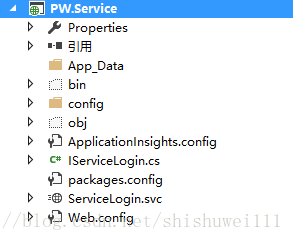
public class ServiceLogin : IServiceLogin

    {

        public bool Login(string username, string pwd)

        {

            if ("root" == username && "root" == pwd)

            {

                return true;

            }

            else

            {

                return false;

            }

        }

        public UserInfo GetUserInfo(string userid)

        {

            return new UserInfo() { username="root",fullname="管理员", role="admin",userid="1" };

        }

    }
这里暂时固定root用户,
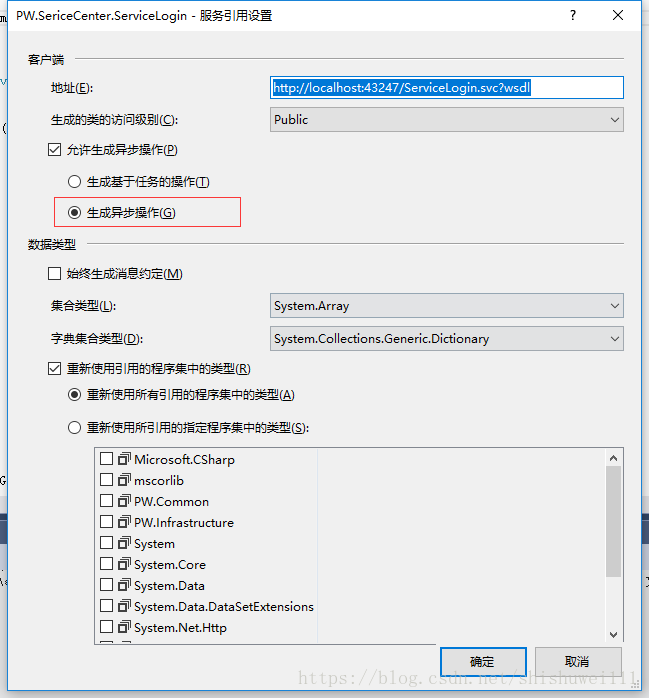
客户端添加一个新的项目PW.SericeCenter,用来引用wcf服务,供其他各个模块调用
在引用时高级里勾选生成异步操作
ServiceComm 封装service,这里可以做一些数据的处理,比如PW.Common.UserInfo数据的转换,或者更为简便的你可以用json,因为wcf返回的对象Userinfo是在引用服务的生成的代码中,不宜做改动,最好是转换成自己的ViewModel,做数据绑定更为方便
public event System.EventHandler<ServicesEventArgs<bool>> LoginCompleted;

        public void Login(string username,string pwd)

        {

            ServiceLogin.ServiceLoginClient client = new ServiceLogin.ServiceLoginClient();

            client.LoginCompleted += (sender, e) =>

            {

                ServicesEventArgs<bool> arg = new ServicesEventArgs<bool>();

                if (e.Error == null)

                {

                    arg.Result = e.Result;

                    arg.Succesed = true;

                }

                else

                {

                    arg.Succesed = false;

                    arg.Error = e.Error;

                    //写错误日志

                    //.....

                }

                if (LoginCompleted != null)

                {

                    LoginCompleted.Invoke(this, arg);

                }

            };

            client.LoginAsync(username, pwd);

        }

public event EventHandler<ServicesEventArgs<PW.Common.UserInfo>> GetUserInfoCompleted;

        public void GetUserInfo(string userid)

        {

            ServiceLogin.ServiceLoginClient client = new ServiceLogin.ServiceLoginClient();

            client.GetUserInfoCompleted += (sender, e) =>

            {

                ServicesEventArgs<PW.Common.UserInfo> arg = new ServicesEventArgs<PW.Common.UserInfo>();

                if (e.Error == null)

                {

                    if (e.Result != null)

                    {

                        arg.Result = new PW.Common.UserInfo() { fullname = e.Result.fullname, role = e.Result.role, userid = e.Result.userid, username = e.Result.username };

                    }

                    else

                    {

                        arg.Result = null;

                    }

                    arg.Succesed = true;

                }

                else

                {

                    arg.Succesed = false;

                    arg.Error = e.Error;

                    //写错误日志

                    //.....

                }

                if (GetUserInfoCompleted != null)

                {

                    GetUserInfoCompleted.Invoke(this, arg);

                }

            };

            client.GetUserInfoAsync(userid);

        }
然后在login模块调用
ServiceComm sc = new ServiceComm();

                sc.LoginCompleted += (serice, eve) =>

                {

                    if (eve.Succesed && eve.Result)

                    {

//成功后balabala

                        GlobalData.EventAggregator.GetEvent<BaseDataLoadedEvent>().Publish(1);

                        LoadAllModules();

                        #region 独立存储区操作

                        try

                        {

                            if (IsolatedStorageFile.IsEnabled == true)

                            {

                                IsolatedStorageFile isoFile = IsolatedStorageFile.GetUserStoreForAssembly();

                                IsolatedStorageFileStream isoFileStream = isoFile.OpenFile("login.txt", System.IO.FileMode.Create);

                                String loginStr = "";

                                if (this.cbxRemPassword.IsChecked == true)

                                {

                                    loginStr = String.Format("{0}", this.txtName.Text.Trim());

                                }

                                Byte[] bts = Encoding.UTF8.GetBytes(loginStr);

                                isoFileStream.Write(bts, 0, bts.Length);

                                isoFileStream.Close();

                                isoFile.Dispose();

                            }

                        }

                        catch (Exception)

                        {

                        }

                        #endregion

                        GlobalData.UserName = this.txtName.Text.Trim();

                    }

                    else

                    {

//失败后balabala

                        this.btnLogin.IsEnabled = true;

                        this.gcLogin.Visibility = Visibility.Visible;

                        this.loadingInfo.Visibility = Visibility.Collapsed;

                        MessageBox.Show("登陆失败!");

                    }

                };

                sc.Login(this.txtName.Text.Trim(), this.txtPassword.Password.Trim());
写完这些吐槽MessageBox.Show("登陆失败!");真的不是一般的难看。。。。有时间换掉
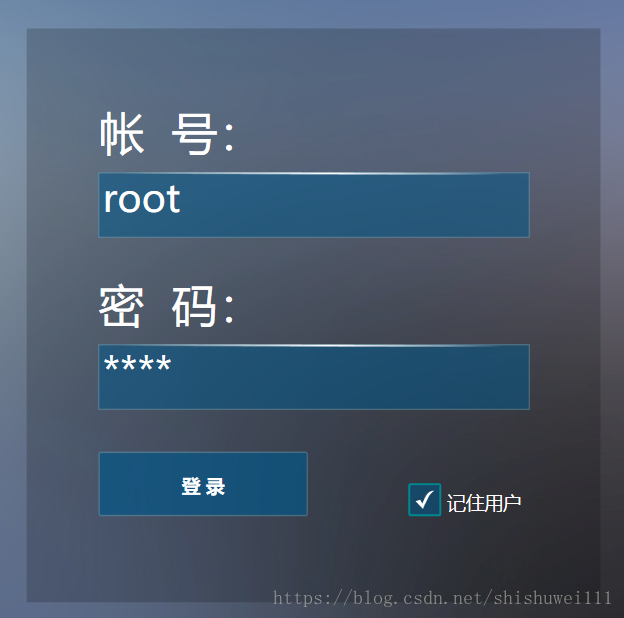
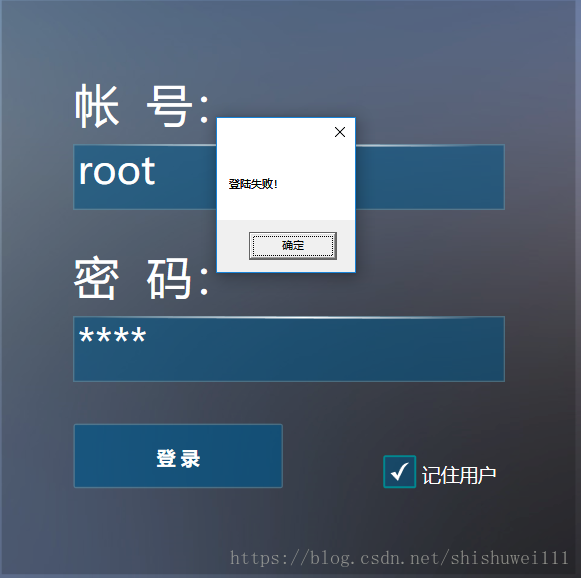
就是这么不协调,,,,登录等待画面暂时有些粗糙,有时间美化一下
登录成功的就和之前一样了。。。
本事wpf去调用wcf服务很简单,但是我搞了一天,主要耗时在了安全验证上面了,
最初想用x509,看了写文章,自己也试了试,很是麻烦,安装证书比较坑,好像是有客户端免安装证书的,但我还是放弃了x509
最后看到了csdn这个问题
https://bbs.csdn.net/topics/390774814/
我就按照消息头拦截这个做的
感觉可以扩展,实现不同的客户端不同的token ,然后每个用户每次登陆带着不同的token,虽然token被人截取了还是不安全,,,再研究吧
具体怎么嵌入到我的项目的就不细说了,论坛有demo连接
Prism for WPF 搭建一个简单的模块化开发框架(四)异步调用WCF服务、WCF消息头添加安全验证Token的更多相关文章
- Prism for WPF 搭建一个简单的模块化开发框架 (一个节点)
原文:Prism for WPF 搭建一个简单的模块化开发框架 (一个节点) 这里我就只贴图不贴代码了,看看这个节点之前的效果 觉得做的好的地方可以范之前的文章看看 有好的建议也可以说说 填充数据 ...
- Prism for WPF 搭建一个简单的模块化开发框架(六)隐藏菜单、导航
原文:Prism for WPF 搭建一个简单的模块化开发框架(六)隐藏菜单.导航 这个实际上是在聊天之前做的,一起写了,也不分先后了 看一下效果图,上面是模块主导航,左侧是模块内菜单,现在加一下隐藏 ...
- Prism for WPF 搭建一个简单的模块化开发框架(五)添加聊天、消息模块
原文:Prism for WPF 搭建一个简单的模块化开发框架(五)添加聊天.消息模块 中秋节假期没事继续搞了搞 做了各聊天的模块,需要继续优化 第一步画页面 页面参考https://github.c ...
- Prism for WPF 搭建一个简单的模块化开发框架(三) 给TreeView加样式做成菜单
原文:Prism for WPF 搭建一个简单的模块化开发框架(三) 给TreeView加样式做成菜单 昨天晚上把TreeView的样式做了一下,今天给TreeView绑了数据,实现了切换页面功能 上 ...
- Prism for WPF 搭建一个简单的模块化开发框架(二)
原文:Prism for WPF 搭建一个简单的模块化开发框架(二) 今天又有时间了,再改改,加了一些控件全局的样式 样式代码 <ResourceDictionary xmlns="h ...
- Prism for WPF 搭建一个简单的模块化开发框架(一)
原文:Prism for WPF 搭建一个简单的模块化开发框架(一) 最近闲来无事又想搞搞WPF..... 做个框架吧,可能又是半途而废....总是坚持不下来 不废话了, 先看一下工程结构 布局大概是 ...
- 用express搭建一个简单的博客系统
转自:https://blog.csdn.net/qq_29721837/article/details/62055603 Express 简介 Express 是一个简洁而灵活的 node.js W ...
- 从零开始搭建一个简单的基于webpack的vue开发环境
原文地址:https://segmentfault.com/a/1190000012789253?utm_source=tag-newest 从零开始搭建一个简单的基于webpack的react开发环 ...
- 用nodejs搭建一个简单的服务器
使用nodejs搭建一个简单的服务器 nodejs优点:性能高(读写文件) 数据操作能力强 官网:www.nodejs.org 验证是否安装成功:cmd命令行中输入node -v 如果显示版本号表示安 ...
随机推荐
- July 10th 2017 Week 28th Monday
I get that look a lot, but I never let it get to me. 我常常受到异样的目光,但我从不把它们放在眼里. I don't feel good these ...
- July 04th 2017 Week 27th Tuesday
Nothing is really beautiful but truth. 只有真理才是真美. Truth can be beautiful, but it also can be cruel. W ...
- 【2D游戏引擎】那些年对游戏对象的思考
WIP源代码: Github OSC镜像 对象系统以对象为中心,对象系统的最基本设计策略是基于组件的设计.对象系统将尽量避免使用继承方式来拓展游戏对象,恰当的使用Mix-in来来最属性做拓展,单个属性 ...
- 零售企业ERP系统慢
数据库优化案例 https://www.cnblogs.com/double-K/p/9210982.html 写在前面 记得在自己学习数据库知识的时候特别喜欢看案例,因为优化的手段是容易掌握的,但是 ...
- SOA架构
基于服务的SOA架构_后续篇 今天是元宵节,首先祝各位广大博友在接下来的光阴中技术更上一层,事事如意!(没能在元宵节发布,今天就补上吧) 昨天简单介绍了一下本人在近期开发过的一个电商购物平台的架构 ...
- 蓝牙BLE4.0的LL层数据和L2CAP层数据的区分与理解
一直搞不太清楚蓝牙BLE协议,不知道LL层和L2CAP层是如何划分的,后来博士给我讲了讲就理解了,写下来,做个记录: 1. 我们知道,除了蓝牙5.1新出的CTE,所有的BLE都是如下类型的包: 对于连 ...
- PHP数组和字符串相互转换以及判断字符串长度
这里只介绍最常用的方法: $array=explode(separator,$string); $string=implode(glue,$array); explode() 函数用来将字符串打散成数 ...
- jpa多条件查询
首先继承JpaSpecificationExecutor<T>接口 需要用到JpaSpecificationExecutor<T>中的Page<T> findAll ...
- event对象,ie8及其以下
event 对象是 JavaScript 中一个非常重要的对象,用来表示当前事件.event 对象的属性和方法包含了当前事件的状态.当前事件,是指正在发生的事件:状态,是与事件有关的性质,如引发事件的 ...
- java根据数据库自动生成代码
出现这个已经创建成功 出现这个情况,没有使用DBUtil,引入即可 已经创建完成 代码下载:https://github.com/weibanggang/tool 项目实例下载:https://pan ...