
一个轻巧高效的多线程c++stream风格异步日志(二)
一个轻巧高效的多线程c++stream风格异步日志(二)
前言
本文紧接上一篇文章: 介绍上文中的一条条日志是如何异步导入本地文件的.
首先会简单介绍下LogFile类,之后会具体讲解下AsyncLogging中的双缓冲机制.
整个日志模块的结构图,
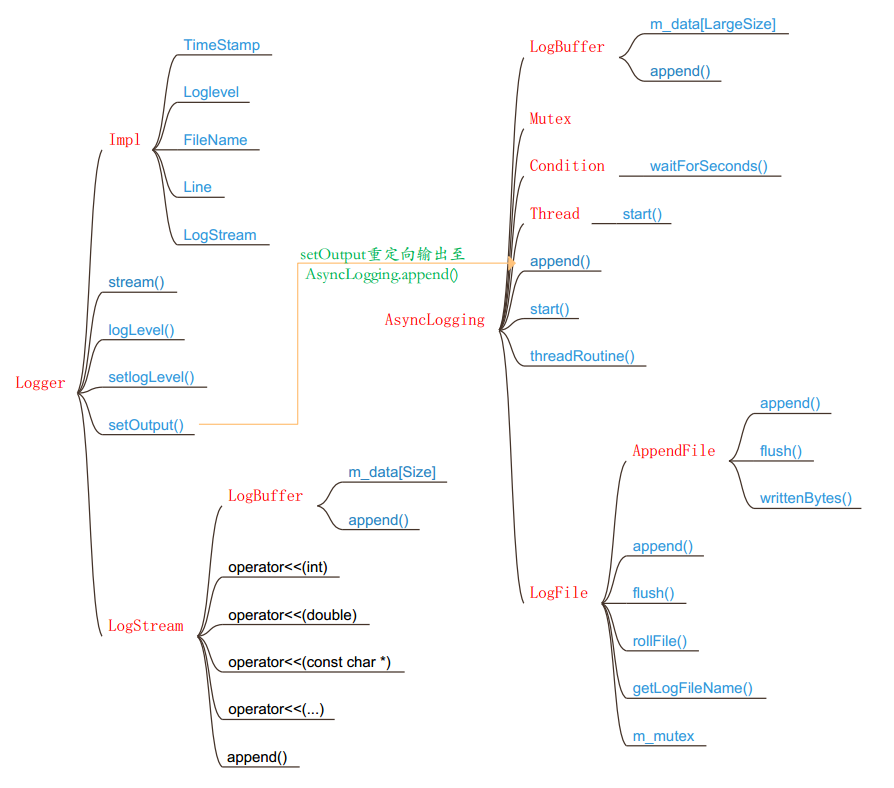
LogFile类
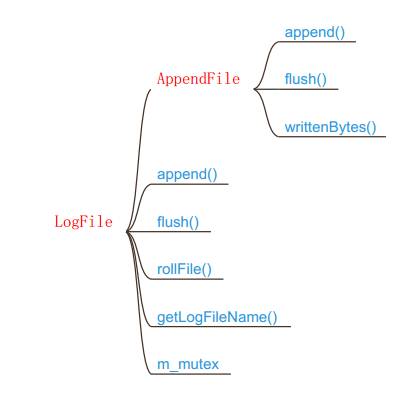
LogFile日志文件类 完成日志文件的管理工作.
rollFile() :滚动文件 当日志超过m_rollSize大小时会滚动一个新的日志文件出来.
getLogFileName() :用与滚动日志时,给日志文件取名,以滚动时间作为后缀.
m_mutex :用于append()数据时,给文件上锁.
append() :黏入日志.
flush() :冲刷缓冲.
LogFile 有一个AppendFIle类,它是最终用于操作本地文件的类.
append() : 里面会调用系统函数fwrite()写入本地文件.
flush() : 冲刷缓冲.
writtenBytes() : 获取已写字节数.
AsyncLogging类
AsyncLogging异步日志类, 完成日志的异步写入工作.
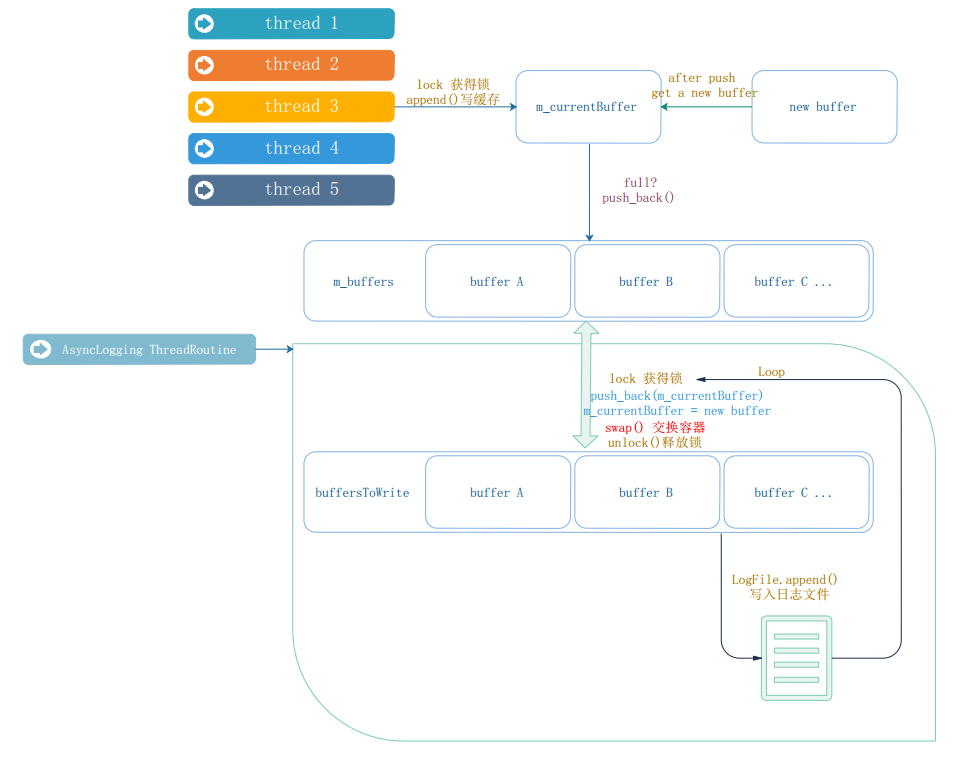
介绍它的接口前,先描述下它的工作逻辑.
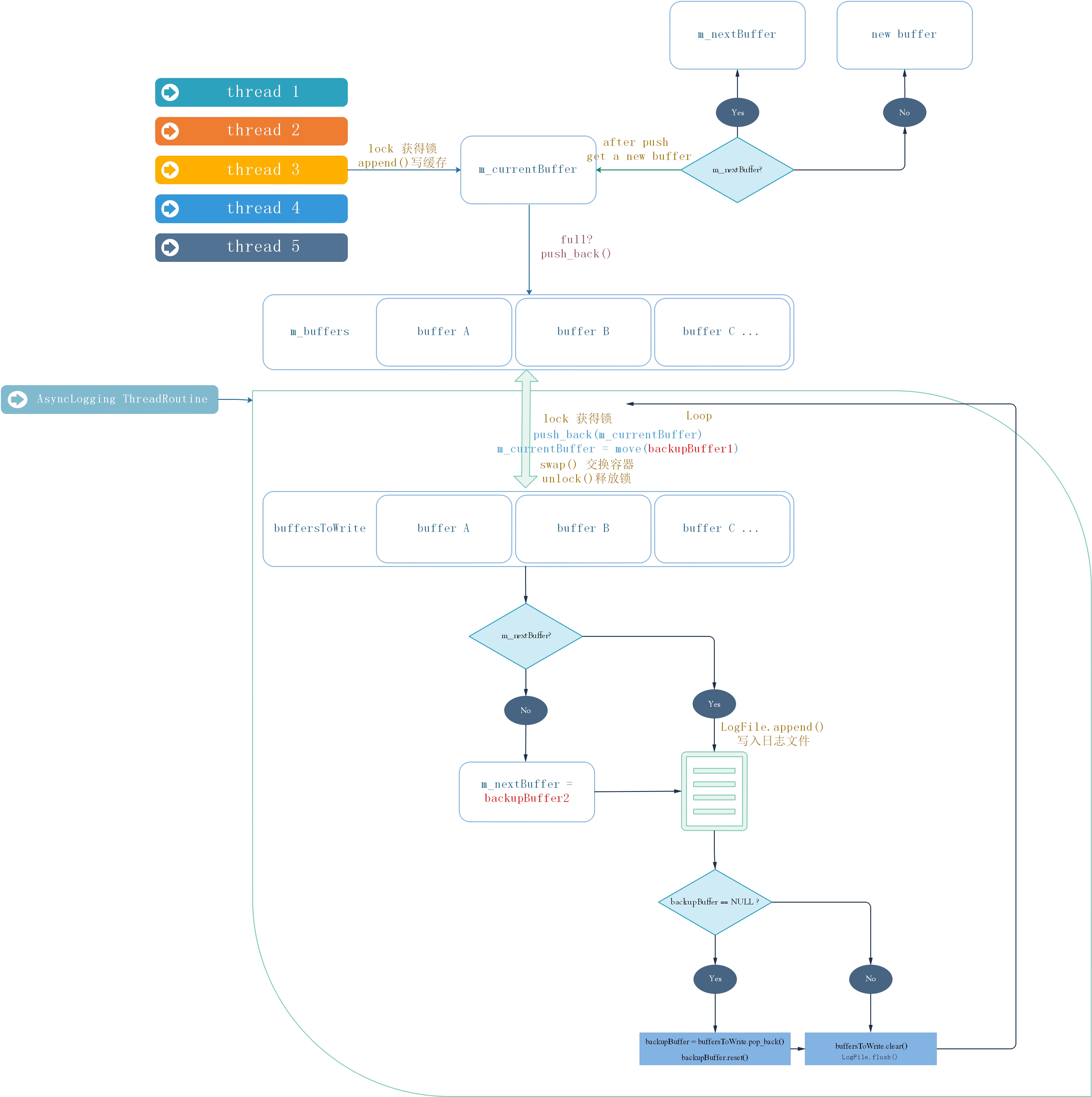
AsyncLogging 有以下述几类缓存.
m_currentBuffer : 指向当前接收其他线程append过来的日志的缓存.
m_buffers : 用于存放当前已写满或过了冲刷周期的日志缓存的指针容器.
m_nextBuffer : 指向当m_currentBuffer满后用于替代m_currentBuffer的缓存.
backupBuffer1 : 备用缓存.
backupBuffer2 : 备用缓存.
buffersToWrite : 和m_buffers通过交换swap()后append()到LogFile的指针容器.
AsyncLogging 使用的双缓冲机制 有两个缓存容器 : m_buffers 、buffersToWrite 交替使用 . 一下我们简称为 A 和 B .
A 用于接收 其他线程 append() 进来的日志.
B 用于将目前已接受的缓存 写入 日志文件. 当B写完时 , clean() B , 交换A,B,如此往复.
优点 : 新建的日志不必等待磁盘操作,也避免了每条新日志都触发日志线程,而是将多条日志拼程一个大的buffer 传送给日志线程写入文件. 相当于批处理, 减少线程唤醒频率 ,降低开销。
另外 ,为了及时将 日志消息写入文件, 即是 buffer A 中还没有push进来日志 也会每三秒 执行一次上述的写入操作.
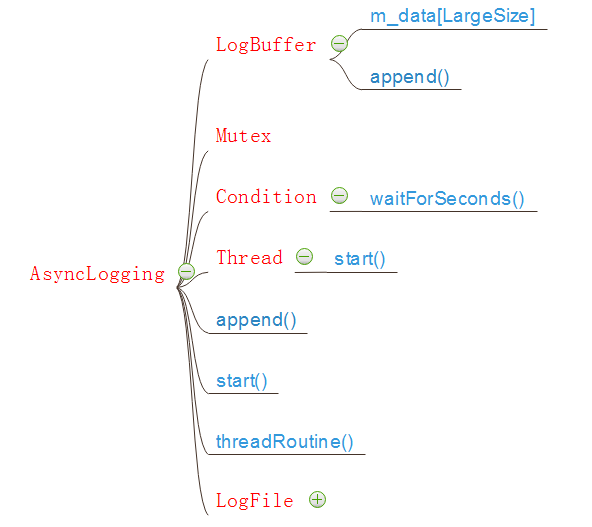
AsyncLogging使用一个更大的LogBuffer来保存一条条Logger传送过来的日志.
Mutex :用来控制多线程的写入.
Condition : 用来等待缓冲区中的数据.
Thread : 使用一个线程处理缓存的交换,以及日志的写入.
AsyncLogging实现
下面会给出AsyncLogging的简单实现.
实际上还有几个备用缓存,这里没有加上去,以便于理解程序; 备用缓存主要是为了减少反复new 操作带来的系统开销,
#ifndef _ASYNC_LOGGING_HH

#define _ASYNC_LOGGING_HH

#include "MutexLock.hh"

#include "Thread.hh"

#include "LogStream.hh"

#include "ptr_vector.hh"

#include "Condition.hh"

#include <string>

class AsyncLogging

{

public:

	AsyncLogging(const std::string filePath, off_t rollSize, int flushInterval = 3);

	~AsyncLogging();

	void start(){

		m_isRunning = true;

		m_thread.start();

	}

	void stop(){

		m_isRunning = false;

		m_cond.notify();

	}

	void append(const char *logline, int len);

private:

	AsyncLogging(const AsyncLogging&);

	AsyncLogging& operator=(const AsyncLogging&);

	void threadRoutine();

	typedef LogBuffer<kLargeBuffer> Buffer;

	typedef oneself::ptr_vector<Buffer> BufferVector;

	typedef oneself::auto_ptr<Buffer> BufferPtr;

	const int m_flushInterval;

	bool m_isRunning;

	off_t m_rollSize;

	std::string m_filePath;

	Thread m_thread;

	MutexLock m_mutex;

	Condition m_cond;

	BufferPtr m_currentBuffer;

	BufferVector m_buffers;

};

#endif

//AsyncLogging.cpp

#include "AsyncLogging.hh"

#include "LogFile.hh"

#include <assert.h>

#include <stdio.h>

AsyncLogging::AsyncLogging(const std::string filePath, off_t rollSize, int flushInterval)

	:m_filePath(filePath),

	 m_rollSize(2048),

	 m_flushInterval(flushInterval),

	 m_isRunning(false),

	 m_thread(std::bind(&AsyncLogging::threadRoutine, this)),

	 m_mutex(),

	 m_cond(m_mutex),

	 m_currentBuffer(new Buffer),

	 m_buffers()

{

}

AsyncLogging::~AsyncLogging(){

	if(m_isRunning) stop();

}

void AsyncLogging::append(const char* logline, int len){

	MutexLockGuard lock(m_mutex);

	if(m_currentBuffer->avail() > len){

		m_currentBuffer->append(logline, len);

	}

	else{

		m_buffers.push_back(m_currentBuffer.release());

		m_currentBuffer.reset(new Buffer);

		m_currentBuffer->append(logline, len);

		m_cond.notify();

	}

}

void AsyncLogging::threadRoutine(){

	assert(m_isRunning == true);

	LogFile output(m_filePath, m_rollSize, false);

	BufferVector buffersToWrite;

	buffersToWrite.reserve(8);

	while(m_isRunning){

		assert(buffersToWrite.empty());

		{

			MutexLockGuard lock(m_mutex);

			if(m_buffers.empty()){

				m_cond.waitForSeconds(m_flushInterval);

			}

			m_buffers.push_back(m_currentBuffer.release());

			m_currentBuffer.reset(new Buffer);

			m_buffers.swap(buffersToWrite);

		}

		assert(!buffersToWrite.empty());

		for(size_t i = 0; i < buffersToWrite.size(); ++i){

			output.append(buffersToWrite[i]->data(), buffersToWrite[i]->length());

		}

		buffersToWrite.clear();

		output.flush();

	}

	output.flush();

}
增加备用缓存
增加备用缓存优化上面程序,上面程序一共在两个地方执行了new操作.
1.m_currentBuffer 填满时,需要把它填进容器的时候.
2.到时间了需要把m_currentBuffer里面的内容写入本地文件时,会把它当前的内容移出来,这时候需要new一个新缓存来给m_currentBuffer.
于是我们准备一个m_nextBuffer来做m_currentBuffer的备用缓存.同时在线程中增加两个backupBuffer 给m_nextBuffer 当备用缓存;当日志量大到不够用的时候, 再考虑用new 操作来动态添加缓存。
#ifndef _ASYNC_LOGGING_HH

#define _ASYNC_LOGGING_HH

#include "MutexLock.hh"

#include "Thread.hh"

#include "LogStream.hh"

#include "ptr_vector.hh"

#include "Condition.hh"

#include <memory>

#include <string>

class AsyncLogging

{

public:

	AsyncLogging(const std::string filePath, off_t rollSize, int flushInterval = 3);

	~AsyncLogging();

	void start(){

		m_isRunning = true;

		m_thread.start();

	}

	void stop(){

		m_isRunning = false;

		m_cond.notify();

	}

	void append(const char *logline, int len);

private:

	AsyncLogging(const AsyncLogging&);

	AsyncLogging& operator=(const AsyncLogging&);

	void threadRoutine();

	typedef LogBuffer<kLargeBuffer> Buffer;

	typedef myself::ptr_vector<Buffer> BufferVector;

	typedef std::unique_ptr<Buffer> BufferPtr;

	const int m_flushInterval;

	bool m_isRunning;

	off_t m_rollSize;

	std::string m_filePath;

	Thread m_thread;

	MutexLock m_mutex;

	Condition m_cond;

	BufferPtr m_currentBuffer;

	BufferPtr m_nextBuffer;

	BufferVector m_buffers;

};

#endif

//AsynvLogging.cpp

#include "AsyncLogging.hh"

#include "LogFile.hh"

#include <assert.h>

#include <stdio.h>

AsyncLogging::AsyncLogging(const std::string filePath, off_t rollSize, int flushInterval)

	:m_filePath(filePath),

	 m_rollSize(rollSize),

	 m_flushInterval(flushInterval),

	 m_isRunning(false),

	 m_thread(std::bind(&AsyncLogging::threadRoutine, this)),

	 m_mutex(),

	 m_cond(m_mutex),

	 m_currentBuffer(new Buffer),

	 m_nextBuffer(new Buffer),

	 m_buffers()

{

}

AsyncLogging::~AsyncLogging(){

	if(m_isRunning) stop();

}

void AsyncLogging::append(const char* logline, int len){

	MutexLockGuard lock(m_mutex);

	if(m_currentBuffer->avail() > len){

		m_currentBuffer->append(logline, len);

	}

	else{

		m_buffers.push_back(m_currentBuffer.release());

		if(m_nextBuffer){

			m_currentBuffer = std::move(m_nextBuffer);

		}

		else{

			m_currentBuffer.reset(new Buffer);

		}

		m_currentBuffer->append(logline, len);

		m_cond.notify();

	}

}

void AsyncLogging::threadRoutine(){

	assert(m_isRunning == true);

	LogFile output(m_filePath, m_rollSize, false);

	BufferPtr backupBuffer1(new Buffer);

	BufferPtr backupBuffer2(new Buffer);

	BufferVector buffersToWrite;

	buffersToWrite.reserve(8);

	while(m_isRunning){

		assert(buffersToWrite.empty());

		{

			MutexLockGuard lock(m_mutex);

			if(m_buffers.empty()){

				m_cond.waitForSeconds(m_flushInterval);

			}

			m_buffers.push_back(m_currentBuffer.release());

			m_currentBuffer = std::move(backupBuffer1);

			m_buffers.swap(buffersToWrite);

			if(!m_nextBuffer)

				m_nextBuffer = std::move(backupBuffer2);

		}

		assert(!buffersToWrite.empty());

		for(size_t i = 0; i < buffersToWrite.size(); ++i){

			output.append(buffersToWrite[i]->data(), buffersToWrite[i]->length());

		}

		if(buffersToWrite.size() > 2)

		{

		    // drop non-bzero-ed buffers, avoid trashing

			buffersToWrite.resize(2);

		}

		if(!backupBuffer1)

		{

			assert(!buffersToWrite.empty());

			backupBuffer1 = std::move(buffersToWrite.pop_back());

			backupBuffer1->reset();

		}

		if(!backupBuffer2)

		{

			assert(!buffersToWrite.empty());

			backupBuffer2 = std::move(buffersToWrite.pop_back());

			backupBuffer2->reset();

		}

		buffersToWrite.clear();

		output.flush();

	}

	output.flush();

}
结语
本文主要介绍了muduo中AsyncLogging类的实现,其中的双缓存机制.
LogFile类及AppendFIle类 分别是日志文件管理类和本地文件的基本操作类. 不难理解,感兴趣的话可以看看muduo的源码,本文不再往下写了,如果想要全部源码可以留言。
最新源码:
https://github.com/BethlyRoseDaisley/SimpleMuduo/tree/master/AsyncLogging
一个轻巧高效的多线程c++stream风格异步日志(二)的更多相关文章
- 一个轻巧高效的多线程c++stream风格异步日志(一)
一个轻巧高效的多线程c++stream风格异步日志 一个轻巧高效的多线程c++stream风格异步日志 前言 功能需求 性能需求 Logger实现 LogStream类 Logger类 LogStre ...
- WaitForSingleObject与WaitForMultipleObjects用法详解(好用,而且进入一个非常高效沉睡状态,只占用极少的CPU时间片)
在多线程下面,有时候会希望等待某一线程完成了再继续做其他事情,要实现这个目的,可以使用Windows API函数WaitForSingleObject,或者WaitForMultipleObjects ...
- [转]一个简单的Linux多线程例子 带你洞悉互斥量 信号量 条件变量编程
一个简单的Linux多线程例子 带你洞悉互斥量 信号量 条件变量编程 希望此文能给初学多线程编程的朋友带来帮助,也希望牛人多多指出错误. 另外感谢以下链接的作者给予,给我的学习带来了很大帮助 http ...
- (转)log4j(四)——如何控制不同风格的日志信息的输出?
一:测试环境与log4j(一)——为什么要使用log4j?一样,这里不再重述 1 老规矩,先来个栗子,然后再聊聊感受 import org.apache.log4j.*; //by godtrue p ...
- python 多进程/多线程/协程 同步异步
这篇主要是对概念的理解: 1.异步和多线程区别:二者不是一个同等关系,异步是最终目的,多线程只是我们实现异步的一种手段.异步是当一个调用请求发送给被调用者,而调用者不用等待其结果的返回而可以做其它的事 ...
- log4j(四)——如何控制不同风格的日志信息的输出?
一:测试环境与log4j(一)——为什么要使用log4j?一样,这里不再重述 二:老规矩,先来个栗子,然后再聊聊感受 import org.apache.log4j.*; //by godtrue p ...
- Java8新特性 Stream流式思想(二)
如何获取Stream流刚开始写博客,有一些不到位的地方,还请各位论坛大佬见谅,谢谢! package cn.com.zq.demo01.Stream.test01.Stream; import org ...
- 写一个Windows上的守护进程(4)日志其余
写一个Windows上的守护进程(4)日志其余 这次把和日志相关的其他东西一并说了. 一.vaformat C++日志接口通常有两种形式:流输入形式,printf形式. 我采用printf形式,因为流 ...
- Prism for WPF 搭建一个简单的模块化开发框架(四)异步调用WCF服务、WCF消息头添加安全验证Token
原文:Prism for WPF 搭建一个简单的模块化开发框架(四)异步调用WCF服务.WCF消息头添加安全验证Token 为什么选择wcf? 因为好像wcf和wpf就是哥俩,,, 为什么选择异步 ...
随机推荐
- bug找到吐的赶脚
bug找到吐的赶脚,真**刺激 一.单元测试 设计思路 首先是需要写一个无括号四则运算函数 下面的运算先是运算括号内的数 然后将null后置 全部代码测试,覆盖率92.4% 二.结构优化 uml图 流 ...
- codeblocks调试
1.Next instruction 逐指令 (有可能一行内有多条指令) (Alt+F7) Next line 逐行(有可能一条指令分成多行) (F7) Next instruction: -> ...
- bzoj千题计划191:bzoj2337: [HNOI2011]XOR和路径
http://www.lydsy.com/JudgeOnline/problem.php?id=2337 概率不能异或 但根据期望的线性,可以计算出每一位为1的概率,再累积他们的期望 枚举每一位i,现 ...
- javascript私有方法揭示为公有方法
揭示模式可用于将私有方法暴露为公共方法.当为了对象的运转而将所有功能放置在一个对象中以及想尽可能地保护该对象,这种揭示模式就非常有用. 板栗: var myarray; (function(){ va ...
- 20155318 2016-2017-2 《Java程序设计》第五周学习总结
20155318 2016-2017-2 <Java程序设计>第五周学习总结 教材学习内容总结 try...catch 键盘输入利用java.util.Scanner,Scanner 名 ...
- keepalived vrrp_script脚本不执行解决办法
首先打开日志观察: tail -f /var/log/messages 然后新开一个客户端重启keepalived , systemctl restart keepalived.service 看日志 ...
- oracle 级联查询 根路径
级联查询有很多教程示例,但是没有找到求特定子孙到根的路径的例子,折腾了一番总算想出方法了. 现假设我们拥有一个菜单表t_menu,其中只有三个字段:id.name和parent_id.它们是具有父子关 ...
- 修改history记录数门限
你的 Bash 命令历史保存的历史命令的数量可以在 ~/.bashrc 文件里设置.在这个文件里,你可以找到下面两行: HISTSIZE=1000 HISTFILESIZE=2000 HISTSIZE ...
- WPF使用DataGridComboBoxColumn完成绑定
在使用DataGrid的时候,有时候需要使某些列为ComboBox,这时自然想到使用DataGridComboBoxColumn,但是如果使用的是ItemsSource数据绑定后台的对象,就会发现,这 ...
- tomcat报错:java.net.SocketException: Permission denied["http-nio-80"]
tomcat报错:java.net.SocketException: Permission denied["http-nio-80"] 问题:使用非root账户tomcat启动to ...