
d3.js在vue项目中的安装及案例
1. 安装:
npm i d3 --save
2. 引入:main.js
import * as d3 from "d3";

Vue.prototype.$d3 = d3;

window.d3 = d3;   //暂时设置为全局变量
3. demo代码: demo源码参考地址
<template>

    <div style="width: 100%;height: 100%;">

        <svg version="1.1" xmlns="http://www.w3.org/2000/svg" xmlns:xlink="http://www.w3.org/1999/xlink" xml:space="preserve"

         width="960" height="500"> </svg>

    </div>

</template>

<script>

    export default {

        mounted() {

            var svg = d3.select("svg"),

                width = +svg.attr("width"),

                height = +svg.attr("height"),

                color = d3.scaleOrdinal(d3.schemeCategory10);

            var a = {

                    id: "a"

                },

                b = {

                    id: "b"

                },

                c = {

                    id: "c"

                },

                nodes = [a, b, c],

                links = [];

            var simulation = d3.forceSimulation(nodes)

                .force("charge", d3.forceManyBody().strength(-1000))

                .force("link", d3.forceLink(links).distance(200))

                .force("x", d3.forceX())

                .force("y", d3.forceY())

                .alphaTarget(1)

                .on("tick", ticked);

            var g = svg.append("g").attr("transform", "translate(" + width / 2 + "," + height / 2 + ")"),

                link = g.append("g").attr("stroke", "#000").attr("stroke-width", 1.5).selectAll(".link"),

                node = g.append("g").attr("stroke", "#fff").attr("stroke-width", 1.5).selectAll(".node");

            restart();

            d3.timeout(function() {

                links.push({

                    source: a,

                    target: b

                }); // Add a-b.

                links.push({

                    source: b,

                    target: c

                }); // Add b-c.

                links.push({

                    source: c,

                    target: a

                }); // Add c-a.

                restart();

            }, 1000);

            d3.interval(function() {

                nodes.pop(); // Remove c.

                links.pop(); // Remove c-a.

                links.pop(); // Remove b-c.

                restart();

            }, 2000, d3.now());

            d3.interval(function() {

                nodes.push(c); // Re-add c.

                links.push({

                    source: b,

                    target: c

                }); // Re-add b-c.

                links.push({

                    source: c,

                    target: a

                }); // Re-add c-a.

                restart();

            }, 2000, d3.now() + 1000);

            function restart() {

                // Apply the general update pattern to the nodes.

                node = node.data(nodes, function(d) {

                    return d.id;

                });

                node.exit().transition()

                    .attr("r", 0)

                    .remove();

                node = node.enter().append("circle")

                    .attr("fill", function(d) {

                        return color(d.id);

                    })

                    .call(function(node) {

                        node.transition().attr("r", 8);

                    })

                    .merge(node);

                // Apply the general update pattern to the links.

                link = link.data(links, function(d) {

                    return d.source.id + "-" + d.target.id;

                });

                // Keep the exiting links connected to the moving remaining nodes.

                link.exit().transition()

                    .attr("stroke-opacity", 0)

                    .attrTween("x1", function(d) {

                        return function() {

                            return d.source.x;

                        };

                    })

                    .attrTween("x2", function(d) {

                        return function() {

                            return d.target.x;

                        };

                    })

                    .attrTween("y1", function(d) {

                        return function() {

                            return d.source.y;

                        };

                    })

                    .attrTween("y2", function(d) {

                        return function() {

                            return d.target.y;

                        };

                    })

                    .remove();

                link = link.enter().append("line")

                    .call(function(link) {

                        link.transition().attr("stroke-opacity", 1);

                    })

                    .merge(link);

                // Update and restart the simulation.

                simulation.nodes(nodes);

                simulation.force("link").links(links);

                simulation.alpha(1).restart();

            }

            function ticked() {

                node.attr("cx", function(d) {

                        return d.x;

                    })

                    .attr("cy", function(d) {

                        return d.y;

                    })

                link.attr("x1", function(d) {

                        return d.source.x;

                    })

                    .attr("y1", function(d) {

                        return d.source.y;

                    })

                    .attr("x2", function(d) {

                        return d.target.x;

                    })

                    .attr("y2", function(d) {

                        return d.target.y;

                    });

            }

        },

    }

</script>
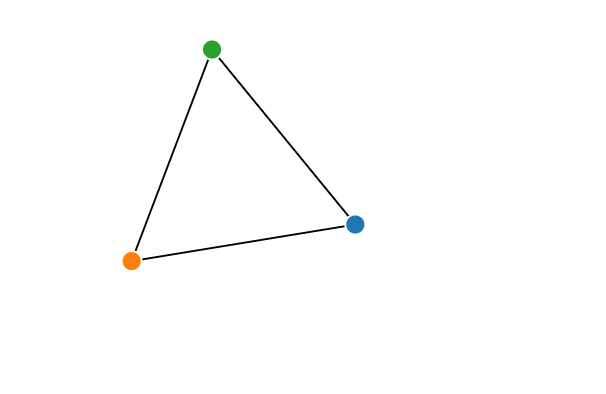
4. demo效果图
d3.js在vue项目中的安装及案例的更多相关文章
- cytoscape.js在vue项目中的安装及案例
1. 安装: npm i cytoscape --save 2. 引入:main.js import cytoscape from 'cytoscape'; Vue.prototype.$cytosc ...
- vue项目中npm安装sass,less,stylus
用vue-cli脚手架搭建出来的,默认是用标准css的.如果你想用sass,less,stylus就需要自己手动安装一下了. 进入项目文件夹,然后安装(这里以stylus为例)stylus和stylu ...
- 【bcrypt】vue项目中bcrypt安装报错
[报错] 报错时安装方法: npm install bcrypt [解决方法] npm install bcryptjs 用 bcryptjs 替换 bcrypt 即可.
- 在vue项目中的axios使用配置记录
默认vue项目中已经安装axios,基于element-ui开发,主要记录配置的相关. axiosConfig.js import Vue from 'vue' import axios from ' ...
- 在vue项目中使用canvas-nest.js,报parameter 1 is not of type 'Element'
canvas-nest.js是一款轻量的网页特效,如图: github地址:https://github.com/hustcc/canvas-nest.js 在普通的html项目中,只要将<sc ...
- vue 项目中安装npm--save-dev 和 --save 命令
在vue项目中我们常用npm install 安装模块或插件 有两种命令把他们写入到 package.json 文件里面去 例如安装axios 安装到开发环境npm axios --save-dev ...
- vue 项目中实用的小技巧
# 在Vue 项目中引入Bootstrap 有时在vue项目中会根据需求引入Bootstrap,而Bootstrap又是依赖于jQuery的,在使用npm按照时,可能会出现一系列的错误 1.安装jQu ...
- 如何在VUE项目中添加ESLint
如何在VUE项目中添加ESLint 1. 首先在项目的根目录下 新建 .eslintrc.js文件,其配置规则可以如下:(自己小整理了一份),所有的代码如下: // https://eslint.or ...
- 浅谈 Axios 在 Vue 项目中的使用
介绍 Axios 是一个基于 promise 的 HTTP 库,可以用在浏览器和 node.js 中. 特性 它主要有如下特性: 浏览器端发起XMLHttpRequests请求 Node端发起http ...
随机推荐
- yum 安装报错:Could not retrieve mirrorlist http://mirrorlist.centos.org/?release=7&arch=x86_64&repo=os&infra=stock error was 14: curl#6 - "Could not resolve host: mirrorlist.centos.org; Unknown error"
[root@venn09 ~]# yum install -y vim Loaded plugins: fastestmirror Could not retrieve mirrorlist http ...
- 720. Longest Word in Dictionary
static int wing=[]() { std::ios::sync_with_stdio(false); cin.tie(NULL); ; }(); class Solution { publ ...
- ios 懒加载详解
iOS开发之懒加载 在iOS开发中几乎经常用到懒加载技术,比如我们存放网络数据的数组,控制器的view,控件的自定义,复杂的运算逻辑等等情况下都会用到懒加载技术,那么什么是懒加载呢?? 他又有什么样的 ...
- Cannot read property 'protocol' of undefined的原因和解决办法
Cannot read property 'protocol' of undefined 原因:axios请求中的错误 1.请求地址写错了 2.没有引入http.js 3.引入http.js的时候,单 ...
- excel怎样添加的选项卡中含有下拉列表
<customUI xmlns="http://schemas.microsoft.com/office/2006/01/customui"> <ribbon s ...
- 2018-03-10 VCard备份恢复联系人
主要在VCardComposer类中备份联系人的逻辑 导出流程: http://blog.csdn.net/michael_yt/article/details/78270537 导入流程: http ...
- c语言洗牌算法
#include<stdio.h> #include<stdlib.h> #include<time.h> #include<string.h> voi ...
- jsp 中出现大量红线,而且页面能正常访问
第一次,出现这种情况真的很苦恼,估计是有强迫症的原因,就是看着不舒服,都页面能正常访问,但是还是想解决它 解决方法:依次按下 ctl+A ctl+X.ctl+V, 没看错就是 全选,剪切,粘贴 就好了 ...
- bootstrap2.2相关文档
本节课我们主要学习一下 Bootstrap表单和图片功能,通过内置的 CSS定义,显示各种丰富的效果. 一.表单 Bootstrap提供了一些丰富的表单样式供开发者使用. 1.基本格式 //实现基本的 ...
- ASP.NET实现头像剪切保存
利用swfupload上传头像,利用Jcrop来实现头像在线选择,然后提交个ashx对原头像进行剪切.代码如下: default.aspx: <%@ Page Language="C# ...