
Tensorflow_入门学习_1
1.0 TensorFlow graphs
Tensorflow是基于graph based computation:
如:
a=(b+c)∗(c+2)
可分解为
d=b+c
e=c+2
a=d∗e
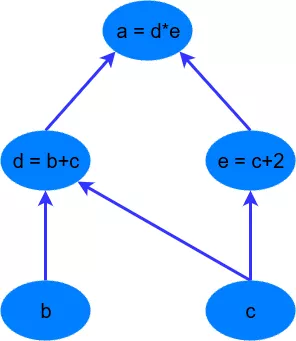
这样做的目的在于,d=b+c,e=c+2,这两个式子就可以并行地计算。
2.0 A Simple TensorFlow example
import tensorflow as tf

# first, create a TensorFlow constant

const = tf.constant(2.0, name="const")

# create TensorFlow variables

b = tf.Variable(2.0, name='b')

c = tf.Variable(1.0, name='c')

# now create some operations

d = tf.add(b, c, name='d')

e = tf.add(c, const, name='e')

a = tf.multiply(d, e, name='a')
声明地常量和变量可以可选地使用一个string来标记,Tensorflow会根据初始值推断变量或常量地类型,也可以使用dtype参数来显式指定类型,如tf.float32, tf.int32等,更多类型
注意:
It’s important to note that, as the Python code runs through these commands, the variables haven’t actually been declared as they would have been if you just had a standard Python declaration (i.e. b = 2.0). Instead, all the constants, variables, operations and the computational graph are only created when the initialisation commands are run.
在执行上述python代码地时候,这些变量和常量并不像标准python那样立刻被声明,而是所有地常量、变量、运算和计算图(computational graph)必须在初始化命令执行时才会被创建。
# setup the variable initialisation

init_op = tf.global_variables_initializer()
To run the operations between the variables, we need to start a TensorFlow session – tf.Session. The TensorFlow session is an object where all operations are run. TensorFlow was initially created in a static graph paradigm – in other words, first all the operations and variables are defined (the graph structure) and then these are compiled within the tf.Sessionobject.
为了执行变量间的运算,需要启动一个tf.Session,所有运算都是在session对象中运行的。TensorFlow首先创建静态图。
# start the session

with tf.Session() as sess:

    # initialise the variables

    sess.run(init_op)

    # compute the output of the graph

    a_out = sess.run(a)

    print("Variable a is {}".format(a_out))
此处a是运算(operation)而不是变量,所以可以run。
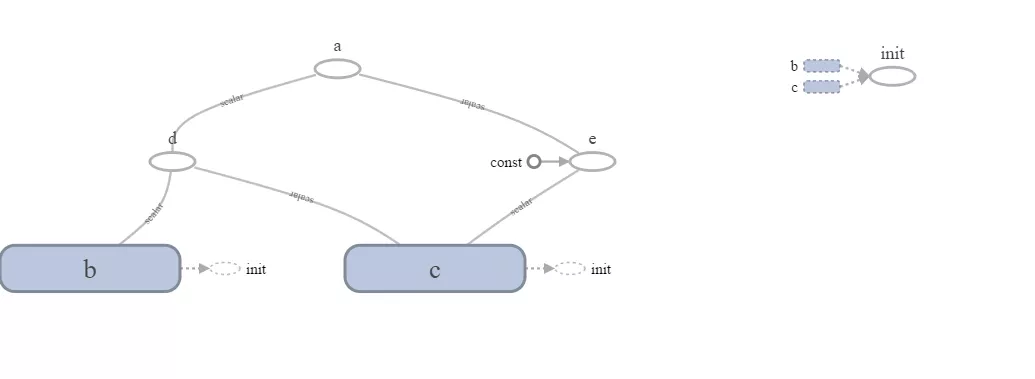
Note something cool - 在a之前还声明了d和e,在计算a之前需要先执行d和e,我们不需要显式执行d和e,Tensorflow通过数据流图(data flow graph)知道a所有的依赖,自动执行依赖的运算。使用TensorBoard的功能可以看到TensorFlow创建的graph:
2.1 The TensorFlow placeholder
Let’s also say that we didn’t know what the value of the array b would be during the declaration phase of the TensorFlow problem (i.e. before the with tf.Session() as sess) stage. In this case, TensorFlow requires us to declare the basic structure of the data by using the tf.placeholder variable declaration. Let’s use it for b:
在Tensorflow训练问题声明阶段,我们可能不知道数组b的具体值。这种情况下,需要我们使用变量声明 tf.placeholder 来声明数据的基本结构。
# create TensorFlow variables

b = tf.placeholder(tf.float32, [None, 1], name='b')
第二个参数是data的shape,placeholder可以接收一个None的size参数。
a_out = sess.run(a, feed_dict={b: np.arange(0, 10)[:, np.newaxis]})
调用session.run时需要将b的具体数据feed进去。
Tensorflow_入门学习_1的更多相关文章
- Tensorflow_入门学习_2_一个神经网络栗子
3.0 A Neural Network Example 载入数据: from tensorflow.examples.tutorials.mnist import input_data mnist ...
- vue入门学习(基础篇)
vue入门学习总结: vue的一个组件包括三部分:template.style.script. vue的数据在data中定义使用. 数据渲染指令:v-text.v-html.{{}}. 隐藏未编译的标 ...
- Hadoop入门学习笔记---part4
紧接着<Hadoop入门学习笔记---part3>中的继续了解如何用java在程序中操作HDFS. 众所周知,对文件的操作无非是创建,查看,下载,删除.下面我们就开始应用java程序进行操 ...
- Hadoop入门学习笔记---part3
2015年元旦,好好学习,天天向上.良好的开端是成功的一半,任何学习都不能中断,只有坚持才会出结果.继续学习Hadoop.冰冻三尺,非一日之寒! 经过Hadoop的伪分布集群环境的搭建,基本对Hado ...
- PyQt4入门学习笔记(三)
# PyQt4入门学习笔记(三) PyQt4内的布局 布局方式是我们控制我们的GUI页面内各个控件的排放位置的.我们可以通过两种基本方式来控制: 1.绝对位置 2.layout类 绝对位置 这种方式要 ...
- PyQt4入门学习笔记(一)
PyQt4入门学习笔记(一) 一直没有找到什么好的pyqt4的教程,偶然在google上搜到一篇不错的入门文档,翻译过来,留以后再复习. 原始链接如下: http://zetcode.com/gui/ ...
- Hadoop入门学习笔记---part2
在<Hadoop入门学习笔记---part1>中感觉自己虽然总结的比较详细,但是始终感觉有点凌乱.不够系统化,不够简洁.经过自己的推敲和总结,现在在此处概括性的总结一下,认为在准备搭建ha ...
- Retrofit 入门学习
Retrofit 入门学习官方RetrofitAPI 官方的一个例子 public interface GitHubService { @GET("users/{user}/repos&qu ...
- MyBatis入门学习教程-使用MyBatis对表执行CRUD操作
上一篇MyBatis学习总结(一)--MyBatis快速入门中我们讲了如何使用Mybatis查询users表中的数据,算是对MyBatis有一个初步的入门了,今天讲解一下如何使用MyBatis对use ...
随机推荐
- Python 之Event
线程间互相等状态. import threading import time import logging logging.basicConfig(level=logging.DEBUG, forma ...
- POJ 1182 食物链 (破题)
题意:中文题. 析:对POJ 真是无语,有的题用G++过不了,C++能过,有的题不写EOF(题目明明说就一组的数据的)不过,有的题写EOF也不过, 这个题就是写EOF就过不了... 这个题用的是加权并 ...
- HTML学习笔记(六)TCP/IP
TCP/IP 是供已连接因特网的计算机进行通信的通信协议. 在 TCP/IP 中包含一系列用于处理数据通信的协议: TCP (传输控制协议) - 应用程序之间通信 UDP (用户数据包协议) - 应用 ...
- C++继承详解:共有(public)继承,私有(private)继承,保护(protected)继承
公有继承(public).私有继承(private).保护继承(protected)是常用的三种继承方式. 1. 公有继承(public) 公有继承的特点是基类的公有成员和保护成员作为派生类的成员时, ...
- lightoj1010【LCS】
题意: 求最长公共子序列,并且这个子序列是字典序最小. 思路: LCS附一个值,dp[i][j].first代表以i,j的LCS的长度,dp[i][j].second代表LCS结尾元素,然后利用路径输 ...
- java 程序从linux 上接收不可见字符
近期在写一个简单的小java程序,希望在运行java 程序时,从shell 中接收参数,并且参数的内容为不可见字符. 开始时还觉得可以使用"\"之类的转义符来写,后来发现java程 ...
- BZOJ2152聪聪可可
bzoj传送门 luogu传送门 这题算是很sb的点分治了,最近在点分治复习,写了练练手,对于这个题只需要对统计0,1,2出现的次数就好了吧,然后发现答案不对,也就是每个点对需要算两遍嘛,0也算,所以 ...
- 最短路之SPFA(单源)HDU 2066
#include "iostream" #include "cstdio" #include "queue" #include <cs ...
- [POJ1463] Strategic game
题目链接: 传送门 题目大意: Bob非常享受玩电脑游戏的过程,尤其是策略游戏,但是在有些时候,他因为不能在第一时间找到最佳的策略而十分伤心. 现在,他遇到了一个问题.他必须保卫一个中世纪的城市,有很 ...
- oracle 直接连接到数据库 CMD窗口
打开cmd 在命令行 中输入如下命令 sqlplus sys/zd****!@60.**.203/orcl as sysdba 就直接连上了