
.NET Core 玩一玩 Ocelot API网关
.net 这几年国内确实不好过。 很多都选择转行。不过.net Core跨平台 开源之后 。社区的生态在慢慢建立。往好的趋势发展。 对于坚守在.NET战线的开发者来说 是个挺不错的消息。
特别是微软收购75亿美金GitHub。.net 生态 社区圈子。肯定会有所上升。 发展趋势越来越好。(当然 这只是我个人祈愿)
最近也比较懒。也有段时间没有写过文章了。 但对于追寻新技术渴望学习 是不会断的
最近微服务比较火热。 将以个大型项目根据业务可以拆分成一个个的较小的独立项目。便于管理 且互相协作
Ocelot是一个用.NET Core实现并且开源的API网关,它功能强大,包括了:路由、请求聚合、服务发现、认证、鉴权、限流熔断、并内置了负载均衡器与Service Fabric、Butterfly Tracing集成。这些功能只都只需要简单的配置即可完成
但是现在网上关于Ocelot的文章还是有限。
首先感谢几位大佬 Ocelot的文章
https://www.cnblogs.com/shanyou/p/7787183.html(张友善 大神)
https://www.cnblogs.com/Leo_wl/p/7852311.html(HackerVirus 大神)
https://www.cnblogs.com/jesse2013/p/net-core-apigateway-ocelot-docs.html(腾飞(Jesse) 大神)
首先用VS2017 新建一个 .NET Core Api
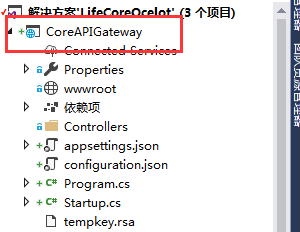
1.NuGet控制台 安装Ocelot
PM> Install-Package Ocelot
2.在项目 Startup.cs 修改
这里需要用到两个比较重要的命名空间
using Ocelot.DependencyInjection;
using Ocelot.Middleware;
 public Startup(IHostingEnvironment environment)

        {

            var builder = new Microsoft.Extensions.Configuration.ConfigurationBuilder();

            builder.SetBasePath(environment.ContentRootPath)

                   .AddJsonFile("appsettings.json", false, reloadOnChange: true)

                   .AddJsonFile($"appsettings.{environment.EnvironmentName}.json", optional: false, reloadOnChange: true)

                   .AddJsonFile("configuration.json", optional: false, reloadOnChange: true)

                   .AddEnvironmentVariables();

            Configuration = builder.Build();

        }
 /// <summary>

        ///配置

        /// </summary>

        public IConfigurationRoot Configuration { get; }

        /// <summary>

        /// 配置服务

        /// </summary>

        /// <param name="services"></param>

        public void ConfigureServices(IServiceCollection services)

        {

            Action<ConfigurationBuilderCachePart> settings = (x) =>

            {

                x.WithMicrosoftLogging(log =>

                {

                    log.AddConsole(LogLevel.Debug);

                }).WithDictionaryHandle();

            };

            services.AddOcelot(Configuration, settings);

            //services.AddMvc();

        }
 /// <summary>

        /// 配置Ocelot

        /// </summary>

        /// <param name="app"></param>

        /// <param name="env"></param>

        public async void Configure(IApplicationBuilder app, IHostingEnvironment env)

        {

            //if (env.IsDevelopment())

            //{

            //    app.UseDeveloperExceptionPage();

            //}

            await app.UseOcelot();

            //app.UseMvc();

        }
然后是入口程序Main
       public static void Main(string[] args)

        {

            IWebHostBuilder builder = new WebHostBuilder();

            builder.ConfigureServices(s =>

            {

                s.AddSingleton(builder);

            });

            builder.UseKestrel()

                   .UseContentRoot(Directory.GetCurrentDirectory())

                   .UseIISIntegration()

                   .UseStartup<Startup>()

                   .UseApplicationInsights();

            var host = builder.Build();

            host.Run();

        }
3. 新建一个命名为configuration的Json 文件

增加配置 如下
{

  "ReRoutes": [

    {

      "DownstreamPathTemplate": "/api/values",

      "DownstreamScheme": "http",

      "DownstreamHost": "localhost",

      "DownstreamPort": ,

      "UpstreamPathTemplate": "/api/values",

      "UpstreamHttpMethod": [ "Get" ],

      "QoSOptions": {

        "ExceptionsAllowedBeforeBreaking": ,

        "DurationOfBreak": ,

        "TimeoutValue":

      },

      "HttpHandlerOptions": {

        "AllowAutoRedirect": false,

        "UseCookieContainer": false

      },

      "AuthenticationOptions": {

      }

    },

    {

      "DownstreamPathTemplate": "/api/product",

      "DownstreamScheme": "http",

      "DownstreamPort": ,

      "DownstreamHost": "localhost",

      "UpstreamPathTemplate": "/api/product",

      "UpstreamHttpMethod": [ "Get" ],

      "QoSOptions": {

        "ExceptionsAllowedBeforeBreaking": ,

        "DurationOfBreak": ,

        "TimeoutValue":

      },

      "AuthenticationOptions": {

      }

    }

  ],

  "GlobalConfiguration": {

    "RequestIdKey": "OcRequestId",

    "AdministrationPath": "/admin"

  }

}
然后新建两个APi项目
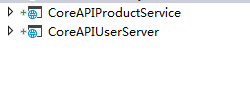
并设置他们端口号为1001 1002
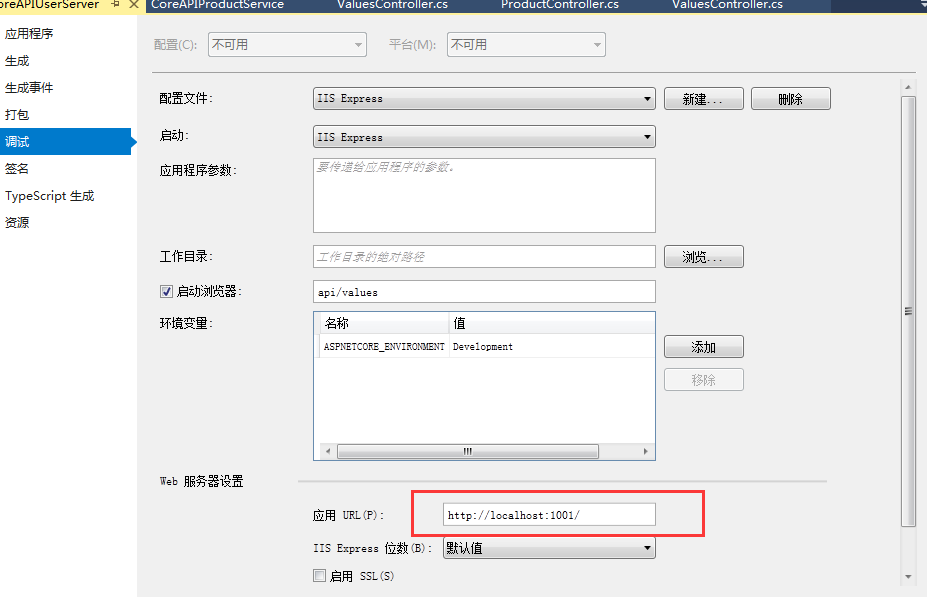
另一个类似
上面Json配置体现了上游请求和下游服务间的映射关系 上游是客户端直接调用的URL ,下游,则是对应我们开发的服务。
然后 你可以设置多项目启动 也可以单独开启新实例
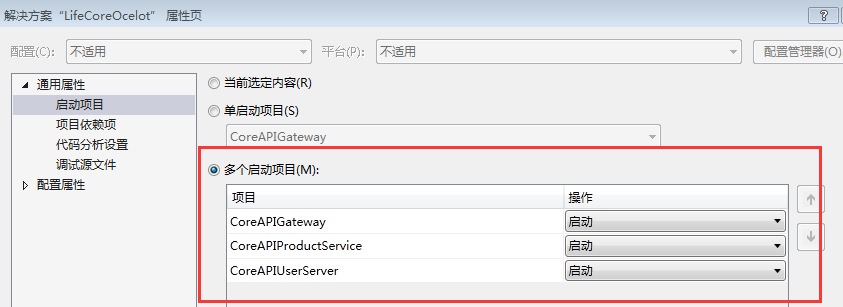
接下 F5启动项目




最后附上Ocelot在GitHub上源码地址
https://github.com/TomPallister/Ocelot
.NET Core 玩一玩 Ocelot API网关的更多相关文章
- .NET Core微服务二:Ocelot API网关
.NET Core微服务一:Consul服务中心 .NET Core微服务二:Ocelot API网关 .NET Core微服务三:polly熔断与降级 本文的项目代码,在文章结尾处可以下载. 本文使 ...
- ASP.NET Core on K8S学习之旅(13)Ocelot API网关接入
本篇已加入<.NET Core on K8S学习实践系列文章索引>,可以点击查看更多容器化技术相关系列文章. 上一篇介绍了Ingress的基本概念和Nginx Ingress的基本配置和使 ...
- Angular SPA基于Ocelot API网关与IdentityServer4的身份认证与授权(四)
在上一讲中,我们已经完成了一个完整的案例,在这个案例中,我们可以通过Angular单页面应用(SPA)进行登录,然后通过后端的Ocelot API网关整合IdentityServer4完成身份认证.在 ...
- Angular SPA基于Ocelot API网关与IdentityServer4的身份认证与授权(一)
好吧,这个题目我也想了很久,不知道如何用最简单的几个字来概括这篇文章,原本打算取名<Angular单页面应用基于Ocelot API网关与IdentityServer4+ASP.NET Iden ...
- Angular SPA基于Ocelot API网关与IdentityServer4的身份认证与授权(二)
上文已经介绍了Identity Service的实现过程.今天我们继续,实现一个简单的Weather API和一个基于Ocelot的API网关. 回顾 <Angular SPA基于Ocelot ...
- Angular SPA基于Ocelot API网关与IdentityServer4的身份认证与授权(三)
在前面两篇文章中,我介绍了基于IdentityServer4的一个Identity Service的实现,并且实现了一个Weather API和基于Ocelot的API网关,然后实现了通过Ocelot ...
- 微服务(入门三):netcore ocelot api网关结合consul服务发现
简介 api网关是提供给外部调用的统一入口,类似于dns,所有的请求统一先到api网关,由api网关进行指定内网链接. ocelot是基于netcore开发的开源API网关项目,功能强大,使用方便,它 ...
- .Netcore 2.0 Ocelot Api网关教程(7)- 限流
本文介绍Ocelot中的限流,限流允许Api网关控制一段时间内特定api的总访问次数.限流的使用非常简单,只需要添加配置即可. 1.添加限流 修改 configuration.json 配置文件,对 ...
- .Netcore 2.0 Ocelot Api网关教程(6)- 配置管理
本文介绍Ocelot中的配置管理,配置管理允许在Api网关运行时动态通过Http Api查看/修改当前配置.由于该功能权限很高,所以需要授权才能进行相关操作.有两种方式来认证,外部Identity S ...
随机推荐
- c++流操作
非缓冲标准出错流对象cerr和缓冲标准出错流对象clog,它们都是来自于ostream类的对象,用于输出错信息.cerr和clog之间的不同之处在于cerr是不经过缓冲区直接向显示器输出有关信息,而c ...
- python 安装scikit!!!
首先,吐槽一下,真的是折腾好几天,一会更新这个,一会更新那个,总是各种奇葩问题诸如此类: cannot import check-build pip有新版本,需要更新(黄字) 其中scipy出错最多, ...
- 分割回文串 II · Palindrome Partitioning II
[抄题]: 给定一个字符串s,将s分割成一些子串,使每个子串都是回文. 返回s符合要求的的最少分割次数. [思维问题]: 不知道要用预处理字符串降低复杂度 [一句话思路]: 先把预处理获得s中回文串的 ...
- 全排列12 · Permutations
无重复 [抄题]: Given a collection of numbers, return all possible permutations. For example,[1,2,3] have ...
- JSF控件的immediate属性和页面生命周期
JSF中的控件基本都有immediate属性,对于这个属性的使用总结如下,更详细内容可参考Oracle官方文档. 1,为了更好的理解immediate属性,先看一下JSF页面的生命周期: JSF页面的 ...
- 2018.09.16 loj#10243. 移棋子游戏(博弈论)
传送门 题目中已经给好了sg图,直接在上面跑出sg函数即可. 最后看给定点的sg值异或和是否等于0就判好了. 代码: #include<bits/stdc++.h> #define N 2 ...
- RHEL6解决无法使用YUM源问题(转)
RHEL的YUM源需要注册用户才能更新使用,由于CentOS和RHEL基本没有区别,并且CentOS已经被REHL收购.所以将RHEL的YUM源替换为CentOS即可.问题如下:[root@bogon ...
- VUE(现代库) VS jquery(传统库)
众所周知最近几年前端发展非常的迅猛,除各种框架如:backbone.angular.reactjs外,还有模块化开发思想的实现库:sea.js .require.js .webpack以及 前端上 ...
- 抓包工具 - HttpWatch(功能详细介绍)
HttpWatch是功能强大的网页数据分析工具,集成在IE工具栏,主要功能有网页摘要.cookies管理.缓存管理.消息头发送/接收,字符查询.POST数据.目录管理功能和报告输出.HttpWatch ...
- (并查集 建立关系)Parity game -- POJ -1733
链接: http://poj.org/problem?id=1733 http://acm.hust.edu.cn/vjudge/contest/view.action?cid=82830#probl ...