
QT基于model/view数据库编程2
Qt中数据编程主要分为以下两点:
1、利用qt提供类 访问数据库或者成为简单的数据库编程
2、数据库编程中引入model/view编程模型
基于model/view数据库编程:
qt提供model类: QSqlTableModel类 QSqlQueryModel类
Qt提供view类: QTableView
需要掌握两个知识:
(1)model/view编程步骤
(2)qt数据库编程步骤
案例:通过界面view控件实现对数据库中的一张表(姓名、年龄、成绩)中记录进行操作
(1)放置一个view控件 QTableView,设置属性
(2)连接数据库
(3)实例化模型和数据库表建立关联
(4)设置模型表头
(5)对模型数据进行 增加 删除 修改
(6)提交或者撤销
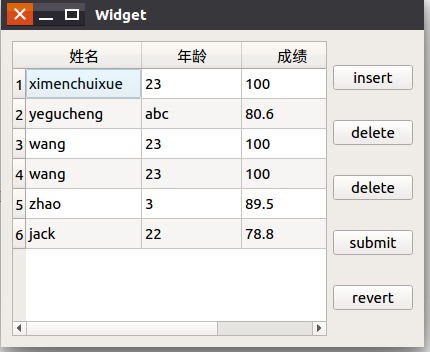
工程的参考代码如下:
widget.h中内容:
#ifndef WIDGET_H
#define WIDGET_H
#include <QWidget>
#include <QSqlTableModel>
#include <QSqlDatabase>
#include <QItemSelectionModel>
namespace Ui {
class Widget;
}
class Widget : public QWidget
{
Q_OBJECT
public:
explicit Widget(QWidget *parent = 0);
~Widget();
private slots:
void on_btnSubmit_clicked();
void on_btnRevert_clicked();
void on_btnInsert_clicked();
void on_btnDelete_clicked();
private:
Ui::Widget *ui;
QSqlTableModel *theModel;
QItemSelectionModel *theSelection;
QSqlDatabase db;
};
#endif // WIDGET_H
widget.cpp文件内容:
#include "widget.h"
#include "ui_widget.h"
#include <QDebug>
Widget::Widget(QWidget *parent) :
QWidget(parent),
ui(new Ui::Widget)
{
ui->setupUi(this);
ui->tableView->setSelectionBehavior(QAbstractItemView::SelectItems);
ui->tableView->setSelectionMode(QAbstractItemView::SingleSelection);
ui->tableView->setAlternatingRowColors(true);
db = QSqlDatabase::addDatabase("QSQLITE");
db.setDatabaseName("/home/hua/students.db");
if(!db.open())
{
qDebug()<<"connect error";
return;
}
theModel = new QSqlTableModel(this,db);
theModel->setTable("stu");
theModel->setEditStrategy(QSqlTableModel::OnManualSubmit);
theModel->select();
ui->tableView->setModel(theModel);
theModel->setHeaderData(0,Qt::Horizontal,"姓名");
theModel->setHeaderData(theModel->fieldIndex("age"),Qt::Horizontal,"年龄");
theModel->setHeaderData(2,Qt::Horizontal,"成绩");
theSelection = new QItemSelectionModel(theModel);
ui->tableView->setSelectionModel(theSelection);
}
Widget::~Widget()
{
delete ui;
}
void Widget::on_btnSubmit_clicked()
{
bool ret = theModel->submitAll();
if(!ret)
{
qDebug()<<"save error";
}
}
void Widget::on_btnRevert_clicked()
{
theModel->revertAll();
}
void Widget::on_btnInsert_clicked()
{
int row = ui->tableView->currentIndex().row();
theModel->insertRow(row);
QModelIndex index = theModel->index(row,0);
theSelection->clearSelection();
theSelection->setCurrentIndex(index,QItemSelectionModel::Select);
theModel->setData(theModel->index(row,1),20);
}
void Widget::on_btnDelete_clicked()
{
int row = ui->tableView->currentIndex().row();
theModel->removeRow(row);
}
main.cpp文件内容:
#include "widget.h"
#include <QApplication>
int main(int argc, char *argv[])
{
QApplication a(argc, argv);
Widget w;
w.show();
return a.exec();
}
QSqlQueryModel类:只读模型,查看数据库中,不能修改
开发中QSqlQueryModel类和QSqlQuery类一起配合进行数据库开发
QT基于model/view数据库编程2的更多相关文章
- Qt基于model/view数据库编程3
QSqlQueryModel和QSqlQuery类: 工程开发过程中将这两个类合起来使用,用QSqlQueryModel查询展示数据库中的数据,用QSqlQuery类执行sql语言,实现对数据库的操作 ...
- Qt的Model/View Framework解析(数据是从真正的“肉(raw)”里取得,Model提供肉,所以读写文件、操作数据库、网络通讯等一系列与数据打交道的工作就在model中做了)
最近在看Qt的Model/View Framework,在网上搜了搜,好像中文的除了几篇翻译没有什么有价值的文章.E文的除了Qt的官方介绍,其它文章也很少.看到一个老外在blog中写道Model/Vi ...
- PyQt学习随笔:Qt中Model/View中的Model Index
Qt中Model/View中的Model Index是一个类,该类用于定位Model/View中数据模型中的数据. Model Index是从QAbstractItemModel派生的子类,用于在项视 ...
- PyQt学习随笔:Qt中Model/View中的怎么构造View匹配的Model
老猿Python博文目录 老猿Python博客地址 在<PyQt学习随笔:Qt中Model/View相关的主要类及继承关系>介绍了Model/View架构的主要类,在实际使用时,view相 ...
- Qt基于tcp协议网络编程
基于Qt网络编程: 基于tcp协议 c/s模式编程 所需要的类:QTcpServer QTcpSocket 利用qt基于tcp协议编写c/s模式程序: 两个类中的信号: QTcpServer : ne ...
- Qt - 基于HTTP的网络编程
HTTP(超文本传输协议 Hyper Text Transfer Protocol) 基于TCP/IP通信协议,属于应用层协议. 使用情况: HTTP是无连接(无连接的含义是限制每次连接只处理一个请求 ...
- Qt - 基于TCP的网络编程
TCP(传输控制协议 Transmission Control Protocol) 可靠.面向数据流.面向连接 的传输协议.(许多应用层协议都是以它为基础:HTTP.FTP) 使用情况: 相比UDP ...
- Qt - 基于UDP的网络编程
UDP(用户数据报协议 User Data Protocol) 轻量级.不可靠.面向数据报.无连接 的传输层协议. 适用情况: 网络数据大多为短消息: 拥有大量客户端: 对数据安全无特殊要求: 网络 ...
- PyQt学习随笔:Qt中Model/View相关的主要类及继承关系
View相关类类继承关系: Model相关类类继承关系:
随机推荐
- Linux防火墙命令
linux 查看防火墙状态 1.查看防火墙状态 systemctl status firewalld firewall-cmd --state #查看默认防火墙状态(关闭后显示notrunning ...
- redux基本使用
redux数据流向 基本使用
- sql and csharp: Split Function
T-SQL: declare @int int,@prov int,@city int,@str nvarchar(500) set @str='天河麗特青春:中國廣東省廣州市天河區天河路623號天河 ...
- mardown文档的用法
<hr>分割换行符<br>分隔符 <ul> <li></li></ul>无序标签 <ol><li>< ...
- angular监听移动端键盘的弹起和收回
页面的提交按钮采用的是固定定位在页面的底部,键盘弹出后,提交按钮紧挨着键盘的上方,输入框获得焦点后,键盘弹出,并且输入框回自动定位上方的空白处,此时由于键盘上方固定定位的提交按钮的原因有可能会遮挡住获 ...
- 1e6等于多少?
如果抽象成这样:aeb 要求a不能不写,也就是说是1也要写上 b必须是整数. 实现上就是 a*10^b a乘以10的b次方 所以楼主的就是1*10^6 100000
- 【邀请函】小投入 大产出—微软智能云(Azure)之CDN 专题
会议时间 2016 年 11 月 24 日 14:00-16:00 会议介绍 尊敬的客户: 您是否还在为如何提高网站的响应速度以及用户增长造成的源站压力烦恼?是否还在担心源站 IP 暴露存在安全隐患? ...
- window medio player 完美代码
var arr = [ '<object width="240" height="240" align="basel ...
- 通过bat设置系统环境变量
在软件运行过程中,可能需要配置计算机的环境变量,在这里分为两种情况: 一:增加或修改环境变量只在当前软件环境中使用 如我们设置Java的环境变量: set CLASSPATH=%CLASSPATH%; ...
- nginx封IP脚本
#!/bin/bash max= confdir=/etc/nginx/conf.d/blockips.conf logdir=/var/log/nginx/access.log echo " ...