
SQL Server Database Backup and Restore in C#
SQL Server Database Backup and Restore in C#



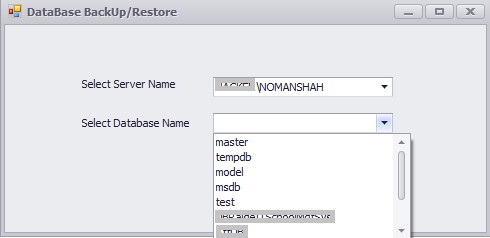
Introduction
Developers need to take backup and restore database. Database backup and restore can help you avert disaster. If you backup your files regularly, you can retrieve your information. By taking database backup and restoration through coding, so this could be done via Server Management Objects. So here, I will describe what is SMO and how it will be used for database backup and restoration.
SQL Server Management Objects (also called SMO) is a .NET library which allows you to access and manage all objects of the Microsoft SQL Server.SMO supports SQL Server 2000, 2005 and 2008, 2012. All functions available in SQL Server Management Studio are available in SMO but SMO includes several more features than Management Studio.
Background
You will have to create DSN for connection.
Before coding, you must set the reference to the SMO assembly. You need to add these components:
Microsoft.SqlServer.SmoMicrosoft.SqlServer.SmoExtendedMicrosoft.SqlServer.ConnectionInfoMicrosoft.SqlServer.Management.Sdk.Sfc
After Adding References, you need to add 2 using statements:
using Microsoft.SqlServer.Management.Smo;

using Microsoft.SqlServer.Management.Common;
Using the Code
The following code creates connection with SQL Server. To execute:
"select * from sys.databases"
The above query retrieves all databases from SQL Server.
public void Createconnection()

        {

            DBbackup.DataBaseClass dbc = new DataBaseClass();

            cbservername.Properties.Items.Clear();

            // select * from sys.databases getting all database name from sql server

            cmd = new OdbcCommand("select * from sys.databases", dbc.openconn());

            dr = cmd.ExecuteReader();

            while (dr.Read())

            {

                cbdatabasename.Properties.Items.Add(dr[0]);

            }

            dr.Close();

        }
The following code gets server names that exist. To execute:
"select * from sys.servers"
The above query retrieves servers:
        public void serverName()

        {

                DBbackup.DataBaseClass dbc = new DataBaseClass();

                // select *  from sys.servers getting server names that exist

                cmd = new OdbcCommand("select *  from sys.servers", dbc.openconn());

                dr = cmd.ExecuteReader();

                while (dr.Read())

                {

                    cbservername.Properties.Items.Add(dr[1]);

                }

                dr.Close();

        }
Database Backup
  public void blank(string str)

        {

                if (string.IsNullOrEmpty(cbservername.Text) | string.IsNullOrEmpty(cbdatabasename.Text))

                {

                    XtraMessageBox.Show("Server Name & Database can not be Blank");

                    return;

                }

                else

                {

                    if (str == "backup")

                    {

                        saveFileDialog1.Filter = "Text files (*.bak)|*.bak|All files (*.*)|*.*";

                        if (saveFileDialog1.ShowDialog() == DialogResult.OK)

                        {

                            // the below query get backup of database you specified in combobox

                             query("Backup database " + cbdatabasename.Text +

                             " to disk='" + saveFileDiaog1.FileName + "'");

                            XtraMessageBox.Show("Database BackUp has been created successful.");

                        }

                    }

                }

         }
Database Restore
 public void Restore(OdbcConnection sqlcon, string DatabaseFullPath, string backUpPath)

        {

                using (sqlcon)

                {

                    string UseMaster = "USE master";

                    OdbcCommand UseMasterCommand = new OdbcCommand(UseMaster, sqlcon);

                    UseMasterCommand.ExecuteNonQuery();

                    // The below query will rollback any transaction which is

                    running on that database and brings SQL Server database in a single user mode.

                    string Alter1 = @"ALTER DATABASE

                    [" + DatabaseFullPath + "] SET Single_User WITH Rollback Immediate";

                    OdbcCommand Alter1Cmd = new OdbcCommand(Alter1, sqlcon);

                    Alter1Cmd.ExecuteNonQuery();

                    // The below query will restore database file from disk where backup was taken ....

                    string Restore = @"RESTORE DATABASE

                    [" + DatabaseFullPath + "] FROM DISK = N'" +

                    backUpPath + @"' WITH  FILE = 1,  NOUNLOAD,  STATS = 10";

                    OdbcCommand RestoreCmd = new OdbcCommand(Restore, sqlcon);

                    RestoreCmd.ExecuteNonQuery();

                    // the below query change the database back to multiuser

                    string Alter2 = @"ALTER DATABASE

                    [" + DatabaseFullPath + "] SET Multi_User";

                    OdbcCommand Alter2Cmd = new OdbcCommand(Alter2, sqlcon);

                    Alter2Cmd.ExecuteNonQuery();

                    Cursor.Current = Cursors.Default;

                }

             }
Conclusion
This code uses the SQL Server 2005, 2012 backup/restore facility. The code follows the rules of SQL Server 2005, 2012 while backing up or restoring database.
License
This article, along with any associated source code and files, is licensed under The Code Project Open License (CPOL)
Share
SQL Server Database Backup and Restore in C#的更多相关文章
- [转]Configure Network Drive Visible for SQL Server During Backup and Restore Using SSMS
本文转自:https://mytechmantra.com/LearnSQLServer/Configure-Network-Drive-Visible-for-SQL-Server-During-B ...
- 转载:Restore SQL Server database and overwrite existing database
转载自:https://www.mssqltips.com/sqlservertutorial/121/restore-sql-server-database-and-overwrite-existi ...
- SQL Server 2014 Backup Encryption
转载自: Microsoft MVP Award Program Blog 来源:Microsoft MVP Award Program Blog 的博客:https://blogs.msdn.mic ...
- P6 Professional Installation and Configuration Guide (Microsoft SQL Server Database) 16 R1
P6 Professional Installation and Configuration Guide (Microsoft SQL Server Database) 16 R1 May ...
- Create a SQL Server Database on a network shared drive
(原文地址:http://blogs.msdn.com/b/varund/archive/2010/09/02/create-a-sql-server-database-on-a-network-sh ...
- How to Kill All Processes That Have Open Connection in a SQL Server Database[关闭数据库链接 最佳方法] -摘自网络
SQL Server database administrators may frequently need in especially development and test environmen ...
- Visual Studio 2012创建SQL Server Database Project提示失败解决方法
新建一个SQL Server Database Project,提示: Unable to open Database project This version of SQL Server Data ...
- SQL Server database mail问题诊断一例
产品环境sql server database的mail发不出邮件,影响客户的业务,在数据库中进行诊断 诊断sql: EXEC msdb.dbo.sp_send_dbmail @profile_nam ...
- SQL Server database – Error 3743
Database mirroring must be removed before you drop SQL Server database – Error 3743 If you try to dr ...
随机推荐
- ZOJ 3203 Light Bulb(数学对勾函数)
Light Bulb Time Limit: 1 Second Memory Limit: 32768 KB Compared to wildleopard's wealthiness, h ...
- Struts09---验证框架
01.创建登录界面 <%@ page language="java" import="java.util.*" pageEncoding="UT ...
- Linux下用c语言实现whereis.
简单的一个whereis的实现,代码如下: #include <stdio.h> #include <errno.h> #include <dirent.h> #i ...
- 一些初学shell自己写的一些练习题脚本
1斐波拉契数列前10个 #!/binbash#declare A=0declare B=1for ((i=1;i<6;i++)); do let A+=B printf " ...
- 嵌入式中 ARM的几种工作模式 以及异常模式的优先级
一.Arm工作模式: Arm微处理器支持7种工作模式,分别为: 1. 用户模式(Usr) 用于正常执行程序 2. 快速中断模式(FIQ) 用于高速数据传输 3. 外部中断模 ...
- Leetcode22. Generate Parentheses(生成有效的括号组合)
(尊重劳动成果,转载请注明出处:http://blog.csdn.net/qq_25827845/article/details/74937307冷血之心的博客) 题目如下:
- dojo chart生成函数
写了一个函数,就是通过传递参数,生成图表,代码如下: /** * created by LZUGIS * @param container * @param type * @param data * ...
- H5 pattern
pattern:正则表达式验证 例如: <input pattern="1[3578]\d{9}"> 可以省略^和$ 必须和required配合使用,否则在用户没有输 ...
- go语言通过反射获取和设置结构体字段值的方法
本文实例讲述了go语言通过反射获取和设置结构体字段值的方法.分享给大家供大家参考.具体实现方法如下: type MyStruct struct { N int } n := MyStruct{ 1 } ...
- NET Core中使用MediatR实现命令和中介者模式
NET Core中使用MediatR实现命令和中介者模式 https://www.cnblogs.com/yilezhu/p/9866068.html 在本文中,我将解释命令模式,以及如何利用基于命令 ...