
springboot成神之——basic auth和JWT验证结合
本文介绍basic auth和JWT验证结合
目录结构
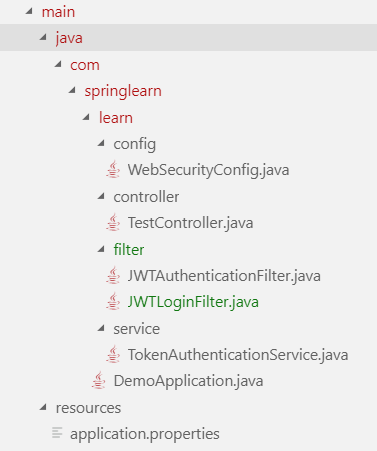
依赖
<dependency>

    <groupId>io.jsonwebtoken</groupId>

    <artifactId>jjwt</artifactId>

    <version>0.9.1</version>

</dependency>

<dependency>

    <groupId>com.auth0</groupId>

    <artifactId>auth0</artifactId>

    <version>1.8.0</version>

</dependency>

<dependency>

	<groupId>com.auth0</groupId>

	<artifactId>auth0-spring-security-api</artifactId>

	<version>1.1.0</version>

</dependency>

<dependency>

    <groupId>org.springframework.boot</groupId>

    <artifactId>spring-boot-starter-security</artifactId>

</dependency>

<dependency>

    <groupId>org.json</groupId>

	<artifactId>json</artifactId>

	<version>20180813</version>

</dependency>

<dependency>

	<groupId>org.glassfish</groupId>

	<artifactId>javax.xml.bind</artifactId>

	<version>10.0-b28</version>

</dependency>
config配置文件WebSecurityConfig
package com.springlearn.learn.config;

import com.springlearn.learn.filter.JWTAuthenticationFilter;

import com.springlearn.learn.filter.JWTLoginFilter;

import org.springframework.beans.factory.annotation.Autowired;

import org.springframework.context.annotation.Bean;

import org.springframework.context.annotation.Configuration;

import org.springframework.http.HttpMethod;

import org.springframework.security.config.annotation.authentication.builders.AuthenticationManagerBuilder;

import org.springframework.security.config.annotation.authentication.configurers.provisioning.InMemoryUserDetailsManagerConfigurer;

import org.springframework.security.config.annotation.web.builders.HttpSecurity;

import org.springframework.security.config.annotation.web.configuration.WebSecurityConfigurerAdapter;

import org.springframework.security.core.userdetails.User;

import org.springframework.security.core.userdetails.UserDetails;

import org.springframework.security.crypto.bcrypt.BCryptPasswordEncoder;

import org.springframework.security.web.authentication.UsernamePasswordAuthenticationFilter;

import org.springframework.web.servlet.config.annotation.CorsRegistry;

import org.springframework.web.servlet.config.annotation.WebMvcConfigurer;

@Configuration

public class WebSecurityConfig extends WebSecurityConfigurerAdapter implements WebMvcConfigurer {

    @Override

    protected void configure(HttpSecurity http) throws Exception {

        http.cors().and().csrf().disable();

        // 所有的请求都要验证

        http.authorizeRequests()

        .antMatchers("/").permitAll() // 访问 "/" 无需验证

        .antMatchers(HttpMethod.POST, "/login").permitAll() // 访问 "/login" 无需token即可进入

        .antMatchers(HttpMethod.GET, "/login").permitAll()

        .anyRequest()

        .authenticated()

        .and()

        .addFilterBefore( // 添加验证过滤器

            new JWTLoginFilter("/login", authenticationManager()),

            UsernamePasswordAuthenticationFilter.class

        )

        .addFilterBefore(

            new JWTAuthenticationFilter(),

            UsernamePasswordAuthenticationFilter.class

        );

    }

    @Bean

    public BCryptPasswordEncoder passwordEncoder() {

        BCryptPasswordEncoder bCryptPasswordEncoder = new BCryptPasswordEncoder();

        return bCryptPasswordEncoder;

    }

    @Autowired

    public void configureGlobal(AuthenticationManagerBuilder auth) throws Exception {

        String password = "234";

        String encrytedPassword = this.passwordEncoder().encode(password);

        System.out.println("Encoded password = " + encrytedPassword);

        // 这里使用写死的验证,你可以在这里访问数据库

        InMemoryUserDetailsManagerConfigurer<AuthenticationManagerBuilder> mngConfig = auth.inMemoryAuthentication();

        UserDetails u1 = User.withUsername("yejiawei").password(encrytedPassword).roles("ADMIN").build();

        UserDetails u2 = User.withUsername("donglei").password(encrytedPassword).roles("USER").build();

        mngConfig.withUser(u1);

        mngConfig.withUser(u2);

    }

    @Override

    public void addCorsMappings(CorsRegistry registry) {

        registry.addMapping("/**").allowedOrigins("*").allowedMethods("GET", "POST", "PUT", "DELETE").allowedOrigins("*")

        .allowedHeaders("*");

    }

}
filter过滤器JWTLoginFilter
package com.springlearn.learn.filter;

import java.io.IOException;

import java.util.Collections;

import java.util.HashMap;

import java.util.Iterator;

import java.util.Map;

import java.util.stream.Collectors;

import javax.servlet.FilterChain;

import javax.servlet.ServletException;

import javax.servlet.http.HttpServletRequest;

import javax.servlet.http.HttpServletResponse;

import com.springlearn.learn.service.TokenAuthenticationService;

import org.json.JSONObject;

import org.springframework.security.authentication.AuthenticationManager;

import org.springframework.security.authentication.UsernamePasswordAuthenticationToken;

import org.springframework.security.core.Authentication;

import org.springframework.security.core.AuthenticationException;

import org.springframework.security.web.authentication.AbstractAuthenticationProcessingFilter;

import org.springframework.security.web.util.matcher.AntPathRequestMatcher;

public class JWTLoginFilter extends AbstractAuthenticationProcessingFilter{

    public JWTLoginFilter(String url, AuthenticationManager authManager) {

        super(new AntPathRequestMatcher(url));

        setAuthenticationManager(authManager);

    }

    @Override

    public Authentication attemptAuthentication(HttpServletRequest request, HttpServletResponse response)

            throws AuthenticationException, IOException, ServletException {

        // get方式获取参数

        // String username = request.getParameter("username");

        // String password = request.getParameter("password");

        // post方式获取数据

        String s = request.getReader().lines().collect(Collectors.joining(System.lineSeparator()));

        JSONObject jsonObject = new JSONObject(s);

        HashMap<String, String> result = new HashMap<String, String>();

        String key = null;

        Iterator<?> keys = jsonObject.keys();

        while(keys.hasNext()) {

            key = (String) keys.next();

            result.put(key, jsonObject.getString(key));

        }

        System.out.printf("JWTLoginFilter.attemptAuthentication: username/password= %s,%s", result.get("username"), result.get("password"));

        System.out.println();

        return getAuthenticationManager().authenticate(new UsernamePasswordAuthenticationToken(result.get("username"), result.get("password"), Collections.emptyList()));

    }

    @Override

    protected void successfulAuthentication(HttpServletRequest request, HttpServletResponse response, FilterChain chain,

            Authentication authResult) throws IOException, ServletException {

        System.out.println("JWTLoginFilter.successfulAuthentication:");

        // Write Authorization to Headers of Response.

        TokenAuthenticationService.addAuthentication(response, authResult.getName());

        String authorizationString = response.getHeader("Authorization");

        System.out.println("Authorization String=" + authorizationString);

    }

    @Override

    protected void unsuccessfulAuthentication(HttpServletRequest request, HttpServletResponse response, AuthenticationException failed) throws IOException, ServletException {

        response.setContentType("application/json");

        response.setStatus(HttpServletResponse.SC_OK);

        response.getOutputStream().println((new JSONObject(){{

            put("status", 500);

            put("message", "Internal Server Error!!!");

            put("result", JSONObject.NULL);

        }}).toString());

    }

}
filter过滤器JWTAuthenticationFilter
package com.springlearn.learn.filter;

import java.io.IOException;

import javax.servlet.FilterChain;

import javax.servlet.ServletException;

import javax.servlet.ServletRequest;

import javax.servlet.ServletResponse;

import javax.servlet.http.HttpServletRequest;

import com.springlearn.learn.service.TokenAuthenticationService;

import org.springframework.security.core.Authentication;

import org.springframework.security.core.context.SecurityContextHolder;

import org.springframework.web.filter.GenericFilterBean;

public class JWTAuthenticationFilter extends GenericFilterBean {

    @Override

    public void doFilter(ServletRequest servletRequest, ServletResponse servletResponse, FilterChain filterChain)

            throws IOException, ServletException {

        System.out.println("JWTAuthenticationFilter.doFilter");

        Authentication authentication = TokenAuthenticationService.getAuthentication((HttpServletRequest) servletRequest);

        SecurityContextHolder.getContext().setAuthentication(authentication);

        filterChain.doFilter(servletRequest, servletResponse);

    }

}
service中的TokenAuthenticationService
package com.springlearn.learn.service;

import java.io.IOException;

import java.util.Collections;

import java.util.Date;

import javax.servlet.http.HttpServletRequest;

import javax.servlet.http.HttpServletResponse;

import org.json.JSONObject;

import org.springframework.security.authentication.UsernamePasswordAuthenticationToken;

import org.springframework.security.core.Authentication;

import io.jsonwebtoken.Jwts;

import io.jsonwebtoken.SignatureAlgorithm;

public class TokenAuthenticationService {

    static final long _expiretime = 864_000_000;

    static final String _secret = "ThisIsASecret";

    static final String _token_prefix = "Bearer";

    static final String _header_string = "Authorization";

    public static void addAuthentication(HttpServletResponse res, String username) throws IOException {

        String JWT =

                Jwts.builder()

                .setSubject(username)

                .setExpiration(new Date(System.currentTimeMillis() + _expiretime))

                .signWith(SignatureAlgorithm.HS512, _secret).compact();

        res.addHeader(_header_string, _token_prefix + " " + JWT);

        res.setContentType("application/json");

        res.setStatus(HttpServletResponse.SC_OK);

        res.getOutputStream().println((new JSONObject(){{

            put("status", 0);

            put("message", "");

            put("result", JWT);

        }}).toString());

    }

    public static Authentication getAuthentication(HttpServletRequest request) {

        String token = request.getHeader(_header_string);

        if (token != null) {

            // parse the token.

            String user = Jwts.parser().setSigningKey(_secret).parseClaimsJws(token.replace(_token_prefix, "")).getBody()

                    .getSubject();

            return user != null ? new UsernamePasswordAuthenticationToken(user, null, Collections.emptyList()) : null;

        }

        return null;

    }

}
启动文件DemoApplication
package com.springlearn.learn;

import org.springframework.boot.SpringApplication;

import org.springframework.boot.autoconfigure.SpringBootApplication;

@SpringBootApplication

public class DemoApplication {

	public static void main(String[] args) {

		SpringApplication.run(DemoApplication.class, args);

	}

}
Controller中的TestController
package com.springlearn.learn.controller;

import javax.servlet.http.HttpServletRequest;

import javax.servlet.http.HttpServletResponse;

import org.springframework.web.bind.annotation.RequestBody;

import org.springframework.web.bind.annotation.RequestMapping;

import org.springframework.web.bind.annotation.RequestMethod;

import org.springframework.web.bind.annotation.ResponseBody;

import org.springframework.web.bind.annotation.RestController;

@RestController

public class TestController {

    @ResponseBody

    @RequestMapping(value = "/AuthTest", method = RequestMethod.GET)

    public String AuthTest(HttpServletRequest request, HttpServletResponse response) {

        return "OK";

    }

    @ResponseBody

    @RequestMapping(value = "/login", method = RequestMethod.GET)

    public String Login(@RequestBody Object user, HttpServletRequest request, HttpServletResponse response) {

        return "OK";

    }

}
前端测试
<!DOCTYPE html>

<html lang="en">

<head>

    <meta charset="UTF-8">

    <meta name="viewport" content="width=device-width, initial-scale=1.0">

    <meta http-equiv="X-UA-Compatible" content="ie=edge">

    <title>Document</title>

    <script src="https://unpkg.com/axios/dist/axios.min.js"></script>

    <script>

        axios.defaults.headers.post['Content-Type'] = 'application/x-www-form-urlencoded';

        axios.post('http://localhost:9001/login', {

            username: 'yejiawei',

            password: '234'

        }).then(function (response) {

            localStorage.setItem("token", response.data.result)

        }).catch(function (error) {

            console.log(error);

        }).then(function () {

        });

        // axios.get('http://localhost:9001/AuthTest', {

        //     headers: {

        //         "Authorization": localStorage.getItem("token")

        //     }

        // }).then(function (response) {

        //     console.log(response.data);

        // }).catch(function (error) {

        //     console.log(error);

        // }).then(function () {

        // });

    </script>

</head>

<body>

</body>

</html>
springboot成神之——basic auth和JWT验证结合的更多相关文章
- springboot成神之——Basic Auth应用
本文介绍Basic Auth在spring中的应用 目录结构 依赖 入口DemoApplication 验证Authenication 配置WebSecurityConfig 控制器TestContr ...
- springboot成神之——ioc容器(依赖注入)
springboot成神之--ioc容器(依赖注入) spring的ioc功能 文件目录结构 lang Chinese English GreetingService MyRepository MyC ...
- springboot成神之——application.properties所有可用属性
application.properties所有可用属性 # =================================================================== # ...
- springboot成神之——springboot入门使用
springboot创建webservice访问mysql(使用maven) 安装 起步 spring常用命令 spring常见注释 springboot入门级使用 配置你的pom.xml文件 配置文 ...
- springboot成神之——mybatis和mybatis-generator
项目结构 依赖 generator配置文件 properties配置 生成文件 使用Example 本文讲解如何在spring-boot中使用mybatis和mybatis-generator自动生成 ...
- springboot成神之——swagger文档自动生成工具
本文讲解如何在spring-boot中使用swagger文档自动生成工具 目录结构 说明 依赖 SwaggerConfig 开启api界面 JSR 303注释信息 Swagger核心注释 User T ...
- springboot成神之——log4j2的使用
本文介绍如何在spring-boot中使用log4j2 说明 依赖 日志记录语句 log4j2配置文件 本文介绍如何在spring-boot中使用log4j2 说明 log4j2本身使用是非常简单的, ...
- springboot成神之——mybatis在spring-boot中使用的几种方式
本文介绍mybatis在spring-boot中使用的几种方式 项目结构 依赖 WebConfig DemoApplication 方式一--@Select User DemoApplication ...
- springboot成神之——发送邮件
本文介绍如何用spring发送邮件 目录结构 依赖 MailConfig TestController 测试 本文介绍如何用spring发送邮件 目录结构 依赖 <dependency> ...
随机推荐
- ddt读取json文件测试用例的执行顺序
一. 源码的说明 在源码中,ddt的file_data函数下有这样一段话 意思是说,如果json文件的内容是字典,字典的键名将会作为测试用例名的后缀,字典的值将会作为测试数据,如果这样的话,如果键名字 ...
- 四十二 Python分布式爬虫打造搜索引擎Scrapy精讲—elasticsearch(搜索引擎)的mget和bulk批量操作
注意:前面讲到的各种操作都是一次http请求操作一条数据,如果想要操作多条数据就会产生多次请求,所以就有了mget和bulk批量操作,mget和bulk批量操作是一次请求可以操作多条数据 1.mget ...
- HDU 3037 组合数、lucas,逆元
题目链接 题目大意,N颗树上取不超过M个果子,求总方案个数模P的值,P是质数且不超过10w,N,M不超过1e9: 在这里树是被认为不同的,也就是将k(0<=k<=M)个小球放入N个不同的盒 ...
- hive 权限:Authorization failed:No privilege 'Create' found for outputs .
创建表报错: create table test ( name string ); Authorization failed:No privilege 'Create' found for outpu ...
- python扫描proxy并获取可用代理ip列表
mac或linux下可以work的代码如下: # coding=utf-8 import requests import re from bs4 import BeautifulSoup as bs ...
- ArrayList、Vector、LinkedList(jdk8)
一.ArrayList分析 1.类和构造方法 public class ArrayList<E> extends AbstractList<E> //可以看到其父类是Abstr ...
- java基本数据类型、修饰符、运算符
数据类型: 基本数据类型 整数类型 byte,8位 short,16位 int,32位i long,64位 浮点类型 float,单精度,32位 double,双精度,64位 布尔类型 ...
- java-正则表达式判断手机号
要更加准确的匹配手机号码只匹配11位数字是不够的,比如说就没有以144开始的号码段, 故先要整清楚现在已经开放了多少个号码段,国家号码段分配如下: 移动:134.135.136.137.138.139 ...
- Arcgis for javascript map操作addLayer详解
本节的内容很简单,说说Arcgis for Javascript里面map对象的addLayer方法.在for JS的API中,addLayer方法有两种,如下图: addLayer方法 在addLa ...
- canvas 绘制环形进度条
结果: 代码: <!DOCTYPE html> <html> <head lang="en"> <meta charset="U ...