
Android——Activity生命周期
启动: 触发 onCreate() onStart() onResume()
Home键: 触发 onPause() onStop()
back键退出: 触发 onPause() onStop() onDestroy()
Home键退出再进去: 触发 onRestart() onStart() onResume()
启动:

Home键:

再次进入:

退出:

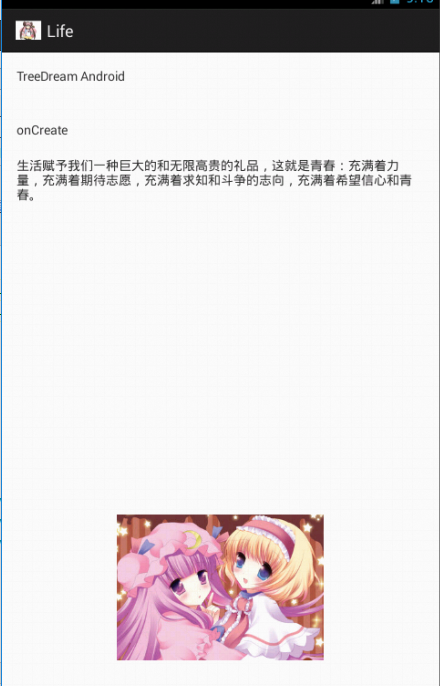
Source:
package com.TreeDream.life;

import android.os.Bundle;

import android.app.Activity;

import android.view.Menu;

import android.widget.TextView;

public class MainActivity extends Activity {

    private TextView textView;

    @Override

    protected void onCreate(Bundle savedInstanceState) {

        super.onCreate(savedInstanceState);

        setContentView(R.layout.activity_main);

        System.out.println("onCreate");

        textView = (TextView)findViewById(R.id.textView1);

        textView.setText("onCreate");

    }

    @Override

    protected void onStart() {

        super.onStart();

        System.out.println("onStart");

    }

    @Override

    protected void onResume() {

        super.onResume();

        System.out.println("onResume");

    }

    @Override

    protected void onPause() {

        super.onPause();

        System.out.println("onPause");

    }

    @Override

    protected void onStop() {

        super.onStop();

        System.out.println("onStop");

    }

    @Override

    protected void onDestroy() {

        super.onDestroy();

        System.out.println("onDestroy");

    }

    @Override

    protected void onRestart() {

        super.onRestart();

        System.out.println("onRestart");

        textView = (TextView)findViewById(R.id.textView1);

        textView.setText("onReStart");

    }

}
<RelativeLayout xmlns:android="http://schemas.android.com/apk/res/android"

    xmlns:tools="http://schemas.android.com/tools"

    android:layout_width="match_parent"

    android:layout_height="match_parent"

    android:paddingBottom="@dimen/activity_vertical_margin"

    android:paddingLeft="@dimen/activity_horizontal_margin"

    android:paddingRight="@dimen/activity_horizontal_margin"

    android:paddingTop="@dimen/activity_vertical_margin"

    tools:context=".MainActivity" >

    <TextView

        android:id="@+id/textView2"

        android:layout_width="wrap_content"

        android:layout_height="wrap_content"

        android:text="@string/Tree" />

    <TextView

        android:id="@+id/textView1"

        android:layout_width="wrap_content"

        android:layout_height="wrap_content"

        android:layout_alignLeft="@+id/textView2"

        android:layout_below="@+id/textView2"

        android:layout_marginTop="40dp"

        android:text="" />

    <TextView

        android:id="@+id/textView3"

        android:layout_width="wrap_content"

        android:layout_height="wrap_content"

        android:layout_alignLeft="@+id/textView1"

        android:layout_below="@+id/textView1"

        android:layout_marginTop="20dp"

        android:text="生活赋予我们一种巨大的和无限高贵的礼品,这就是青春:充满着力量,充满着期待志愿,充满着求知和斗争的志向,充满着希望信心和青春。" />

    <ImageView

        android:id="@+id/imageView1"

        android:layout_width="wrap_content"

        android:layout_height="wrap_content"

        android:layout_alignParentBottom="true"

        android:layout_centerHorizontal="true"

        android:layout_marginBottom="44dp"

        android:src="@drawable/x" />

</RelativeLayout>
activity_main.xml
<?xml version="1.0" encoding="utf-8"?>

<resources>

    <string name="app_name">Life</string>

    <string name="action_settings">Settings</string>

    <string name="hello_world">Hello world!</string>

    <string name="Tree">TreeDream Android</string>

</resources>
string.xml
Android——Activity生命周期的更多相关文章
- [转]: 两分钟彻底让你明白Android Activity生命周期(图文)!
转自:http://blog.csdn.net/android_tutor/article/details/5772285 大家好,今天给大家详解一下Android中Activity的生命周期,我在前 ...
- Android Activity生命周期
从android api文档摘抄出来的activity生命周期图如下: Activity有如下四种状态 a.活动状态 activity处于屏幕前台,获取到了焦点可以和用户进行交互,同一时刻只有一个a ...
- Android Activity生命周期详讲
管理 Activity 生命周期 通过实现回调方法管理 Activity 的生命周期对开发强大而又灵活的应用至关重要. Activity 的生命周期会直接受到 Activity 与其他 Activit ...
- android Activity生命周期(设备旋转、数据恢复等)与启动模式
1.Activity生命周期 接下来将介绍 Android Activity(四大组件之一) 的生命周期, 包含运行.暂停和停止三种状态,onCreate.onStart.onResume.o ...
- Android Activity生命周期以及Fragment生命周期的区别与分析
Android Fragment生命周期图: Activity生命周期图: 对照图: Fragment生命周期分析: 1. 当一个fragment被创建的时候,它会经历以下状态. onAttach() ...
- Android Activity 生命周期详解
学习android开发这么久对于activity的生命周期还没有仔细思考过,所以,我大致的把这些东西整理一下,希望通过这使自己理解的更透彻点吧! 首先看一下Activity生命周期图和它的的四个阶段 ...
- xamarin Android activity生命周期详解
学Xamarin我为什么要写这样一篇关于Android 的activity生命周期的文章 已经学Xamarin android有一段时间了,现在想起当初Xamarin也走了不少的弯路.当然Xamari ...
- Android——Activity生命周期(转)
Activity生命周期 子曰:溫故而知新,可以為師矣.<論語> 学习技术也一样,对于技术文档或者经典的技术书籍来说,指望看一遍就完全掌握,那基本不大可能,所以我们需要经常回过头再仔细 ...
- Android Activity生命周期的几个问题
每一个Android开发者都应该知道,android系统有四个重要的基本组件,即Activity(活动).Service(服务).Broadcast Receive(广播接收器)和Content ...
- android --Activity生命周期具体解释
一. 再探Activity生命周期 为了研究activity的生命周期,简单測试代码例如以下. package com.example.testactivity; import android.app ...
随机推荐
- PIE SDK同态滤波
1.算法功能简介 同态滤波是减少低频增加高频,从而减少光照变化并锐化边缘或细节的图像滤波方法. 同态滤波的流程为:空间域图像→对数运算→傅里叶正变换→同态滤波――傅里叶逆变换→指数运算→同态滤波结果. ...
- 采用MQTT协议实现android消息推送(4)选fusesource-mqtt-client为客户端
1.简介 一个java写的mqtt客户端.项目地址: https://github.com/fusesource/mqtt-client 2.引入fusesource-mqtt-client库 Fil ...
- 转-------CNN图像相似度匹配 2-channel network
基于2-channel network的图片相似度判别 原文地址:http://blog.csdn.net/hjimce/article/details/50098483 作者:hjimce 一.相 ...
- Bootstrap 斜体、文本对齐、缩略图、地址、列表等
目录1.标题2.页面主体3.强调 a.小号文本 b.着重 c.斜体 d.对齐class e.强调class4.缩略语5.地址6.列表 a.无序列表 b.有序列 ...
- vsftpd配置文件解析
对vsftpd配置文件详细解答. 1.默认配置: 1>允许匿名用户和本地用户登陆. anonymous_enable=YES local_enable=YES 2>匿名用户使用的登陆名为f ...
- 电影:换肤(Replace)
一个恐怖题材的电影,欧美的恐怖电影给我的感觉是一点也不恐怖,只是血腥,非常血腥,看这部电影的时候我还在吃中午饭........ 开头没看懂,应该都是女主的幻觉吧,女主本来是一个年近六十多岁的老太太,然 ...
- 数据库mysql中编码自动生成
call PrGetRuleCodeNoDate('Table_Name'); call PrGetRuleCode('Table_Name');
- 第一个servet(用注解),不用web.xml
环境: idea 1.新建模块 2.在蓝色src下新建一个包com.test 3.在包下新建servlet 4.写代码 package com.test; import javax.servlet.S ...
- Linux ARP代理 与 NAT
有时候我们会在一个已有网络(10.10.10.0/24)内组建一个实验网络(192.168.1.0/24),网络结构如上图所示. 假设我们不能控制(修改)A网络内除D主机以外的系统配置,但可以完全控制 ...
- contentType和dataType
contentType: 告诉服务器,我要发什么类型的数据 dataType:告诉服务器,我要想什么类型的数据,如果没有指定,那么会自动推断是返回 XML,还是JSON,还是script,还是Stri ...