
spring cloud:config-eureka-refresh
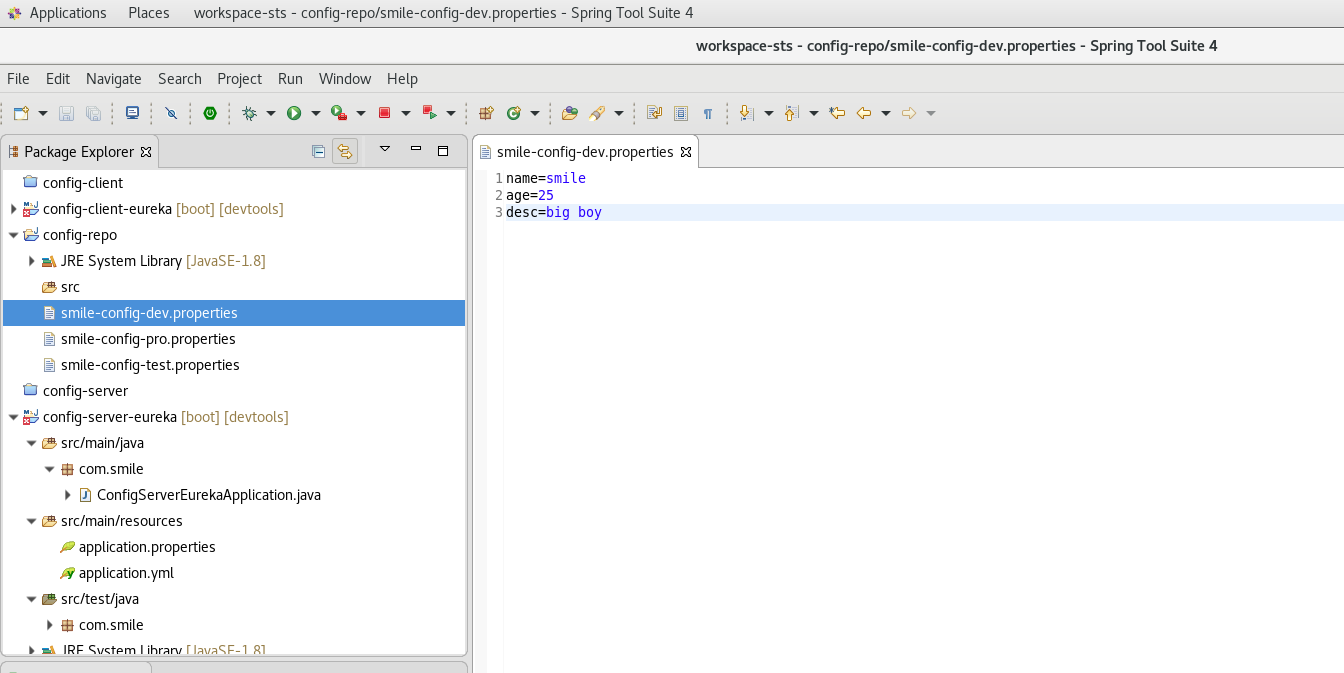
config-server-eureka project
1. File-->new spring project
2.add dependency
<parent>

        <groupId>org.springframework.boot</groupId>

        <artifactId>spring-boot-starter-parent</artifactId>

        <version>2.1.5.RELEASE</version>

        <relativePath/> <!-- lookup parent from repository -->

    </parent>
        <dependency>

            <groupId>org.springframework.boot</groupId>

            <artifactId>spring-boot-starter</artifactId>

        </dependency>

        <dependency>

            <groupId>org.springframework.cloud</groupId>

            <artifactId>spring-cloud-config-server</artifactId>

            <version>2.1.1.RELEASE</version>

        </dependency>

        <dependency>

            <groupId>org.springframework.cloud</groupId>

            <artifactId>

                spring-cloud-starter-netflix-eureka-client

            </artifactId>

            <version>2.1.1.RELEASE</version>

        </dependency>
3.Edit application.yml
server:

  port:

#spring cloud config native

spring:

  profiles:

    active: native

  application:

    name: config-server-eureka

  cloud:

    config:

      server:

        native:

          search-locations: /home/smile/workspace-sts/config-repo

#spring cloud config git

#spring:

#  application:

#    name: config-server-eureka

#  cloud:

#    config:

#      server:

#        git:

#          uri: http://localhost:3380/root/smile.git

#          search-paths: config-repo

#          username: root

#          password: root123456

eureka:

  client:

    service-url:

      defaultZone: http://localhost:8761/eureka/
4.program
package com.smile;

import org.springframework.boot.SpringApplication;

import org.springframework.boot.autoconfigure.SpringBootApplication;

import org.springframework.cloud.config.server.EnableConfigServer;

import org.springframework.cloud.netflix.eureka.EnableEurekaClient;

@SpringBootApplication

@EnableEurekaClient

@EnableConfigServer

public class ConfigServerEurekaApplication {

    public static void main(String[] args) {

        SpringApplication.run(ConfigServerEurekaApplication.class, args);

    }

}
5.Run
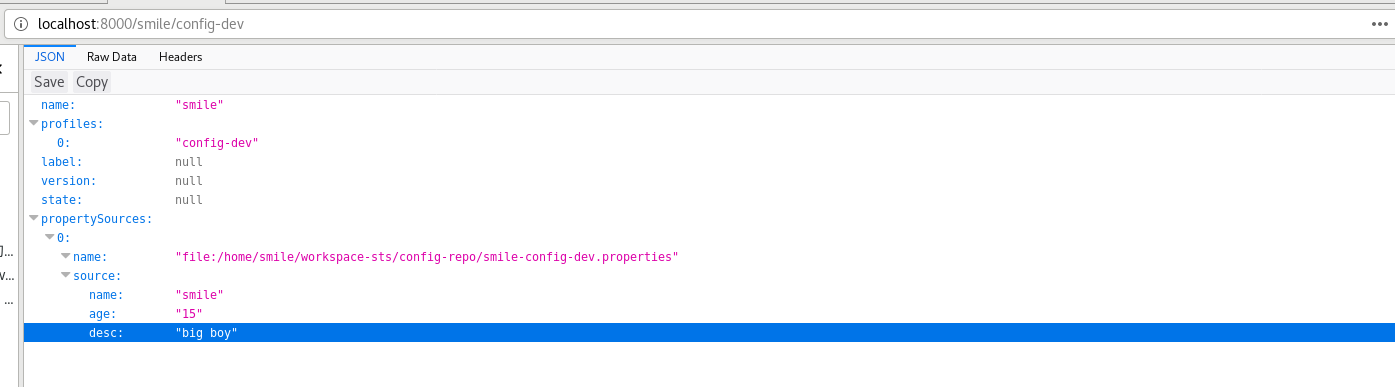
visit : http://localhost:8000/smile/config-dev
config-client-eureka
1. File-->new spring project
2.add dependency
<parent>

        <groupId>org.springframework.boot</groupId>

        <artifactId>spring-boot-starter-parent</artifactId>

        <version>2.1.5.RELEASE</version>

        <relativePath/> <!-- lookup parent from repository -->

    </parent>
        <dependency>

            <groupId>org.springframework.cloud</groupId>

            <artifactId>spring-cloud-starter-config</artifactId>

        </dependency>

        <dependency>

            <groupId>org.springframework.cloud</groupId>

            <artifactId>spring-cloud-starter-netflix-eureka-client</artifactId>

        </dependency>

        <dependency>

            <groupId>org.springframework.boot</groupId>

            <artifactId>spring-boot-starter-web</artifactId>

        </dependency>

        <dependency>

            <groupId>org.springframework.boot</groupId>

            <artifactId>spring-boot-starter-actuator</artifactId>

        </dependency>
spring-boot-starter-actuator refresh 需要用到
3.Edit application.yml
bootstrap.yml
server:

  port:

spring:

  application:

    name: config-client-eureka

  cloud:

    config:

#      uri: http://localhost:8000/

      discovery:

        enabled: true

        service-id: config-server-eureka

      name: smile

      profile: config-dev

      # dev 开发环境配置文件 |  test 测试环境  |  pro 正式环境   smile-config-dev.properties {name}-{profile}.properties

eureka:

  client:

#    registerWithEureka: false

#    fetchRegistry: false

    serviceUrl:

      defaultZone: http://localhost:8761/eureka/
application.yml
management:

#  server:

#    port:

  endpoint:

    refresh:

      enabled: true

  endpoints:

    web:

      exposure:

        include:

        - info

        - health

        - refresh
4.program
ConfigClientEurekaApplication
package com.smile;

import org.springframework.boot.SpringApplication;

import org.springframework.boot.autoconfigure.SpringBootApplication;

import org.springframework.cloud.context.config.annotation.RefreshScope;

import org.springframework.cloud.netflix.eureka.EnableEurekaClient;

@SpringBootApplication

@EnableEurekaClient

@RefreshScope

public class ConfigClientEurekaApplication {

    public static void main(String[] args) {

        SpringApplication.run(ConfigClientEurekaApplication.class, args);

    }

}
ConfigClientController
package com.smile.controller;

import org.springframework.beans.factory.annotation.Value;

import org.springframework.cloud.context.config.annotation.RefreshScope;

import org.springframework.web.bind.annotation.RequestMapping;

import org.springframework.web.bind.annotation.RestController;

@RestController

@RefreshScope

public class ConfigClientController {

    @Value("${name}")

    String name;

    @Value("${age}")

    String age;

    @RequestMapping("/hello")

    public String hello() {

        return "name:"+name+",age:"+age;

    }

}
5.Run
visit: http://localhost:8003/hello/

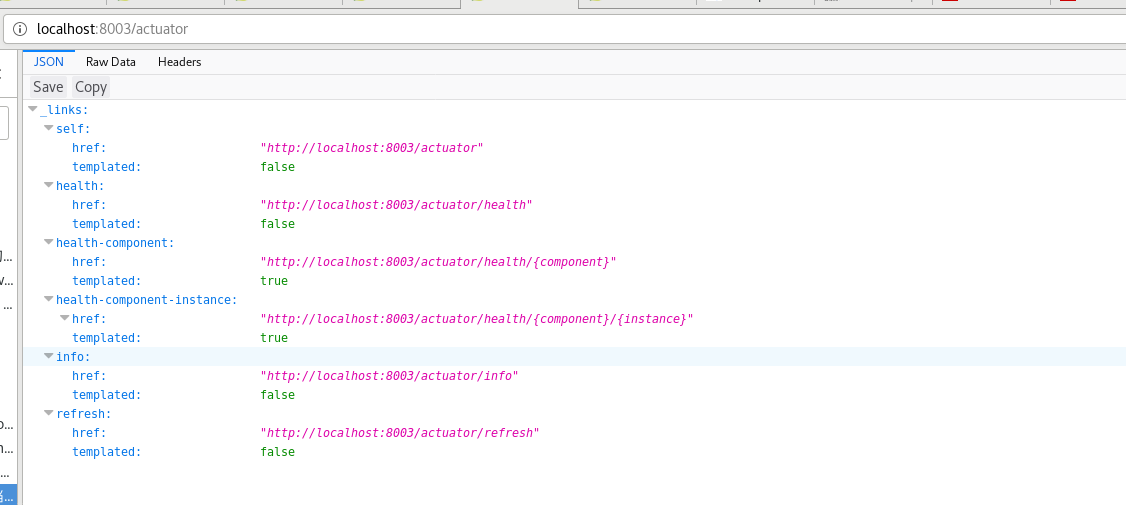
refresh:
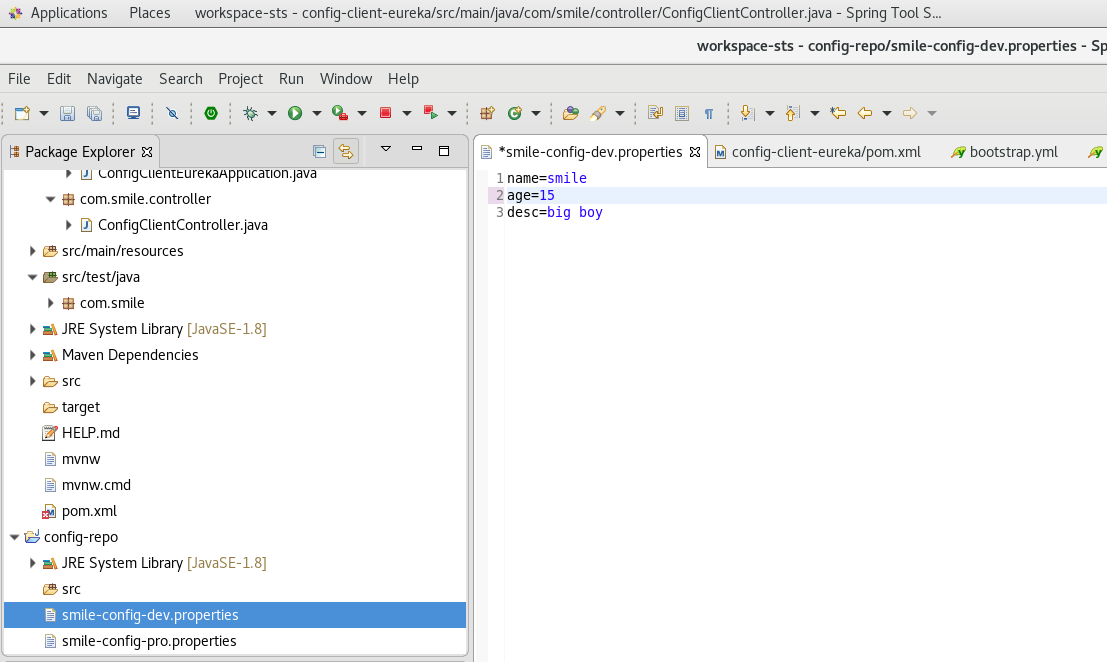
update smile-config-dev.properties age=25--->age=15 save
post http://localhost:8003/actuator/refresh with firefox browser
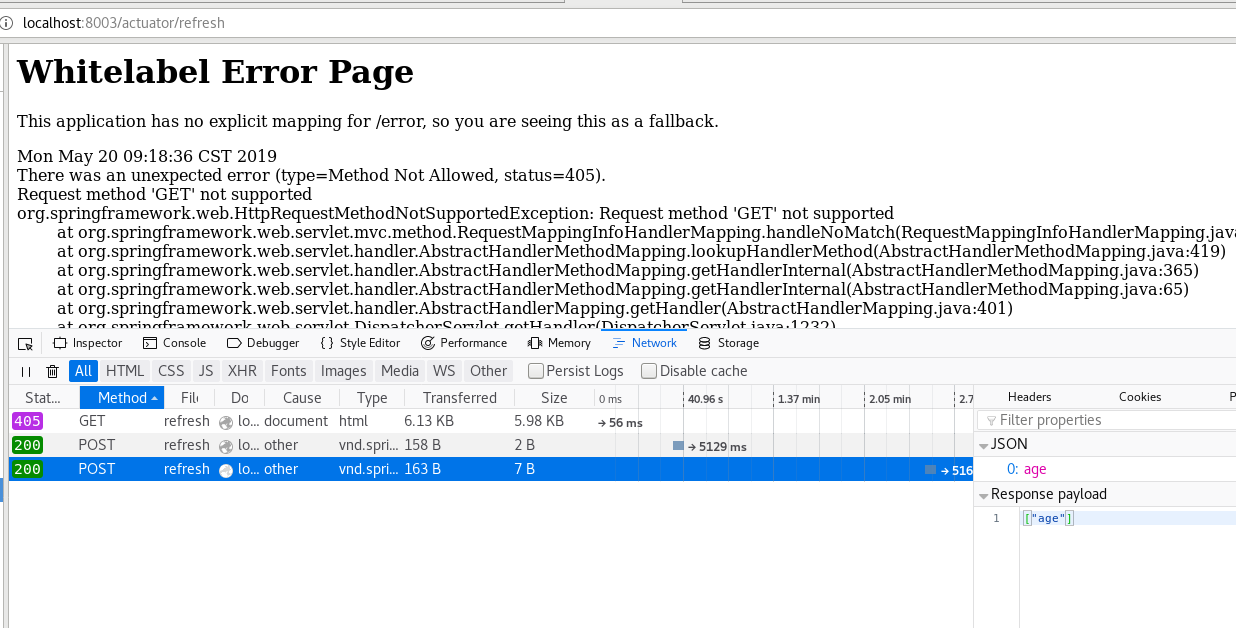
visit: http://localhost:8003/hello/ age is changed
spring cloud:config-eureka-refresh的更多相关文章
- Spring Cloud Security&Eureka安全认证(Greenwich版本)
Spring Cloud Security&Eureka安全认证(Greenwich版本) 一·安全 Spring Cloud支持多种安全认证方式,比如OAuth等.而默认是可以直接添加spr ...
- 跟我学SpringCloud | 第七篇:Spring Cloud Config 配置中心高可用和refresh
SpringCloud系列教程 | 第七篇:Spring Cloud Config 配置中心高可用和refresh Springboot: 2.1.6.RELEASE SpringCloud: Gre ...
- spring cloud config与eureka配合使用
前面两篇介绍了Spring Cloud Config服务端和客户端的简单配置,本篇介绍Spring Cloud Config与Eureka配合使用 前言 默认情况下,配置客户端启动时,都是通过配置属性 ...
- spring cloud config搭建说明例子(二)-添加eureka
添加注册eureka 服务端 ConfigServer pom.xml <dependency> <groupId>org.springframework.cloud</ ...
- Spring Cloud(九)高可用的分布式配置中心 Spring Cloud Config 集成 Eureka 服务
上一篇文章,讲了SpringCloudConfig 集成Git仓库,这一篇我们讲一下SpringCloudConfig 配和 Eureka 注册中心一起使用 在分布式系统中,由于服务数量巨多,为了方便 ...
- spring Cloud 之 Eureka、Feign、Hystrix、Zuul、Config、Bus
一.服务发现——Netflix Eureka Eureka包含两个组件: Eureka Server和Eureka Client 1.创建Eureka Server服务端 (1).引入依赖 父工程po ...
- Spring Cloud Config
Spring Cloud Config provides server and client-side support for externalized configuration in a dist ...
- .NET Core微服务之基于Steeltoe使用Spring Cloud Config统一管理配置
Tip: 此篇已加入.NET Core微服务基础系列文章索引 => Steeltoe目录快速导航: 1. 基于Steeltoe使用Spring Cloud Eureka 2. 基于Steelt ...
- springboot+cloud 学习(五)统一配置中心 spring cloud config + cloud bus + WebHooks +RibbitMQ
前言 微服务要实现集中管理微服务配置.不同环境不同配置.运行期间也可动态调整.配置修改后可以自动更新的需求,Spring Cloud Config同时满足了以上要求.Spring Cloud Conf ...
- SpringCloud(6)分布式配置中心Spring Cloud Config
1.Spring Cloud Config 简介 在分布式系统中,由于服务数量巨多,为了方便服务配置文件统一管理,实时更新,所以需要分布式配置中心组件.在Spring Cloud中,有分布式配置中心组 ...
随机推荐
- laravel框架之即點即改
//控制器層 public function ajaxsex(request $request) { $id = $request->get('id'); $fd = $request-> ...
- JavaSE--抽象类、内部类、接口
一.抽象类 当事物不能具体描述时可将事物抽象化,只对其应有的行为进行简单的描述而不进行深度具体的描述,这样就产生了抽象类,使用abstract关键字对类进行修饰内部方法也是用abstract进行描述. ...
- IDEA配置远程git仓库
一,在项目创建本地仓储 2,选择当前文件夹为本地仓储 3, 将代码添加到本地仓库 4,提交到本地仓库 5,提交到本地仓库 配置远程账号和地址 输入你自己的远程仓库----码云或者github,创建的 ...
- Homebrew学习(七)之你应该定期更新 Homebrew
参考 你应该定期更新 Homebrew
- Jquery复习(十)之$.fn.extend()
定义和用法 $.fn.extend() 函数为jQuery扩展一个或多个实例属性和方法(主要用于扩展方法). 提示:jQuery.fn是jQuery的原型对象,其extend()方法用于为jQuery ...
- Scala学习笔记(3)
数组 ----------------------------------- 0.若长度固定则用Array,若长度可能变化则使用ArrayBuffer 1.提供初始值的时候不要使用new. 2.用() ...
- J2EE WEB应用架构分析
1. 架构概述 J2EE体系包括java server pages(JSP) ,java SERVLET, enterprise bean,WEB service等技术.这些技术的出现给电子商务时代的 ...
- 使用elasticdump导入导出数据
一.安装elasticdump 终端中输入 npm install elasticdump -g -g表示全局可用,直接在终端输入 elasticdump --version,出现版本信息即表示安装成 ...
- 使用layer弹窗和layui表单做新增功能
注释:代码参考http://blog.51cto.com/825272560/1891158,在其修改之上而来,在此感谢! 1.需求:使用layer在弹窗内完成新增,成功后提示并刷新页面(父页面,li ...
- thinkphp+webuploader实现大文件分片上传
大文件分片上传,简单来说就是把大文件切分为小文件,然后再一个一个的上传,到最后由这些小文件再合并成原来的文件 webuploader下载地址及其文档:http://fex.baidu.com/webu ...