
cs224d 作业 problem set2 (一) 用tensorflow纯手写实现sofmax 函数,线性判别分析,命名实体识别
Hi Dear
Today we will use tensorflow to implement the softmax regression and linear classifier algorithm.
not using the library of tensorflow (like tf.nn.softmax),
but using tensorflow simple function to implement the softmax.
The whole structure of the network is the shown blow:
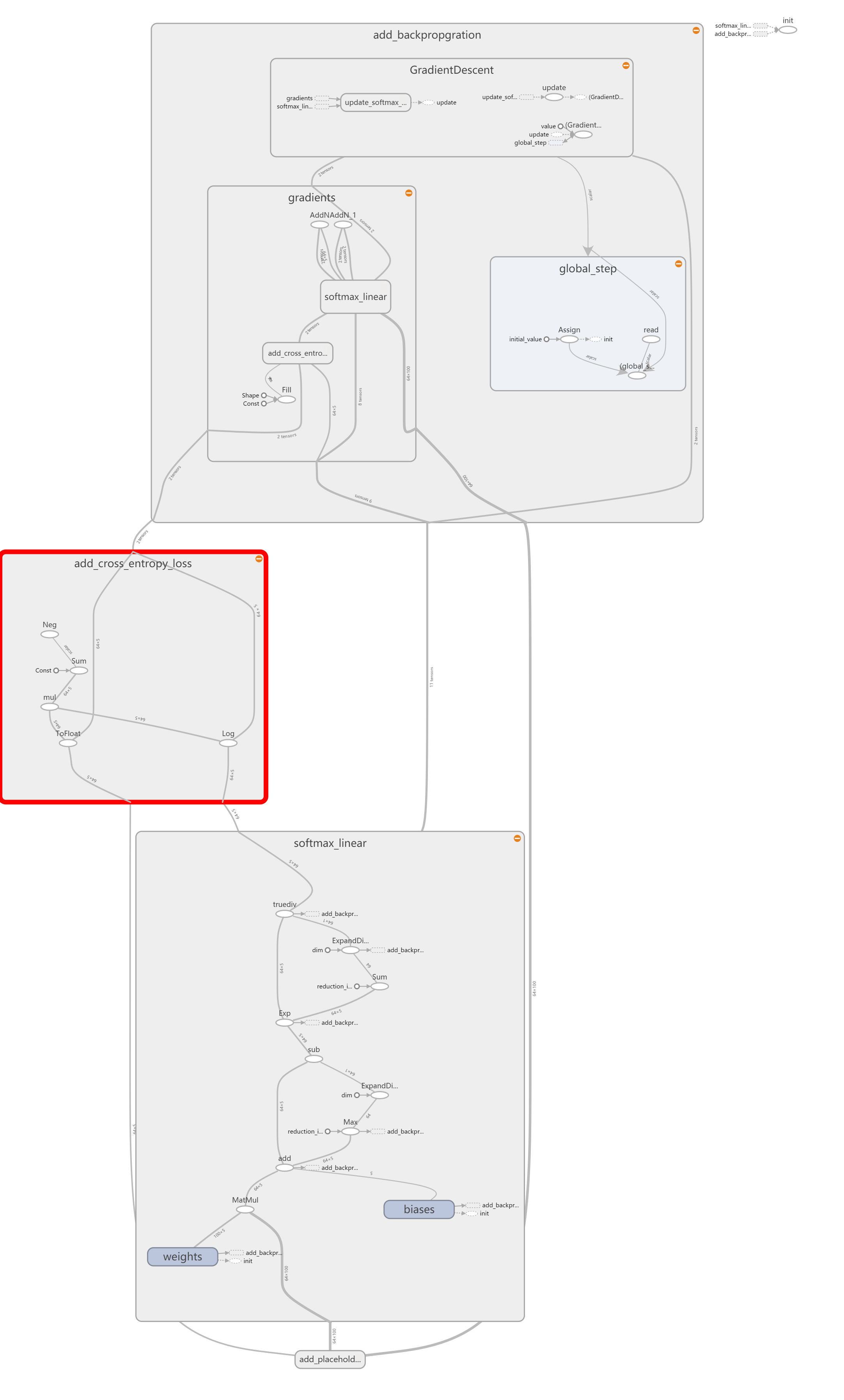
so first let us take a look at the softmax function.I think it's so easy.
import tensorflow as tf

import numpy as np

def softmax(x):

    """

    tensorflow 版本的softmax函数

    compute the softmax function in tensorflow

    interal functions may be used:

    tf.exp,tf.reduce_max,tf.reduce_sum,tf.expend_dims

    Args:

        x:tf.Tensor with shape (n_samples,n_features)

        feature vectors are represented by row-vectors (no need to handle 1-d

        input as in the previous homework)

    Returns:

        out:tf.Tensor with shape (n_sample,n_features). You need to construct

        this tensor in this problem

    """

    # tf.reduce_max沿着tensorflow的某一维度计算元素的最大值

    # tf.reduce_sum沿着tensorflow的某一维度计算元素的和

    # tf.expand_dims在tensorflow的某一维度插入一个tensor

    maxes = tf.expand_dims(tf.reduce_max(x, reduction_indices=[1]), 1)

    x_red = x - maxes

    x_exp = tf.exp(x_red)

    sums = tf.expand_dims(tf.reduce_sum(x_exp, reduction_indices=[1]), 1)

    out = x_exp / sums

    return out
Then here goes the cross-entropy to calculate the loss
def cross_entropy_loss(y, yhat):

    """

                  计算交叉熵在tensorflow中

       y是一个one-hot tensor  大小是(n_samples,n_classes)这么大,类型是tf.int32

       yhat是一个tensor 大小是(n_samples,n_classes)  类型是 tf.float32

       function:

           tf.to_float,tf.reduce_sum,tf.log可能会用到

                  参数:

           y:tf.Tensor with shape(n_samples,n_classes) One-hot encoded

           yhat: tf.Tensorwith shape (n_samples,n_classes) Each row encodes a

                probability distribution and should sum to 1

                  返回:

           out: tf.Tensor with shape(1,) (Scalar output).You need to construct

              this tensor in the problem.

    """

    y = tf.to_float(y)

    out = -tf.reduce_sum(y * tf.log(yhat))

    return out
after the two previous implementation,we will test our function in the following code
def test_softmax_basic():

    """

    Some simple tests to get you started.

    Warning: these are not exhaustive

    """

    print("Running basic tests...")

    test1 = softmax(tf.convert_to_tensor(np.array([[1001, 1002], [3, 4]]), dtype=tf.float32))

    with tf.Session():

        test1 = test1.eval()

    assert np.amax(np.fabs(test1 - np.array([0.26894142, 0.73105858]))) <= 1e-6

    test2 = softmax(tf.convert_to_tensor(np.array([[-1001, -1002]]), dtype=tf.float32))

    with tf.Session():

        test2 = test2.eval()

    assert np.amax(np.fabs(test2 - np.array([0.73105858, 0.26894142]))) <= 1e-6

    print("Basic (non-exhaustive) softmax tests pass\n")

def test_cross_entropy_loss_basic():

    """

    Some simple tests to get you started

    Warning: these are not exhaustive.

    """

    y = np.array([[0, 1], [1, 0], [1, 0]])

    yhat = np.array([[.5, .5], [.5, .5], [.5, .5]])

    test1 = cross_entropy_loss(tf.convert_to_tensor(y, dtype=tf.int32),

                               tf.convert_to_tensor(yhat, dtype=tf.float32))

    with tf.Session():

        test1 = test1.eval()

    result = -3 * np.log(.5)

    assert np.amax(np.fabs(test1 - result)) <= 1e-6

    print("Basic (non-exhaustive) cross-entropy tests pass\n")

if __name__ == "__main__":

    test_softmax_basic()

    test_cross_entropy_loss_basic()
in the end let's take a look at the log
Running basic tests...

2017-09-21 20:41:46.031587: W c:\tf_jenkins\home\workspace\release-win\device\gpu\os\windows\tensorflow\core\platform\cpu_feature_guard.cc:45] The TensorFlow library wasn't compiled to use SSE instructions, but these are available on your machine and could speed up CPU computations.

2017-09-21 20:41:46.032109: W c:\tf_jenkins\home\workspace\release-win\device\gpu\os\windows\tensorflow\core\platform\cpu_feature_guard.cc:45] The TensorFlow library wasn't compiled to use SSE2 instructions, but these are available on your machine and could speed up CPU computations.

2017-09-21 20:41:46.032409: W c:\tf_jenkins\home\workspace\release-win\device\gpu\os\windows\tensorflow\core\platform\cpu_feature_guard.cc:45] The TensorFlow library wasn't compiled to use SSE3 instructions, but these are available on your machine and could speed up CPU computations.

2017-09-21 20:41:46.033081: W c:\tf_jenkins\home\workspace\release-win\device\gpu\os\windows\tensorflow\core\platform\cpu_feature_guard.cc:45] The TensorFlow library wasn't compiled to use SSE4.1 instructions, but these are available on your machine and could speed up CPU computations.

2017-09-21 20:41:46.033489: W c:\tf_jenkins\home\workspace\release-win\device\gpu\os\windows\tensorflow\core\platform\cpu_feature_guard.cc:45] The TensorFlow library wasn't compiled to use SSE4.2 instructions, but these are available on your machine and could speed up CPU computations.

2017-09-21 20:41:46.033870: W c:\tf_jenkins\home\workspace\release-win\device\gpu\os\windows\tensorflow\core\platform\cpu_feature_guard.cc:45] The TensorFlow library wasn't compiled to use AVX instructions, but these are available on your machine and could speed up CPU computations.

2017-09-21 20:41:46.034304: W c:\tf_jenkins\home\workspace\release-win\device\gpu\os\windows\tensorflow\core\platform\cpu_feature_guard.cc:45] The TensorFlow library wasn't compiled to use AVX2 instructions, but these are available on your machine and could speed up CPU computations.

2017-09-21 20:41:46.034710: W c:\tf_jenkins\home\workspace\release-win\device\gpu\os\windows\tensorflow\core\platform\cpu_feature_guard.cc:45] The TensorFlow library wasn't compiled to use FMA instructions, but these are available on your machine and could speed up CPU computations.

2017-09-21 20:41:46.759599: I c:\tf_jenkins\home\workspace\release-win\device\gpu\os\windows\tensorflow\core\common_runtime\gpu\gpu_device.cc:887] Found device 0 with properties:

name: GeForce 940MX

major: 5 minor: 0 memoryClockRate (GHz) 1.189

pciBusID 0000:01:00.0

Total memory: 2.00GiB

Free memory: 1.66GiB

2017-09-21 20:41:46.760018: I c:\tf_jenkins\home\workspace\release-win\device\gpu\os\windows\tensorflow\core\common_runtime\gpu\gpu_device.cc:908] DMA: 0

2017-09-21 20:41:46.760183: I c:\tf_jenkins\home\workspace\release-win\device\gpu\os\windows\tensorflow\core\common_runtime\gpu\gpu_device.cc:918] 0:   Y

2017-09-21 20:41:46.760640: I c:\tf_jenkins\home\workspace\release-win\device\gpu\os\windows\tensorflow\core\common_runtime\gpu\gpu_device.cc:977] Creating TensorFlow device (/gpu:0) -> (device: 0, name: GeForce 940MX, pci bus id: 0000:01:00.0)

2017-09-21 20:41:46.944591: I c:\tf_jenkins\home\workspace\release-win\device\gpu\os\windows\tensorflow\core\common_runtime\gpu\gpu_device.cc:977] Creating TensorFlow device (/gpu:0) -> (device: 0, name: GeForce 940MX, pci bus id: 0000:01:00.0)

Basic (non-exhaustive) softmax tests pass

2017-09-21 20:41:46.977580: I c:\tf_jenkins\home\workspace\release-win\device\gpu\os\windows\tensorflow\core\common_runtime\gpu\gpu_device.cc:977] Creating TensorFlow device (/gpu:0) -> (device: 0, name: GeForce 940MX, pci bus id: 0000:01:00.0)

Basic (non-exhaustive) cross-entropy tests pass
you see the function successfully pass the test.
Second we comes to the linear classifier function
1、we defined a basic config of the training parameter
import time

from model import Model

import numpy as np

import tensorflow as tf

from tf_softmax import cross_entropy_loss

from tf_softmax import softmax

from utils import data_iterator

class Config(object):

    """

    Holds model hyperparams and data information

    The config class is used to store various hyperparameters and dataset

    information parameters.

    Model objects are passed a Config() object at instantiation.

    """

    batch_size = 64      #how many data we train in one forward and backward process

    n_samples = 1024      #the total number of our data

    n_features = 100      #one data can have 100 dimension feature

    n_classes = 5        #total there are 5 classes in deed for us to classified

    #You may adjust the max_epochs to ensure Convergence

    max_epochs = 50

    #You may adjust this learning rate to ensure convergence.

    lr = 1e-4
2、then we defined our a class called softmax for us to train,which include functions of
load_data, :load the trainning data
add_placeholders,:define the input and output data
create_feed_dict,:receive the input and output data
add_training_op,:set the goal of our trainning and select the optimizer function
add_model, :do forward calculation
add_loss_op, :add cross-entropy function to our model
run_epoch, :how many times we run our model forward and backward each time with batch_size of data
fit, :in this function we evaluate our model and calculate the total loss
__init__ :the construction of our class in this function we call the above function in correct order.to construct the model
load_data
class SoftmaxModel(Model):

    """实现一个softmax 交叉熵分类器"""

    def load_data(self):

        """创建一个预测数据集,并且在内存中储存它"""

        np.random.seed(1234)

        self.input_data = np.random.rand(self.config.n_samples,self.config.n_features)

        self.input_labels = np.ones((self.config.n_samples,), dtype=np.int32)
add_placeholders
def add_placeholders(self):

        """生成    placeholder 变量来呈现输入的 tensor

                            这些    placeholders 是被用做输入,

                            在建立别的模型的时候还可以用到,

                            在训练的过程中可以对其填入数据

        input_placeholder:Input placeholder :tensor of shape (batch_size,n_features),type tf.float32

                          labels_placeholder:Labels placeholder tensor of shape (batch_size,n_classes),type tf.int32

        Add these placeholders to self as the instance variables

            self.input_placeholder

            self.labels_placeholder

        (Don't change the variable names)

    """

        self.input_placeholder = tf.placeholder(tf.float32, shape=(self.config.batch_size,self.config.n_features))

        self.labels_placeholder = tf.placeholder(tf.int32,shape=(self.config.batch_size,self.config.n_classes))
create_feed_dict
    def create_feed_dict(self,input_batch,label_batch):

        """为softmax classifier创建feed_dict"""

        feed_dict={

            self.input_placeholder:input_batch,

            self.labels_placeholder:label_batch,

        }

        return feed_dict
add_training_op
    def add_training_op(self,loss):

        """设置训练目标,创建一个优化器,应用梯度下降到所有的训练变量上面

        Args:

            loss:Loss tensor,from cross_entropy_loss

        Returns:

            train_op:The Op for training

        """

        optimizer = tf.train.GradientDescentOptimizer(self.config.lr)

        global_step = tf.Variable(0,name='global_step',trainable=False)

        train_op = optimizer.minimize(loss,global_step=global_step)

        return train_op
add_model
    def add_model(self,input_data):

        """添加一个线性层,增加一个softmax变换

        y = softmax(xW+b)

        Hint:make sure to create tf.Variables as needed

             also make sure to use tf.name_scope to ensure that your name

             spaces are clean

        Hint:For this simple use-case, it's sufficient to initialize both

            weights W and biases b with zeros

        Args:

            input_data:A tensor of shape (batch_size,n_features)

        Returns:

            out:       A tensor of shape (batch_size,n_classes)

        """

        n_features,n_classes = self.config.n_features,self.config.n_classes

        with tf.name_scope('softmax_linear'):

            weights = tf.Variable(tf.zeros([n_features,n_classes]),name='weights')

            biases = tf.Variable(tf.zeros([n_classes]),name='biases')

            #矩阵乘法,不是内积

            logits = tf.matmul(input_data,weights)+biases

            out = softmax(logits)

        return out
add_loss_op
    def add_loss_op(self,pred):

        """将交叉熵损失添加到目标的损失函数上

        Hint: use the cross_entropy_loss function we defined. This should be a very

              short function.

        Args:

            pred: A tensor of shape (batch_size,n_classes)

        Returns:

            loss: A 0-d tensor (scalar)

        """

        loss = cross_entropy_loss(self.labels_placeholder, pred)

        return loss
run_epoch
    def run_epoch(self,sess,input_data,input_labels):

        """运行一段epoch大小数据的训练

            Trains the model for one-epoch

        Args:

            sess:tf.Session() object

            input_data : np.ndarray of shape (n_samples,n_features)

            input_labels : np.ndarray of shape (n_samples,n_classes)

        Returns:

            average_loss : scalar . Average minibatch loss of model on epoch

        """

        #And then after everything is built , start the training loop.

        average_loss = 0

        for step,(input_batch,label_batch) in enumerate(

            data_iterator(input_data,input_labels,

                          batch_size=self.config.batch_size,

                          label_size=self.config.n_classes)):

            #Fill a feed dictionary with the actual set of images and labels

            #for this particular training step

            feed_dict = self.create_feed_dict(input_batch, label_batch)

            #Run one step of the model. The return values are the activations

            #from the 'self.train_op' (which is discard) and the 'loss' Op.

            #To inspect the values of your Ops or variables, you may include then

            #in the list passed to sess.run() and the value tensors will be

            #returned in the tuple from the call.

            _,loss_value = sess.run([self.train_op,self.loss],feed_dict=feed_dict)

            average_loss += loss_value

        average_loss = average_loss / step

        return average_loss
fit
    def fit(self,sess,input_data,input_labels):

        """Fit model on provided data

        Args:

            sess:tf.Session()

            input_data : np.ndarray of shape (n_samples,n_features)

            input_labels : np.ndarray of shape (n_samples,n_classes)

        Returns:

            losses: list of loss per epoch

        """

        losses = []

        for epoch in range(self.config.max_epochs):

            start_time = time.time()

            average_loss = self.run_epoch(sess, input_data, input_labels)

            duration = time.time() - start_time

            #Print status to stdout

            print('Epoch %d: loss = %.2f (%3.f sec)'%(epoch,average_loss,duration))

            losses.append(average_loss)

        return losses
__init__
    def __init__(self,config):

        """Initializes the model.

           Args:

               config:A model configuration object of type Config

        """

        self.config = config

        #Generate placeholders for the images and labels

        self.load_data()

        self.add_placeholders()

        self.pred = self.add_model(self.input_placeholder)

        self.loss = self.add_loss_op(self.pred)

        self.train_op = self.add_training_op(self.loss)
test_SoftmaxModel 测试softmax模型
def test_SoftmaxModel():

    """Train softmax model for a number of steps."""

    config = Config()

    with tf.Graph().as_default():

        model = SoftmaxModel(config)

        #create a session for running Ops on the Graph

        sess = tf.Session()

        #Run the Op to initialize the variables

        init = tf.initialize_all_variables()

        sess.run(init)

        losses = model.fit(sess, model.input_data, model.input_labels)

    #If ops are implemented correctly, the average loss should fall close to zero

    #repidly

    assert losses[-1]<.5

    print("Basic (non-exhaustive) classifier tests pass\n")
最后是程序入口
if __name__=="__main__":

    test_SoftmaxModel()
下面是训练的log
2017-09-21 21:42:00.292713: W c:\tf_jenkins\home\workspace\release-win\device\gpu\os\windows\tensorflow\core\platform\cpu_feature_guard.cc:45] The TensorFlow library wasn't compiled to use SSE instructions, but these are available on your machine and could speed up CPU computations.

2017-09-21 21:42:00.293137: W c:\tf_jenkins\home\workspace\release-win\device\gpu\os\windows\tensorflow\core\platform\cpu_feature_guard.cc:45] The TensorFlow library wasn't compiled to use SSE2 instructions, but these are available on your machine and could speed up CPU computations.

2017-09-21 21:42:00.293493: W c:\tf_jenkins\home\workspace\release-win\device\gpu\os\windows\tensorflow\core\platform\cpu_feature_guard.cc:45] The TensorFlow library wasn't compiled to use SSE3 instructions, but these are available on your machine and could speed up CPU computations.

2017-09-21 21:42:00.293854: W c:\tf_jenkins\home\workspace\release-win\device\gpu\os\windows\tensorflow\core\platform\cpu_feature_guard.cc:45] The TensorFlow library wasn't compiled to use SSE4.1 instructions, but these are available on your machine and could speed up CPU computations.

2017-09-21 21:42:00.294870: W c:\tf_jenkins\home\workspace\release-win\device\gpu\os\windows\tensorflow\core\platform\cpu_feature_guard.cc:45] The TensorFlow library wasn't compiled to use SSE4.2 instructions, but these are available on your machine and could speed up CPU computations.

2017-09-21 21:42:00.295880: W c:\tf_jenkins\home\workspace\release-win\device\gpu\os\windows\tensorflow\core\platform\cpu_feature_guard.cc:45] The TensorFlow library wasn't compiled to use AVX instructions, but these are available on your machine and could speed up CPU computations.

2017-09-21 21:42:00.296193: W c:\tf_jenkins\home\workspace\release-win\device\gpu\os\windows\tensorflow\core\platform\cpu_feature_guard.cc:45] The TensorFlow library wasn't compiled to use AVX2 instructions, but these are available on your machine and could speed up CPU computations.

2017-09-21 21:42:00.296527: W c:\tf_jenkins\home\workspace\release-win\device\gpu\os\windows\tensorflow\core\platform\cpu_feature_guard.cc:45] The TensorFlow library wasn't compiled to use FMA instructions, but these are available on your machine and could speed up CPU computations.

2017-09-21 21:42:01.016620: I c:\tf_jenkins\home\workspace\release-win\device\gpu\os\windows\tensorflow\core\common_runtime\gpu\gpu_device.cc:887] Found device 0 with properties:

name: GeForce 940MX

major: 5 minor: 0 memoryClockRate (GHz) 1.189

pciBusID 0000:01:00.0

Total memory: 2.00GiB

Free memory: 1.66GiB

2017-09-21 21:42:01.017317: I c:\tf_jenkins\home\workspace\release-win\device\gpu\os\windows\tensorflow\core\common_runtime\gpu\gpu_device.cc:908] DMA: 0

2017-09-21 21:42:01.017652: I c:\tf_jenkins\home\workspace\release-win\device\gpu\os\windows\tensorflow\core\common_runtime\gpu\gpu_device.cc:918] 0:   Y

2017-09-21 21:42:01.018251: I c:\tf_jenkins\home\workspace\release-win\device\gpu\os\windows\tensorflow\core\common_runtime\gpu\gpu_device.cc:977] Creating TensorFlow device (/gpu:0) -> (device: 0, name: GeForce 940MX, pci bus id: 0000:01:00.0)

WARNING:tensorflow:From C:\Users\weizhen\workspace\TflinearClassifier\tf_classifier.py:181: initialize_all_variables (from tensorflow.python.ops.variables) is deprecated and will be removed after 2017-03-02.

Instructions for updating:

Use `tf.global_variables_initializer` instead.

Epoch 0: loss = 63.15 (  1 sec)

Epoch 1: loss = 21.69 (  0 sec)

Epoch 2: loss = 11.66 (  0 sec)

Epoch 3: loss = 7.79 (  0 sec)

Epoch 4: loss = 5.80 (  0 sec)

Epoch 5: loss = 4.61 (  0 sec)

Epoch 6: loss = 3.82 (  0 sec)

Epoch 7: loss = 3.25 (  0 sec)

Epoch 8: loss = 2.83 (  0 sec)

Epoch 9: loss = 2.51 (  0 sec)

Epoch 10: loss = 2.25 (  0 sec)

Epoch 11: loss = 2.04 (  0 sec)

Epoch 12: loss = 1.86 (  0 sec)

Epoch 13: loss = 1.71 (  0 sec)

Epoch 14: loss = 1.59 (  0 sec)

Epoch 15: loss = 1.48 (  0 sec)

Epoch 16: loss = 1.38 (  0 sec)

Epoch 17: loss = 1.30 (  0 sec)

Epoch 18: loss = 1.23 (  0 sec)

Epoch 19: loss = 1.16 (  0 sec)

Epoch 20: loss = 1.10 (  0 sec)

Epoch 21: loss = 1.05 (  0 sec)

Epoch 22: loss = 1.00 (  0 sec)

Epoch 23: loss = 0.95 (  0 sec)

Epoch 24: loss = 0.91 (  0 sec)

Epoch 25: loss = 0.88 (  0 sec)

Epoch 26: loss = 0.84 (  0 sec)

Epoch 27: loss = 0.81 (  0 sec)

Epoch 28: loss = 0.78 (  0 sec)

Epoch 29: loss = 0.75 (  0 sec)

Epoch 30: loss = 0.73 (  0 sec)

Epoch 31: loss = 0.70 (  0 sec)

Epoch 32: loss = 0.68 (  0 sec)

Epoch 33: loss = 0.66 (  0 sec)

Epoch 34: loss = 0.64 (  0 sec)

Epoch 35: loss = 0.62 (  0 sec)

Epoch 36: loss = 0.60 (  0 sec)

Epoch 37: loss = 0.59 (  0 sec)

Epoch 38: loss = 0.57 (  0 sec)

Epoch 39: loss = 0.56 (  0 sec)

Epoch 40: loss = 0.54 (  0 sec)

Epoch 41: loss = 0.53 (  0 sec)

Epoch 42: loss = 0.52 (  0 sec)

Epoch 43: loss = 0.50 (  0 sec)

Epoch 44: loss = 0.49 (  0 sec)

Epoch 45: loss = 0.48 (  0 sec)

Epoch 46: loss = 0.47 (  0 sec)

Epoch 47: loss = 0.46 (  0 sec)

Epoch 48: loss = 0.45 (  0 sec)

Epoch 49: loss = 0.44 (  0 sec)

Basic (non-exhaustive) classifier tests pass
Thanks
WeiZhen
cs224d 作业 problem set2 (一) 用tensorflow纯手写实现sofmax 函数,线性判别分析,命名实体识别的更多相关文章
- cs224d 作业 problem set2 (二) TensorFlow 实现命名实体识别
神经网络在命名实体识别中的应用 所有的这些包括之前的两篇都可以通过tensorflow 模型的托管部署到 google cloud 上面,发布成restful接口,从而与任何的ERP,CRM系统集成. ...
- cs224d 作业 problem set2 (三) 用RNNLM模型实现Language Model,来预测下一个单词的出现
今天将的还是cs224d 的problem set2 的第三部分习题, 原来国外大学的系统难度真的如此之大,相比之下还是默默地再天朝继续搬砖吧 下面讲述一下RNN语言建模的数学公式: 给出一串连续 ...
- cs224d 作业 problem set1 (一) 主要是实现word2vector模型,SGD,CBOW,Softmax,算法
''' Created on 2017年9月13日 @author: weizhen ''' import numpy as np def sigmoid(x): return 1 / (1 + np ...
- CS224d 单隐层全连接网络处理英文命名实体识别tensorflow
什么是NER? 命名实体识别(NER)是指识别文本中具有特定意义的实体,主要包括人名.地名.机构名.专有名词等.命名实体识别是信息提取.问答系统.句法分析.机器翻译等应用领域的重要基础工具,作为结构化 ...
- springmvc 动态代理 JDK实现与模拟JDK纯手写实现。
首先明白 动态代理和静态代理的区别: 静态代理:①持有被代理类的引用 ② 代理类一开始就被加载到内存中了(非常重要) 动态代理:JDK中的动态代理中的代理类是动态生成的.并且生成的动态代理类为$Pr ...
- 简易-五星评分-jQuery纯手写
超级简单的评分功能,分为四个步骤轻松搞定: 第一步: 引入jquery文件:这里我用百度CDN的jquery: <script src="http://apps.bdimg.com/l ...
- vue10行代码实现上拉翻页加载更多数据,纯手写js实现下拉刷新上拉翻页不引用任何第三方插件
vue10行代码实现上拉翻页加载更多数据,纯手写js实现下拉刷新上拉翻页不引用任何第三方插件/库 一提到移动端的下拉刷新上拉翻页,你可能就会想到iScroll插件,没错iScroll是一个高性能,资源 ...
- TensorFlow 之 手写数字识别MNIST
官方文档: MNIST For ML Beginners - https://www.tensorflow.org/get_started/mnist/beginners Deep MNIST for ...
- 超级简单的jQuery纯手写五星评分效果
超级简单的评分功能,分为四个步骤轻松搞定: 第一步: 引入jquery文件:这里我用百度CDN的jquery: <script src="http://apps.bdimg.com/l ...
随机推荐
- 分布式架构下的会话追踪实践【基于Cookie和Redis实现】
分布式架构下的会话追踪实践[基于Cookie和Redis实现] 博客分类: NoSQL/Redis/MongoDB session共享rediscookie分布式架构session 在单台Tomcat ...
- The SDK directory '/home/wangju/gitProject/Automation/D:\Android_SDK' does not exist.
执行gradle clean命令报错 gradle clean FAILURE: Build failed with an exception. * What went wrong: A proble ...
- 15. Jmeter-配置元件二
jmeter-配置元件介绍与使用 JDBC Connection Configuration Java请求默认值 密钥库配置 LDAP Extended Request Defaults LDAP请求 ...
- Visual C++中error spawning cl.exe解决办法
| 版权声明:本文为博主原创文章,未经博主允许不得转载. 今天安装Vc6.0的时候出现了一个error spawning cl.exe的错误,在网上找了一些资料,才知道这是因为路径设置的问题引起的 ...
- JavaScript Stack
function Stack() { var items = []; this.push = function(item) { items.push(item) } this.pop = functi ...
- nginx 日志统计接口每个小时访问量
指定时间段增量统计nginx日志不同接口的访问量: #!/bin/bash#此脚本用于统计nginx日志当前时间15分钟之内不同接口(URL)的访问量统计LOG=/usr/local/nginx/lo ...
- MySQL-mysql_config_editor安全登录工具
mysql_config_editor出现在mysql5.6.6以后的版本,可以给指定的连接和密码生成一个加密文件.mylogin.cnf,默认位于当前用户家目录下.通过该文件可以使用mysql.my ...
- 监控工具 zxbbix
报错 [Z3001] connection to database 'zabbix' failed: [2002] Can't connect to local MySQL server throug ...
- python第三方库安装失败处理方法
各位道友,是不是在使用pip 命令安装第三方库遇到了以下情形呢? 这种情况可真让人头疼啊..经过几番周折,终于找到了认为最有效的解决方法 首先 先把要安装的包下载下来,不管用什么方式 在这里我用的迅雷 ...
- 48-python基础-python3-字符串-常用字符串方法(六)-strip()-rstrip()-lstrip()
7-用 strip().rstrip()和 lstrip()删除空白字符 strip()字符串方法将返回一个新的字符串,它的开头或末尾都没有空白字符. lstrip()和 rstrip()方法将相应删 ...