
OAuth 2.0 授权码请求
关于OAuth 2.0,请参见下面这两篇文章(墙裂推荐):
纸上得来终觉浅,绝知此事要躬行。理论知识了解以后,最终还是要动手实践,不亲自做一遍永远不知道里面有多少坑。本节的重点是用Spring Security实现授权码模式。
1. maven依赖
<?xml version="1.0" encoding="UTF-8"?>

<project xmlns="http://maven.apache.org/POM/4.0.0" xmlns:xsi="http://www.w3.org/2001/XMLSchema-instance"

    xsi:schemaLocation="http://maven.apache.org/POM/4.0.0 http://maven.apache.org/xsd/maven-4.0.0.xsd">

    <modelVersion>4.0.0</modelVersion>

    <groupId>com.cjs.example</groupId>

    <artifactId>cjs-oauth2-code-server</artifactId>

    <version>0.0.1-SNAPSHOT</version>

    <packaging>jar</packaging>

    <name>cjs-oauth2-code-server</name>

    <description></description>

    <parent>

        <groupId>org.springframework.boot</groupId>

        <artifactId>spring-boot-starter-parent</artifactId>

        <version>2.0.2.RELEASE</version>

        <relativePath/> <!-- lookup parent from repository -->

    </parent>

    <properties>

        <project.build.sourceEncoding>UTF-8</project.build.sourceEncoding>

        <project.reporting.outputEncoding>UTF-8</project.reporting.outputEncoding>

        <java.version>1.8</java.version>

    </properties>

    <dependencies>

        <dependency>

            <groupId>org.springframework.boot</groupId>

            <artifactId>spring-boot-starter-security</artifactId>

        </dependency>

        <dependency>

            <groupId>org.springframework.boot</groupId>

            <artifactId>spring-boot-starter-thymeleaf</artifactId>

        </dependency>

        <dependency>

            <groupId>org.springframework.boot</groupId>

            <artifactId>spring-boot-starter-web</artifactId>

        </dependency>

        <dependency>

            <groupId>org.springframework.security.oauth</groupId>

            <artifactId>spring-security-oauth2</artifactId>

            <version>2.3.3.RELEASE</version>

        </dependency>

        <dependency>

            <groupId>org.projectlombok</groupId>

            <artifactId>lombok</artifactId>

            <optional>true</optional>

        </dependency>

        <dependency>

            <groupId>org.springframework.boot</groupId>

            <artifactId>spring-boot-starter-test</artifactId>

            <scope>test</scope>

        </dependency>

        <dependency>

            <groupId>org.springframework.security</groupId>

            <artifactId>spring-security-test</artifactId>

            <scope>test</scope>

        </dependency>

    </dependencies>

    <build>

        <plugins>

            <plugin>

                <groupId>org.springframework.boot</groupId>

                <artifactId>spring-boot-maven-plugin</artifactId>

            </plugin>

        </plugins>

    </build>

</project>
2. 配置Security
package com.cjs.example.config;

import org.springframework.context.annotation.Bean;

import org.springframework.context.annotation.Configuration;

import org.springframework.security.config.annotation.authentication.builders.AuthenticationManagerBuilder;

import org.springframework.security.config.annotation.web.builders.HttpSecurity;

import org.springframework.security.config.annotation.web.builders.WebSecurity;

import org.springframework.security.config.annotation.web.configuration.EnableWebSecurity;

import org.springframework.security.config.annotation.web.configuration.WebSecurityConfigurerAdapter;

import org.springframework.security.core.userdetails.User;

import org.springframework.security.core.userdetails.UserDetails;

import org.springframework.security.core.userdetails.UserDetailsService;

import org.springframework.security.crypto.bcrypt.BCryptPasswordEncoder;

import org.springframework.security.crypto.password.PasswordEncoder;

import org.springframework.security.provisioning.InMemoryUserDetailsManager;

@Configuration

@EnableWebSecurity

public class WebSecurityConfig extends WebSecurityConfigurerAdapter {

    @Override

    protected void configure(AuthenticationManagerBuilder auth) throws Exception {

        super.configure(auth);

//        auth.inMemoryAuthentication().withUser("zhangsan").password("$2a$10$qsJ/Oy1RmUxFA.YtDT8RJ.Y2kU3U4z0jvd35YmiMOAPpD.nZUIRMC").roles("USER");

    }

    @Override

    public void configure(WebSecurity web) throws Exception {

        super.configure(web);

    }

    @Override

    protected void configure(HttpSecurity http) throws Exception {

        super.configure(http);

    }

    @Bean

    @Override

    protected UserDetailsService userDetailsService() {

        User.UserBuilder builder = User.builder();

        UserDetails user = builder.username("zhangsan").password("$2a$10$GStfEJEyoSHiSxnoP3SbD.R8XRowP1QKOdi.N6/iFEwEJWTQqlSba").roles("USER").build();

        UserDetails admin = builder.username("lisi").password("$2a$10$GStfEJEyoSHiSxnoP3SbD.R8XRowP1QKOdi.N6/iFEwEJWTQqlSba").roles("USER", "ADMIN").build();

        return new InMemoryUserDetailsManager(user, admin);

    }

    @Bean

    public PasswordEncoder passwordEncoder() {

        return new BCryptPasswordEncoder();

    }

    public static void main(String[] args) {

        BCryptPasswordEncoder bCryptPasswordEncoder = new BCryptPasswordEncoder();

        System.out.println(bCryptPasswordEncoder.encode("123456"));

        System.out.println(bCryptPasswordEncoder.encode("12345678"));

    }

}
3. 配置授权服务器
package com.cjs.example.config;

import org.springframework.context.annotation.Configuration;

import org.springframework.security.oauth2.config.annotation.configurers.ClientDetailsServiceConfigurer;

import org.springframework.security.oauth2.config.annotation.web.configuration.AuthorizationServerConfigurerAdapter;

import org.springframework.security.oauth2.config.annotation.web.configuration.EnableAuthorizationServer;

import org.springframework.security.oauth2.config.annotation.web.configurers.AuthorizationServerEndpointsConfigurer;

import org.springframework.security.oauth2.config.annotation.web.configurers.AuthorizationServerSecurityConfigurer;

@Configuration

@EnableAuthorizationServer

public class AuthorizationServerConfig extends AuthorizationServerConfigurerAdapter {

    @Override

    public void configure(AuthorizationServerSecurityConfigurer security) throws Exception {

        super.configure(security);

    }

    @Override

    public void configure(ClientDetailsServiceConfigurer clients) throws Exception {

        clients.inMemory()

                .withClient("my-client-1")

                .secret("$2a$10$0jyHr4rGRdQw.X9mrLkVROdQI8.qnWJ1Sl8ly.yzK0bp06aaAkL9W")

                .authorizedGrantTypes("authorization_code", "refresh_token")

                .scopes("all")

                .redirectUris("http://www.baidu.com");

    }

    @Override

    public void configure(AuthorizationServerEndpointsConfigurer endpoints) throws Exception {

        super.configure(endpoints);

    }

    public static void main(String[] args) {

        System.out.println(new org.apache.tomcat.util.codec.binary.Base64().encodeAsString("my-client-1:12345678".getBytes()));

        System.out.println(java.util.Base64.getEncoder().encodeToString("my-client-1:12345678".getBytes()));

    }

}
这里客户端的secret是12345678,存储的是加密后的值
4. 启动类
package com.cjs.example;

import org.springframework.boot.SpringApplication;

import org.springframework.boot.autoconfigure.SpringBootApplication;

@SpringBootApplication

public class CjsOauth2CodeServerApplication {

    public static void main(String[] args) {

        SpringApplication.run(CjsOauth2CodeServerApplication.class, args);

    }

}
到目前为止,好像我们就做了两件事情:一、配置用户;二、注册客户端
现在,我们有两个用户(zhangsan和lisi)以及一个已注册的客户端(my-client-1)
接下来,用postman模拟客户端请求获取access_token
5. 协议端点
我们知道,在获取access_token之前需要用户授权,然后返回一个code,最后用code换access_token
在这个过程中涉及到三个服务器端点:授权端点、重定向端点、令牌端点
通过控制台看看启动日志可能会加深理解:
  .   ____          _            __ _ _

 /\\ / ___'_ __ _ _(_)_ __  __ _ \ \ \ \

( ( )\___ | '_ | '_| | '_ \/ _` | \ \ \ \

 \\/  ___)| |_)| | | | | || (_| |  ) ) ) )

  '  |____| .__|_| |_|_| |_\__, | / / / /

 =========|_|==============|___/=/_/_/_/

 :: Spring Boot ::        (v2.0.3.RELEASE)

2018-06-26 09:44:09.575  INFO 6528 --- [           main] c.c.e.CjsOauth2CodeServerApplication     : Starting CjsOauth2CodeServerApplication on USER-20170302XK with PID 6528 (E:\cjsworkspace\cjs-oauth2-example\cjs-oauth2-code-server\target\classes started by Administrator in E:\cjsworkspace\cjs-oauth2-example\cjs-oauth2-code-server)

2018-06-26 09:44:09.597  INFO 6528 --- [           main] c.c.e.CjsOauth2CodeServerApplication     : No active profile set, falling back to default profiles: default

2018-06-26 09:44:09.762  INFO 6528 --- [           main] ConfigServletWebServerApplicationContext : Refreshing org.springframework.boot.web.servlet.context.AnnotationConfigServletWebServerApplicationContext@22635ba0: startup date [Tue Jun 26 09:44:09 CST 2018]; root of context hierarchy

2018-06-26 09:44:12.931  INFO 6528 --- [           main] o.s.b.w.embedded.tomcat.TomcatWebServer  : Tomcat initialized with port(s): 8080 (http)

2018-06-26 09:44:12.997  INFO 6528 --- [           main] o.apache.catalina.core.StandardService   : Starting service [Tomcat]

2018-06-26 09:44:12.998  INFO 6528 --- [           main] org.apache.catalina.core.StandardEngine  : Starting Servlet Engine: Apache Tomcat/8.5.31

2018-06-26 09:44:13.200  INFO 6528 --- [ost-startStop-1] o.a.c.c.C.[Tomcat].[localhost].[/]       : Initializing Spring embedded WebApplicationContext

2018-06-26 09:44:13.200  INFO 6528 --- [ost-startStop-1] o.s.web.context.ContextLoader            : Root WebApplicationContext: initialization completed in 3448 ms

2018-06-26 09:44:13.379  INFO 6528 --- [ost-startStop-1] o.s.b.w.servlet.FilterRegistrationBean   : Mapping filter: 'characterEncodingFilter' to: [/*]

2018-06-26 09:44:13.379  INFO 6528 --- [ost-startStop-1] o.s.b.w.servlet.FilterRegistrationBean   : Mapping filter: 'hiddenHttpMethodFilter' to: [/*]

2018-06-26 09:44:13.379  INFO 6528 --- [ost-startStop-1] o.s.b.w.servlet.FilterRegistrationBean   : Mapping filter: 'httpPutFormContentFilter' to: [/*]

2018-06-26 09:44:13.379  INFO 6528 --- [ost-startStop-1] o.s.b.w.servlet.FilterRegistrationBean   : Mapping filter: 'requestContextFilter' to: [/*]

2018-06-26 09:44:13.379  INFO 6528 --- [ost-startStop-1] .s.DelegatingFilterProxyRegistrationBean : Mapping filter: 'springSecurityFilterChain' to: [/*]

2018-06-26 09:44:13.380  INFO 6528 --- [ost-startStop-1] o.s.b.w.servlet.ServletRegistrationBean  : Servlet dispatcherServlet mapped to [/]

2018-06-26 09:44:13.529  INFO 6528 --- [           main] .s.o.p.e.FrameworkEndpointHandlerMapping : Mapped "{[/oauth/authorize]}" onto public org.springframework.web.servlet.ModelAndView org.springframework.security.oauth2.provider.endpoint.AuthorizationEndpoint.authorize(java.util.Map<java.lang.String, java.lang.Object>,java.util.Map<java.lang.String, java.lang.String>,org.springframework.web.bind.support.SessionStatus,java.security.Principal)

2018-06-26 09:44:13.530  INFO 6528 --- [           main] .s.o.p.e.FrameworkEndpointHandlerMapping : Mapped "{[/oauth/authorize],methods=[POST],params=[user_oauth_approval]}" onto public org.springframework.web.servlet.View org.springframework.security.oauth2.provider.endpoint.AuthorizationEndpoint.approveOrDeny(java.util.Map<java.lang.String, java.lang.String>,java.util.Map<java.lang.String, ?>,org.springframework.web.bind.support.SessionStatus,java.security.Principal)

2018-06-26 09:44:13.530  INFO 6528 --- [           main] .s.o.p.e.FrameworkEndpointHandlerMapping : Mapped "{[/oauth/token],methods=[POST]}" onto public org.springframework.http.ResponseEntity<org.springframework.security.oauth2.common.OAuth2AccessToken> org.springframework.security.oauth2.provider.endpoint.TokenEndpoint.postAccessToken(java.security.Principal,java.util.Map<java.lang.String, java.lang.String>) throws org.springframework.web.HttpRequestMethodNotSupportedException

2018-06-26 09:44:13.531  INFO 6528 --- [           main] .s.o.p.e.FrameworkEndpointHandlerMapping : Mapped "{[/oauth/token],methods=[GET]}" onto public org.springframework.http.ResponseEntity<org.springframework.security.oauth2.common.OAuth2AccessToken> org.springframework.security.oauth2.provider.endpoint.TokenEndpoint.getAccessToken(java.security.Principal,java.util.Map<java.lang.String, java.lang.String>) throws org.springframework.web.HttpRequestMethodNotSupportedException

2018-06-26 09:44:13.531  INFO 6528 --- [           main] .s.o.p.e.FrameworkEndpointHandlerMapping : Mapped "{[/oauth/check_token]}" onto public java.util.Map<java.lang.String, ?> org.springframework.security.oauth2.provider.endpoint.CheckTokenEndpoint.checkToken(java.lang.String)

2018-06-26 09:44:13.531  INFO 6528 --- [           main] .s.o.p.e.FrameworkEndpointHandlerMapping : Mapped "{[/oauth/confirm_access]}" onto public org.springframework.web.servlet.ModelAndView org.springframework.security.oauth2.provider.endpoint.WhitelabelApprovalEndpoint.getAccessConfirmation(java.util.Map<java.lang.String, java.lang.Object>,javax.servlet.http.HttpServletRequest) throws java.lang.Exception

2018-06-26 09:44:13.531  INFO 6528 --- [           main] .s.o.p.e.FrameworkEndpointHandlerMapping : Mapped "{[/oauth/error]}" onto public org.springframework.web.servlet.ModelAndView org.springframework.security.oauth2.provider.endpoint.WhitelabelErrorEndpoint.handleError(javax.servlet.http.HttpServletRequest)

2018-06-26 09:44:13.760  INFO 6528 --- [           main] o.s.w.s.handler.SimpleUrlHandlerMapping  : Mapped URL path [/**/favicon.ico] onto handler of type [class org.springframework.web.servlet.resource.ResourceHttpRequestHandler]

2018-06-26 09:44:14.019  INFO 6528 --- [           main] s.w.s.m.m.a.RequestMappingHandlerAdapter : Looking for @ControllerAdvice: org.springframework.boot.web.servlet.context.AnnotationConfigServletWebServerApplicationContext@22635ba0: startup date [Tue Jun 26 09:44:09 CST 2018]; root of context hierarchy

2018-06-26 09:44:14.049  INFO 6528 --- [           main] s.w.s.m.m.a.RequestMappingHandlerMapping : Mapped "{[/error]}" onto public org.springframework.http.ResponseEntity<java.util.Map<java.lang.String, java.lang.Object>> org.springframework.boot.autoconfigure.web.servlet.error.BasicErrorController.error(javax.servlet.http.HttpServletRequest)

2018-06-26 09:44:14.049  INFO 6528 --- [           main] s.w.s.m.m.a.RequestMappingHandlerMapping : Mapped "{[/error],produces=[text/html]}" onto public org.springframework.web.servlet.ModelAndView org.springframework.boot.autoconfigure.web.servlet.error.BasicErrorController.errorHtml(javax.servlet.http.HttpServletRequest,javax.servlet.http.HttpServletResponse)

2018-06-26 09:44:14.062  INFO 6528 --- [           main] o.s.w.s.handler.SimpleUrlHandlerMapping  : Mapped URL path [/webjars/**] onto handler of type [class org.springframework.web.servlet.resource.ResourceHttpRequestHandler]

2018-06-26 09:44:14.063  INFO 6528 --- [           main] o.s.w.s.handler.SimpleUrlHandlerMapping  : Mapped URL path [/**] onto handler of type [class org.springframework.web.servlet.resource.ResourceHttpRequestHandler]

2018-06-26 09:44:14.103  WARN 6528 --- [           main] ion$DefaultTemplateResolverConfiguration : Cannot find template location: classpath:/templates/ (please add some templates or check your Thymeleaf configuration)

2018-06-26 09:44:14.865  INFO 6528 --- [           main] o.s.j.e.a.AnnotationMBeanExporter        : Registering beans for JMX exposure on startup

2018-06-26 09:44:14.901  INFO 6528 --- [           main] o.s.b.w.embedded.tomcat.TomcatWebServer  : Tomcat started on port(s): 8080 (http) with context path ''

2018-06-26 09:44:14.904  INFO 6528 --- [           main] c.c.e.CjsOauth2CodeServerApplication     : Started CjsOauth2CodeServerApplication in 6.298 seconds (JVM running for 8.287)
5.1. 授权端点
请求
| 参数名称 | 描述 |
| response_type | 必填。将其值设置为code表示如果成功的话将收到一个授权码。 |
| client_id | 必填。客户端标识。 |
| redirect_uri | 可选。重定向URI虽然不是必须的,但是你的服务应该会需要它。而且,这个URL必须和授权服务端注册的redirect_id一致。 |
| scope | 可选。请求可能会有一个或多个scope值。授权服务器会把客户端请求的范围(scope)展示给用户看。 |
| state | 推荐。state参数用于应用存储特定的请求数据的可以防止CSRF攻击。授权服务器必须原封不动地将这个值返回给应用。 |
例如:
http://localhost:8080/oauth/authorize?response_type=code&client_id=my-client-1&redirect_uri=http://www.baidu.com&scope=all
响应
| 参数名称 | 描述 |
| code | 授权码,稍后用此授权码交换访问令牌 |
| state | 请求时带的state参数 |
例如:
https://www.baidu.com/?code=7Zudn6
5.2. 令牌端点
请求
| 参数名称 | 描述 |
| grant_type | 必填。参数值必须是"authorization_code" |
| code | 必填。之前收到的授权码 |
| redirect_uri | 可能是必填的。如果授权请求的时候有redirect_uri,那么token请求的时候也必须带上这个参数,二者的值必须是一样的。 |
| client_id | 客户端标识,如果没有其它的客户端认证存在的话这个参数是必须的。 |
关于客户端认证补充一点
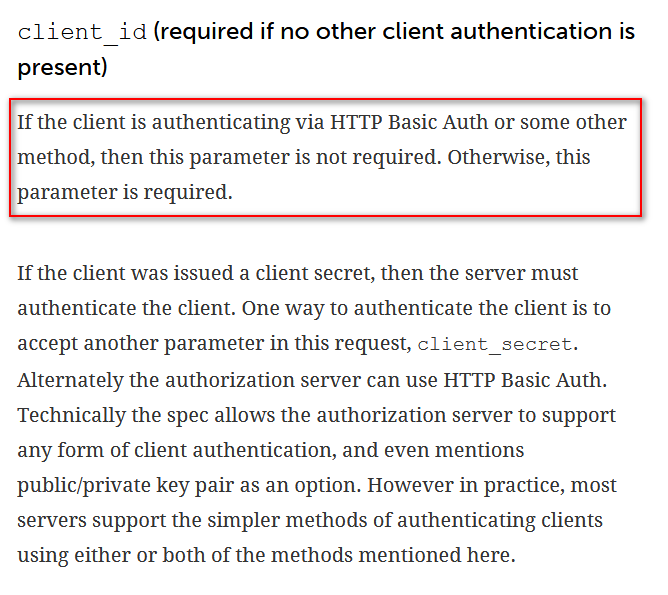
授权服务器可以通过HTTP Basic Auth方式对客户端进行认证,也可以通过在请求中加一个client_secret参数来对客户端进行认证。
不建议将客户端的secret直接作为参数放到client_secret中,而且这种方式下client_id和client_secret都是必填参数。
特别注意,用户(资源所有者)的用户名和密码跟客户端的用户名和密码(client_id、client_secret)不是一套,它们是两个东西。
那么,通过HTTP Basic Auth如何对客户端进行认证呢?客户端需要怎样传参呢?
需要在请求header中设置Authorization,它的值是Basic + 空格 + Base64加密后的client_id:secret
至于为什么,那是协议要求的,具体可以参考https://tools.ietf.org/html/rfc2617#page-5,格式如下:
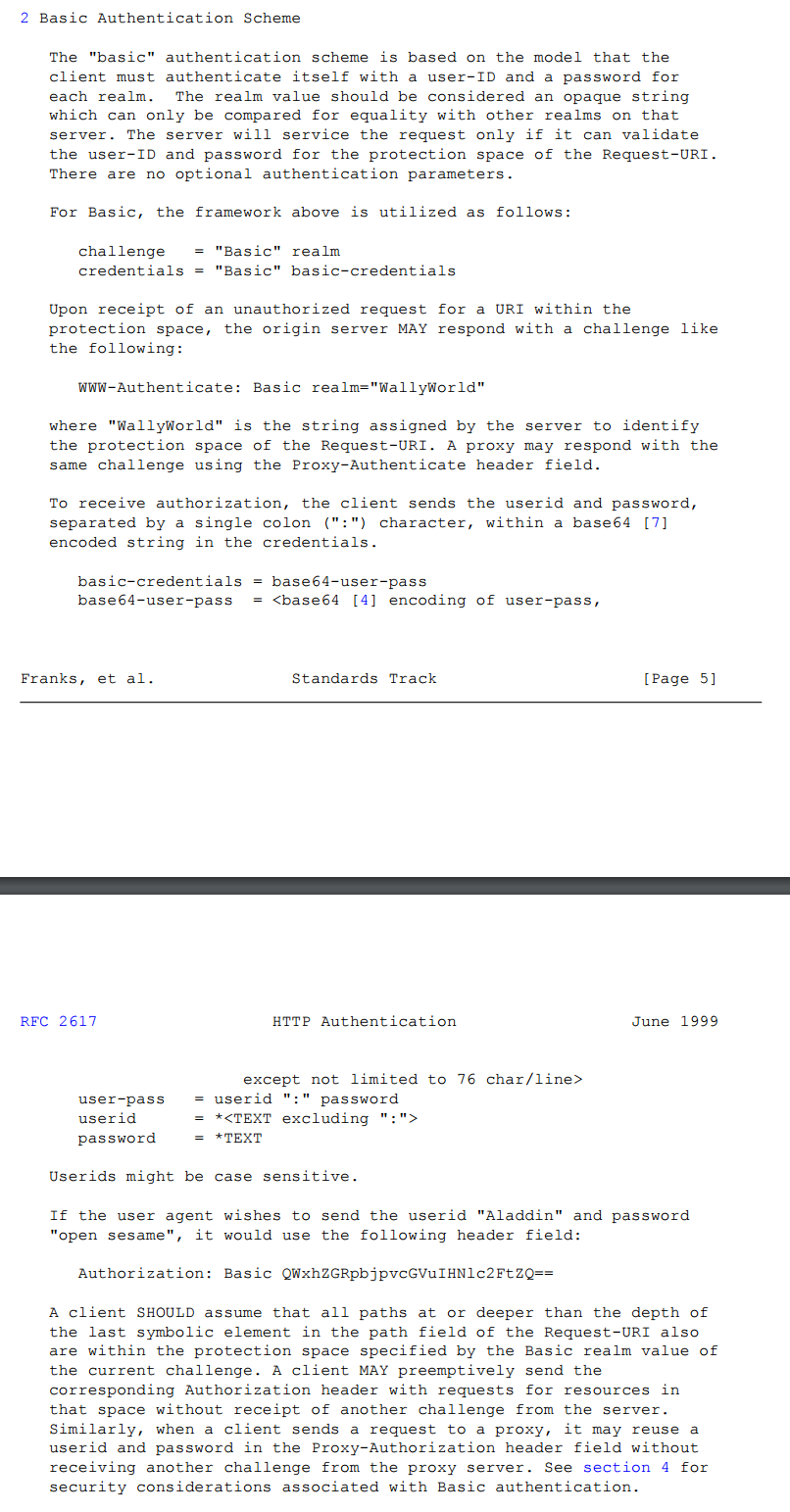
例如:
POST /oauth/token HTTP/1.1

Content-Type: application/x-www-form-urlencoded

Authorization: Basic bXktY2xpZW50LTE6MTIzNDU2Nzg=

cache-control: no-cache

Postman-Token: baf729b9-f030-41c1-b6fb-d740b0c5c573

User-Agent: PostmanRuntime/7.1.1

Accept: */*

Host: localhost:8080

cookie: JSESSIONID=45EAF00C9829B9F569579DB08533D850; UISESSION=2A65FF6FC8C6BE415DE3C043E3EDAAA4

accept-encoding: gzip, deflate

content-length: 103

Connection: keep-alive

grant_type=authorization_code&code=7Zudn6&redirect_uri=http%3A%2F%2Fwww.baidu.com&client_id=my-client-1
6. 客户端请求
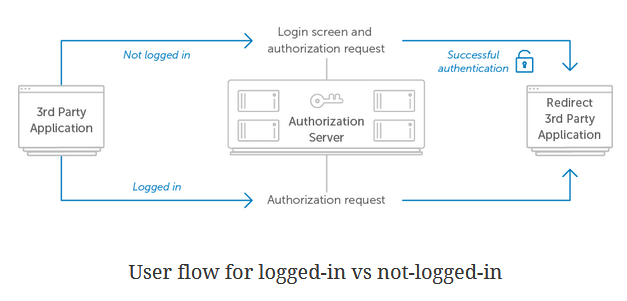
直接在浏览器中输入以下地址,然后会跳到登录授权页面
http://localhost:8080/oauth/authorize?response_type=code&client_id=my-client-1&redirect_uri=http://www.baidu.com&scope=all
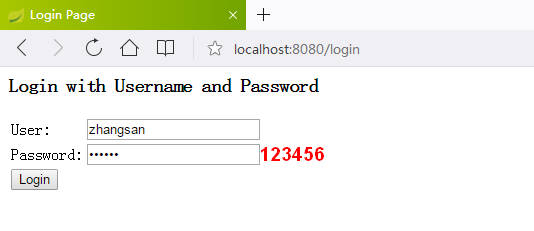
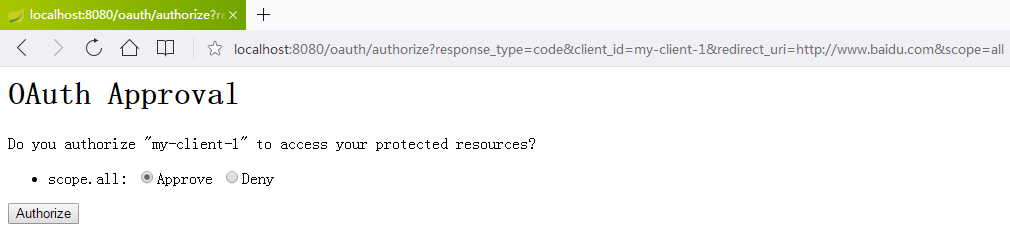
上面这两个页面都是默认自带的
授权成功以后重定向
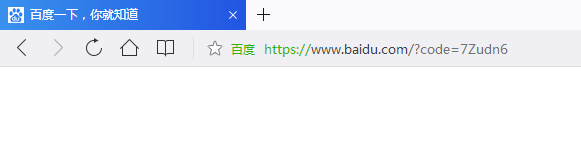
有了授权码以后就可以换取access_token了
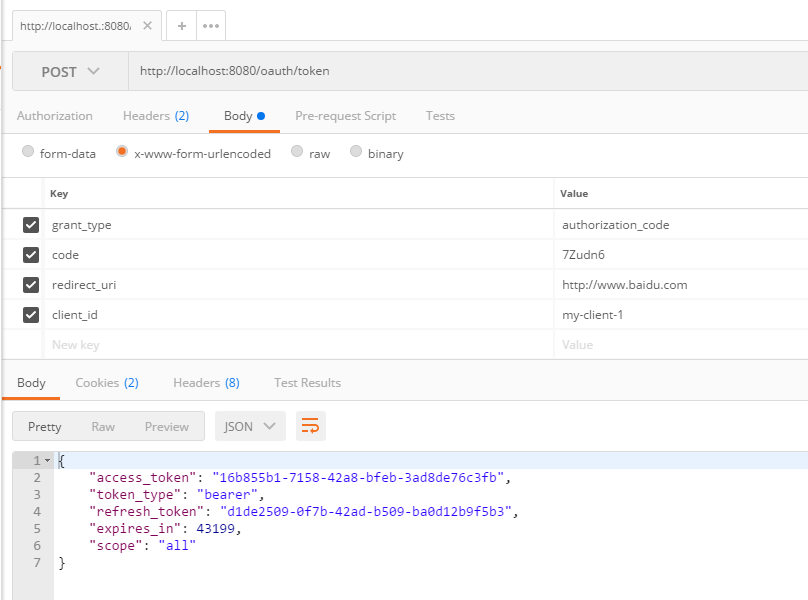
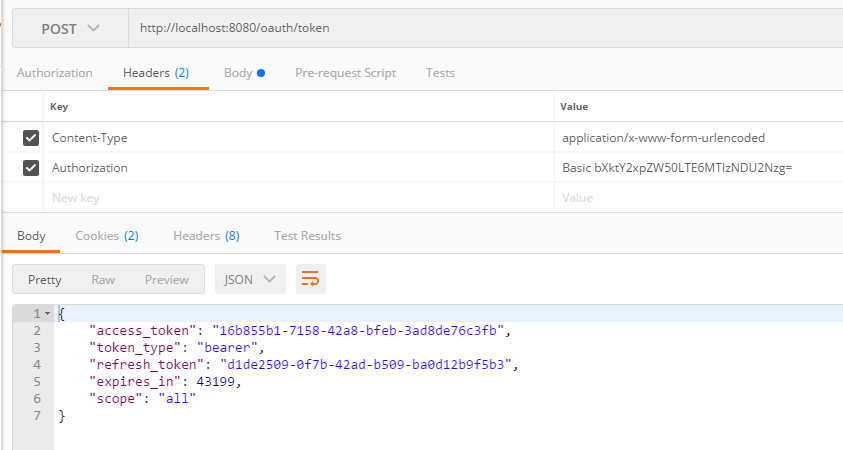
这个请求中唯一需要注意的一个参数就是Authorization,这是用于认证客户端的,本例中它是这样算出来的
public static void main(String[] args) {

    System.out.println(new org.apache.tomcat.util.codec.binary.Base64().encodeAsString("my-client-1:12345678".getBytes()));

    System.out.println(java.util.Base64.getEncoder().encodeToString("my-client-1:12345678".getBytes()));

}
所以,最终是Basic bXktY2xpZW50LTE6MTIzNDU2Nzg=
到此为止,我们只是获得了access_token,下一节将讲解如何配置资源服务器,以及客户端访问受保护的资源。
另外,本例中关于令牌的存储,以及客户端注册都是在内存中,实际生产过程中肯定是要存储到数据库中的,这一部分以后有时间再写吧!
OAuth 2.0 授权码请求的更多相关文章
- 单点登录 - OAuth 2.0 授权码模式(一)
OAuth 2.0定义了四种授权方式 授权码模式(authorization code) 简化模式(implicit) 密码模式(resource owner password credentials ...
- 理解OAuth 2.0授权
一.什么是OAuth 二.什么场景下会用到OAuth授权 三.OAuth 2.0中的4个成员 四.OAuth 2.0授权流程 五.OAuth 2.0授权模式 1. authorization c ...
- 转 OAuth 2.0授权协议详解
http://www.jb51.net/article/54948.htm 作者:阮一峰 字体:[增加 减小] 类型:转载 时间:2014-09-10我要评论 这篇文章主要介绍了OAuth 2.0授权 ...
- React + Node 单页应用「二」OAuth 2.0 授权认证 & GitHub 授权实践
关于项目 项目地址 预览地址 记录最近做的一个 demo,前端使用 React,用 React Router 实现前端路由,Koa 2 搭建 API Server, 最后通过 Nginx 做请求转发. ...
- OAuth 2.0授权框架详解
目录 简介 OAuth的构成 refresh Token Authorization Code模式 隐式授权 Resource Owner 授权密码认证 Client 认证授权 github的OAut ...
- 基于 IdentityServer3 实现 OAuth 2.0 授权服务【密码模式(Resource Owner Password Credentials)】
密码模式(Resource Owner Password Credentials Grant)中,用户向客户端提供自己的用户名和密码.客户端使用这些信息,向"服务商提供商"索要授权 ...
- OAuth 2.0授权之授权码授权
OAuth 2.0 是一个开放的标准协议,允许应用程序访问其它应用的用户授权的数据(如用户名.头像.昵称等).比如使用微信.QQ.支付宝登录等第三方网站,只需要用户点击授权按钮,第三方网站就会获取到用 ...
- 基于 IdentityServer3 实现 OAuth 2.0 授权服务【客户端模式(Client Credentials Grant)】
github:https://github.com/IdentityServer/IdentityServer3/ documentation:https://identityserver.githu ...
- OAuth2.0 授权码理解
OAuth2.0授权模式 本篇文章介绍OAuth的经典授权模式,授权码模式 所谓授权无非就是授权与被授权,被授权方通过请求得到授权方的同意,并赋予某用权力,这个过程就是授权. 那作为授权码 ...
随机推荐
- 打包ideaUI本地项目,以供本地使用
#首先我们要在本机进行一些配置 在本机配置环境变量(控制面板->高级系统设置->环境变量->) #用cmd检测是否配置成功 如果你在ideaUI里,配置好了之后.我们现在来打架包 # ...
- hashMap源码学习记录
hashMap作为java开发面试最常考的一个题目之一,有必要花时间去阅读源码,了解底层实现原理. 首先,让我们看看hashMap这个类有哪些属性 // hashMap初始数组容量 static fi ...
- ASP.NET Aries 开发框架(已支持.NET Core)
背景: 当年,在卖弄与开源QBlog时,也曾想过把QBlog的开发理念整理整理,独立一个框架来开源. 不过,人越长大就越憔悴,激情终敌不过疲惫的惰性,最终无痕而终,连3.0的版本也没开源出来. 关于框 ...
- STM8L052低功耗模式
Stm8L系列单片机的低功耗有五种模式: § wait模式 § Lowpower run模式 § Lowpower wait模式 § Active-haltwith full RTC模式 § Halt ...
- hadoop常用操作命令
#############centos6.8IP常用操作命令#######################DEVICE=eth0TYPE=EthernetONBOOT=yesNM_CONTROLLED ...
- JavaScript字符串与数组方法整理
字符串(String)的方法: 代码后面的都是返回值 var str = "atusdgafsvg"; var str1 = "123456789"; var ...
- JavaScript递归
什么是递归? 在函数的内部调用自己 下面有一个例子,通过这个例子,大家就可以了解什么是递归 function fun(){ console.log(new Date()) //获取当前时间,并在控制台 ...
- H5_ 多媒体video,autio使用示例
<!DOCTYPE html> <html lang="en"> <head> <meta charset="UTF-8&quo ...
- over(partition by..) 的运用(转)
oracle的分析函数over 及开窗函数一:分析函数overOracle从8.1.6开始提供分析函数,分析函数用于计算基于组的某种聚合值,它和聚合函数的不同之处是对于每个组返回多行,而聚合函数对于每 ...
- vue事件修饰符
阻止单击事件冒泡 <a v-on:click.stop="doThis"></a>提交事件不再重载页面<form v-on:submit.preven ...