
CSS之实现垂直时间线展示相关内容效果
如下,最近在工作中遇到实现时间线效果的需求,用纯css即可实现,下面给出详细实现代码。
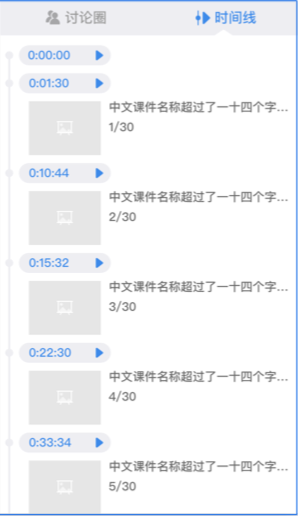
html:
 <div class="time_line_list_wrap hide">

             <ul class="time_line">

               <li>

                 <div class="time_line_item_wrap">

                   <span class="time">00:00:00</span>

                 </div>

               </li>

               <li class="time_line_item_tmpl">

                 <div class="time_line_item_wrap">

                   <span class="time"></span>

                   <div class="time_item_contain_wrap">

                     <img class="ppt_item_img_left">

                     <div class="item_contain_right">

                       <p class="ppt_name">中文课件名称超过了一定长度的字之后隐藏</p>

                       <span class="item_page_number">2/30</span>

                     </div>

                   </div>

                 </div>

               </li>

             </ul>

           </div>
css:(此处用的less语法)
 .time_line_list_wrap{

         width: 100%;

         height: 100%;

         overflow-y: scroll;

         overflow-x: hidden;

         background-color: #ffffff;

         padding:;

         flex-grow:;

         .time_line{

           padding: 16px 10px 0px 10px;

           li{

             list-style-type: none;

             position: relative;

             width: 2px;

             height: 102px;

             background-color: #e6e6e6;

             &.time_line_item_tmpl{

               display: none;

             }

             &:last-child{

               height: 0px;

             }

             &:first-child{

               height: 30px;

             }

             &:before{

               content: '';

               position: absolute;

               left: 50%;

               top:;

               transform: translateX(-50%);

               width: 8px;

               height: 8px;

               border-radius: 50%;

               background: inherit;

             }

             .time_line_item_wrap {

               width: 280px;

               margin-left: 10px;

               position: relative;

               bottom: 6px;

               &:last-child{

                 margin-bottom: 20px;

               }

               &:first-child{

                 margin-bottom: 0px;

               }

               .time{

                 display: inline-block;

                 width: 92px;

                 height: 20px;

                 line-height: 20px;

                 font-size: 12px;

                 color: #4a90e2;

                 box-sizing: border-box;

                 padding-left: 10px;

               }

               .time_item_contain_wrap{

                 display: flex;

                 padding: 10px 0 10px 9px;

                 .ppt_item_img_left{

                   width: 80px;

                   height: 62px;

                   object-fit: contain;

                   flex-shrink:;

                 }

                 .item_contain_right{

                   font-size: 12px;

                   color: #696969;

                   font-weight:;

                   margin-left: 8px;

                   width: 68%;

                   .ppt_name{

                     .text-autocut();

                   }

                 }

               }

             }

           }

         }

         &.hide{

           display: none;

         }

       }
js:
 const $timeLineUl = $('.time_line')

 const $timeLineItemTmpl = $('.time_line_item_tmpl').clone().removeClass('time_line_item_tmpl')

 // 初始化侧边栏中时间线数据

       for (let i = 0; i < slideInfo.length; i += 1) {

         const currentSlide = slideInfo[i]

         const $timeLineItem = $timeLineItemTmpl.clone()

         $timeLineItem.find('.time').text(formatTime(currentSlide.recordTime / 1000).join(':'))

         $timeLineItem.find('.time').css({

           background: `url(${triangleTimeStr}) no-repeat center`,

         })

         $timeLineItem.find('.ppt_item_img_left').attr('src', currentSlide.slideUrl)

         $timeLineItem.find('.ppt_name').text(currentSlide.slideName)

         $timeLineItem.find('.item_page_number').text(`${currentSlide.currentPageNumber}/${currentSlide.totalPageNumber}`)

         $timeLineUl.append($timeLineItem)

       }
注意此处,需要用find()方法来查找后代元素,.children()方法是查找直接后代(儿子辈)的元素,.find()方法是查找所有后代元素(包括儿子、孙子、孙子的孙子及更多)。
CSS之实现垂直时间线展示相关内容效果的更多相关文章
- 一款纯css实现的垂直时间线效果
今天给大家分享一款纯css实现的垂直时间线效果.垂直时间线适合放在类似任务时间安排的网页上.该实现采用了蓝色作为主题色,界面效果还不错.一起看下效果图: 实现的代码. html代码: ... 阅读原文 ...
- 纯css实现同一页面下选择之后更换内容效果
实现效果为如下:在同一页面下,当我选中输入手机号时,出现手机号输入框,当我选中输入验证码时,出现验证码输入框,当我选中设置密码时,出现密码框 在这里有一个小技巧,就是 1.对下面的输入框设置同样的样 ...
- 腾讯微博API时间线相关接口返回的微博信息中head值使用问题
腾讯微博API时间线相关接口返回的微博信息中head值表示作者头像url,这个链接直接访问并不能使用,需要再附加一个参数指定图片的大小(100.50),比如:[head]/100.
- moviepy音视频剪辑:与time时间线相关的变换函数freeze_region、make_loopable、speedx、time_mirror、time_symmetrize介绍
☞ ░ 前往老猿Python博文目录 ░ 一.引言 在<moviepy音视频剪辑:moviepy中的剪辑基类Clip详解>介绍了剪辑基类的fl.fl_time.fx方法,在<movi ...
- echarts的时间线图表
<!DOCTYPE html> <html> <head> <meta charset="utf-8"> <script sr ...
- Layui选项卡、进度条、面板、徽章、时间线、辅助元素
Layui选项卡.进度条.面板.徽章.时间线.辅助元素 Tab选项卡 - 页面元素 导航菜单可应用于头部和侧边,Tab选项卡提供多套风格,支持响应式,支持删除选项卡等功能.面包屑结构简单,支持自 ...
- 《时间线》:WWT 数字宇宙,虚拟星空
李北辰/文 王尔德说:我们生活在阴沟里,却仍有人仰望星空.如今,这句感叹依旧代表某种程度的正确,但这位19世纪的英国绅士有所不知:在一百多年后的东方"帝都",当困于阴沟中的年轻人们 ...
- WPF中的动画——(三)时间线(TimeLine)
WPF中的动画——(三)时间线(TimeLine) 时间线(TimeLine)表示时间段. 它提供的属性可以让控制该时间段的长度.开始时间.重复次数.该时间段内时间进度的快慢等等.在WPF中内置了如下 ...
- 如何解决Angular网页内嵌推特时间线无法正常显示
我最近解决了一个折磨了我好久但是解决方法却只是添加两三行代码的问题.我没有在网上找到合适的解决方案,最后是我根据官方网站和很多的帖子里的部分代码得到的启发,尝试了很久之后得到的解决方法.因为过程实在是 ...
随机推荐
- Python结合SAP GUI Script操作sap的简易教程
众所周知,如果要用Python做一些桌面WIN32应用的自动化工作,就需要用到著名的pywin32尤其是其中的win32com.client模块,pywin32的安装不能直接通过pip install ...
- 消息中间件之一:RabbitMQ
RabbitMQ 是一个实现了AMQP(高级消息队列协议)的消息队列,最初起源于金融系统,主要用来实现应用程序间的异步和解耦,可用于在分布式系统中做消息的存储转发 相比于传统的队列服务概念(消息发送者 ...
- MyBatis探究-----传递参数详解
1.单个参数 mybatis不会做特殊处理,#{参数名/任意名}:取出参数值 例如:接口中方法 public Employee getEmpById(String empId); XML中 <s ...
- c++常用
常用函数,方便查找,不定时更新. 1. 生成随机数 #include <iostream> #include <stdlib.h> #include <time.h> ...
- FileFilter过滤器
FileFilter过滤器原理: File对象的listFiles()方法做了三件事情: 第一件,遍历得到所有的文件/文件夹: 第二件,调用入参过滤器接口自己DIY的实现类中重写的accept()方法 ...
- Tensorflow object detection API ——环境搭建与测试
1.开发环境搭建 ①.安装Anaconda 建议选择 Anaconda3-5.0.1 版本,已经集成大多数库,并将其作为默认python版本(3.6.3),配置好环境变量(Anaconda安装则已经配 ...
- wpf中插入winform控件并获取句柄
因工作需要使用wpf做界面,而有个开发包依赖picturebox控件,上网研究了一下,总算弄通了. 首先在项目中添加引用System.Windows.Forms与WindowsFormsIntegra ...
- centos7.4卸载再安装mariadb服务无法启动问题
今天yum安装MariaDB完成后,启动服务时一直报以下错误 Job for mariadb.service failed. See ‘systemctl status mariadb.service ...
- 火狐开发----从头用到尾的cfx
此教程阐述了如何使用 SDK 开发一个简单的扩展. 准备 要想使用 SDK 开发 Firefox 的扩展,您首先需要 安装并激活 SDK.一旦您完成了以上步骤,您将会看到一个命令行窗口. 初始化一个空 ...
- 1.2:Properties
文章著作权归作者所有.转载请联系作者,并在文中注明出处,给出原文链接. 本系列原更新于作者的github博客,这里给出链接. 上一节我们了解了一个Shader的基本结构,这一节,我们从 Propert ...